How To Check Email TLS Configuration And Fix SMTP Encryption Errors

Quick Answer
Email TLS configuration secures messages in transit between mail servers. To check it, test SMTP ports, verify SSL/TLS certificates, and confirm STARTTLS support. Fix encryption errors by renewing expired certificates, correcting port settings, and enabling compatible TLS versions.
To check email TLS configuration and fix SMTP encryption errors, test STARTTLS or implicit TLS using tools such as OpenSSL and Swaks. Verify certificate validity, supported TLS versions, and cipher settings, then review mail-server logs to identify handshake failures. Configure transport-security policies such as MTA-STS or DANE where appropriate, and use TLS Reporting (TLS-RPT) to monitor email delivery issues related to TLS. Regular testing and monitoring help administrators maintain secure email delivery.
Email TLS determines whether messages traverse the internet encrypted between mail servers and clients. Most SMTP on port 25 uses opportunistic STARTTLS, upgrading a plain connection to TLS when both ends support it; client submission typically uses STARTTLS on 587 or implicit TLS on 465. Failures often arise from expired or mismatched certificates, unsupported TLS versions/ciphers, broken chains, or policy misalignment, all of which are diagnosable with standard tools and fixable via configuration and certificate hygiene.
TLS configuration issues can affect secure email delivery when servers cannot negotiate encryption or validate certificates correctly. To reduce these risks, maintain supported Transport Layer Security (TLS) versions, automate certificate renewal, monitor SMTP connections, and investigate errors through server logs and TLS-RPT reports. Combining transport-security checks with SPF, DKIM, and DMARC monitoring can help administrators maintain a more complete view of their email security.
Quick tests: Does your SMTP server support STARTTLS or SMTPS, and is it negotiating securely?
Use these field-proven tests to confirm capabilities and negotiate details.
Command-line probes
-
openssl s_client
- STARTTLS on 25/587:
Look for:openssl s_client -starttls smtp -connect mx.example.com:25 -servername mx.example.com -tls1_2 -verify_return_error- depth/verify OK lines (chain validation)
- subject, issuer, and SANs (verify hostname matches)
- New, TLSv1.3 or TLSv1.2 (protocol)
- cipher (prefer TLS_AES_256_GCM_SHA384/TLS_CHACHA20_POLY1305_SHA256)
- Implicit TLS on 465:
openssl s_client -connect smtp.example.com:465 -servername smtp.example.com -tls1_3
- STARTTLS on 25/587:
-
swaks (scripted SMTP testing)
- STARTTLS and send a test mail:
Add —auth for submission testing. Check for “TLS started with” and “TLS peer verified”.swaks --to postmaster@example.com --server mx.example.com --port 25 --tls --tls-verify --ehlo example.com
- STARTTLS and send a test mail:
-
nmap (capability scan)
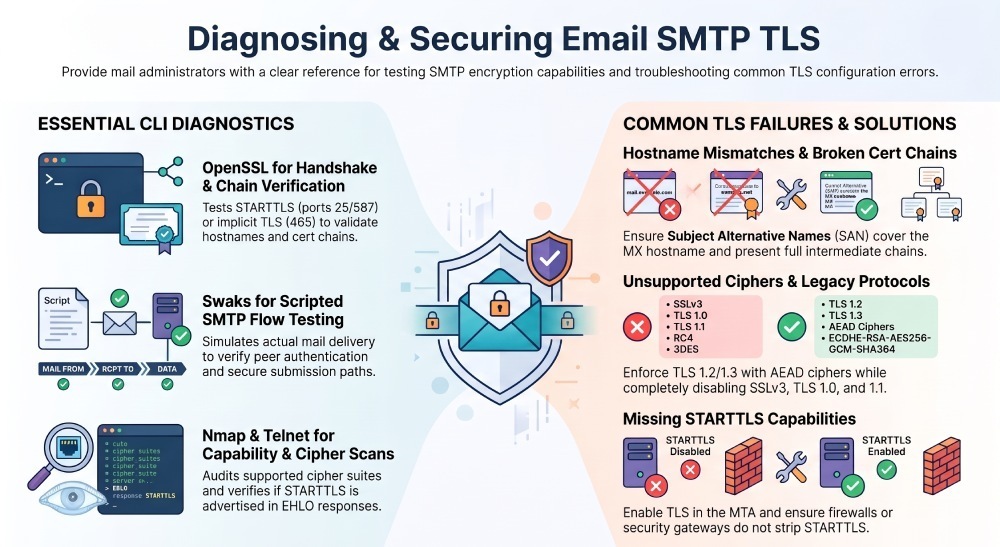
nmap --script ssl-enum-ciphers -p 25,465,587 mx.example.comConfirms supported protocols/ciphers and highlights weak suites.
-
Bonus: Check banner and EHLO responses to confirm STARTTLS advertised:
telnet mx.example.com 25
EHLO test
STARTTLS must appear in the capability list.
These tests help administrators identify supported TLS versions, certificate validation problems, and missing STARTTLS support. Repeat the checks after certificate renewals, mail-server configuration changes, or security updates to confirm that the SMTP service still negotiates TLS correctly.
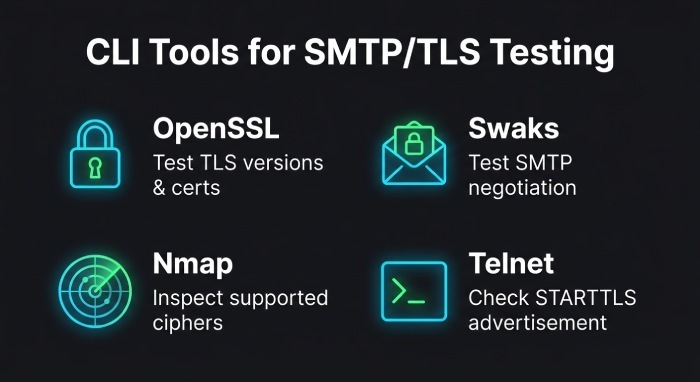
Secure SMTP/TLS configuration by MTA: versions, ciphers, and validation
Use command-line tools to check SMTP capabilities, negotiate TLS, and identify certificate or protocol issues. Replace example hostnames with your actual server hostname.
1. Test SMTP TLS with OpenSSL
STARTTLS on port 25 or 587
openssl s_client
  -starttls smtp
  -connect mx.example.com:25
  -servername mx.example.com
  -verify_hostname mx.example.com
  -verify_return_error
Use port 587 when testing a client-submission endpoint.
Implicit TLS on port 465
openssl s_client
  -connect smtp.example.com:465
  -servername smtp.example.com
  -verify_hostname smtp.example.com
  -verify_return_error
Check the output for:
- Certificate verification results and any trust errors.
- Certificate validity and hostname coverage.
- The negotiated TLS version and cipher suite.
- Handshake failures or other connection errors.
2. Test STARTTLS with Swaks
Swaks can test SMTP negotiation and, when configured appropriately, send a test message. swaks —server mx.example.com —port 587 —tls
  --tls-verify --ehlo example.com
  --to test@example.com
Use a test recipient you control. For authenticated submission, configure the appropriate authentication options and credentials securely. A successful TLS handshake does not by itself prove that email delivery will succeed.
3. Inspect Supported TLS Protocols and Ciphers with Nmap
nmap --script ssl-enum-ciphers -p 25,465,587 mx.example.comThis scan can report supported protocols and cipher suites on the specified ports. Results depend on the server and Nmap version, so confirm any suspected weakness before changing configuration.
4. Check Whether STARTTLS Is Advertised
Connect to the SMTP service:
telnet mx.example.com 25
EHLO test.example.com
Look for STARTTLS in the server’s EHLO response. This confirms that the server advertises the capability, but it does not verify certificate validity or prove that the TLS handshake succeeds. Repeat relevant tests after certificate renewals, mail-server changes, or security updates.
Secure SMTP/TLS Configuration by Mail Server
Modern SMTP deployments should generally support TLS 1.2 or TLS 1.3 where compatible with their security requirements. Disable obsolete protocols, use trusted certificates, and apply strict TLS enforcement only where the connection role and delivery policy require it.
Postfix
Postfix separates inbound SMTP server settings from outbound SMTP client settings. Review the following parameters in main.cf against your installed Postfix version:
- smtpd_tls_security_level: Controls TLS behavior for inbound SMTP connections.
- smtpd_tls_protocols: Controls protocols accepted by the SMTP server.
- smtp_tls_security_level: Controls TLS policy for outbound SMTP connections.
- smtp_tls_protocols: Controls protocols used by the SMTP client.
- smtp_tls_CApath or smtp_tls_CAfile: Configures trusted certificate authorities where required.
- smtp_tls_policy_maps: Supports per-destination TLS policies.
Use opportunistic TLS for general mail delivery when appropriate. Configure mandatory TLS or authenticated certificate validation for submission services and specific destinations that require it. Validate parameter compatibility and test the resulting configuration before deployment.
Exim
Exim TLS configuration depends on the installed version and configuration structure. Review the following settings where supported:
- tls_advertise_hosts: Determines which clients are offered STARTTLS.
- tls_certificate and tls_privatekey: Identify the server certificate and private key.
- tls_verify_certificates: Configures trusted certificates for relevant verification operations.
- tls_require_ciphers: Restricts negotiated cipher suites.
- Router and transport settings: Apply outbound TLS requirements where necessary.
Confirm the correct protocol controls and certificate-verification behavior in the documentation for your Exim version before applying changes.
Sendmail
Sendmail TLS settings are commonly configured through sendmail.mc and generated into the active configuration. Review certificate paths, protocol restrictions, and verification settings against your installed version and TLS library.
After changing the configuration, regenerate it using the appropriate platform procedure, restart or reload the service as required, and test both the TLS handshake and certificate validation.
Microsoft Exchange Server
For on-premises Exchange Server, review the receive connector, send connector, SMTP certificate assignment, and Windows Schannel protocol settings.
- Ensure the SMTP service uses a valid certificate with the correct hostname.
- Configure outbound TLS requirements for partner domains that require enforced encryption.
- Check protocol and cipher settings using guidance appropriate to your Exchange Server and Windows versions.
- Test SMTP connectivity after making changes.
Exchange Online has a different configuration model from on-premises Exchange Server. Do not apply on-premises Exchange PowerShell examples directly to Exchange Online.
Certificates: generate, install, and renew (SANs, chains, automation)
Your SMTP certificate’s Common Name/SAN must match the hostname clients and peers connect to (e.g., mx1.example.com). Always install the full chain.
Let’s Encrypt (recommended)
- Hostname requirements: publish A/AAAA for each MX and submission host, ensure port reachability.
- Automation (Postfix/Exim/Sendmail):
certbot certonly --standalone -d mx1.example.com -d mx2.example.com
# or webroot if you have HTTP
systemctl reload postfix # or exim/sendmail after renewal- Point MTA (Mail Transfer Agent) to fullchain.pem and privkey.pem; reload after certbot hooks. For multiple MTAs, use acme-dns-01 if ports aren’t exposed.
Commercial CA
- Generate CSR with SANs:
openssl req -new -newkey rsa:2048 -nodes -keyout mx.key -out mx.csr -subj "/CN=mx1.example.com" -reqexts SAN -config <(cat /etc/ssl/openssl.cnf <(printf "[SAN]nsubjectAltName=DNS:mx1.example.com,DNS:mx2.example.com"))- Install issued cert + intermediates as full chain, verify with:
openssl verify -CAfile chain.pem fullchain.pemSelf-signed (last resort)
- Only for internal/test; distribute CA to clients explicitly to avoid warnings. Do not use public MX.
Exchange certificates
Use a certificate authority (CA) trusted by the systems connecting to your Exchange Server. Let’s Encrypt certificates can also be used when the deployment and renewal process support your environment.
For certificate management, win-acme is one option for obtaining and renewing certificates on Windows. Configure the certificate for the appropriate Exchange services and follow Microsoft’s documentation for assigning it to SMTP.
After installation:
- Verify that the certificate covers the SMTP hostname in its Subject Alternative Name (SAN).
- Confirm that the certificate is valid and the full certificate chain is trusted.
- Ensure the certificate is assigned to the appropriate Exchange services.
- Test SMTP TLS connectivity after making changes.
- Monitor certificate expiry and confirm that renewal procedures work correctly.
The exact commands and certificate-assignment steps depend on your Exchange Server version and environment. Validate them before applying changes to production.
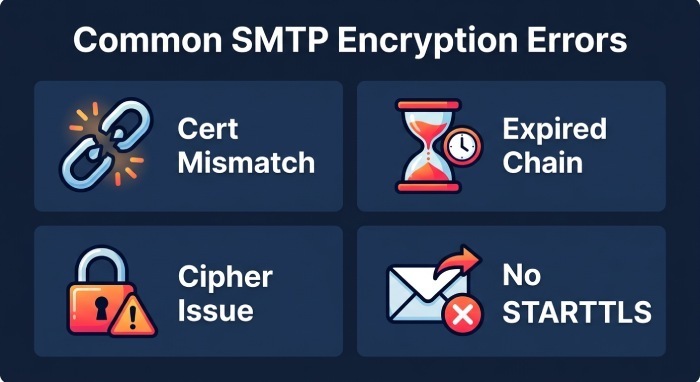
Troubleshoot common SMTP encryption errors fast
Identify the error, check the likely cause, and apply the appropriate fix.
Certificate Name Mismatch
- Symptom: OpenSSL reports a hostname mismatch, or an email client displays a certificate warning.
- Fix: Ensure the hostname used by the client matches a name in the certificate’s Subject Alternative Name (SAN). If necessary, install a certificate covering the correct hostname and verify the SMTP server configuration.
Expired or Incomplete Certificate Chain
- Symptom: OpenSSL reports an expired certificate, unable to get local issuer certificate, or another certificate-validation error.
- Fix: Renew expired certificates and configure the server to present the required intermediate certificates. For environments using PEM certificates, configure the appropriate full-chain file where supported.
Test the live SMTP endpoint:
openssl s_client
  -starttls smtp
  -connect mx.example.com:25
  -servername mx.example.com
  -verify_hostname mx.example.com
  -verify_return_error
Replace mx.example.com with the actual mail-server hostname. Check the verification result, certificate validity, hostname, and certificate chain. Use the SMTP port and connection mode appropriate to the service being tested.
Unsupported TLS versions/ciphers
- Symptom: handshake failure; “no shared cipher”.
- Fix: Enable TLS 1.2/1.3; ensure ECDHE+AES-GCM/CHACHA20 are present. For legacy peers, consider a separate legacy listener (see best practices below).
SNI-related issues
- Symptom: correct cert appears only when -servername is set; otherwise wrong cert.
- Fix: Configure SNI mappings on your TLS proxy/NGINX/Exchange Edge; ensure each hostname has a dedicated certificate and mapping.
STARTTLS not offered
- Symptom: No STARTTLS in EHLO.
- Fix: Enable TLS in MTA; ensure no SMTP inspection device strips STARTTLS; check firewall/anti-spam gateway.
DMARCReport connection: DMARCReport classifies TLS-RPT failure types (policy, certificate, protocol) and pinpoints affected sending domains/paths, then links to actionable runbooks for each error class.
Policy and enforcement: Opportunistic TLS, MTA-STS, and TLSRPT
- Opportunistic TLS: Default on MX 25—encrypt when possible, fall back if not. High deliverability, lower guarantees.
- Mandatory TLS: For submission and high-sensitivity partners; requires policy signals to avoid delivery failures.
MTA-STS (SMTP TLS Reporting and Strict Transport Security)
- DNS TXT policy:
_mta-sts.example.com TXT "v=STSv1; id=20260101T0000"- HTTPS policy file (policy mode “enforce”):
https://mta-sts.example.com/.well-known/mta-sts.txt
version: STSv1
mode: enforce
mx: mx1.example.com
mx: mx2.example.com
max_age: 86400- TLSRPT (reporting) DNS:
_smtp._tls.example.com TXT "v=TLSRPTv1; rua=mailto:tlsrpt@example.com"Benefits: prevents downgrade/MITM to plaintext, enforces valid certs to listed MX. Risks: strict mode can cause bounces if your TLS breaks; stage with mode=testing first. DMARCReport connection: DMARCReport hosts and validates your MTA-STS policy, monitors HTTPS/TXT reachability, collects and parses TLSRPT JSON at scale, and alerts you before you switch to enforce.
Client-side SMTP TLS: Thunderbird, Outlook, and mobile
- Recommended ports:
- Submission: 587 with STARTTLS
- Implicit TLS: 465 (if supported by your provider)
- Thunderbird:
- Outgoing Server: STARTTLS, Authentication “Normal password”, Server Name must match cert SAN.
- Outlook:
- Account Settings > More Settings > Advanced:
- Outgoing server 587 with “Use the following type of encrypted connection: STARTTLS” or 465 with SSL/TLS.
- If warnings appear, verify hostname and chain.
- Account Settings > More Settings > Advanced:
- iOS/Android:
- SMTP server: 587 STARTTLS or 465 SSL/TLS; accept only if certificate matches and is trusted.
Troubleshooting tip: Toggle between 587 STARTTLS and 465 SSL/TLS if a firewall or proxy interferes. Validate with swaks using the same hostname and port.
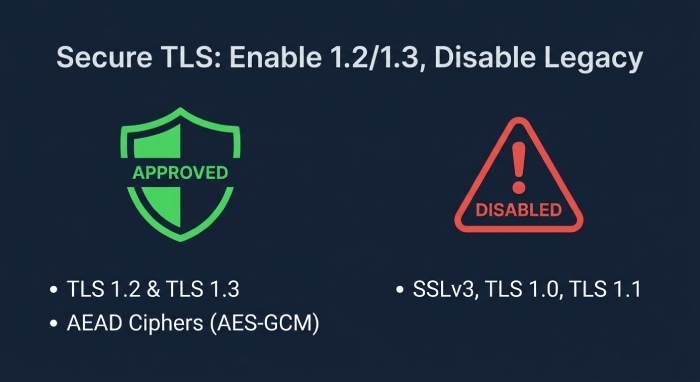
Best practices: cipher suites, TLS 1.2/1.3 only, and graceful legacy handling
- Enable only TLS 1.2 and 1.3 for public services; disable SSLv3/TLS1.0/1.1.
- Prefer AEAD ciphers: TLS_AES_256_GCM_SHA384, TLS_AES_128_GCM_SHA256, TLS_CHACHA20_POLY1305_SHA256, and ECDHE_RSA/ECDHE_ECDSA with AES-GCM for TLS 1.2.
- Use modern curves (X25519, secp256r1).
- For legacy servers/clients:
- Consider a dedicated legacy listener on a separate IP with constrained exposure and logging.
- Apply per-domain outbound policies (Postfix smtp_tls_policy_maps) to allow weaker negotiation only for specific partners after risk review.
- Document and time-box exceptions.
DMARCReport connection: DMARCReport inventories cipher usage observed in TLSRPT and your active scans, highlighting domains requiring exceptions and tracking their sunset dates.
Read the signals: logs and packet captures
- OpenSSL verbose:
Observe ClientHello/ServerHello, selected version, cipher, SNI, ALPN.openssl s_client -starttls smtp -connect mx:25 -servername mx -tls1_2 -msg -state -debug - MTA logs:
- Postfix: /var/log/maillog with “TLS connection established” and “verify error:num=”.
- Exim: mainlog shows TLS negotiation details and verify outcomes.
- Exchange: Protocol logs, Event Viewer > MSExchangeTransport.
- Packet capture:
tcpdump -i eth0 port 25 -w smtp.pcap - Analyze in Wireshark: filter by tcp.port==25; use “ssl.handshake” dissector; locate alert descriptions (handshake_failure, bad_certificate).
DMARCReport connection: DMARCReport links TLS-RPT aggregate categories back to exemplar log lines and suggests exact openssl/swaks commands to reproduce, shortening Mean time to repair (MTTR).
DANE for SMTP with DNSSEC: stronger than MTA-STS, different trade-offs
- What it is: Publishing TLSA records (RFC 7672) under _25._tcp.mx.example.com to assert the valid certificate or CA; requires DNSSEC.
- Example TLSA:
_25._tcp.mx1.example.com. IN TLSA 3 1 1 <SHA-256-SPKI-HASH>- Usage 3=Domain-issued cert, 1=SPKI, 1=SHA-256.
- Benefits: Authenticates TLS without web/HTTPS dependency; resists MX hijack and downgrade.
- Pitfalls: Requires DNSSEC; mispublishing can cause immediate delivery failures; coordinate renewals so TLSA hash updates with new certs.
MTA-STS vs DANE:
- MTA-STS: simpler to deploy, no DNSSEC, relies on web PKI and cached policy; subject to first-contact risks without prior policy.
- DANE: cryptographically anchored in DNSSEC; more robust but operationally heavier.
DMARCReport connection: DMARCReport verifies DNSSEC status, validates TLSA records against live certs, and alerts on hash/cert mismatches—plus compares DANE and MTA-STS coverage across your domains.
Monitoring, alerting, and runbooks for SMTP TLS
- Automated tests:
- Nightly swaks/openssl checks on all MX and submission hosts.
- nmap ssl-enum-ciphers weekly to detect weak cipher regressions.
- TLSRPT parsing:
- Collect reports at tlsrpt@; parse JSON fields like submitter, result-type (starttls-not-supported, certificate-host-mismatch, validation-failure), count, and affected IPs.
- SLOs and alerts:
- TLS success rate > 99.9%, certificate expiry > 21 days, no legacy protocol exposure.
- Runbooks:
- Certificate mismatch: validate hostname → reissue cert → reload MTA → confirm with
s_client→ update MTA-STS id. - STARTTLS missing: check gateway/maps → restore STARTTLS → confirm via EHLO and TLSRPT back to normal.
- Protocol failure: enable TLS 1.2/1.3 → retest → if partner legacy, add temporary per-domain policy.
- Certificate mismatch: validate hostname → reissue cert → reload MTA → confirm with
DMARCReport connection: DMARCReport centralizes TLSRPT inbox processing, visualizes trendlines, runs external TLS checks on a schedule, and triggers PagerDuty/Slack alerts with suggested runbooks and remediation owners.
Common SMTP TLS Problems and How to Investigate Them
SMTP TLS failures can result from expired certificates, incomplete certificate chains, hostname mismatches, unsupported TLS versions, or missing STARTTLS support. These issues can affect secure connections between mail servers and contribute to email delivery problems.
To investigate SMTP TLS errors:
- Check certificate validity: Confirm that the certificate is not expired, its hostname matches the SMTP endpoint, and the required certificate chain is available.
- Test TLS negotiation: Use OpenSSL or Swaks to check whether the SMTP server successfully negotiates TLS.
- Review TLS reporting: Examine TLS-RPT reports for reported connection failures and policy-related issues.
- Verify transport security policies: Check MTA-STS configuration and, where applicable, DNSSEC and DANE records.
- Retest after changes: Repeat the relevant connection and certificate checks to confirm that the issue has been resolved.
Regular testing and TLS reporting help administrators identify configuration problems and investigate potential email delivery disruptions.
FAQs
Should I prefer port 587 STARTTLS or 465 implicit TLS for client submission?
Both are secure when configured correctly; 587 with STARTTLS is the standards-based default, while 465 (SMTPS) offers simpler firewall traversal. Choose one primary method and ensure your certificate matches the submission hostname. DMARCReport’s Submission Checker validates both paths for consistency.
Do I need both MTA-STS and DANE?
If you can deploy DNSSEC reliably, DANE offers stronger cryptographic guarantees. MTA-STS is easier to roll out and widely supported. Many organizations run both: DANE for authenticity and MTA-STS for compatibility. DMARCReport monitors policy health and alerts on misalignment for either.
How often should I rotate SMTP certificates?
Use 60–90 day lifetimes with automated renewal (Let’s Encrypt) to minimize risk. Ensure your MTA reloads after renewal and, if using DANE, update TLSA records in lockstep. DMARCReport warns 30/14/7 days before expiry and verifies renewed chains.
Why are some partners failing TLS after I disable TLS 1.0/1.1?
They may run legacy stacks. Use per-domain outbound policies or a quarantined legacy listener temporarily, and invite partners to upgrade. DMARCReport’s TLSRPT analytics identify which partners are impacted so you can prioritize outreach.
Conclusion: Make TLS a managed control with DMARCReport
Checking and troubleshooting SMTP TLS involves testing STARTTLS or implicit TLS, validating certificates and hostnames, reviewing supported TLS versions, and investigating errors in server logs. Tools such as OpenSSL and Swaks can help identify connection and certificate problems, while Nmap can provide additional information about exposed services and supported protocols. For domains using MTA-STS or DANE, verify that the relevant policies and DNS records are configured correctly. Regular testing, certificate-renewal procedures, and log monitoring can help administrators detect and resolve issues before they disrupt secure email delivery. Combining TLS checks with SPF, DKIM, and DMARC monitoring provides a more complete view of email security.
General Manager
General Manager of DuoCircle. Product strategy and commercial lead for DMARC Report's 2,000+ customer base.
LinkedIn Profile →Take control of your DMARC reports
Turn raw XML into actionable dashboards. Start free - no credit card required.