What is TLS-RPT? How to Set Up SMTP TLS Reporting and Read the Reports

Quick Answer
TLS-RPT (Transport Layer Security Reporting) helps domain owners monitor SMTP encryption failures, certificate errors, and email delivery issues. By publishing a TLS-RPT DNS record, administrators can receive reports, troubleshoot TLS problems, and improve email security alongside MTA-STS.
What TLS-RPT Is and Why SMTP TLS Reporting Matters
TLS-RPT, defined in RFC 8460, allows domain owners to receive reports about TLS encryption problems affecting inbound email. Also called SMTP TLS reporting or Transport Layer Security reporting, it helps administrators monitor encrypted mail traffic.
When a sending Mail Transfer Agent (MTA) uses STARTTLS to encrypt an SMTP connection, a failed TLS handshake can generate an aggregate report. These reports help identify certificate errors, downgrade attempts, server misconfigurations, and email delivery failures.
Why SMTP TLS Reporting Matters
SMTP uses opportunistic encryption, meaning sending servers may fall back to unencrypted delivery if TLS is unavailable. This can expose email to man-in-the-middle attacks, TLS downgrade attempts, and weak encryption configurations.
TLS-RPT improves visibility by monitoring encryption failures and helping teams identify certificate issues, MX changes, and provider migration problems. It supports email security, compliance, and reliable delivery, especially for business-critical messages such as invoices, legal notices, account recovery emails, and customer support communications.
How TLS-RPT Works with MTA-STS and Email Security
The Relationship Between TLS-RPT and MTA-STS
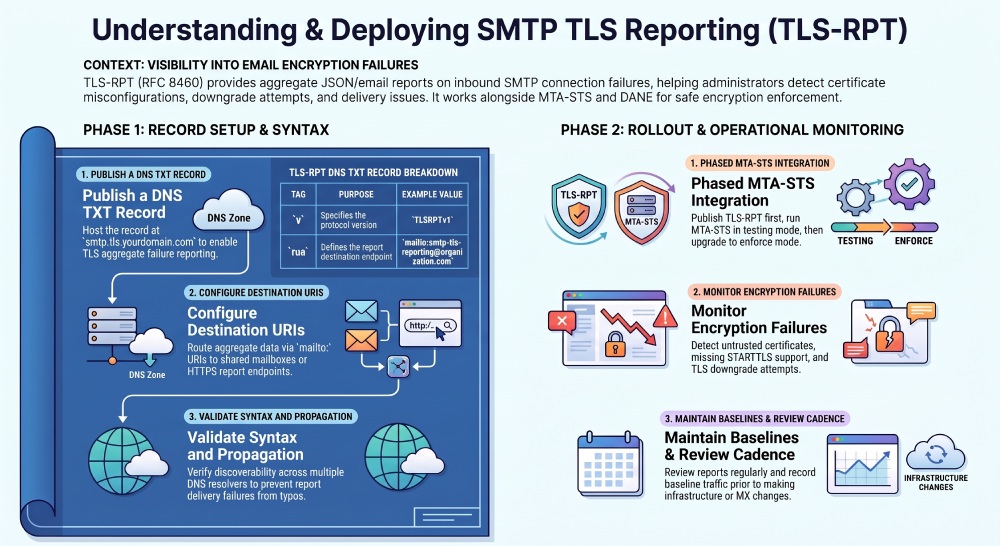
TLS-RPT works alongside MTA-STS (RFC 8461), which lets domains specify approved MX hosts and require TLS encryption. Policies can use testing mode to identify issues without blocking messages or enforce mode to prevent delivery when TLS requirements are not met. TLS-RPT reports help administrators assess whether enforcement is safe.
A recommended rollout is to publish the TLS-RPT DNS record first, enable MTA-STS in testing mode, and switch to enforce mode after reviewing reports. Before enforcement, verify that all listed MX hosts support STARTTLS, use trusted certificates, and match the published policy.
TLS-RPT, DANE, and Broader Email Security
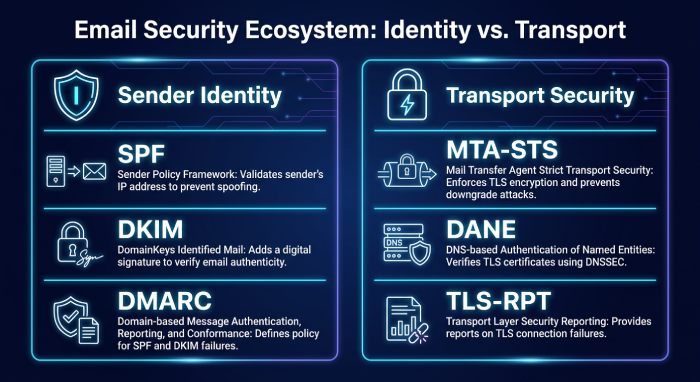
MTA-STS and DANE both improve SMTP security but use different methods. MTA-STS relies on HTTPS and trusted certificate authorities, while DANE uses DNSSEC to verify certificate associations. TLS-RPT helps administrators identify encryption and policy failures involving these mechanisms.
TLS-RPT also complements email authentication protocols such as SPF, DKIM, and DMARC. These protocols help prevent spoofing and verify sender identity, while MTA-STS, DANE, and TLS-RPT focus on securing and monitoring email transport. Together, they provide better visibility into domain authentication and encryption.
How to Create and Publish a TLS-RPT DNS Record
TLS-RPT DNS Record Format
To enable smtp tls reporting, publish a TLS-RPT DNS record as a DNS TXT record at:
smtp.tls.yourdomain.comA basic DNS TXT record looks like this:
v=TLSRPTv1; rua=mailto:tlsrpt@example.comHere, v=TLSRPTv1 identifies the record as a TLS-RPT record, and rua defines the reporting URI. The reporting URI is where aggregate data will be sent. You can use a reporting email address such as smtp-tls-reporting@organization.com, tlsrpt@example.com, or a managed endpoint from platforms. In plain-text configuration notes, that same reporting address may appear as smtp-tls-reporting@organization.com, which is a practical shared mailbox for Organization Inc.
Some organizations also use HTTPS report collection endpoints, for example:
v=TLSRPTv1; rua=mailto:smtp-tls-reporting@organization.com,https://tlsreport.example.com/reportsBefore publishing, check whether your mail provider, Domain Registrar, and DNS host support long TXT values correctly.
Choose a shared mailbox, ticketing system, or security dashboard to receive and review TLS reports. This prevents missed reports when employees change roles and helps track recurring TLS failures through your existing security workflow.
Example TLS-RPT DNS Record for an Organization
For Organization Inc., a practical TLS-RPT DNS record might be:
smtp.tls.organization.com. IN TXT "v=TLSRPTv1; rua=mailto:smtp-tls-reporting@organization.com"If the domain receives mail through mail.example.com and uses MTA-STS in enforce mode, TLS-RPT reports will show whether senders such as Google, Microsoft, or Mailgun successfully established TLS encryption.
Organization Inc. could also separate reporting by environment or brand domain. For example, a primary corporate domain may send reports to a central security mailbox, while a customer-facing transactional domain may use a managed reporting endpoint. This separation helps teams identify whether a problem affects all mail infrastructure or only a specific platform, MX host, or business unit.
For a more explicit production example, Organization Inc. could publish a TLS-RPT DNS record that sends reports to smtp-tls-reporting@organization.com and monitors MX hosts such as smtp.example.org or smtp.tls.yourdomain.com. This makes it easier to connect the reporting destination, the expected SMTP connection path, and the certificate names reviewed during troubleshooting.
Using a TLS-RPT Record Generator
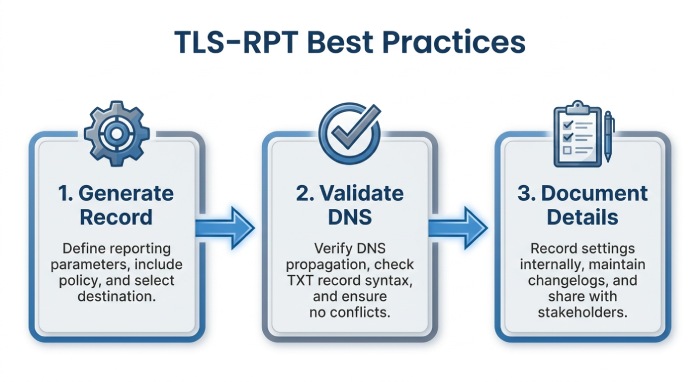
A TLS-RPT record generator can help reduce syntax errors. Tools from email security providers, can create the correct DNS TXT record, validate the reporting URI, and confirm whether the TLS-RPT DNS record is discoverable. Still, administrators should understand the record structure, because a small typo in v=TLSRPTv1 or rua= can stop report delivery.
After generating the record, validate it from more than one DNS resolver. DNS caching and propagation delays can make troubleshooting confusing, especially after a recent change at the Domain Registrar. It is also helpful to document the record owner, the purpose of the reporting address, and the expected review cadence so future administrators understand why the record exists.
Operationalizing TLS-RPT Monitoring Over Time
After setup, TLS-RPT should be included in regular email monitoring. Review reports weekly for small domains or daily for high-volume environments. Repeated certificate-not-trusted, validation-failure, or starttls-not-supported errors should trigger investigation, especially when MTA-STS is in enforcement mode.
Organizations should also use TLS-RPT to monitor infrastructure changes. Capture baseline reports before changing MX records, switching providers, or adding security gateways, then compare new reports to confirm that TLS encryption remains stable.
Finally, retain historical reports or summarized metrics where practical. Historical data can show whether certificate renewals are improving, whether a provider migration reduced failures, or whether a recurring problem appears at the same time each month. Combined with DMARC reporting, mail logs, and provider dashboards, TLS-RPT gives administrators a clearer view of how securely and reliably email is moving across the public internet.
General Manager
General Manager of DuoCircle. Product strategy and commercial lead for DMARC Report's 2,000+ customer base.
LinkedIn Profile →Take control of your DMARC reports
Turn raw XML into actionable dashboards. Start free - no credit card required.