How To Use A CAA Checker To Validate DNS Records

Quick Answer
A CAA checker helps you validate DNS records by identifying which Certificate Authorities (CAs) are authorized to issue SSL/TLS certificates for your domain. Enter your domain name, check the CAA records, and verify that only trusted CAs are permitted to issue certificates.
A CAA checker helps you verify DNS Certificate Authority Authorization (CAA) records and ensure that only authorized certificate authorities can issue SSL/TLS certificates for your domain. By checking CAA records, you can identify configuration errors, confirm certificate authority permissions, and reduce the risk of unauthorized certificate issuance. In this guide, you’ll learn how to use a CAA checker to validate DNS records and maintain better domain security.
What CAA Records Are and Why They Matter
A CAA record, short for Certificate Authority Authorization, is a DNS record type that tells public certificate authorities which providers are allowed to issue TLS certificates for a specific domain name. In practical terms, a DNS CAA record helps a domain owner control SSL/TLS certificate issuance and reduce the risk of certificates being issued by an unauthorized provider.
When a certificate authority such as Let’s Encrypt, DigiCert, Sectigo, or another CA receives a certificate order, it must perform a CAA lookup before issuing an SSL/TLS certificate. This requirement is part of the CA/Browser Forum Baseline Requirements and is an important control within the broader public key infrastructure, or PKI, ecosystem.
A properly configured CAA record can prevent unauthorized certificate issuance by ensuring that only an authorized certificate authority is allowed to issue certificates for your domain. For example, if your domain only uses DigiCert, your CAA record values can specify DigiCert as the only authorized certificate authority. If another CA tries to issue a certificate, the CAA record prevents issuance unless the configuration allows it.
Unlike common DNS record types such as an A record, AAAA record, CNAME record, MX record, NS record, TXT record, SOA record, or DNSKEY, a DNS CAA record is specifically tied to certificate issuance policy. It does not point traffic to a server or manage email routing. Instead, it strengthens domain security and supports better SSL certificate management.
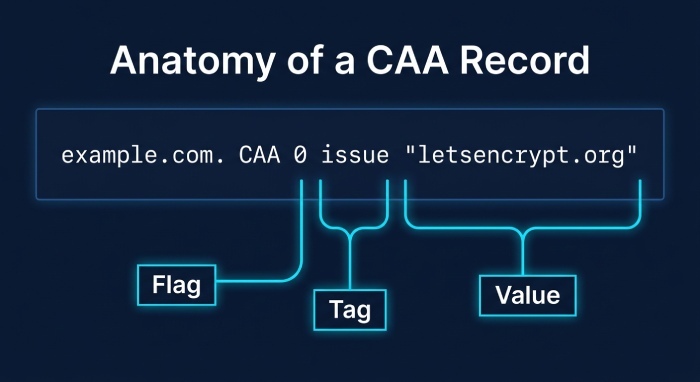
Understanding CAA Record Structure
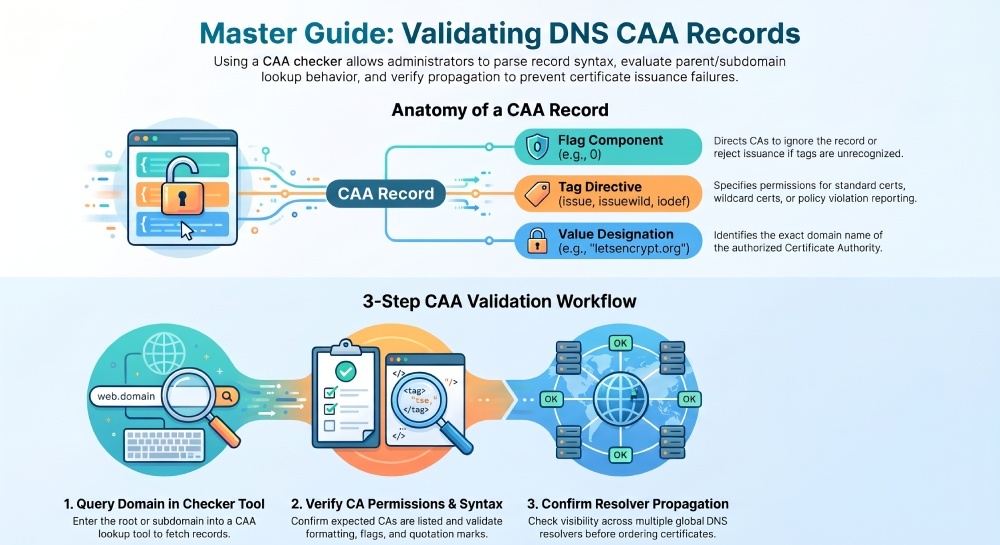
A typical CAA record structure includes three main parts: the CAA record flag, the CAA record tag, and the tag value. The flag is usually 0, although a critical flag can be used to instruct certificate authorities to reject the record if they do not understand the tag.
Common tags include:
- issue — authorizes a CA to issue standard certificates.
- issuewild — authorizes a CA to issue wildcard certificates.
- iodef — provides a reporting URL or email address for CAA policy violations.
CAA record example
example.com. CAA 0 issue “letsencrypt.org” example.com. CAA 0 issuewild digicert.com” example.com. CAA 0 iodef “mailto:security@example.com”
This CAA record example allows Let’s Encrypt to issue regular certificates, DigiCert to issue wildcard certificates, and sends violation reports to the listed email address. A CAA checker or CAA record checker can parse this format and help you verify CAA records before certificate issuance fails.
How a CAA Checker Works
A CAA checker performs a DNS lookup against authoritative or recursive DNS servers to retrieve the DNS CAA record for a domain. The tool sends a DNS query, collects the response, and displays the discovered CAA record values in a readable format. A good CAA record checker also identifies syntax problems, missing authorizations, and policy conflicts that could interfere with SSL/TLS certificate issuance.
When you run a CAA lookup, the tool does not only check the exact host. It may also evaluate the parent domain if no CAA policy exists on the requested subdomain. For example, if you check shop.example.com and there is no CAA record there, the CA may look upward to example.com. This lookup behavior matters because a restrictive record at the parent level can affect certificate issuance for subdomains.
A modern DNS CAA checker tool may provide a real-time CAA record lookup, showing whether current global DNS resolvers can see the expected configuration. Some tools also include misconfiguration detection, warnings about unsupported tags, and guidance to troubleshoot CAA errors.
Popular options include SSLMate, SSL Labs, PowerDMARC, DMARCReport, nslookup.io, and caaTest.co.uk. General DNS platforms and registrars such as Cloudflare, GoDaddy, Google Cloud DNS, AWS, and AWS Route 53 can also be used to manage or inspect records. Administrators may additionally use command-line tools on Windows, Mac OS, and Linux to look up CAA records directly.
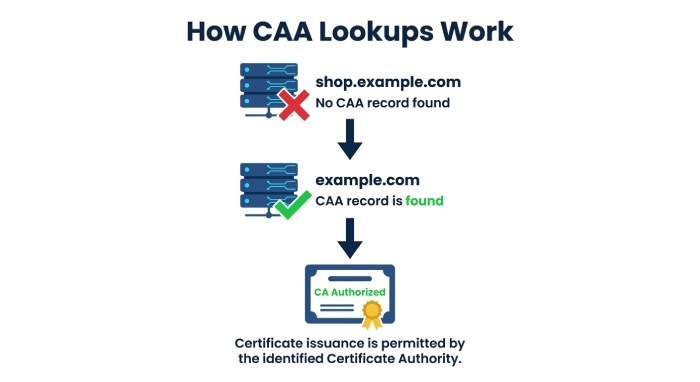
What Happens During a CAA Lookup
During a CAA lookup, the CAA checker queries DNS for records attached to the requested host. If a direct CAA record exists, the checker displays it. If not, the lookup process may continue to the parent domain until it finds a policy or reaches the DNS root.
This process is similar in concept to checking a CNAME, A record, or TXT record, but the interpretation is specific to certificate authority authorization. The CAA record checker determines whether the listed CA is an authorized certificate authority for the domain and whether the policy permits regular certificates, wildcard certificates, or both.
A reliable CAA checker should also indicate whether the DNS CAA record is visible from multiple resolvers, because CAA record propagation can vary. If records were just added in Cloudflare, GoDaddy, or AWS Route 53, the change may not be immediately visible to all DNS servers.
Step-by-Step Guide to Validating DNS Records with a CAA Checker
To validate CAA records, start by identifying the exact hostname you want to check. This may be the root domain, such as example.com, or a subdomain, such as api.example.com. If you are preparing an SSL certificate request, validate the same name that appears in the certificate order.
1. Enter the domain into a CAA checker
Open a trusted CAA checker such as SSLMate, SSL Labs, nslookup.io, PowerDMARC, or caaTest.co.uk. Enter the domain and run the CAA lookup. The CAA record checker will perform a DNS query and return any discovered records.
You can test public domains such as yahoo.com or bilibili.com to see how large organizations configure certificate authority authorization. These examples can help you understand how multiple certificate authorities may be authorized at once.
2. Review the authorized certificate authority
Check whether the expected provider appears in the results. If you use Let’s Encrypt, the CAA record should include letsencrypt.org. If you use DigiCert or Sectigo, the DNS CAA record should authorize the correct CA domain.
This is an important step when verifying CAA records. If your certificate authority is not authorized by the applicable CAA policy, SSL/TLS certificate issuance may fail. For wildcard certificates, check whether the policy permits the intended certificate authority to issue them. If no issuewild property is present, the issue property also applies to wildcard certificate requests. If an issuewild property is present, it controls wildcard certificate authorization.
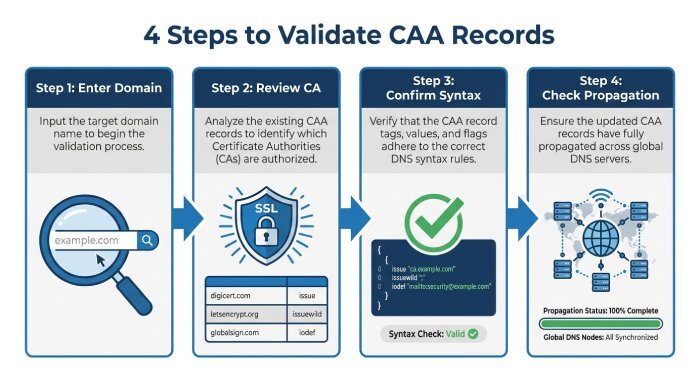
3. Confirm tags, flags, and values
Inspect the CAA record tag, CAA record flag, and value. For most configurations, the flag is 0. The tags should be valid, such as issue, issuewild, and iodef. Incorrect spelling, malformed quotation marks, or unsupported values can cause a dns failure or prevent a CA from processing the policy correctly.
This is where a detailed CAA record guide or advanced CAA record checker becomes valuable. It can highlight invalid syntax and explain whether the critical flag is being used appropriately.
4. Check propagation and resolver visibility
After editing a DNS CAA record, use a DNS propagation checker or a real-time CAA record lookup to confirm that the change has reached public resolvers. CAA record propagation depends on Time to live (TTL) settings and DNS provider behavior. Until propagation completes, one CA may see the new record while another resolver still sees the old one.
To be safe, check CAA record visibility before placing a new certificate order. This reduces failed validations and avoids delays in issuing TLS certificates.
Common CAA Record Errors and How to Fix Them
One common problem is authorizing the wrong CA domain. For example, a company intending to use Let’s Encrypt may accidentally enter an incorrect value instead of letsencrypt.org. A CAA checker can help identify the incorrect record so the administrator can fix it before attempting SSL/TLS certificate issuance.
Another issue is misunderstanding wildcard certificate authorization. A domain may have the following record:
example.com. CAA 0 issue “letsencrypt.org”
This authorizes Let’s Encrypt to issue regular certificates. If an issuewild property is not present, the issue property also applies to wildcard certificate requests. To authorize a different CA specifically for wildcard certificates, add an issuewild record using that CA’s verified issuer identifier.
Best Practices for Managing and Monitoring CAA Records
Treat CAA record management as part of your broader domain security and regulatory compliance program. Because CAA is directly tied to TLS certificates, it should be reviewed whenever certificate vendors, hosting providers, or DNS providers change.
Key security best practices include:
- Use a CAA checker before every major certificate renewal or new certificate order.
- Maintain a clear list of each authorized certificate authority used by the organization.
- Keep issue and issuewild policies aligned with actual certificate needs.
- Add an iodef contact so certificate authorities can report policy violations.
- Use a CAA record checker after DNS changes in Cloudflare, GoDaddy, AWS Route 53, or Google Cloud DNS.
- Periodically verify CAA records for root domains and critical subdomains.
- Document ownership, approval workflows, and emergency exceptions for SSL and TLS certificate issuance.
- Monitor CAA record propagation after changes and confirm visibility across multiple DNS servers.
A mature process should combine automated monitoring with manual review. For example, security teams can schedule a weekly CAA lookup across production domains, while infrastructure teams validate changes during release or migration windows. This approach helps ensure each DNS CAA record remains accurate, enforceable, and aligned with the organization’s Public key infrastructure (PKI) strategy.
General Manager
General Manager of DuoCircle. Product strategy and commercial lead for DMARC Report's 2,000+ customer base.
LinkedIn Profile →Take control of your DMARC reports
Turn raw XML into actionable dashboards. Start free - no credit card required.