How To Recall Email In Yahoo: What To Do If You Send A Sensitive Email By Mistake

Quick Answer
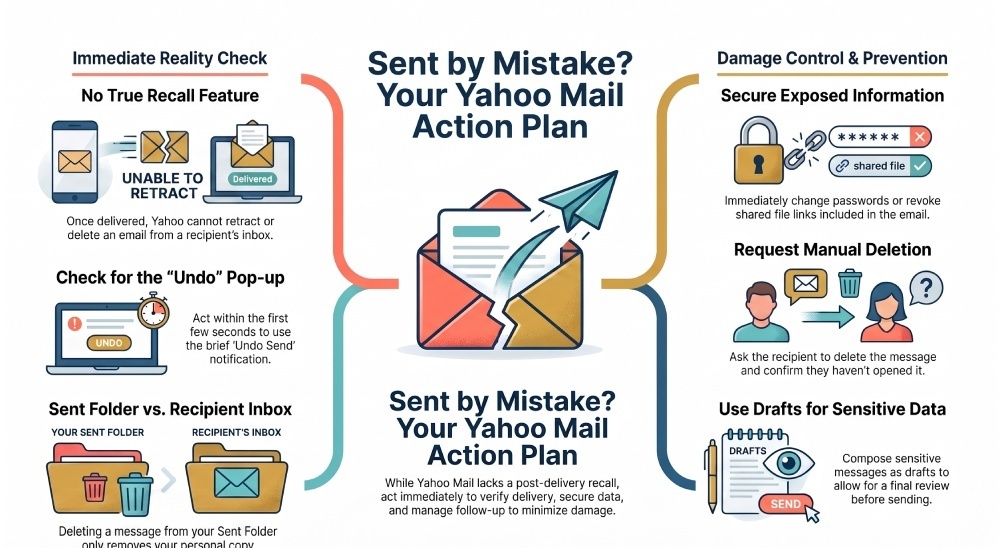
Yahoo Mail does not offer a true email recall feature after sending. If you send a sensitive email by mistake, use Undo Send immediately, contact the recipient, request deletion, and secure any exposed accounts or information.
Accidentally sending a sensitive email can be stressful, especially when it contains private information, confidential documents, or an attachment meant for someone else. If you use Yahoo Mail, it’s important to know that there is no true recall feature that can remove a delivered email from the recipient’s inbox. However, acting quickly can still help minimize the risk. In this guide, we’ll explain what you can do after sending a sensitive email by mistake and how to protect your information.
Can You Recall an Email in Yahoo? The Short Answer and Why Yahoo Mail Doesn’t Offer True Recall
If you are trying to recall an email in Yahoo Mail, the short answer is that Yahoo Mail does not offer a true post-delivery recall feature that can remove a message from the recipient’s inbox. Unlike some Microsoft Outlook environments, where recall may work under specific conditions, Yahoo Mail cannot reliably retract an email after it has been delivered.
This means there is no guaranteed way to recall Yahoo email once Yahoo has already processed and delivered it. You may see references to undo send, an unsend feature, or an undo feature in email apps, but these tools usually work by delaying delivery for a few seconds. They do not perform true email recall after delivery. In other words, undo send can help you cancel sent email during a short time limit, but it cannot take back email that has already reached the recipient.
Yahoo Mail, operated by Yahoo Inc., is primarily a webmail client and mobile app service. Once you click Send in the Compose Window, Yahoo attempts to deliver email immediately. After that, your copy appears in the sent folder, but deleting it from the Sent Folder only removes your copy. It does not delete email from the recipient’s mailbox.
That distinction matters. If you delete email from your sent folder, the recipient can still have an unread email or read email in their account. Likewise, moving sent emails to Trash, trying to recover deleted emails, or clearing unwanted messages from your own mailbox will not affect the delivery status of the message elsewhere.
Immediate Steps to Take After Sending Sensitive Information by Mistake
When you notice a mistake in email—such as sending confidential data, an attachment missing from a revised version, or sending to an incorrect recipient—act quickly. While you may not be able to recall message delivery in Yahoo Mail, fast action can reduce harm.
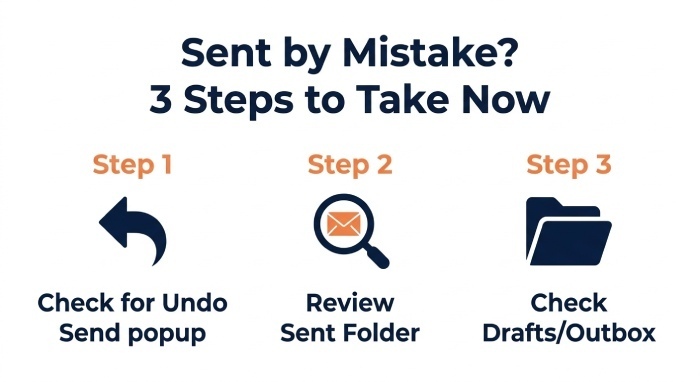
First, check whether the message is still in progress. Open Yahoo Mail immediately and look for any email sent notification, pop-up window, undo button, or confirmation window that may appear after sending. If an undo send option is visible, use it right away. This is the closest Yahoo Mail or a connected app may come to helping you unsend email. However, the undo send window is usually brief, so do not rely on it as a full email recall solution.
Next, go to the sent folder and review the message. Your sent emails can confirm exactly what was shared, who received it, and whether an attachment was included. The sent folder is your record of what happened, and you should revisit email details carefully before contacting the recipient.
Check the Sent Folder, Drafts Folder, and Delivery Details
Open the Sent Folder in Yahoo Mail and verify the recipient, subject line, body text, and attachments. If the message is not in the sent folder, check whether it remains as an email draft in the drafts folder. Sometimes users think they sent something, but the message is still an email draft in the Drafts Folder or Outbox, especially when using a mobile app on Android, iOS, or iPhone with an unstable connection.
If it is still an email draft, you can edit email content before sending or delete email entirely from the drafts folder. This is one reason reviewing the drafts folder is useful before assuming a missed email has actually gone out. If the message remains in your Drafts folder, you can revise it, remove sensitive information, or delete the draft before it is sent.
If the message is already in the sent folder, treat it as delivered unless there is clear evidence otherwise. Yahoo Mail does not typically show detailed delivery status the way enterprise systems may, and Yahoo Help or Help Central will not be able to remove a message from another person’s inbox.
How to Reduce the Risk: Change Passwords, Revoke Access, and Secure Exposed Accounts
If the sent emails included passwords, account numbers, private documents, API keys, medical information, tax records, or internal business data, assume exposure and secure the affected accounts immediately. Since you cannot depend on email recall in Yahoo Mail, containment is the priority.
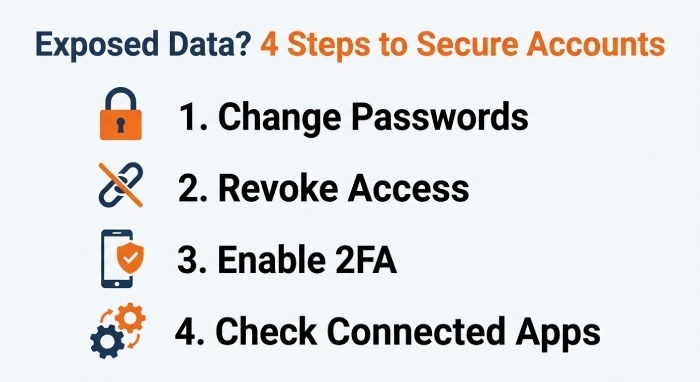
Change any exposed passwords at once. If you sent login credentials, update them before the recipient can use them, even if you believe the recipient is trustworthy. Revoke active sessions, reset recovery codes, and enable two-factor authentication where possible. For accounts tied to Google, Gmail, Microsoft, Outlook, Apple, or financial platforms, check security pages for active devices and recent sign-ins.
If you sent links to shared files, revoke public access or change permissions. For example, remove the recipient’s access, disable link sharing, or replace the document with a sanitized version. If you sent a sensitive attachment, upload a corrected file only after access controls are fixed. Do not simply resend email with a revised file and assume the original is harmless.
Secure Devices and Connected Mail Apps
Also review connected apps. If you use Yahoo Mail through a third-party mail client such as Edison Mail by Edison Software, Mailbird by Mailbird Inc., Spike by SpikeNow, or Apple Mail through the Apple Mail App, check whether the message may have passed through those apps’ Outbox or sync systems. These alternative options can improve productivity, but they do not guarantee email recall once Yahoo Mail has delivered a message.
Check the Settings Menu in Yahoo Mail and connect clients for account access, app passwords, forwarding rules, filters, and recovery options. Remove anything suspicious. Clean Email can help organize and remove unwanted messages from your mailbox, but like other mailbox management tools, it cannot delete email from a recipient inbox after delivery.
What to Say to the Recipient: Requesting Deletion and Handling Professional Follow-Up
Because Yahoo Mail does not let you reliably unsend email after delivery, your next best step is human follow-up. Contact the recipient as soon as possible and ask them not to open, forward, download, or share the message. If appropriate, request that they delete email from their inbox and trash folder.
Keep the tone calm, specific, and professional. A short apology email is often better than a long explanation. For example:
“Hello, I accidentally sent you an email containing information that was not intended for you. Please delete email with the subject line ‘[Subject]’ from your inbox and trash folder without opening or forwarding it. I apologize for the mistake and appreciate your confirmation once it has been deleted.”
If the recipient has already opened it, the email is a read email, and you should document the exposure internally if it involves company, legal, or regulated data. If it remains an unread email, your request may prevent further exposure. Either way, you cannot force deletion through Yahoo Mail, so confirmation from the recipient matters.
When to Notify a Manager, Client, or Compliance Team
If the missed email contains customer data, employee records, contracts, financial details, health information, or credentials, notify the appropriate person or team. This may be a manager, IT administrator, privacy officer, legal department, or client contact. Do not spend time looking for a recall option that cannot retrieve a delivered message. Focus instead on containing the exposure and notifying the appropriate people.
For professional follow-up, explain what happened, when it happened, what information was included, who received it, and what steps you took to reduce risk. If you need to resend email, create a corrected version only after the exposed information has been secured.
Prevention Tips for the Future: Draft Reviews, Delayed Sending Workarounds, and Safer Alternatives
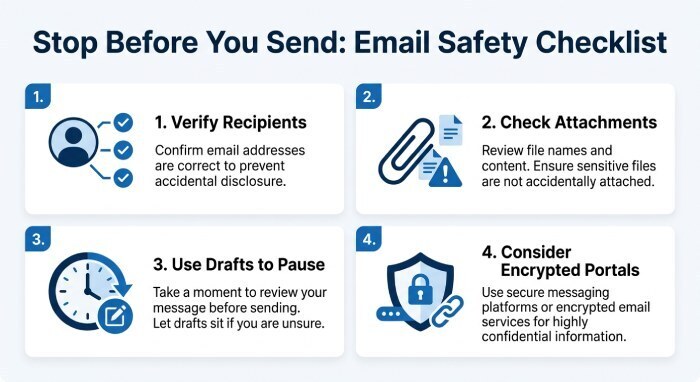
The best way to avoid needing to recall email is to build a safer sending workflow. Before you compose email containing sensitive content, verify whether email is the right channel. For highly confidential information, use encrypted portals, access-controlled document sharing, or secure messaging systems instead of standard Yahoo Mail.
Use an email draft process for important messages. Save the message as an email draft, step away, then revisit email before sending. The drafts folder gives you a chance to check recipients, attachments, tone, and sensitive details. For business messages, review the Drafts Folder at the start and end of the day so unfinished messages do not get sent too quickly.
Practical Draft and Delay Habits
Before pressing Send, confirm the recipient name and address, especially if autocomplete suggests similar contacts. Many sent emails become problems because of one incorrect recipient. Attach files only after reviewing the body, and verify that no outdated or sensitive attachment is included. If you need to edit an email, do it while it is still in the compose window, not after it is in the sent folder.
Some email services, such as Gmail, offer an Undo Send period that delays delivery briefly, while Microsoft Outlook provides recall and message-replacement options in certain account and organisational environments. These features have different limitations and are not equivalent to true post-delivery recall. For Yahoo Mail, users should not assume that an undo option can retrieve a message once it has been delivered.
While SPF, DKIM, and DMARC cannot recall a delivered email, they help authenticate legitimate messages and protect your domain against email spoofing and impersonation.
Still, treat every undo send feature as a safety net, not a guarantee. The time limit is short, and once the app releases the message for delivery, you generally cannot unsend email or perform true email recall. If Yahoo Mail shows an undo send prompt, use it immediately; if it does not, assume the message has been sent.
Finally, maintain your mailbox carefully. Delete email you no longer need, but remember that deleting sent emails from your sent folder does not erase delivered copies. Keep sensitive templates as secure drafts only when necessary, clean up the drafts folder regularly, and avoid storing passwords or confidential data in an email draft. These habits reduce the likelihood of accidental disclosure and give you more control over sensitive messages before they are sent.
General Manager
General Manager of DuoCircle. Product strategy and commercial lead for DMARC Report's 2,000+ customer base.
LinkedIn Profile →Take control of your DMARC reports
Turn raw XML into actionable dashboards. Start free - no credit card required.