Sender Not Authorized for Relay Error: How to Fix It

Quick Answer
The “Sender Not Authorized for Relay” error occurs when your SMTP server rejects the sender because authentication or relay permissions are missing. Fix it by verifying SMTP credentials, enabling authentication, checking relay settings, and confirming the sender address is authorized.
The sender not authorized for relay message is a common relay error that appears when an email server refuses to pass a message from one sender to another domain. In Microsoft environments, especially Office 365, Exchange Online, and Outlook, the error often appears with the code 550 5.7.367 in a non-delivery report. The user may simply see that the message was rejected, while the email admin or IT administrator sees a deeper issue involving SMTP authentication, relay permissions, or domain policy.
What the “Sender Not Authorized for Relay” Error Means
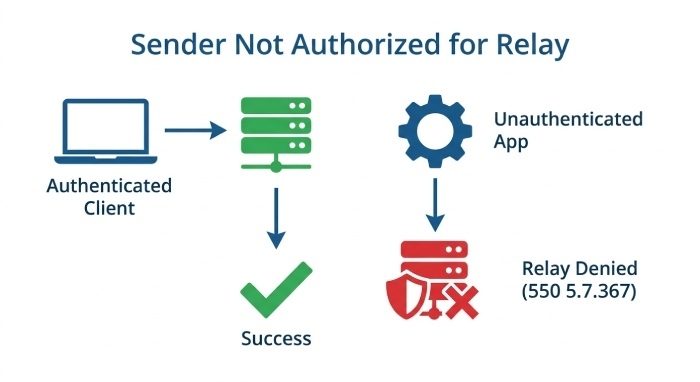
When you receive a non-delivery report saying 550 5.7.367 or sender not authorized for relay, your mail server is telling you that it will not relay the message to the destination. In plain terms, the sending system tried to use an email server to deliver mail, but that server did not recognize the sender as an authenticated user or did not allow the sending domain, application, IP address, or connector to relay messages.
This type of relay error is different from a typo in an address or a full mailbox. It usually points to a permissions, authentication, or policy problem. The non-delivery report, also called an NDR, may include phrases such as relay access denied, unable to relay, or sender not authorized for relay. In Microsoft 365, 550 5.7.367 often means the sending account, app, or SMTP connector is not permitted to send through the configured mail server.
For example, Amanda may send from Outlook using her company account at contoso.com, while Chris sends mail from a web app using the same domain. Amanda’s message succeeds because Outlook uses proper SMTP authentication, but Chris’s app fails because the email server sees it as an unauthenticated mail server. David, the IT admin, would then review the non-delivery report to determine whether the failure is caused by missing relay permissions, a server configuration mistake, or a policy enforced by the recipient’s email server.
Common Causes: Authentication, SMTP Settings, and Server Restrictions
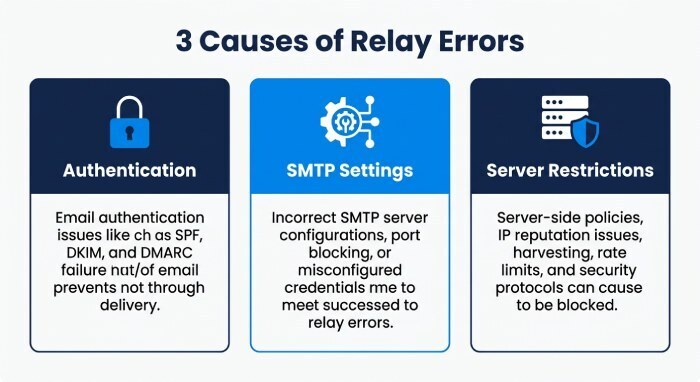
A sender not authorized for relay error is usually caused by one of three areas: authentication failure, incorrect SMTP settings, or relay restrictions on the sending or receiving mail server. These problems can also harm email deliverability, trigger email bounces, and create broader email delivery issues.
Authentication and SMTP mismatches
The most frequent cause is failed or incorrect SMTP authentication. If an app, copier, Customer relationship management (CRM), website plugin, or email client sends mail without authenticating correctly, the email server may reject the message with 550 5.7.367. This is especially common when users change passwords, enable multi-factor authentication, migrate to Office 365, or switch from legacy SMTP to modern authentication protocols.
Incorrect credentials, disabled SMTP AUTH, or outdated sessions
In Outlook, Outlook Web App, and third-party apps, the sending identity must match the configured account and SMTP service. An outdated server session can also cause a relay error, particularly if cached credentials remain active after a password reset. Signing out and back in may refresh the token, but persistent failures usually require checking the account’s SMTP AUTH status in Exchange Online.
A typical non-delivery report may show 550 5.7.367 when the mail server receives outbound mail from an app that is not logged in as an approved sender. The result is an email rejection, even if the address looks valid to the user.
Wrong server settings, encryption, or port numbers
Another common configuration issue involves incorrect server settings, encryption, or port numbers. For outbound SMTP email, Microsoft commonly uses authenticated SMTP submission on port 587 with STARTTLS. If an email client is set to port 25 without authentication, or if SSL/TLS is misconfigured, the email server may return a sender not authorized for relay.
To test SMTP configuration, compare the hostname, username, encryption method, and ports against the provider’s documentation, such as support.office.com for Microsoft services or provider-specific guidance from Email Service Provider (ESP) .
Server restrictions and relay policy
Even when SMTP authentication is correct, relay policy can block delivery. A mail server may allow messages only from approved IPs, specific domains, or authenticated users. This is known as a restricted relay, and it is the safer alternative to an open relay, which can be abused for spam.
Relay permissions, domain restrictions, and tenant policies
In Microsoft 365 or Exchange Online, relay permissions may depend on connectors, accepted domains, IP-based restrictions, and the organization’s tenant domain. If an application sends as alerts@contoso.com but the connector only permits another domain, the system may generate a 550 5.7.367 non-delivery report.
Domain restrictions can also occur at the recipients’ organization. Their gateway may reject the message if the sender domain fails validation, appears suspicious, or conflicts with security policy. In that case, the relay error may appear to originate from the receiving mail server, not the sender’s environment.
SPF, DKIM, DMARC, and reputation failures
DNS-based sender validation matters. A misconfigured SPF policy, missing SPF record, DKIM failure, or DMARC failure can reduce email deliverability and cause inconsistent message delivery. While SPF, DKIM, and DMARC do not always directly cause senders not authorized for relay, they influence whether a recipient’s email server trusts the message.
Poor sender reputation or an IP address appearing on a blocklist can contribute to email deliverability problems. If relay configuration and SMTP authentication are working correctly, check the sending IP’s reputation and blocklist status to determine whether an external filtering system is affecting message delivery.
How to Fix the Error in Email Clients and Apps
Start with the sending device or application before changing the email server. In many cases, the sender not authorized for relay problems is caused by Outlook, a mobile app, a scanner, or a web application using old credentials or the wrong SMTP endpoint.
Email client and app checks
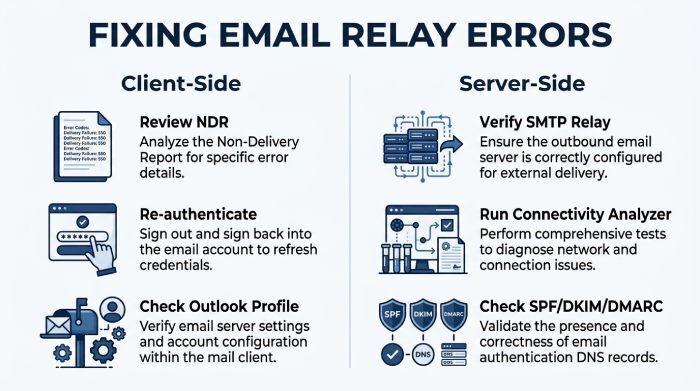
First, review the non-delivery report carefully. Look for 550 5.7.367, relay access denied, unable to relay, or wording that identifies the failing mail server. If the message came from Outlook, compare the account used in the From field with the account used for SMTP authentication.
Refresh sessions and re-authenticate
In Outlook, sign out and sign back in. If using Outlook Web App, test sending the same message from the browser. If Outlook Web App succeeds but desktop Outlook fails, the issue is likely local profile corruption, cached credentials, or incorrect SMTP authentication in the desktop profile.
For apps, verify that the sender is an authenticated user and that the app is not trying to send through an unauthenticated mail server. If the app sends system messages, avoid using a personal mailbox without explicit approval from the email admin.
Verify allow lists and recipient-side filtering
If only one recipient fails, ask whether the recipient can add the sender to a safe sender list or whitelist. However, do not rely on allow listing as the only fix. A relay error involving 550 5.7.367 usually requires correcting SMTP authentication, relay permissions, or DNS alignment.
If the issue involves a sensitive recipient, send the diagnostic details through a private message to the IT team rather than posting headers publicly.
Server-Side Fixes for Admins: SMTP Relay, DNS, SPF, DKIM, and DMARC
For administrators, the fix depends on whether the sending source is a user mailbox, an application, a device, or a connector. Review the server configuration and determine whether the sender should use authenticated SMTP submission, direct send, or an SMTP relay connector.
Check SMTP relay and relay permissions
In Exchange Online, confirm that the connector permits the sending IP or certificate and that the sending address belongs to an accepted domain. If the organization uses a hybrid mail server, confirm that local relay rules match Microsoft’s cloud configuration. Overly broad relay settings can create an open relay, while overly narrow rules can create a restricted relay that blocks legitimate systems.
Run internet email tests, including Internet Email Tests in the Microsoft Remote Connectivity Analyzer, to validate SMTP connectivity and test SMTP configuration. The Microsoft Remote Connectivity Analyzer can help confirm whether authentication, Transport Layer Security (TLS), DNS, or connector settings are responsible for the sender not authorized for relay failure.
Validate DNS, SPF, DKIM, and DMARC
Check public DNS records for SPF, DKIM, and DMARC. The SPF record should include the legitimate sending services, including Microsoft, Office 365, or approved ESPs. DKIM should be enabled for the sending domain, and DMARC should align with the visible From domain.
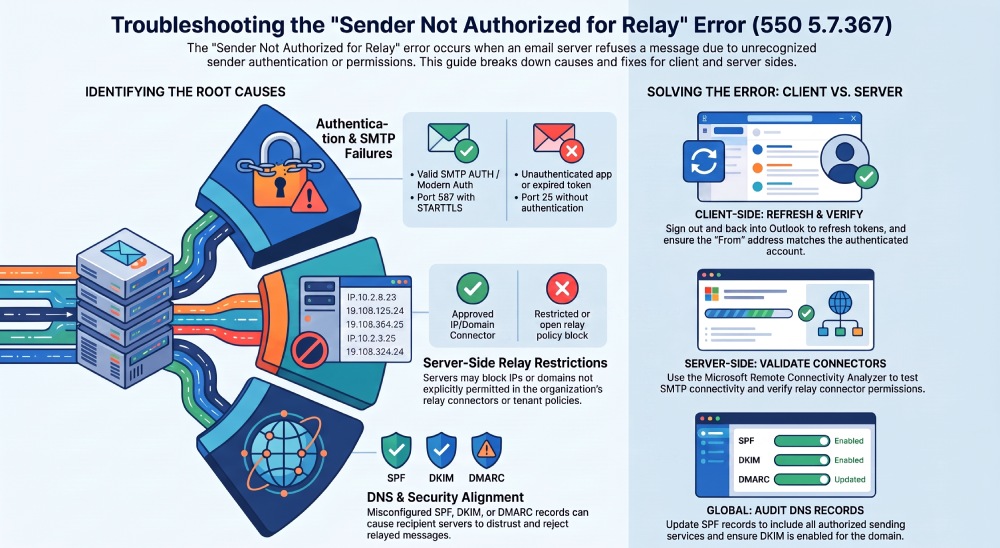
If the mail server sends from contoso.com, but the SPF record does not authorize the actual sending service, SPF authentication may fail and contribute to email delivery problems. Review SPF, DKIM, and DMARC results to identify authentication failures, alignment issues, or unauthorized sending sources.
Prevention Tips: Secure Relay Configuration and Ongoing Monitoring
To prevent the sender not authorized for relay error from returning, document every system that sends mail: users, apps, scanners, websites, ticketing systems, and marketing ESPs. Each source should have approved SMTP authentication, clear relay permissions, and properly aligned SPF, DKIM, and DMARC records.
Monitor deliverability, blocklists, and policy changes
Implement regular email deliverability checks, blocklist monitoring, and IP blocklisting alerts. Review message trace logs in Microsoft 365 and investigate spikes in email bounces, email delivery issues, or inconsistent message delivery. When Microsoft, an ESP, or the recipients’ organization changes policy, previously working configurations can fail with 550 5.7.367.
Finally, keep server settings current, remove unused relay connectors, and avoid allowing unauthenticated devices to send through the production email server. Secure relay design reduces spam exposure, protects sender reputation, and lowers the chance of another sender not authorized for relay relay error appearing in a future non-delivery report.
General Manager
General Manager of DuoCircle. Product strategy and commercial lead for DMARC Report's 2,000+ customer base.
LinkedIn Profile →Take control of your DMARC reports
Turn raw XML into actionable dashboards. Start free - no credit card required.