SPF Authentication: Understanding SPF -all vs ~all

Quick Answer
SPF -all produces a hard fail for unauthorized senders, while ~all produces a soft fail. Use ~all while identifying legitimate sources and consider -all after your SPF record is complete and verified.
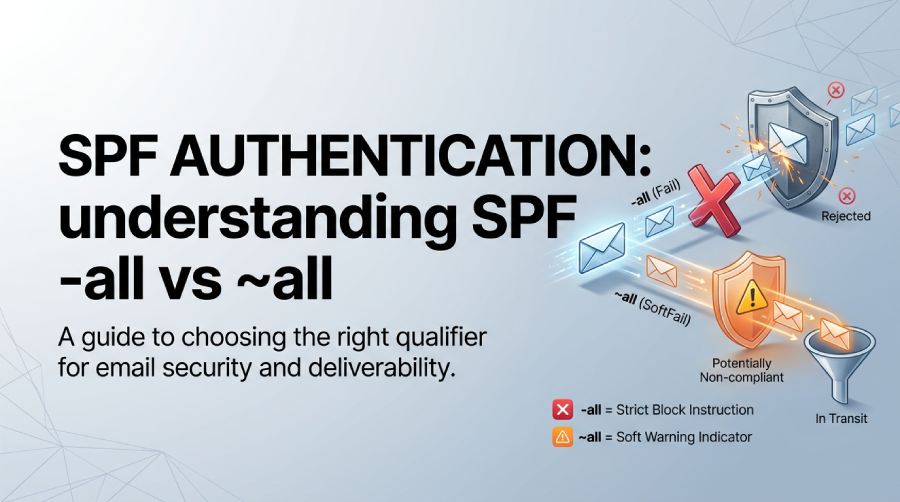
Sender Policy Framework (SPF) is one of the fundamental technologies used to protect email domains from unauthorized sending. It allows domain owners to publish a list of legitimate email sources in DNS so receiving mail servers can determine whether a message was sent from an approved server.
One of the most important decisions when creating an SPF record is choosing the appropriate qualifier for the all mechanism. The two options most commonly considered are -all and ~all.
Although both indicate that a sending source was not authorized by the SPF record, they communicate different levels of policy. Understanding the distinction can help you maintain email security without unnecessarily interfering with legitimate messages.
This guide explains how SPF works, what each all qualifier means, and how to decide between SPF hardfail and softfail.
What Is SPF Authentication?
Sender Policy Framework, commonly called SPF, is an email authentication method that helps prevent unauthorized servers from sending messages using your domain.
A domain owner publishes an SPF policy as a TXT record in DNS. The record identifies the servers, IP addresses, and authorized third-party email services that are permitted to send mail for the domain.
When an email is received, the receiving server evaluates the sending IP against the SPF policy associated with the domain used in the SMTP envelope.
The domain evaluated by SPF is generally the domain associated with the SMTP MAIL FROM address, also known as the Return-Path or envelope sender. This is different from the visible From: address that recipients see in their email clients.
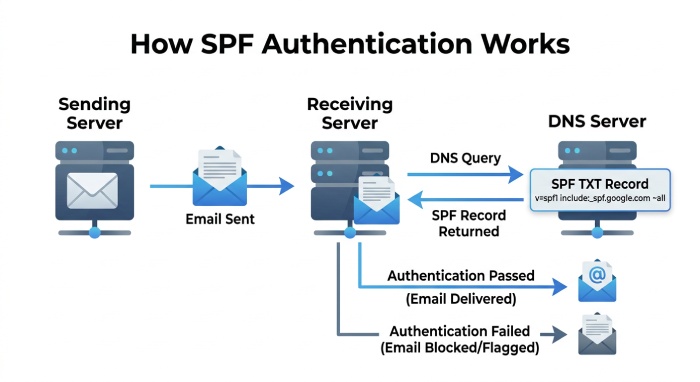 A simplified SPF record might look like this:
v=spf1 ip4:192.0.2.10 include:_spf.examplemail.com ~allThe receiving server evaluates the mechanisms in the record and determines whether the sending server is authorized.
What Does the SPF all Mechanism Do?
The all mechanism acts as the final catch-all in an SPF record.
The receiving server evaluates the mechanisms in sequence. It may first encounter authorized IP addresses, include mechanisms, or other SPF mechanisms. If none of those mechanisms match the sending server, evaluation eventually reaches all.
The qualifier placed before all determines the SPF result for that unmatched sender.
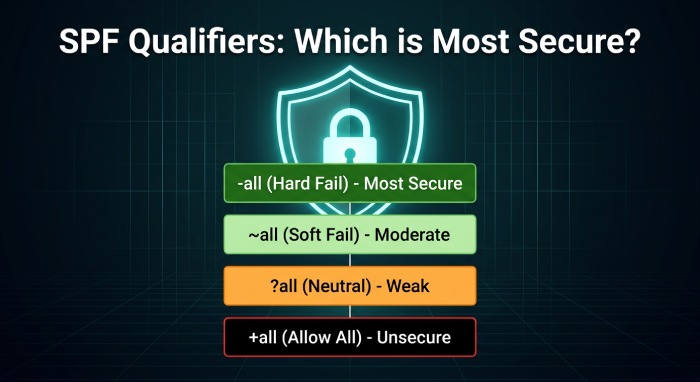
There are four possible qualifiers:
| SPF qualifier | Result | General meaning |
|---|---|---|
+all | Pass | Every sending server is considered authorized |
-all | Fail | Unlisted sending servers are explicitly unauthorized |
~all | SoftFail | Unlisted sending servers are probably unauthorized |
?all | Neutral | The domain makes no assertion about unlisted senders |
For most domains, the practical choice is between ~all and -all.
The other two options generally provide little or no useful protection and should not normally be used in a properly configured SPF policy.
SPF +all: Why It Should Be Avoided
Consider the following record:
v=spf1 +allThis effectively tells receiving servers that any IP address is allowed to send email for the domain.
That eliminates the authorization benefit SPF is designed to provide.
Even if legitimate sending sources are listed elsewhere in the record, adding +all ultimately authorizes every sender because the all mechanism matches all remaining IP addresses.
For this reason, +all is generally unsuitable for a security-focused SPF configuration.
SPF ?all: What Does Neutral Mean?
The ?all qualifier produces a neutral SPF result.
A neutral result does not make a positive or negative statement about whether the sending server is authorized.
For example:
v=spf1 include:_spf.examplemail.com ?allIf the sender is not covered by the preceding mechanisms, SPF returns Neutral.
This provides very little enforcement value. If your objective is to communicate that unidentified senders are suspicious, ~all provides a stronger signal. If your SPF policy is fully established and you want a strict authorization statement, -all is stronger still.
What Does SPF ~all Mean?
~all represents an SPF SoftFail.
For example:
v=spf1 include:_spf.examplemail.com ~allThis tells the receiving system that sources not matched by the preceding SPF mechanisms are not authorized, but the domain is not making the strongest possible rejection-oriented statement.
A SoftFail does not necessarily mean that the message will be rejected. The receiving provider can combine the SPF result with other information, including DMARC, DKIM, sender reputation, message characteristics, and its own filtering policies.
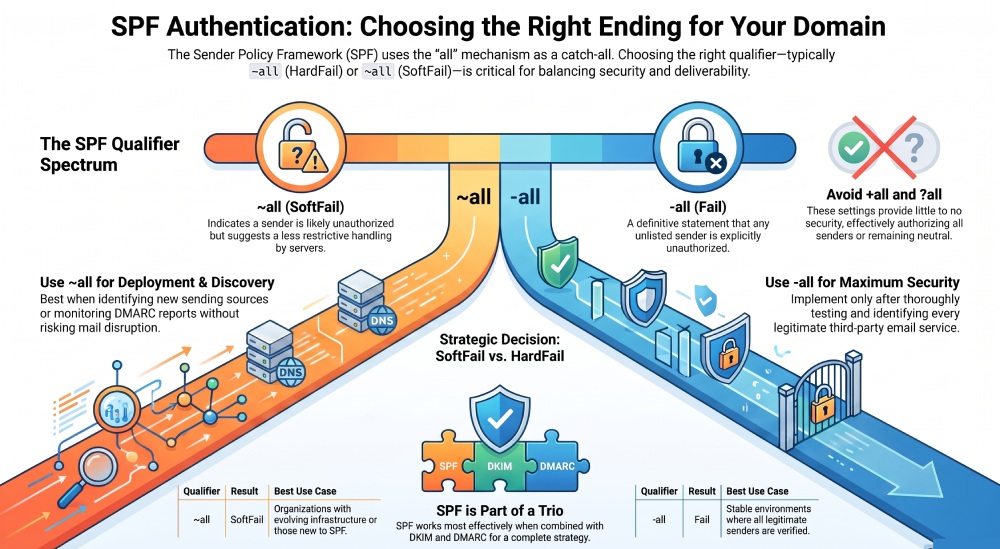
This makes ~all useful when an organization is still identifying all of its legitimate email-sending services.
Advantages of ~all
Using SoftFail can be helpful when:
- You are deploying SPF for the first time.
- Your organization uses several third-party email platforms.
- You are still discovering legitimate sending sources.
- You want to reduce the possibility of disrupting legitimate mail during SPF deployment.
- You are monitoring DMARC reports before applying a stricter SPF policy.
- Your email infrastructure changes frequently.
For example:
v=spf1 ip4:192.0.2.10 include:_spf.examplemail.com ~allIf a legitimate service was accidentally omitted, its messages are not automatically subjected to the strongest SPF failure instruction.
What Does SPF -all Mean?
-all represents an SPF Fail result.
A record such as:
v=spf1 include:_spf.examplemail.com -allstates that only the sources authorized by the preceding mechanisms should be permitted to send mail using the domain.
Any sender that does not match the listed mechanisms receives an SPF Fail result.
This is the strictest of the commonly used SPF endings.
However, an SPF Fail result does not mean that every receiving mail server is required to reject the message. The receiving server ultimately determines how to handle the result according to its own policies and the other authentication signals available to it.
When Can -all Be Appropriate?
A hardfail can be appropriate when:
- Every legitimate sending service has been identified.
- Your SPF record has been thoroughly tested.
- Your third-party email providers are correctly included.
- Your DNS configuration is stable.
- DMARC monitoring shows that legitimate messages are authenticating correctly.
- You are comfortable explicitly declaring unlisted sources unauthorized.
For domains that do not send email at all, a policy such as v=spf1 -all can also be used to state that no sending hosts are authorized.
SPF -all vs ~all: Key Difference
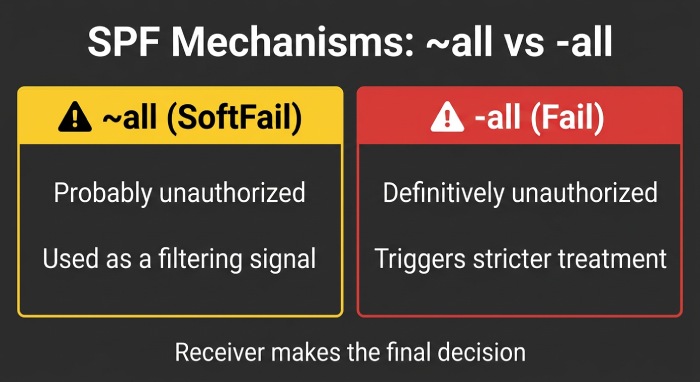 The main difference is the strength of the SPF result generated for a sender that does not match the authorized mechanisms.
~all — SoftFail
The domain indicates that the sender is probably unauthorized.
The receiving provider can use this information as part of its filtering decision without necessarily rejecting the message solely because of the SPF result.
-all — Fail
The domain makes a definitive statement that the unmatched sender is not authorized.
A receiving server may apply stricter treatment based on this result, depending on its own mail-handling policies.
Therefore, the difference is not simply that one “blocks” and the other “allows” email. SPF produces an authentication result, while the receiving system determines the ultimate disposition of the message.
Example: Comparing the Two Policies
Suppose a company legitimately sends email through Google Workspace and a marketing platform.
Its SPF record could be:
v=spf1 include:_spf.google.com include:marketing.example.com ~all
With ~all, a previously unknown sending IP produces a SoftFail.
The same policy could eventually be changed to:
v=spf1 include:_spf.google.com include:marketing.example.com -allNow an unmatched sending source produces an SPF Fail.
The important point is that changing the qualifier does not add a missing sender to the SPF record. Before moving to -all, the organization must first make sure that every legitimate sending platform has been properly authorized.
Why SPF Configuration Errors Matter
One of the biggest risks associated with changing from ~all to -all is an incomplete SPF record.
Modern organizations often send email through many different systems, including:
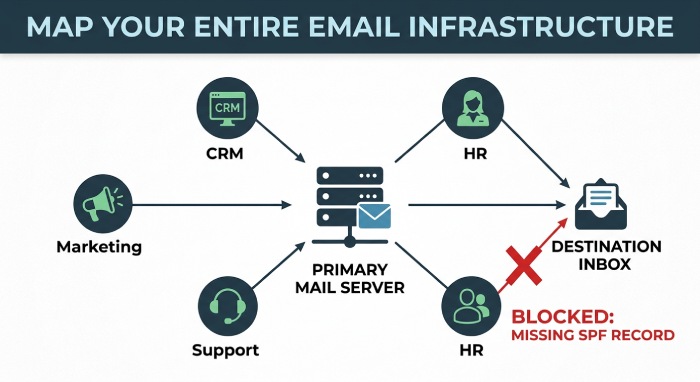
- Corporate email platforms
- Marketing automation services
- Customer support software
- CRM systems
- Transactional email providers
- Website contact forms
- Cloud applications
- Billing platforms
- Notification systems
- Human resources platforms
If one legitimate service is missing from the SPF record, its messages can fail SPF authentication.
This is why SPF should be reviewed as part of the organization’s complete email-sending infrastructure rather than configured using only the primary mail server.
How DMARC Changes the SPF Conversation
SPF does not operate in isolation.
DMARC adds another layer of email authentication by evaluating SPF and DKIM results in relation to the visible From domain.
A DMARC policy can specify how receiving providers should handle messages that fail the required authentication and alignment checks.
The three commonly used DMARC policies are:
p=none— Monitor authentication results without requesting quarantine or rejection.p=quarantine— Ask receiving systems to treat failing messages as suspicious.p=reject— Request rejection of messages that fail DMARC.
This means the all mechanism in an SPF record is not the only factor determining what happens to an email.
SPF Authentication and SPF Alignment Are Different
It is also important to distinguish SPF authentication from SPF alignment.
SPF authentication checks whether the sending IP is authorized by the SPF record associated with the envelope sender domain.
DMARC alignment goes one step further by checking whether the authenticated SPF domain aligns with the domain presented in the visible From: address.
For example, a message may successfully authenticate through SPF using one domain while displaying another domain in the visible From field.
SPF can therefore pass while DMARC still fails if the required alignment condition is not satisfied.
This distinction is particularly important when troubleshooting email authentication problems.
Why Monitoring Is Important Before Using -all
Before implementing a strict SPF policy, organizations should identify all legitimate sending sources.
DMARC aggregate reporting can help with this process by providing information about sending IP addresses and authentication outcomes.
A practical deployment process can look like this:
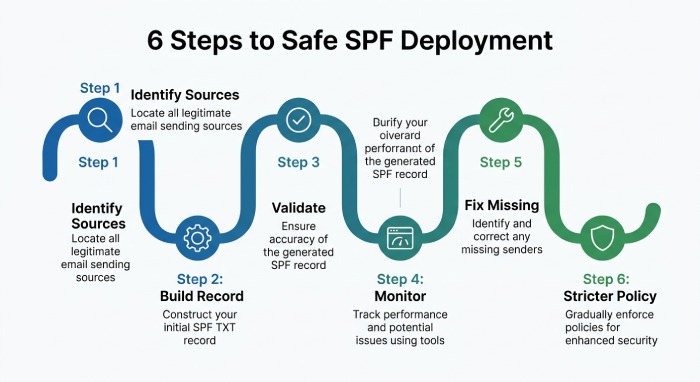 Step 1: Identify Your Email Sources
Create a list of every service that sends email using your domain.
Step 2: Build the SPF Record
Add the necessary IP addresses and authorized third-party services.
Step 3: Validate the Record
Check the syntax and make sure the SPF policy can be evaluated correctly.
Step 4: Monitor Authentication
Review SPF, DKIM, and DMARC results to identify legitimate services that may have been overlooked.
Step 5: Fix Missing Sources
Update your SPF record when a legitimate sender is discovered.
Step 6: Consider a Stricter Policy
Once the sending infrastructure is well understood and the record is complete, evaluate whether -all is appropriate for your domain.
Common SPF all Mistakes
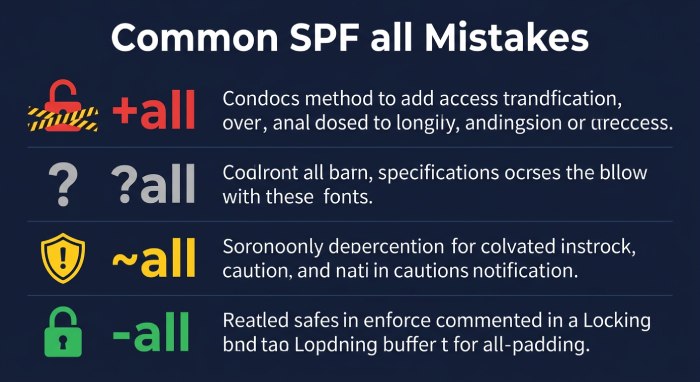
1. Publishing +all
This effectively authorizes every IP address and defeats SPF’s purpose.
2. Using ?all as a permanent policy
Neutral provides little protection because it does not make a meaningful statement about unauthorized senders.
3. Placing all Before Other Mechanisms
The all mechanism matches every sender that reaches it. Therefore, it should normally appear at the end of the SPF record.
For example, this is problematic:
v=spf1 ~all include:_spf.google.comThe include mechanism will never be reached because ~all has already matched.
4. Switching to -all Without Identifying Every Sender
A strict SPF policy can expose configuration mistakes if legitimate services were left out.
5. Forgetting Third-Party Platforms
A company may authorize its primary email provider while overlooking marketing, CRM, ticketing, or transactional email services.
6. Ignoring SPF Record Complexity
Large organizations can accumulate many SPF mechanisms and DNS lookups. SPF has a DNS lookup evaluation limit, so records should be carefully optimized as the number of email providers grows.
7. Treating SPF as the Entire Email Security Strategy
SPF is only one component of a broader email authentication system. DKIM and DMARC should also be considered when building a comprehensive anti-spoofing strategy.
Should You Choose ~all or -all?
There is no universal answer for every domain.
If you are still discovering legitimate email sources, ~all provides a more cautious starting point. It allows you to monitor authentication behavior while reducing the risk associated with an incomplete SPF configuration.
Once your SPF record accurately represents your email infrastructure and your authentication reports show that legitimate sources are properly authorized, -all can be considered when you want to make a stronger statement that unidentified senders are unauthorized.
The important principle is to avoid choosing a qualifier based solely on the idea that “stricter is always better.” A strict SPF policy is useful only when the underlying record is accurate.
A Practical SPF Example
Consider a business that uses:
- Google Workspace for employee email
- A marketing platform for newsletters
- A transactional email provider for application notifications
Its SPF record could look similar to:
v=spf1 include:_spf.google.com include:marketing.example.com include:transactional.example.com ~allAfter monitoring authentication results and confirming that these are the organization’s complete legitimate sending sources, the organization may decide to use:
v=spf1 include:_spf.google.com include:marketing.example.com include:transactional.example.com -allThe exact SPF mechanisms required depend on the providers being used. Never copy an SPF record from another organization simply because its setup looks similar.
Final Thoughts
The all mechanism is a small but important part of an SPF record. Its qualifier determines how an SPF evaluation concludes when the sending source does not match any of the authorized mechanisms that came before it.
~all produces a SoftFail and is useful when you want a more cautious policy while validating your email infrastructure.
-all produces a Fail and provides a stronger statement that unlisted sending sources are unauthorized.
Meanwhile, +all effectively removes SPF’s authorization protection, and ?all provides little useful policy information.
The best approach is to build an accurate SPF record first, verify every legitimate sending service, monitor authentication results, and then choose the appropriate ending for your organization’s email environment.
SPF works most effectively when combined with DKIM and DMARC. Together, these technologies provide a stronger framework for authenticating legitimate email, reducing domain spoofing, and improving overall email security.
General Manager
General Manager of DuoCircle. Product strategy and commercial lead for DMARC Report's 2,000+ customer base.
LinkedIn Profile →Take control of your DMARC reports
Turn raw XML into actionable dashboards. Start free - no credit card required.