What is a 550 5.7.0 local policy violation, and how to solve it?

Quick Answer
What is a 550 5.7.0 local policy violation, and how to solve it? Sending bulk emails certainly means reaching a wider audience, but what if your emails fail to even reach the recipients? Such problems often occur even when you believe you.
Related: Free DMARC Checker ·How to Create an SPF Record ·SPF Record Format


Compliance is driving a lot of the DMARC adoption we see, says Vasile Diaconu, Operations Lead at DuoCircle. PCI DSS v4.0, Google’s sender requirements, Microsoft’s May 2025 enforcement - our support team fields questions about these mandates daily. The organizations that moved early are already at p=reject. The rest are scrambling.
Sending bulk emails certainly means reaching a wider audience, but what if your emails fail to even reach the recipients? Such problems often occur even when you believe you are doing everything right.
The reason for this error could be hidden **email-policy checks running in the background that are causing your emails to fail and showing a 550 5.7.0 local policy violation error.
When you receive this error message, consider it a clear sign that receiving servers are outrightly rejecting your emails. What makes things worse is that it is a permanent failure, which means the server has decided not to accept the message at all, and retrying will not help.
So, the only way to get your emails to reach the recipients is to **identify the root cause and address it directly. In most cases, it usually means fixing SPF verification issues.

In this article, we will understand what exactly the “550 5.7.0 Local Policy Violation” error is and how you can fix this error to improve deliverability.
What is the “550 5.7.0 Local Policy Violation” error?
The 550 5.7.0 Local Policy Violation error means that the recipient’s mail server has permanently rejected your email because it does not meet its internal security rules. What it simply means is that the receiving server does not trust the email enough to deliver it to the recipient.
The reason behind this error message cannot be narrowed down to a single mistake. It is usually the result of sender authentication and verification checks that the receiving servers perform on your incoming emails. These checks are designed to confirm that the email is coming from an authorized sending source and that the **sender’s identity can be reliably verified.

In most cases, you might see the error message in one of two ways:
-
“550 5.7.0 email rejected per SPF policy”
-
“550 5.7.0 SMTP error”
There are two important parts to this message. The first one is “550,” which indicates a permanent failure, and the other is “5.7.0,” which says the rejection is due to a policy-related issue. And when you put these two messages together, it becomes clear that your email has failed a **mandatory policy check and will not be delivered unless the underlying problem is fixed.
Moreover, if the error message specifically mentions SPF (like that in the 1st error message), it means that the receiving server could not verify if the sending source is authorized to send emails on your behalf.
What causes “550 5.7.0 email rejected per SPF policy”?

Now that we have understood what the error message essentially means and what it indicates, let’s dig deeper to understand the reasons behind this error.
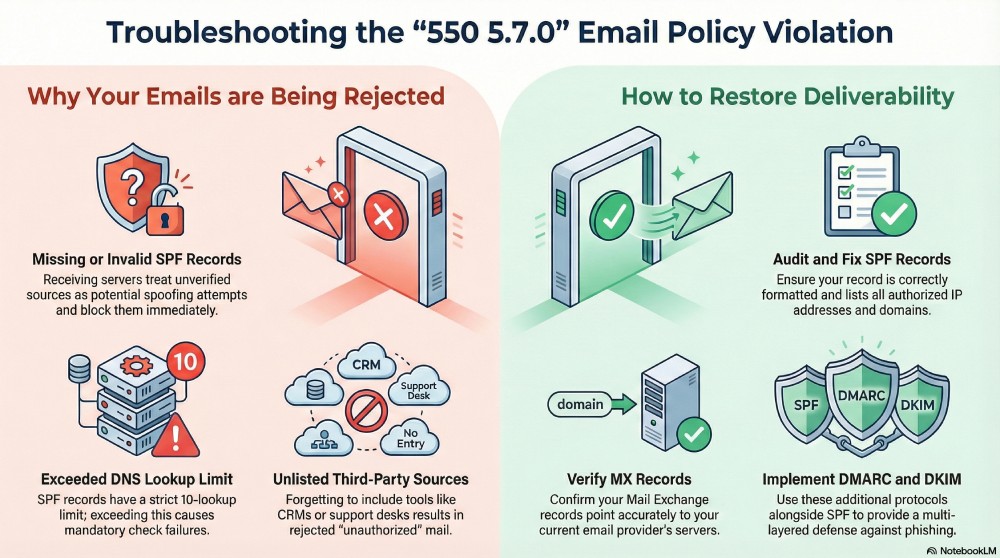
Your SPF records are missing or invalid
If you do not have a valid SPF record that lists all the addresses and servers authorized to send emails, the recipients’ servers will not be able to verify if the incoming email is indeed from an authorized source. Since SPF is one of the most basic checks, failing it raises an immediate trust issue.
When an email fails SPF verification, the receiving server treats it as a potential spoofing attempt and blocks it altogether.

You have not listed all the sources in your SPF record
Another reason why you might be receiving the 550 5.7.0 local policy violation error is that you have not listed all your sending sources in your SPF record. Most organizations send emails from multiple systems, such as a primary mail server, a marketing platform, a CRM tool, a support desk , or a ticketing system. If even one of these sources is missing from the SPF record, emails sent from that source will fail SPF verification.
You have exceeded the DNS lookup limit
As your email ecosystem grows, your SPF record also becomes more complex. New marketing tools, CRM platforms, payment services, and other third-party services each take up one or more DNS lookups in your SPF record.

Since SPF has a strict lookup limit of 10, chances are they will all be exhausted with mechanisms such as “include”, “a”, “mx”, and “redirect”. When the total number of lookups exceeds 10, the receiving server cannot complete the SPF evaluation, and your email fails the SPF check.
How can you fix the problem?
The first and most important step is **understanding and identifying the gaps in your email authentication setup. A clear DMARC enforcement policy sits on top of SPF and DKIM to tell receivers how to handle failures. Now that we have done that, the next step is to take active measures to address those gaps.
Here’s how you can ensure that you no longer receive the 550 5.7.0 local policy violation error and your emails reach their destination - the recipients’ inboxes.

How Do You Fix your SPF record?
Most often, a misconfigured SPF record is the reason behind delivery failures and the “550 5.7.0 SMTP error.” If your SPF record is missing, incomplete, or incorrectly formatted, receiving mail servers cannot verify whether the sending source is authorized. As a result, your emails are treated with suspicion and, in most cases, aren’t let in by the receiving server.
List all the third-party senders
Your SPF record serves as a complete list of all systems authorized to send emails on behalf of your domain. It must include the **IP addresses or approved domains of every third-party service you use. If even one legitimate sender is missing, emails from that source can fail SPF verification and be rejected with a “550 5.7.0 Local Policy Violation” error.
Verify your MX (Mail Exchange) Record
To ensure that your emails are **securely delivered to the recipients’ inboxes, make sure that your MX record is correctly published and points to the mail servers that actually handle email for your domain. If your MX record is outdated, perhaps your MX hostname does not match your current email provider or mail setup, the receiving server will treat your domain as misconfigured, and incoming emails from that domain will be rejected.
Enhance your email security with DMARC, SPF, and DKIM protocols to prevent phishing, spoofing, and unauthorized email delivery. Meeting email authentication compliance standards also keeps your mail flowing to inbox providers that now require it.
Need help improving **email deliverability for your domain? Reach out to us!
Topics
Content Specialist
Content Specialist at DMARC Report. Writes vendor-specific email authentication guides and troubleshooting walkthroughs.
LinkedIn Profile →Take control of your DMARC reports
Turn raw XML into actionable dashboards. Start free - no credit card required.