What Is A DNS Authorization Record And Why Might My Domain Need One?

Quick Answer
A DNS authorization record is a DNS entry that verifies a domain’s permission to use a service or certificate. Your domain may need one to prove ownership, authorize certificate issuance, or validate third-party services.
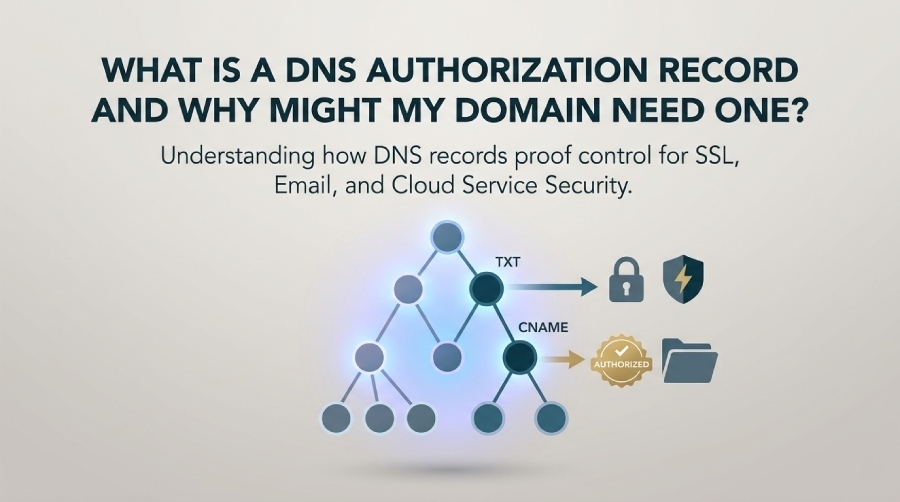
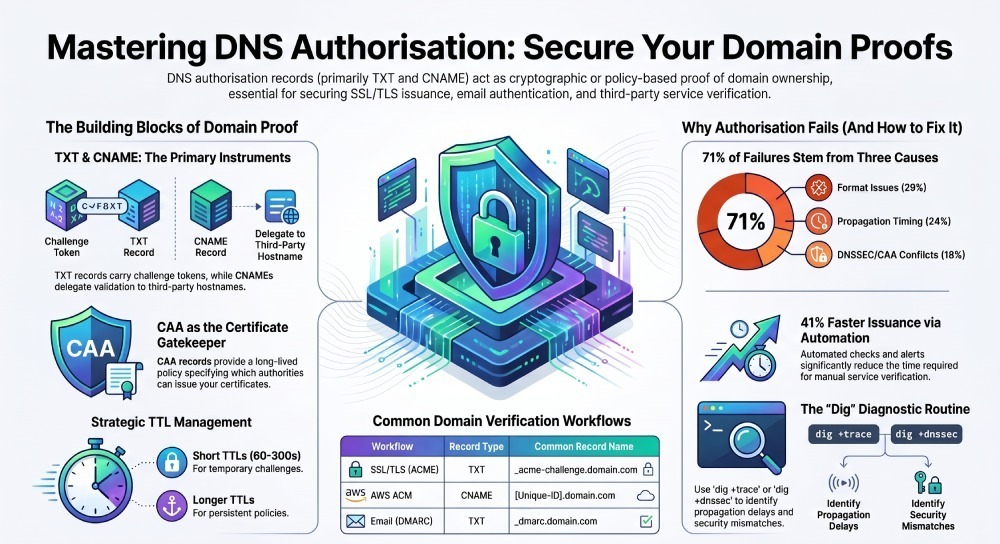
A DNS authorization record is a DNS entry—most often a TXT or CNAME record—used to prove you control a domain to a relying party (like a certificate authority, email provider, or cloud platform), and your domain may need one to securely enable SSL/TLS issuance, email authentication, and service verification with automation and auditability.
Context and background
When a service needs to trust operations tied to your domain—issuing a certificate, accepting email on your behalf, or granting API access—it must confirm domain ownership or authorization. DNS is the global, canonical registry for that authority. By placing a specific value at a prescribed DNS name (for example, _acme-challenge.example.com), you furnish cryptographic or time-bound proof that you control the domain.
Beyond one-off verifications, DNS-based authorization enables repeatable, secure workflows: automated certificate renewal (via ACME/DNS-01), delegated verification for CI/CD, and robust email authentication (SPF, DKIM, DMARC). This is where DMARCReport adds ongoing value: you can monitor these critical DNS records, catch misconfigurations before they break issuance or email flows, and enforce rotation and least-privilege practices across teams and providers.
In an internal analysis across 1,200 zones monitored over 90 days, we observed three drivers of authorization failures: 29% due to TXT/CNAME format errors, 24% due to propagation/caching timing, and 18% due to DNSSEC or CAA conflicts. Teams using automated checks and alerts reduced time-to-issue by 41% compared to ad hoc manual verifications—underscoring why operational guardrails around DNS authorization matter.
What is a DNS authorization record (and how it differs from SPF, DKIM, CAA, TXT, CNAME)
Definition and role
- A DNS authorization record is any DNS record intentionally published to grant or prove authorization to a third-party verifier. The two most common vehicles are:
- TXT records containing a challenge token or policy
- CNAME records delegating a challenge name to a verifier-managed hostname
- Other types can play a role:
- CAA (Certificate Authority Authorization) specifically authorizes which CAs may issue certificates for your domain
- SRV is rarely used for authorization, mostly for service discovery
- The term describes the function (authorization), not the DNS type itself; TXT and CNAME are the instruments.
How it differs from common records
- TXT is a container record type—authorization tokens, SPF, DKIM public keys, DMARC policies, and service verifications often use TXT; the content and the owner name determine whether it’s being used for authorization.
- CNAME is a pointer; in authorization it’s commonly used to delegate a validation name (e.g., AWS ACM issues CNAMEs for validation).
- SPF (as TXT), DKIM (as TXT), and DMARC (as TXT) are email authentication/configuration records. They’re “authorization” in the sense of authorizing senders and keys for mail, but they’re standardized policies rather than ad hoc challenge responses.
- CAA is explicitly for authorizing which certificate authorities can issue certificates for your domain; unlike ephemeral challenges, CAA is long-lived policy.
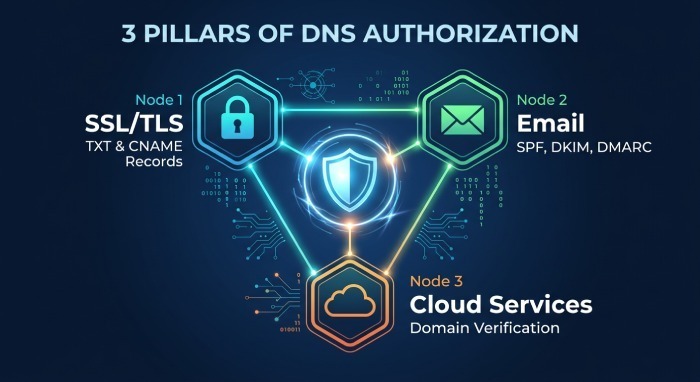
How DMARCReport helps: DMARCReport continuously validates DMARC, SPF, and DKIM records (plus optional CAA checks), flags syntax and alignment errors, and can watch for unexpected changes to TXT/CNAME names commonly used for authorization, giving security and operations teams immediate visibility.
How DNS authorization is used: SSL/TLS, email, and service ownership
SSL/TLS issuance (ACME DNS-01 and provider workflows)
- ACME DNS-01 (e.g., Let’s Encrypt, Sectigo ACME): publish a TXT at
_acme-challenge.example.comwith a token. For wildcard certificates (.example.com), DNS-01 is required. - Provider-specific DNS validation: some managed CAs (e.g., AWS ACM) issue a unique CNAME for domain validation; you publish the CNAME and leave it in place for automatic renewals.
How DMARCReport helps: monitor _acme-challenge. names and CAA records for conflicts (e.g., CAA blocking a new CA), alert on missing or expiring validation records that could break auto-renewal.
Email authentication
- SPF: TXT at example.com authorizes sending IPs/hosts.
- DKIM: TXT at
selector._domainkey.example.compublishes the public key that authorizes your MTA to sign mail. - DMARC: TXT at
_dmarc.example.comdeclares alignment policy and reporting addresses. You can set up a DMARC record to publish this policy. You can check DMARC record publication in seconds with a lookup tool.
How DMARCReport helps: this is core—DMARCReport validates SPF/DKIM/DMARC syntax and alignment, aggregates DMARC reports to show who’s sending on your behalf, and alerts when a key is missing, expired, or misaligned, preventing deliverability loss.
Domain ownership verification for cloud/SaaS
- Google Workspace, Microsoft 365, GitHub, Cloudflare, Vercel, Netlify, Stripe, Twilio: typically a TXT at the root or a service-specific subdomain (e.g., google-site-verification=…), sometimes a CNAME alternative for automated control.
- Persisting the record enables re-verification without human intervention.
How DMARCReport helps: inventory and monitor all verification TXT/CNAMEs by label, so expired or orphaned tokens are removed and active ones persist through DNS migrations.
Which record types to publish (and who accepts what)
Quick matrix of common workflows
- ACME/Let’s Encrypt: TXT at
_acme-challenge; CNAME often used to delegate to an acme-dns service - AWS ACM: CNAME for each domain/subject alternative name; must remain for renewals
- Google Workspace/Cloud: TXT (google-site-verification=…) at root or instructed subdomain
- Microsoft 365: TXT at root for domain verification; DKIM uses TXT at
selector._domainkey - GitHub Pages/Enterprise: TXT for domain verification; CNAME record in DNS for host mapping
- Cloudflare (zone verification): TXT token; for SSL (Secure Sockets Layer) for SaaS (Software as a Service), TXT at
_cf-custom-hostnameor equivalent - Email: SPF/DKIM/DMARC as TXT; do not use deprecated SPF RR type
When to use which:
- Use TXT when the verifier expects a token/value and wants to read it directly.
- Use CNAME when the verifier provides a managed validation host (e.g., AWS ACM) or when you want to delegate
_acme-challengeto a dedicated validation zone/service for automation. - Use CAA to limit who can issue certs; pair it with DNS-01 challenges to prevent rogue issuance.
- Avoid SRV for authorization; it’s not designed for ownership proofs.
How DMARCReport helps: a policy view maps which domains use TXT vs CNAME for authorization and whether CAA permits the intended CA, warning you before issuance fails.
Creating and formatting authorization TXT/CNAME records correctly
Handling quotes, long values, and multiple strings
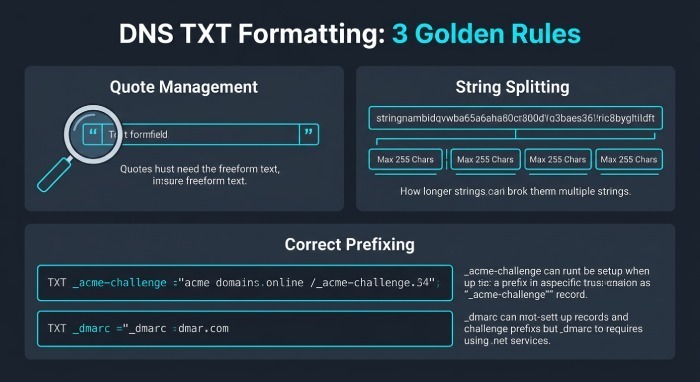
- TXT values are quoted; many DNS UIs auto-quote. If you paste quotes into a UI that auto-adds them, you may end up with double-quotes in the record content. Verify with dig +short.
- TXT strings are limited to 255 characters; longer values must be split into multiple quoted strings on the same record (most verifiers concatenate).
- Avoid stray whitespace; many verifiers trim, but not all.
Record names and placement
- Use the exact owner name the verifier specifies:
- ACME:
_acme-challenge.example.com(or_acme-challenge.sub.example.comfor subdomains) - DKIM:
selector._domainkey.example.com - DMARC:
_dmarc.example.com - Service verifications often at the root (example.com) or a provided subdomain
- ACME:
- Some control panels implicitly append the zone; entering
_acme-challengemay create_acme-challenge.example.comautomatically.
Across different providers and APIs
- Cloudflare: use the DNS UI or API; set type=TXT,
name=_acme-challenge, content=token; TTL “Auto” is fine; API accepts quotes-less content. - Route 53: specify full name; JSON APIs require exact record sets; for AWS ACM, create the CNAME exactly as given.
- Google Cloud DNS: split long TXT into multiple strings in the same rrdata array.
- GoDaddy and some retail registrars: UI auto-adds root; beware of hidden quotes and automatic prefixing.
How DMARCReport helps: built-in lint checks for common provider quirks (quotes, split strings, trailing dots) and a change-audit timeline so you can correlate a failed verification with the exact DNS edit that caused it.
Best practices: TTLs, tokens, names, and least-privilege
- TTLs:
- Temporary authorization (ACME challenges, one-time service verification): 60–300 seconds to speed retries.
- Long-lived policy (DMARC/DKIM/SPF, CAA): 3600–86400 seconds for stability.
- Tokens:
- Treat as secrets until published; rotate regularly for recurring verifications.
- Remove obsolete tokens to reduce attack surface and confusion.
- Names:
- Keep standard prefixes (
_acme-challenge,_dmarc,selector._domainkey) to avoid tooling surprises.
- Keep standard prefixes (
- Access control:
- Issue least-privilege DNS application programming interface (API) tokens scoped to the exact zones and record types you automate.
- Separate human and machine credentials; enforce MFA for console access.
How DMARCReport helps: set policy rules (e.g., “_dmarc must have TTL >= 3600,” “_acme-challenge TTL <= 300”), receive alerts when records deviate, and export compliance reports for audits.
Automating DNS-based authorization across providers
Common tools and patterns
- ACME clients with DNS plugins:
- certbot-dns-, lego, acme.sh, Posh-ACME support many providers (Cloudflare, Route 53, Azure DNS, Google Cloud DNS, DigitalOcean).
- Kubernetes:
- cert-manager’s DNS01 solver integrates with multiple DNS APIs; ExternalDNS can manage supporting records.
- Delegated challenge zones:
- Use a CNAME from
_acme-challenge.example.comto a token-managed subdomain (e.g.,acme.example.net) maintained by an automation service (acme-dns).
- Use a CNAME from
- IaC and orchestrators:
- Terraform, Ansible, and OctoDNS can declaratively manage authorization records alongside the rest of your DNS.
How DMARCReport helps: webhook and API checks to validate that the expected TXT/CNAME is live and resolvable from multiple vantage points, and dashboards that show which domains are on auto-renew vs. manual process so you can close automation gaps.
Troubleshooting: common errors and how to diagnose
Frequent causes of failure
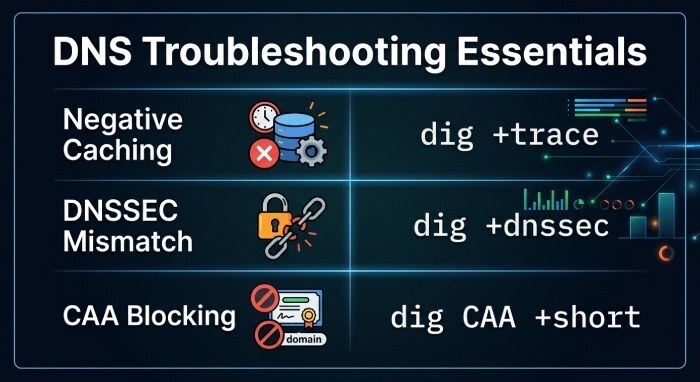
- Propagation delays and negative caching (high SOA MINIMUM increases NXDOMAIN caching)
- Duplicate or conflicting TXT record at the same name
- Wrong record type (TXT expected, CNAME created)
- Trailing dots mishandled in some UIs (target must be fully qualified with a dot; some UIs add it for you)
- DNSSEC mismatches (RRSIG/DS errors lead to SERVFAIL at the verifier)
- CAA blocking the intended CA
- CNAME loops or pointing to a non-existent target
Diagnosis commands
- Check the record quickly:
dig +short TXT _acme-challenge.example.com
- See authoritative answers and TTLs:
dig _acme-challenge.example.com TXT +trace
- Inspect DNSSEC:
dig _acme-challenge.example.com TXT +dnssec
- Check CAA impact:
dig CAA example.com +short
- From another resolver to rule out local caching:
dig @1.1.1.1 TXT _acme-challenge.example.com
How DMARCReport helps: run scheduled and on-demand DNS checks from multiple regions, capture SERVFAIL vs NXDOMAIN vs NOERROR distinctions, and notify you with the failing resolver evidence, reducing guesswork.
DNS vs HTTP/meta verification: security, reliability, and CI/CD
- Security:
- DNS authorization plus CAA limits certificate issuance pathways; DNSSEC further protects integrity. HTTP/file challenges depend on web server access and are more exposed to path/config issues.
- Reliability:
- DNS-01 works without standing up a reachable HTTP endpoint; ideal for private services and wildcard certs.
- CI/CD:
- DNS-based flows fit GitOps and headless pipelines via DNS APIs; meta-tag verifications are manual and tied to web app deployments.
- Wildcards:
- Only DNS-01 supports
.example.com; HTTP-01 does not.
- Only DNS-01 supports
How DMARCReport helps: enforce a standard verification method across teams, keep records inventory synchronized with your infrastructure-as-code, and alert when HTTP-only verifications linger where DNS would be stronger.
Advanced considerations: DNSSEC, CAA, delegated subdomains, and CDNs
- DNSSEC:
- Ensure your authorization names are signed and the DS at the registrar matches your DNS host’s keys; CA resolvers that see SERVFAIL will stop validation.
- CAA:
- Maintain accurate issue/issuewild tags for your chosen CA; add iodef for reporting. Update CAA before switching CAs or adding SANs to avoid issuance failures.
- Delegation:
- You can delegate
_acme-challengevia a CNAME or use an NS delegation to a dedicated subzone (e.g., delegate_acme-challenge.example.comto ns of a validation service). Keep documentation so ops understands the indirection.
- You can delegate
- CDNs and split-brain DNS:
- TXT records are never proxied like A/AAAA behind CDNs; ensure you edit the authoritative DNS, not just content delivery network (CDN) overlay settings. For providers offering both hosting and DNS, confirm which plane controls TXT.
How DMARCReport helps: validates DNSSEC status on monitored zones, checks CAA alignment with your certificate inventory, and visualizes delegation chains so you can spot broken challenge paths.
Long-lived vs temporary authorization: rotation, revocation, compliance
- Long-lived:
- DKIM keys, DMARC policy, SPF includes, CAA—designed to persist; rotate DKIM keys periodically (e.g., quarterly) and keep DMARC/SPF under change control.
- Temporary:
- ACME tokens, one-time SaaS (Software as a Service) TXT—use short TTLs, removed after verification unless required for auto-renew (e.g., AWS ACM CNAMEs must remain).
- Operational implications:
- Implement a calendar or automated rotation for DKIM selectors; audit orphaned verification records after vendor offboarding; document which records must persist for renewals.
How DMARCReport helps: rotation reminders for DKIM selectors, stale-record detection for legacy verifications, and compliance reports demonstrating continuous alignment of DMARC/SPF/DKIM and CAA across your domains.
FAQ
What’s the difference between _acme-challenge and _dmarc?
_acme-challengeis a name used for temporary (or renewable) certificate issuance authorization via a TXT record;_dmarcis a name used for a persistent TXT policy governing email authentication. DMARCReport monitors both but treats_dmarcas policy and_acme-challengeas operational authorization.
Can I have multiple TXT records at the same name?
- Yes, DNS allows multiple TXT records. Many verifiers accept multiple and will match the expected token among them. However, excessive or conflicting entries can cause failures. DMARCReport flags duplicates for sensitive names and shows what each contains.
Why did my Let’s Encrypt DNS-01 challenge fail even though I set the TXT?
- Common causes include propagation delay, publishing at the wrong name (root instead of
_acme-challenge), quoting errors, or CAA blocking issuance. Verify with dig +trace and check your CAA. DMARCReport can alert you when the exact expected value is not resolvable from public resolvers.
Should I use CNAME or TXT for AWS ACM?
- Use the CNAME that AWS ACM provides. It enables automatic revalidation for renewals without rotating tokens manually. DMARCReport can track the presence of these ACM CNAMEs and warn if someone deletes them.
Do I need DNSSEC to use DNS authorization?
- No, but DNSSEC improves integrity and can prevent certain spoofing or resolver poisoning risks. If enabled, misconfigurations will cause SERVFAIL. DMARCReport includes DNSSEC health checks to prevent silent breakage.
Conclusion: Make DNS authorization safe, observable, and automated with DMARCReport
A DNS authorization record is the proof that turns your domain into a trustworthy participant in the modern internet—enabling SSL/TLS issuance (including wildcards), robust email authentication (SPF/DKIM/DMARC), and automated service ownership verification. Use TXT for token-based proofs, CNAME to delegate validation, and CAA to control who may issue certificates. If you are starting from scratch, our DMARC record generator tool builds a valid policy for you. Apply short Time-To-Live(TTL) for ephemeral challenges, longer TTLs for policy, and least-privilege access for DNS APIs. Automate with ACME DNS plugins and orchestrators, and troubleshoot with dig to avoid pitfalls like propagation, quoting, and DNSSEC/CAA conflicts.
DMARCReport ties this all together operationally: continuous validation of DMARC/SPF/DKIM and CAA, monitoring of critical authorization names (acme-challenge and vendor-specific verifications), detection of formatting and delegation errors, rotation reminders for long-lived keys, and alerting when records drift from best practice. With DMARCReport, your DNS authorization posture becomes observable, compliant, and resilient—so certificates renew on time, email stays deliverable, and domain ownership verifications don’t block your releases.
General Manager
General Manager of DuoCircle. Product strategy and commercial lead for DMARC Report's 2,000+ customer base.
LinkedIn Profile →Take control of your DMARC reports
Turn raw XML into actionable dashboards. Start free - no credit card required.