What Is An MX Record In DNS? How It Works And Why It Matters

Quick Answer
An MX record (Mail Exchange record) is a DNS resource record that tells the world which mail server is responsible for accepting email on behalf of a domain name. When someone sends you a message, the sending email server performs an MX lookup to discover where to deliver that message.
Related: Free DMARC Checker ·How to Create an SPF Record ·SPF Record Format

An MX record (Mail Exchange record) is a DNS resource record that tells the world which mail server is responsible for accepting email on behalf of a domain name. When someone sends you a message, the sending email server performs an MX lookup to discover where to deliver that message. Without a correctly configured MX record, email delivery to your domain will fail or become unreliable.
Key purpose and behavior
- MX records map a domain name (for example, example.com) to one or more hostnames of mail servers (like mail1.example.com).
- Each entry includes a preference value that creates a priority order, guiding senders to the best target for reliable email delivery and failover.
- MX records are part of your DNS records and live on the authoritative name server for your domain.
Where MX Records Fit in the DNS System
When an email is sent, the path looks like a standard DNS lookup sequence with a mail-specific twist:
- A sending system queries its recursive DNS resolver for the MX record of the recipient’s domain name.
- The resolver follows the chain to the domain’s authoritative name server, which returns the MX record set and their priority order.
- The sender then performs A/AAAA lookups to find the IP address of the chosen mail server and initiates an SMTP session.
Authoritative name servers and caching
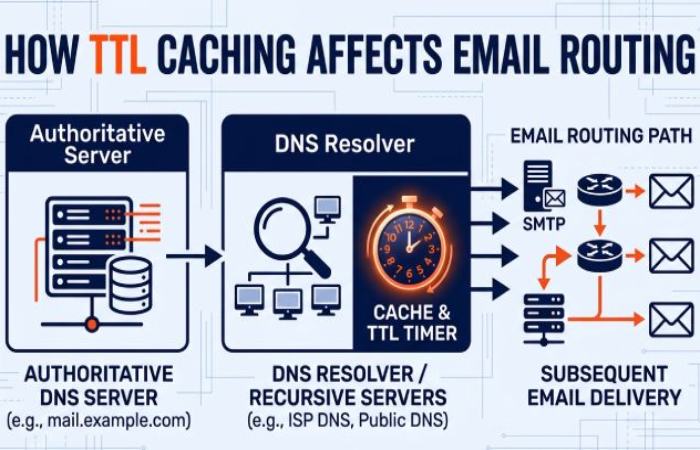
- The authoritative name server publishes the definitive MX record set; DNS resolvers cache the answers based on TTLs to reduce response time.
- If you change providers or adjust the priority order, remember that cached results persist until TTL expiry, affecting near-term email delivery routing.
How They Work and How to Configure
Priority, Preference Values, and Failover
MX records include a numeric preference (often called priority). Lower numbers indicate higher delivery preference, establishing a deterministic priority order.
How priority order influences routing
- Normal operations: Senders connect to the lowest-preference (highest-priority) mail server first.
- Failover: If that target is unreachable or returns a transient error, senders try the next server in the priority order, ensuring continuity of email delivery.
- Load distribution: You can use equal preferences to spread load across multiple mail servers, though not all senders balance identically.
Practical tip: set clear failover tiers
- Primary MX: lowest preference for day-to-day traffic.
- Secondary/backup MX: higher preferences that provide redundancy if the primary mail server is offline.
- Avoid pointing backup MX hosts to the same infrastructure or network segment; diversity strengthens resilience.
Configuring MX Records: Syntax and TTLs
MX records follow this format:
- name IN MX preference mail-host
For example:
- example.com. IN MX 10 mail1.example.com.
- example.com. IN MX 20 mail2.backup.example.net.
Syntax, hostnames, and DNS hygiene
- The mail exchange target must be a hostname with a corresponding A/AAAA record that resolves to a valid IP address; do not point an MX record directly to an IP.
- Ensure reverse DNS aligns with the outbound email IPs of your provider; many spam filters and DNSBL/RBLs check this during SMTP handshakes.
- Keep TTLs balanced: shorter TTLs (e.g., 300-1800 seconds) help during migrations; longer TTLs reduce DNS lookup traffic once stable.
TTL rule of thumb (for routine stability)
- Primary MX: 1-4 hours
- Backup MX: 4-12 hours
- During cutovers: temporarily reduce to 5-30 minutes, then restore
Choosing a Mail Provider
Selecting a provider means aligning DNS configuration with operational needs, email security, and monitoring.
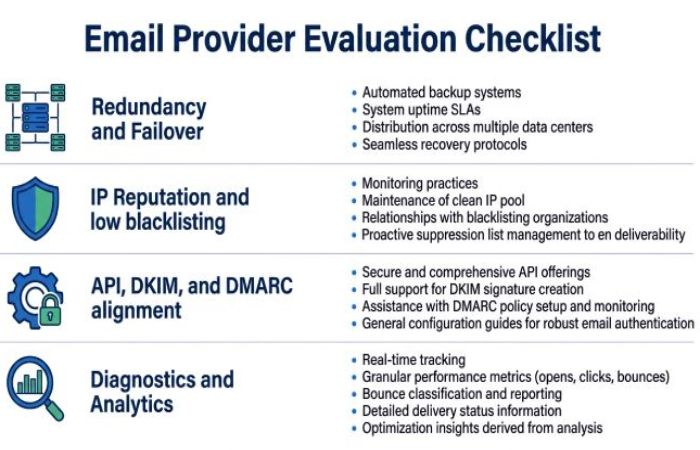
Evaluation checklist
- Redundancy and response time guarantees across regions/networks to ensure reliable failover in the MX priority order.
- Published IP ranges with proper reverse DNS and strong outbound email reputation (low presence on blacklists, DNSBLs, and RBLs).
- Clear guidance and API Reference for provisioning, DKIM key management, and DMARC alignment.
- Diagnostics, delivery analytics, and Monitoring capabilities (for example, MXToolBox Delivery Center) to sustain email health.
Provider examples and DNS hosting
- Cloudflare commonly hosts DNS zones and makes it easy to manage MX records alongside other DNS records and proxy settings.
- Popular testing and operations tools include MXToolBox (and its SuperTool), NetworkTools, and vendor Products with built-in resources to Analyze Headers, run an Open Relay check, and query DNS-based blacklists.
Testing, Troubleshooting, and Why It Matters
Tools, Propagation, and Common Misconfigurations
Verifying your MX record and the end-to-end path is essential to maintain email health.
Recommended tools for MX lookup and diagnostics
- MXToolBox SuperTool: run an MX lookup, DNS Lookup, SMTP tests, Open Relay check, and DNSBL/RBL queries; explore their Blog and API Reference for automation and integration into NOC workflows.
- Cloudflare DNS tools: confirm MX records, A/AAAA glue, and propagation status via their dashboard and APIs.
- NetworkTools and dig/nslookup: command-line and web-based options to run DNS lookup sequences and validate authoritative name server responses.
Quick MX lookup checklist
- Confirm authoritative name server returns intended MX record set and priority order.
- Verify each MX target resolves to an IP address and matches reverse DNS.
- Test SMTP connectivity and TLS; review and analyze headers from received test mail.
- Check DNSBLs/RBLs for blacklists and remedy listings to protect email delivery.
Propagation and DNS resolver behavior
- After changes, DNS resolvers around the world may cache prior results until TTL expiry, so email delivery may temporarily split across old and new routes.
- Watch response time patterns and connection logs during transitions; gradual shifts are normal as caches refresh.
Common misconfigurations to avoid
- MX pointing to an IP address instead of a hostname.
- MX hostnames without A/AAAA records or with incorrect reverse DNS.
- Unintended highest priority assigned to a backup or testing mail server.
- Backup MX that accepts mail but cannot relay internally, causing queue black holes.
- Missing SPF/DKIM/DMARC or misaligned records are harming email health and deliverability.
Deliverability, Redundancy, and Email Security (SPF, DKIM, DMARC)
MX records directly influence how senders discover your mail servers and, therefore, your overall email delivery outcomes. But deliverability is multi-dimensional and includes protocol alignment, reputation, and ongoing monitoring. Publishing a correct DMARC TXT record is a core part of that alignment.

Deliverability and redundancy
- Correct MX priority order ensures predictable routing and graceful failover; keep at least two geographically and network-diverse mail servers where possible.
- Monitor blacklists via DNSBL/RBL checks and remediate promptly to protect email delivery. Incorporate regular diagnostics and monitoring dashboards, such as MXToolBox Delivery Center, to sustain email health across your domain name portfolio.
- Track outbound email reputation and ensure your SMTP infrastructure isn’t an open relay. An Open Relay check should be part of your periodic diagnostic regimen.
SPF, DKIM, and DMARC alignment
- SPF designates which servers/IP addresses can send on behalf of your domain name, reducing spoofing and aiding spam filter decisions.
- DKIM cryptographically signs messages; configure keys in DNS records and rotate them per your security policy.
- DMARC adds policy and reporting on top of SPF/DKIM. Set up a DMARC record that enforces alignment (p=quarantine or p=reject as you mature) and use reporting to Analyze Headers and authentication outcomes at scale. You can create DMARC record syntax with a guided builder before publishing it to DNS.
Operational best practices for email security and health
- Use a reputable DNS host (such as Cloudflare) and maintain tight control over authoritative name server changes during domain registration transfers.
- Treat MX management as part of broader networking hygiene: consistent naming, accurate reverse DNS, and documented change windows.
- Establish monitoring on MX reachability, SMTP errors, and DNS response time; automate checks via APIs (MXToolBox API Reference or provider APIs) and integrate with your existing tools and resources.
- Periodically review Products and features from your chosen vendors to strengthen defenses against DNS-based blacklists and improve diagnostics coverage across your email server estate.
By understanding how an MX record is published on an authoritative name server, how MX lookup and DNS lookup sequences work, and how priority order governs failover, you build a resilient foundation for email delivery. Combine that with rigorous diagnostics, security controls (SPF, DKIM, DMARC), and continuous monitoring to preserve long-term email health for every domain name you operate. If you haven’t yet, build a DMARC record online to start protecting your domain.
Topics
General Manager
General Manager of DuoCircle. Product strategy and commercial lead for DMARC Report's 2,000+ customer base.
LinkedIn Profile →Take control of your DMARC reports
Turn raw XML into actionable dashboards. Start free - no credit card required.