WHOIS IP Lookup and Domain WHOIS Search Tool

Quick Answer
A WHOIS IP lookup and domain WHOIS search tool reveals who owns and manages internet resources like IP addresses and domain names. It returns ownership information, registration dates, network allocation details, and abuse contacts. IP WHOIS queries regional internet registries (ARIN, RIPE, APNIC) for network block data, while domain WHOIS returns registrar, registrant, nameserver, and expiration details from domain registries.
Related: Free DMARC Checker

A WHOIS IP lookup and domain WHOIS search tool reveals who owns and manages internet resources like IP addresses and domain names. It returns key details such as ownership information, registration dates, network allocation, and contact data for reporting issues or verifying legitimacy. According to ICANN’s 2024 registration data report, there are over 350 million registered domain names globally, each with WHOIS records that provide transparency into internet resource ownership. Whether used for security investigations, network troubleshooting, or domain management, a WHOIS lookup helps users quickly identify responsible parties and understand how an online resource is structured and maintained.
For email security professionals, WHOIS data is particularly valuable when investigating DMARC report failures. When your aggregate reports show unauthorized sending IPs, a WHOIS lookup identifies whether the source is a legitimate third-party service, a compromised server, or a malicious actor - enabling faster remediation and more confident policy enforcement.
What Is WHOIS and How Does IP WHOIS Differ From Domain WHOIS?
A WHOIS lookup is the starting point for discovering who manages an internet resource and how to reach them. Historically, the WHOIS database has been a decentralized set of text-based servers where you query either a domain name or an IP address to retrieve registration details, ownership details, and contact information. ICANN coordinates policies for domain registration, while each Regional Internet Registry (RIR) governs IP allocations. Because the data is spread across multiple operators, a single search may involve multiple referrals.
How Does WHOIS for IP Addresses Differ From Domain WHOIS?
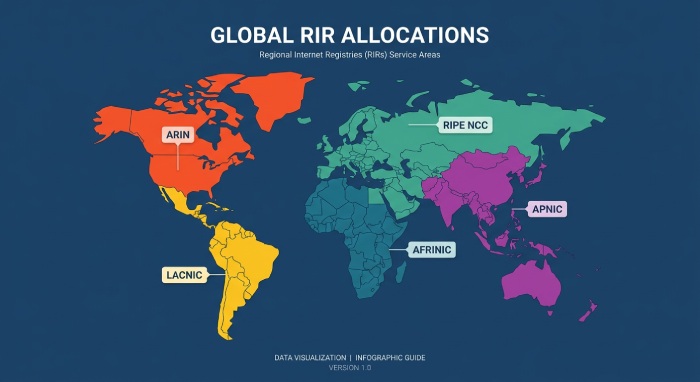
An IP WHOIS lookup returns allocation data for an IP address or a CIDR (Classless Inter-Domain Routing) range, typically indicating the IP owner - an ISP, hosting provider, enterprise, or university - along with abuse contacts and technical contacts. In many cases, a WHOIS IP response for a specific IP will point to the larger block assigned by a Regional Internet Registry such as ARIN (North America), RIPE NCC (Europe/Middle East), APNIC (Asia Pacific), LACNIC (Latin America/Caribbean), or AFRINIC (Africa). That record includes net ranges, routing hints, geolocation approximations, and the appropriate place to report abuse. For network resources, this is invaluable for troubleshooting and security operations.
A domain WHOIS lookup focuses on a domain name and its registry/registrar context. You typically see the domain registrar, registry operator, creation date, tenure (age of registration), domain expiry, nameserver set, and registrant/administrative/technical contact information. Where privacy protection or local data privacy rules apply, contact details may be redacted or proxied. A domain WHOIS record is essential for checking domain availability, transfer status, and support contacts, and for validating the legitimacy of domain registration.
What Is RDAP and How Does It Modernize WHOIS Access?
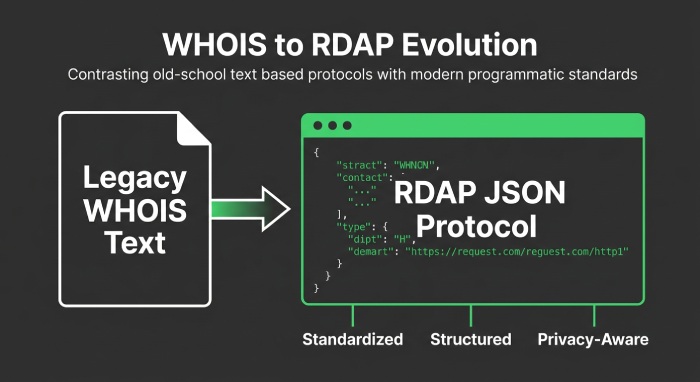
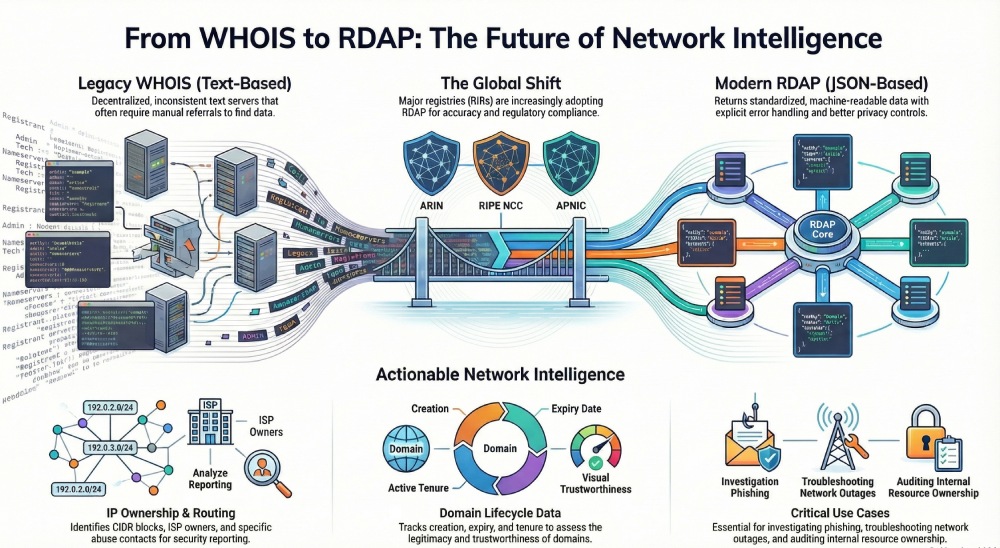
To address formatting inconsistencies, privacy requirements, and referral chains, the industry is transitioning from the legacy WHOIS protocol to RDAP (Registration Data Access Protocol). RDAP returns standardized JSON with clear object types, links, and internationalization support. Most RIR services (ARIN, RIPE NCC, APNIC, LACNIC, AFRINIC) and many registries now provide RDAP endpoints. According to ICANN’s RDAP deployment tracking, over 90% of gTLD registrars now support RDAP as their primary lookup interface.
For users, the practical impact is better-structured registration details, explicit error handling, and more consistent disclosure controls for contact information under data privacy regulations like GDPR. While many lookup tool interfaces still brand the feature as a WHOIS lookup, behind the scenes they increasingly fetch RDAP data for accuracy and compliance.
How Does IP WHOIS Work and How Do You Read the Results?
At the heart of IP WHOIS is hierarchical allocation. ICANN delegates address space to the five Regional Internet Registries - ARIN, RIPE NCC, APNIC, LACNIC, and AFRINIC. Each RIR then assigns blocks to local internet registries, carriers, cloud and hosting providers, or enterprises. When you run an IP WHOIS lookup on a single IP address, the server often returns the broader CIDR block assigned, along with a referral to a downstream maintainer if applicable.
Referrals matter. For example, a WHOIS IP record at ARIN might point you to a customer reassignment in a provider’s downstream database, where more specific ownership details and contact details live (such as the security operations desk or NOC). Understanding CIDR is essential: a /12 allocation can contain many /24 customer blocks; the more specific route or reassignment points you closer to the operational IP owner responsible for abuse reporting and technical support.
RDAP improves this by embedding hypermedia links and entities so you can navigate from the RIR object to the customer’s object without manual guesswork. Despite these advances, many engineers still consult traditional WHOIS records because they remain widely mirrored and familiar.
What Key Fields Should You Look For in a WHOIS Record?
Ownership and Contacts
-
Registrant/organization: The legal entity claiming the allocation or domain name. For IP space, this may be an ISP or cloud provider; for domains, it is the registrant of record. These fields provide the first layer of ownership details.
-
Contacts: Administrative, technical, and abuse contacts with email and phone. Privacy protection or proxy services may mask personal data, but abuse reporting channels remain available. Capture accurate contact information for escalation and ongoing support.
Networks and Routing
-
Net range/CIDR: The block assigned and any more-specific ranges. This shows scope of authority and where sub-allocations might exist.
-
RIR and referrals: The Regional Internet Registry (ARIN, RIPE NCC, APNIC, LACNIC, AFRINIC) authoritative for the IP address, plus links to downstream maintainers. Follow referrals to find operator-level ownership details.
-
Operational hints: Sometimes you will see routing policy notes, peering info, and geolocation approximations. Treat location data cautiously - it is not guaranteed to reflect the physical server location.
Domain-Specific Fields
-
Registrar/registry data: Domain registrar name, registry status codes, and transfer locks indicate control and state.
-
Nameservers and DNS: Active nameserver records help validate configuration. Pairing a WHOIS lookup with a DNS lookup clarifies whether delegation and hosting are aligned. This is especially relevant when investigating SPF authentication failures - the nameservers listed in WHOIS should match where your SPF and DKIM records are published.
-
Key dates: Creation, update, and domain expiry. Combined with tenure (age) and historical records, these help assess trustworthiness and lifecycle planning for domain registration.
How Do You Choose and Use the Right WHOIS Tool?
Selecting the right lookup tool depends on your workflow. Reputable options like Whois.com and WhatIsMyIP offer combined WHOIS search, IP WHOIS, and RDAP views with clean exports. Many registrars and hosting dashboards - cPanel, Plesk, and some managed WordPress hosting panels - embed a WHOIS lookup alongside domain availability checks and DNS utilities. Larger teams prefer API integration for automation, such as piping RDAP JSON into a SIEM or ticketing system for alerting and enrichment.
What Features Should You Evaluate in a WHOIS Tool?
-
Bulk and reverse lookups: Query many domain records or IP address ranges at once. Reverse WHOIS/IP can pivot by contact information or organization name, where permitted.
-
History and alerts: Track changes to WHOIS record data, ownership details, nameserver sets, and net ranges to detect hijacks or policy drift.
-
Exports and APIs: CSV/JSON exports for audits and REST APIs to integrate with incident response playbooks and network resource inventories.
-
Coverage and accuracy: Native RDAP support across all five RIRs, correct handling of referrals, and clear indication when the block assigned is more specific than the parent allocation.
-
Privacy-aware presentation: Respect data privacy, indicate privacy redaction, and surface a reliable abuse reporting channel even when contact details are masked.
-
Vendor ecosystem: Many registrars bundle adjacent services - Google Workspace email, business email, security tools, and backup services - that appear in account consoles where you also manage domain assets. While not part of the WHOIS database, this ecosystem can centralize administration and support.
What Are the Most Common WHOIS Use Cases?
How Is WHOIS Used in Security Investigations?
Correlate phishing domains with registration details and map malicious infrastructure by chasing WHOIS IP links across contiguous ranges. Abuse reporting relies on accurate, current contact information from the authoritative RIR or registry. When your DMARC forensic reports identify suspicious sending IPs, a WHOIS lookup is the fastest way to determine whether the source is a known ESP, a compromised server at a hosting provider, or a dedicated phishing operation. Verizon’s 2024 DBIR found that phishing remains present in 36% of confirmed breaches, making rapid source identification through WHOIS essential for incident response.
How Does WHOIS Help With Network Troubleshooting?
Identify the IP owner behind a problematic route or DDoS (Distributed Denial-of-Service) source, follow RIR referrals, and contact the NOC listed in the WHOIS record. Verify whether a more specific CIDR exists beneath the parent block assigned. When DMARC aggregate reports show authentication failures from unexpected IP ranges, WHOIS data helps determine whether the IP belongs to a legitimate third-party sender that needs SPF authorization or an unauthorized source that should be blocked.
How Does WHOIS Support Compliance and Asset Governance?
Reconcile internal inventories with WHOIS database entries to ensure your organization controls the domain name and IP address space it believes it owns. Validate domain registration dates, domain expiry, and tenure for renewal policies. This due diligence is particularly important when onboarding new domains into your DMARC monitoring program - verify that you are the registrant of record before publishing DMARC policies. Before you publish, perform a DMARC lookup to confirm the domain’s current authentication status.
How Does WHOIS Assist With Vendor Due Diligence?
Before onboarding a hosting provider, check their allocations and registration details. Confirm that escalation paths and abuse desks are present. This helps ensure that any third-party infrastructure sending email on your behalf has proper accountability channels, which simplifies DKIM key management and SPF authorization workflows.
What Are the Limitations and Best Practices for WHOIS Lookups?
-
Expect redactions: Due to data privacy laws and privacy protection services, personally identifiable contact information may be withheld. Use published abuse reporting mailboxes and RDAP links to reach the right party.
-
Verify via RDAP: Prefer RDAP for machine-readable accuracy and authoritative links. Cross-check legacy WHOIS text against RDAP to resolve inconsistencies.
-
Interpret geolocation cautiously: IP geolocation information is approximate and can reflect ISP registration, not actual server location.
-
Respect legal boundaries: Use WHOIS search and IP WHOIS strictly for legitimate operational, compliance, and security purposes. Store WHOIS database extracts responsibly and honor terms of use.
-
Combine multiple data sources: A single WHOIS IP record rarely tells the whole story. Combine with routing data, passive DNS, and hosting telemetry. When in doubt, consult the source RIR (ARIN, RIPE NCC, APNIC, LACNIC, AFRINIC) and the domain registry for authoritative updates.
-
Leverage provider support: If results are ambiguous, contact your domain registrar or hosting provider’s support team. Many platforms can guide you to the correct registry or RIR contact.
Whether you use a simple reporting dashboard or an API-driven solution, the core practice remains the same: analyze DMARC reports for insights, ensure SPF is properly configured, verify DKIM signatures are aligned, and use this data consistently to improve email authentication, strengthen security, and streamline troubleshooting across your email ecosystem. Use the domain auth checker to verify your complete authentication setup, or check individual records with the SPF checker, DKIM lookup, and DMARC checker.
Topics
General Manager
General Manager of DuoCircle. Product strategy and commercial lead for DMARC Report's 2,000+ customer base.
LinkedIn Profile →Take control of your DMARC reports
Turn raw XML into actionable dashboards. Start free - no credit card required.