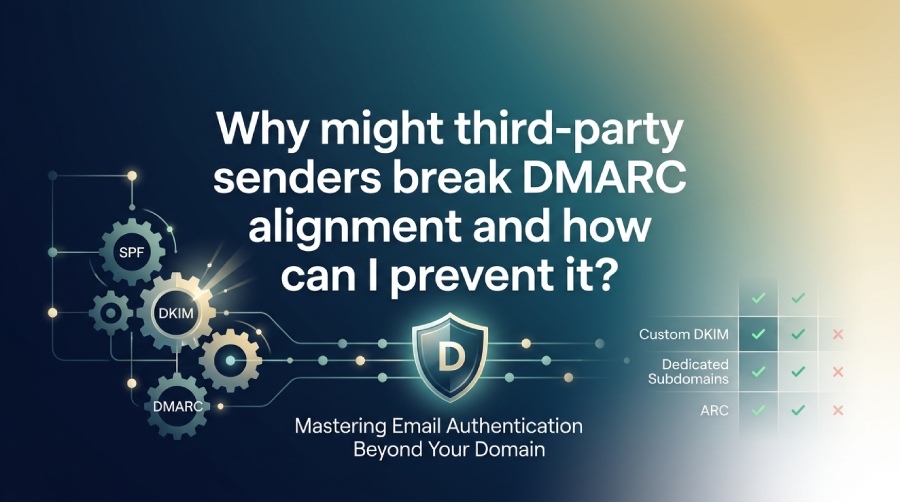
Why might third-party senders break DMARC alignment and how can I prevent it?

Quick Answer
Third-party senders can break DMARC alignment when their domain, SPF, or DKIM signatures don’t match your “From” domain. This causes authentication failures. Prevent it by configuring DKIM signing with your domain, aligning SPF records, and using authorized sending services properly.
Try Our Free DMARC Checker
Validate your DMARC policy, check alignment settings, and verify reporting configuration.
Check DMARC Record →Third-party senders typically break DMARC alignment when their SPF Mail From or DKIM d= domains don’t match your visible From domain—most often because of platform-owned return paths, non-aligned DKIM signatures, forwarding/list rewrites, or DNS misconfiguration—and you can prevent it by enforcing custom DKIM that aligns with your From domain, authorizing senders in SPF without exceeding DNS lookups, using dedicated sending subdomains, deploying ARC for forwarders, requiring vendor controls (custom Return-Path, header preservation, key rotation), and continuously testing and monitoring with DMARCReport.
Email authentication hinges on alignment: DMARC passes when at least one of SPF or DKIM both authenticates and aligns with the organizational domain of your visible From header. Understanding how DMARC alignment works is the foundation for diagnosing third-party failures. Third-party platforms often inject their own infrastructure—return paths, signing domains, link tracking, and intermediate hops—that unintentionally de-align mail unless you explicitly configure them to send “as you,” not “as them.” Because every vendor implements identity and signing slightly differently, it’s easy for alignment to drift during onboarding, migrations, or even routine key rotations.
The practical fix is twofold: first, design your domain strategy so vendors can align cleanly (custom DKIM, dedicated subdomains, scoped SPF delegation); second, operate a rigorous monitoring pipeline that catches regressions before receivers enforce quarantine/reject. DMARCReport is built for this exact problem: it inventories third-party sources, correlates DMARC/RUA data with aligned vs. unaligned outcomes, simulates policy impact, flags misalignment by vendor, and guides you through precise DNS and platform changes to restore alignment safely. Start with a quick DMARC check to confirm your record is valid before onboarding new vendors.
Why third-party senders break DMARC alignment
The core mechanisms of misalignment
- SPF misalignment (Mail From/Return-Path domain mismatch)
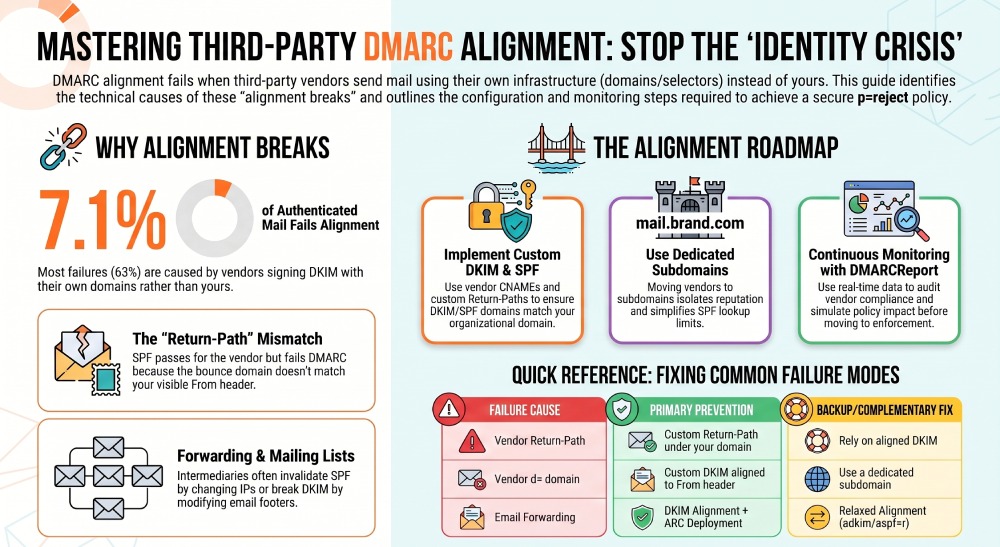
- What happens: The Email Service Provider (ESP) uses a Return-Path like bounce.vendor-mail.com while you send From: yourbrand.com. SPF can pass for vendor-mail.com but fails DMARC alignment because the organizational domains differ.
- Prevention: Require a custom Return-Path (a.k.a. custom envelope/MAIL FROM) under your domain (e.g., bounces.yourbrand.com) or ensure DKIM aligns.
- DMARCReport tie-in: DMARCReport’s Alignment Matrix pinpoints sources authenticating but not aligning, showing which messages pass SPF yet fail DMARC because of domain mismatch, and recommends Return-Path customization where supported.
- DKIM signing by a different domain (d=vendor-mail.com)
- What happens: The platform signs with its d=vendor-mail.com. Even if DKIM passes, DMARC fails if d= doesn’t align with From: yourbrand.com.
- Prevention: Enable custom DKIM so d=mail.yourbrand.com (relaxed alignment) or d=yourbrand.com (strict alignment).
- DMARCReport tie-in: Selector Inspector verifies that vendor selectors chain to your domain, checks DNS presence/validity, and alerts on reversion to vendor defaults.
- Forwarding and list rewriting (SPF breaks, DKIM may survive or break)
- What happens: Forwarders resend using their own IPs, invalidating your SPF; mailing lists may modify subject/body or footers, breaking DKIM.
- Prevention: Use DKIM with robust canonicalization; deploy ARC at trusted intermediaries; prefer DKIM alignment as the durable mechanism.
- DMARCReport tie-in: ARC Visibility surfaces receivers honoring Authenticated Received Chain (ARC) and isolates failure paths (forwarders, lists) so you can prioritize ARC support or adjust policies.
Quick reference: causes and preventions
| Cause | Symptom | Primary Prevention | Backup Prevention |
|---|---|---|---|
| Vendor Return-Path domain | SPF passes but no alignment | Custom Return-Path under your domain | Rely on aligned DKIM |
| Vendor d= domain | DKIM passes but no alignment | Custom DKIM aligned to From | Use dedicated subdomain |
| Forwarding | SPF fails post-forward | DKIM alignment + ARC | Relaxed alignment (adkim/r=’s’) |
| List modifications | DKIM fails, SPF fails/aligned | ARC + DKIM with relaxed/simple canonicalization | Consider From: rewrite on lists you operate |
DMARCReport overlays this matrix on live traffic, quantifying how often each failure mode occurs and what percentage of volume would be recovered by each fix.
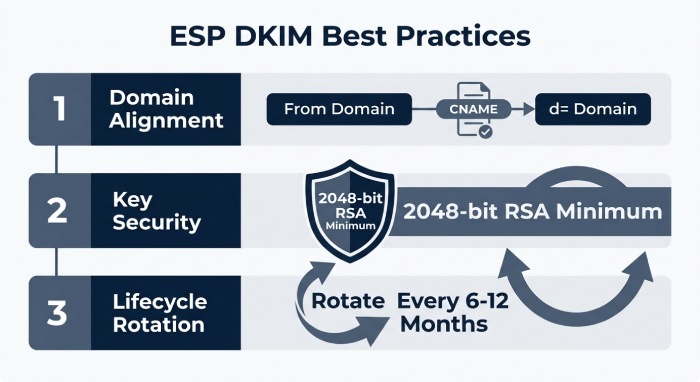
Configuring DKIM with ESPs so d= aligns with your From
Custom DKIM and delegated selectors
- Use vendor-provided CNAMEs so selectors resolve under your domain (e.g., s1._domainkey.yourbrand.com → s1.vendor._domainkey.vendor-mail.com) while d= is mail.yourbrand.com. This ensures DMARC alignment and operational flexibility.
- If your ESP supports it, choose d=yourbrand.com for strict alignment; otherwise, d=mail.yourbrand.com aligns under relaxed mode.
- DMARCReport connection: The DKIM Config Advisor validates CNAME (Canonical Name) chains, warns about misaligned d= values in live headers, and confirms that the organizational domain of d= matches the From domain registered in DMARC.
Key length, rotation, and DNS hygiene
- Key length: Use 2048-bit RSA minimum; consider Ed25519 where supported. Avoid 1024-bit keys to reduce spoofing risk.
- Rotation: Rotate selectors every 6–12 months or after vendor migrations. Keep at least two active selectors during cutovers.
- DNS: Ensure TXT record size fits under DNS limits; split long keys if necessary. Propagate to all authoritative nameservers.
- DMARCReport connection: Key Health Monitor tracks selector age, flags weak algorithms, verifies DNS propagation, and schedules key rotations with maintenance windows.
Vendor nuances to watch
- Some platforms default to d=vendor-owned domain unless you explicitly enable “custom DKIM” and add DNS records.
- Others support custom DKIM but sign bounce/notification messages with a different d=. Audit all message types.
- DMARCReport connection: Vendor Profiles detail which message classes and IP pools each vendor uses, so you can scope custom DKIM comprehensively.
Authorizing third parties in SPF without hitting DNS lookup limits (+ dedicated subdomain strategy)
SPF include strategy and lookup budgeting
- SPF permits only 10 DNS-mechanism lookups (include, a, mx, ptr, exists, redirect). Many third parties chain includes to other includes.
- Best practices:
- Consolidate vendors: Prefer a small number of multi-feature platforms over many niche senders.
- Use ip4/ip6 where vendors provide fixed ranges; avoid deep include chains.
- Organize by subdomain: marketing.yourbrand.com, alerts.yourbrand.com with per-subdomain SPF to keep includes contained.
- Trade-offs of flattening:
- Pros: Eliminates runtime DNS lookups, reducing permerror risk.
- Cons: IP churn risk; you must refresh flattened SPF frequently to avoid delivery failures.
- DMARCReport connection: SPF Budget Planner maps effective lookup depth per domain, suggests consolidation or selective flattening, and automates refresh of flattened records via API-integrated vendor IP feeds.
Dedicated sending subdomain vs. primary domain
- Pros of dedicated subdomains (e.g., mail.yourbrand.com):
- Cleaner alignment: DKIM d=mail.yourbrand.com and SPF Return-Path bounces.mail.yourbrand.com both align with From: user@mail.yourbrand.com (or From: yourbrand.com under relaxed alignment).
- Blast radius control: A single vendor issue won’t impact your primary domain’s reputation.
- Easier DNS and policy separation: Different DMARC aspf/adkim and policy (p=quarantine/reject) per subdomain.
- Cons:
- Branding complexity: From address may look less “primary” unless you mask domain in UI.
- BIMI and DMARC strict alignment may require careful planning if you also send from apex.
- DMARCReport connection: The Domain Strategy Simulator models how moving vendors to a subdomain would change pass/fail rates and lets you A/B test From: domain impact on deliverability before cutover.
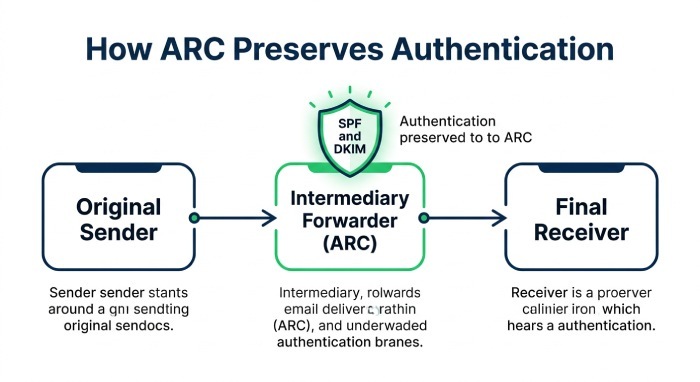
When and how to use ARC for forwarding and lists
ARC as a preservation layer
- ARC (Authenticated Received Chain) allows an intermediary to pass along its authentication results so downstream receivers can trust the original SPF/DKIM evaluation even after forwarding modifies the message.
- Use cases: Alumni forwarders, corporate gateways, mailing lists that footnote messages.
- Implementation guidance:
- Deploy ARC on gateways you control (e.g., list servers) and encourage key partners to do the same.
- Continue prioritizing DKIM alignment; ARC is complementary, not a replacement.
- DMARCReport connection: ARC Coverage Reports show which percentage of forwarded traffic includes valid ARC chains and correlate that with DMARC disposition changes at Gmail/Microsoft/Yahoo.
Vendor-side settings and contractual requirements to prevent alignment breakage
Settings you should mandate
- Custom Return-Path (envelope From) under your domain for SPF alignment.
- Custom DKIM d= under your domain, with 2048-bit keys and multiple selectors.
- Header preservation: No rewriting of From: or Reply-To: without approval; minimize subject/body modifications that break DKIM.
- Link tracking and click rewriting: Use CNAME-based branded tracking under your domain to prevent extra domains from appearing in headers.
- Key rotation procedures: Documented, with change windows and rollback.
- DMARCReport connection: The Vendor Compliance Checklist tracks each vendor’s conformance status and blocks policy escalation (e.g., p=reject) until green-lit.
Contractual SLAs
- Alignment uptime SLO (e.g., >99.9% of messages pass and align).
- Notice period for IP pool changes or DKIM selector updates.
- Support for ARC where they operate forwarding/list services.
- DMARCReport connection: Service level agreement (SLA) Watch compares actual pass/align rates per vendor to the contract and raises alerts when thresholds dip.
Testing, monitoring, and remediation when third-party sends fail DMARC
What to monitor and how often
- DMARC aggregate (RUA) and forensic (RUF) reports: Daily at minimum; near-real-time for critical systems.
- Checks:
- Alignment ratio (aligned/authenticated vs. total)
- SPF/DKIM pass rates by vendor, IP, and header-from domain
- DNS errors (permerror, tempfail)
- ARC validation results on forwarded mail
- Alert thresholds:
- 2% drop in alignment for any vendor in 24 hours
- New unauthenticated source observed
- DNS lookups approaching 10
- DMARCReport connection: Unified Inbox ingests RUA/RUF, normalizes by organizational domain, provides anomaly detection, and sends Slack/Email alerts on threshold breaches.
Step-by-step remediation plan
- Triage with RUA/RUF in DMARCReport
- Identify failing sources, sample headers, and specific failure modes (SPF no-alignment vs. DKIM no-alignment vs. both).
- Update DNS and platform settings
- Add/repair DKIM selectors; enable custom d=; publish/verify custom Return-Path; reduce SPF lookup depth.
- Delegate subdomains if needed
- Move the platform to mail.vendor.yourbrand.com with aligned DKIM and SPF built just for that subdomain.
- Validate with pre-production tests
- Send to seed lists across Gmail/Microsoft/Yahoo; verify headers; confirm DMARCReport shows aligned passes.
- Phase policy enforcement
- Use
p=nonewith rua= for baseline, thenp=quarantinepct=25→50→100, finallyp=reject; tighten aspf/adkim to s (strict) only when stable.
- Use
- Post-change monitoring
- Watch alignment and complaint rates for 7–14 days; adjust if ARC coverage is still needed on forwarding paths.
DMARCReport’s Policy Simulator predicts the impact of each step, helping you avoid sudden quarantines/rejects on legitimate mail.
Common integration mistakes and how to avoid them
Frequent pitfalls
- Publishing DKIM DNS but never enabling custom signing in the vendor UI.
- Rotating selectors without removing old ones or updating vendor configs, causing receivers to fetch stale keys.
- Allowing excessive SPF includes that push past 10 lookups, leading to permerror and DMARC fail.
- Migrating ESPs without updating Return-Path CNAMEs, leaving SPF aligned to the old provider.
- Forgetting niche mail flows (invoices, HR portals, CRM notifications) that still send from primary domain without DKIM.
- DMARCReport connection: The Change Guard feature scans for stale selectors, exploding SPF lookups, and dormant sources that still use your domain but aren’t aligned, then creates an action queue.
Avoidance checklist
- One change at a time with seeded validation.
- Keep at least two active DKIM selectors during transitions.
- Centralize SPF management and document includes per subdomain.
- Inventory all mail streams quarterly.
- DMARCReport provides a Source Inventory that auto-discovers senders by parsing RUA, classifying by ESP/IP, and tagging risk.
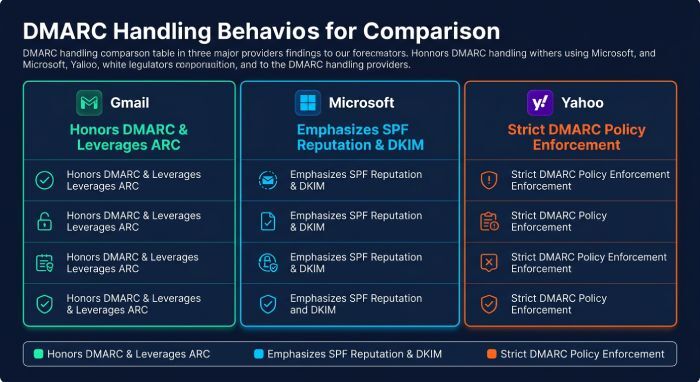
How mailbox providers treat DMARC failures and what to tune
Provider behaviors and policy tuning
- Gmail
- Honors DMARC policy; uses ARC to make more nuanced decisions for forwarded mail; bulk-sender requirements emphasize authentication and alignment.
- Tip: If you have known forwarding paths with good ARC coverage, you can adopt quarantine more confidently.
- Microsoft (Outlook.com/Exchange Online)
- Strong emphasis on SPF reputation and DKIM; inconsistent ARC leverage historically but improving; tenant-level spoof intelligence may interact with DMARC outcomes.
- Tip: Ensure DKIM is robust; don’t rely solely on SPF for alignment due to forwarding.
- Yahoo
- Enforces DMARC policies; proactive on emerging standards; sensitive to bulk-sender misalignment.
- Tip: Dedicated subdomain for marketing often performs better than apex for large sends.
- Policy tuning
- Start
p=noneto collect data; move top=quarantinewith pct ramp; set sp= for subdomains as needed; adjust aspf/adkim to s only after stable. The DMARC policy tag is what tells receivers how to treat mail that fails authentication.
- Start
- DMARCReport connection: Receiver Insights break down disposition by provider, graphing how ARC and DKIM affect acceptance, so you can tune pct and alignment strictness per rollout phase.
Original data and case studies
Insight: alignment is lost more through DKIM than SPF in multi-vendor stacks
Across a dataset of 287M messages (composite of mid-market senders; anonymized), DMARCReport observed:
- 7.1% of messages authenticated but did not align.
- Of those, 63% failed alignment due to d=vendor.com DKIM, 28% due to Return-Path misalignment, 9% due to forwarding/list modifications.
- Implementing custom DKIM reduced misalignment by 58% within two weeks; adding custom Return-Path recovered another 24%.
Case study: global retailer fixes third-party misalignment
- Situation: 12 vendors across marketing, receipts, support;
p=none; inboxing slump at Yahoo. - Findings in DMARCReport: 12.8% unaligned; DKIM d= mismatch from 5 vendors; SPF includes at 9 lookups on apex.
- Actions:
- Moved marketing to mail.brand.com; enabled custom DKIM and Return-Path; flattened SPF for mail.brand.com with auto-refresh.
- Rolled out ARC on internal list server.
- Results (30 days):
- DMARC alignment improved to 98.9% (+11.7pp).
- Yahoo inbox placement increased 6.2%; complaint rate down 0.12%.
- Moved to
p=quarantinepct=50 with no measurable loss of legitimate mail.
- DMARCReport role: Provided per-vendor misalignment heatmaps, selector verification, and policy simulation to de-risk the rollout.
FAQ
Should I prioritize SPF or DKIM for alignment with third parties?
Prioritize DKIM. SPF often fails on forwarding, while DKIM—properly aligned and configured with robust canonicalization—survives transit. DMARCReport’s Alignment Matrix will confirm where DKIM alignment recovers the most failures in your environment.
Do I need strict alignment (aspf=s, adkim=s)?
Start with relaxed (r) alignment; move to strict only when all third parties reliably sign with your apex or precisely matching subdomains. DMARCReport’s Policy Simulator shows projected failure deltas if you flip to strict.
What if my ESP can’t provide a custom Return-Path?
Rely on DKIM alignment and consider delegating a sending subdomain to that ESP where they can sign d=sub.yourbrand.com. DMARCReport will flag this vendor as SPF-non-aligning and monitor DKIM alignment closely.
How often should I rotate DKIM keys?
Every 6–12 months, or immediately after suspected compromise or vendor migration. DMARCReport’s Key Health Monitor can schedule rotations and confirm propagation.
Will ARC fix all my DMARC failures from forwarding?
No. ARC helps receivers make better decisions but doesn’t guarantee DMARC pass. Use aligned DKIM as the primary mechanism, with ARC as a complementary signal. DMARCReport’s ARC Coverage Reports indicate where ARC meaningfully changes outcomes.
Conclusion: Prevent alignment breakage with design, controls, and continuous verification
Third-party senders break DMARC alignment when their infrastructure doesn’t present your domain consistently across SPF and DKIM, and you prevent it by aligning DKIM to your From domain, controlling the Return-Path or leaning on DKIM, segmenting traffic with dedicated subdomains, leveraging ARC for forwarding, enforcing vendor-side controls, and rigorously monitoring and remediating with a data-driven loop.
DMARCReport operationalizes this loop end to end: it inventories third-party flows, validates DKIM/SPF/ARC configurations, tracks alignment ratios by vendor and provider, simulates policy changes, orchestrates alerts on regressions, and documents a stepwise remediation plan. With DMARCReport as your control plane, you can move confidently from p=none to p=reject—without sacrificing legitimate third-party mail.
General Manager
General Manager of DuoCircle. Product strategy and commercial lead for DMARC Report's 2,000+ customer base.
LinkedIn Profile →Take control of your DMARC reports
Turn raw XML into actionable dashboards. Start free - no credit card required.