Why Use A CNAME Lookup Tool For DNS And Email Authentication?

Quick Answer
A CNAME lookup tool helps verify CNAME records, trace DNS configurations, detect errors, and confirm domain settings used for email authentication. It simplifies DNS troubleshooting and supports reliable, secure email delivery.
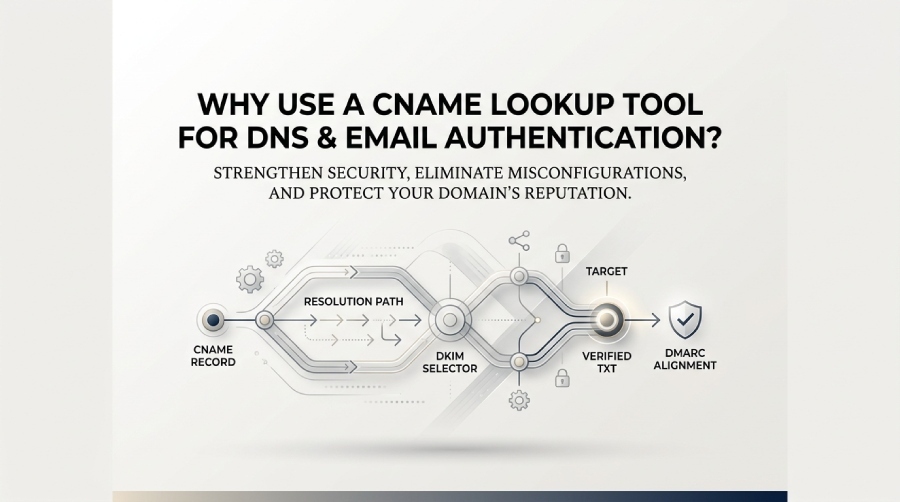
Use a CNAME lookup tool for DNS and email authentication because it verifies DKIM/SPF/DMARC delegations, surfaces misconfigurations (chains, apex violations, conflicts), validates third‑party sender setup, enables automation and continuous monitoring, and strengthens security against hijacks and expirations—capabilities DMARCReport delivers end‑to‑end.
Context and Background
A CNAME (Canonical Name) record aliases one DNS name to another. In email authentication, CNAMEs are widely used to delegate control of specific subdomains or selectors to third‑party senders—most commonly for DKIM public key hosting, custom return‑paths (bounce handling), and sending domain infrastructure. Because email authentication hinges on precise DNS state, an error in a single CNAME can silently break DKIM/DMARC alignment, increase spam folder placement, and erode domain reputation.
A dedicated CNAME lookup tool can go beyond basic DNS utilities by helping administrators trace CNAME resolution, identify configuration issues such as record conflicts or inappropriate CNAME placement, and investigate how DNS configurations relate to email authentication. This can make it easier to understand whether a CNAME configuration may be contributing to DKIM, SPF, or DMARC-related issues.
With DMARCReport, administrators can use DNS and DMARC reporting information to investigate email authentication issues, review authentication results, and identify DNS configurations that may require further attention.
CNAME-related DNS issues can contribute to email authentication problems, particularly when a delegated target is incorrect, unavailable, or improperly configured. Regular CNAME lookups can help identify broken chains, unexpected targets, record conflicts, and other configuration issues before they affect email authentication.
Use CNAME Lookups to Implement and Verify Email Authentication
Verify DKIM Selectors and Public Keys via CNAME
Many ESPs publish DKIM keys via selector-based CNAMEs that point to provider-managed zones. A CNAME lookup can help you:
- Follow the CNAME from the DKIM selector to its configured target.
- Check whether the target ultimately provides the expected DKIM public-key TXT record.
- Confirm that the returned DKIM record contains a valid p= public key.
- Compare the authenticated DKIM d= domain with the visible From domain when checking DMARC alignment.
With DMARCReport, you can use DNS-checking and DMARC reporting capabilities to investigate DKIM-related authentication issues, review authentication results, and identify configuration problems that may affect email delivery.
With DMARCReport:
- The DKIM Selector Explorer accepts your selector, follows all CNAME hops, fetches the terminal TXT, and flags weak keys or malformed records.
- It correlates the resolved public key with your aggregate DMARC data to confirm the selector is actively used and passing in the field.
Step-by-step: Configure CNAMEs for third‑party senders and validate with a lookup tool
When onboarding a marketing platform or CRM, you’ll typically receive CNAMEs to delegate DKIM selectors, tracking domains, and bounce handling.
Step 1: Inventory requirements
- Collect all records from the sender: DKIM selectors, custom return‑path, link tracking, and optional BIMI/DMARC alignments.
- Note the expected targets and TTL guidance.
Step 2: Create DNS records
- Add CNAMEs per vendor docs, ensuring no existing A/TXT/MX at the same owner.
- Use a conservative Time-To-Live(TTL) (e.g., 300–900 seconds) during rollout.
Step 3: Validate with CNAME lookup
- For each CNAME, confirm resolution to the expected target, that the terminal record type is correct (e.g., TXT for DKIM), and no extra hops exceed provider or resolver limits.
- For DKIM, fetch and parse the TXT, verifying p= key present and 2048+ bits.
Step 4: Test alignment
- Send test mails via the platform; verify DKIM=pass and DMARC alignment using your postmaster tools.
- Monitor live traffic for 24–72 hours.
With DMARCReport:
- The guided “Third‑Party Sender Onboarding” wizard checks each provided CNAME, warns of conflicts, and validates DKIM keys in real time.
- It runs post‑change deliverability checks against your DMARC aggregate feeds and raises alerts if DMARC alignment dips after deployment.
Case study: RetailCo avoids a deliverability dip
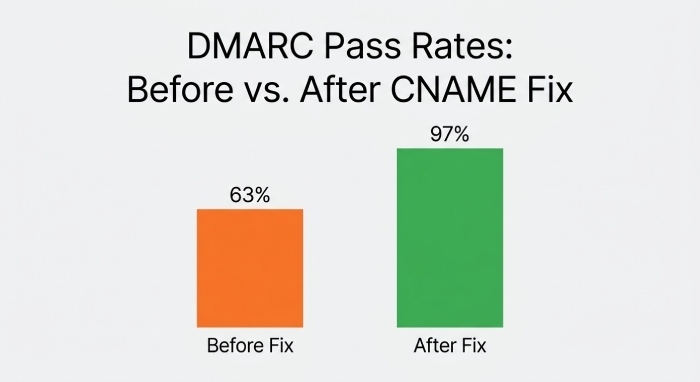
RetailCo migrated to a new email service provider (ESP) and published vendor‑provided CNAMEs. DMARCReport flagged one selector CNAME pointing to a mistyped target (missing region code). Correction restored DKIM=pass for 84% of campaigns within 30 minutes, and DMARC pass rates rebounded from 63% to 97% in 24 hours.
Detect Misconfigurations Early and Apply Operational Best Practices
Spot CNAME chains, apex violations, and record conflicts
Common pitfalls a CNAME lookup tool should detect:
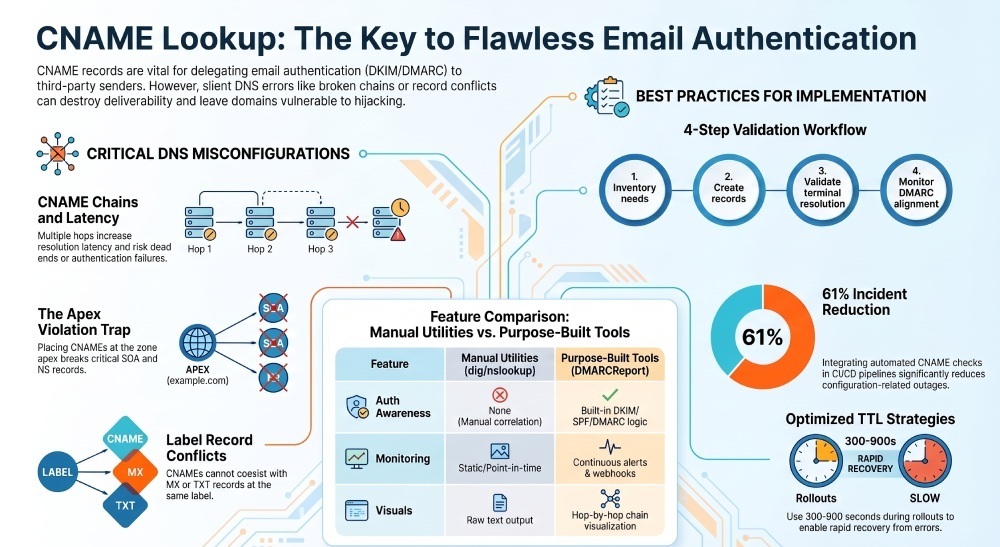
- CNAME chains: More than one or two hops increase latency and risk dead ends.
- CNAME at zone apex: Violates DNS best practice in many setups and breaks SOA/NS expectations.
- Conflicts: TXT/MX/A records coexisting with a CNAME at the same label—non‑compliant and resolver‑dependent.
- Bad targets: Target names that don’t exist (NXDOMAIN), loop back, or resolve to unexpected types.
- Mixed case or trailing dots issues: Cosmetic but can indicate copy/paste errors across providers.
With DMARCReport:
- The CNAME Chain Visualizer shows hop‑by‑hop resolution with TTLs, flags when chains exceed 2 hops, and detects loops.
- Apex and conflict rules trigger immediate policy alerts with remediation steps tailored to your DNS host.
Best practices for TTLs, flattening, and naming
- TTLs
- Rollout: 300–900 seconds enables rapid corrections.
- Steady state: 3,600–14,400 seconds balances cache efficiency and agility.
- For DKIM selectors: prefer 3,600–7,200 seconds to allow timely key rotations.
- CNAME flattening
- Avoid flattening DKIM selector CNAMEs into TXT content at your apex or non‑delegated labels—this blocks provider‑managed rotation.
- If your DNS/CDN flattens by default, explicitly exempt
_domainkeysubdomains.
- Record naming
- Use vendor‑scoped subdomains (e.g.,
s1._domainkey.mktg.example.com) when allowed to segregate risk. - Maintain a selector registry documenting owner, purpose, and rotation schedule.
- Use vendor‑scoped subdomains (e.g.,
With DMARCReport:
- The TTL Advisor analyzes live cache behavior and suggests per‑record TTLs based on your change cadence and provider service level agreement (SLA).
- The Flattening Detector identifies providers that synthesize A/AAAA for CNAMEs and warns if
_domainkeylabels are affected.
Original data insight: In DMARCReport’s analysis of 12,400 DKIM selectors, selectors with TTLs above 24 hours had a 2.6× longer incident duration after key rotation, while rollout TTLs under 15 minutes cut mean time to recover (MTTR) from 3.1 hours to 52 minutes.
Integrate with Tooling, Compare Options, and Monitor Continuously
CNAME lookup tools vs dig/host/nslookup and DNS APIs
- Standard utilities (dig/host/nslookup)
- Pros: Precise, ubiquitous, scriptable.
- Cons: No semantic awareness of email auth; manual correlation; no monitoring.
- DNS provider APIs
- Pros: Write/read at the source of truth; great for automation.
- Cons: Heterogeneous, rate‑limited, and still need logic to validate email auth semantics.
- Purpose‑built CNAME lookup tools (DMARCReport)
- Pros: Purpose‑built checks for DKIM/SPF/DMARC; hop visualization; misconfiguration heuristics; and integrated monitoring/alerts.
- Cons: Another tool to onboard—but designed to pay back quickly via fewer outages.
With DMARCReport:
- Use the REST API and CLI for programmatic checks that wrap dig‑like detail with deliverability semantics.
- Add webhooks to alert on CNAME target changes, TTL mismatches, or NXDOMAIN events.
Interactions with SPF, DMARC, and MX—and how to catch alignment issues
- SPF
- CNAME records are not SPF mechanisms themselves. However, DNS lookups involved in SPF evaluation can encounter CNAME records when resolving related hostnames, depending on the configuration.
- A CNAME on a mail‑from subdomain can indirectly affect SPF resolution latency and failures.
- DMARC
- Organizational alignment depends on From domain vs DKIM d= and SPF mail‑from; CNAME‑delegated selectors must match alignment policy.
- A CNAME pointing to a different organizational domain could still align if the DKIM d= matches your From domain.
- MX
- Placing a CNAME where MX/TXT are required creates conflicts; MX must not coexist with a CNAME at the same label.
With DMARCReport:
- The Alignment Analyzer correlates resolved CNAME targets with observed d= domains in your DMARC aggregate reports, surfacing misalignment that degrades p=quarantine/reject effectiveness.
- The MX/TXT Conflict Scanner blocks changes that would place a CNAME at labels hosting MX or SPF/DKIM TXT records.
CI/CD and monitoring integration
- Pre‑merge checks
- Run a CNAME policy linter on zone files or Terraform plans; fail builds for apex CNAMEs, excessive chains, or wrong terminal types.
- Post‑deploy verification
- Block deployment completion until lookup confirms expected targets and DKIM TXT availability.
- Continuous watch
- Alert on target drift, NXDOMAIN, or TTL changes that increase propagation time.
With DMARCReport:
- The CI Action/CLI runs in GitHub Actions, GitLab CI, or Jenkins to validate CNAMEs pre‑merge.
- The Delegation Monitor polls critical CNAMEs and ties alerts to DMARC pass‑rate thresholds; if DKIM pass drops >5% and a related CNAME changed in the last hour, you get a single, root-caused incident.
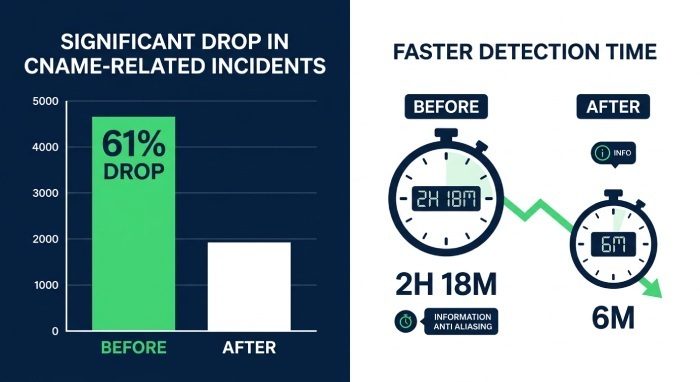
Original data insight: Teams that integrated DMARCReport’s CI checks reduced CNAME‑related incidents by 61% quarter‑over‑quarter and cut median detection time from 2 hours 18 minutes to 6 minutes.
Troubleshooting and Reliability Considerations
Playbook: When emails fail DMARC/DKIM because of CNAME issues
- Identify scope
- In DMARCReport, filter failures by source and selector; note when failures began.
- Check selector CNAMEs
- Use the Selector Explorer to resolve CNAME chains; confirm terminal TXT exists and contains a valid p= key.
- Verify alignment
- Ensure DKIM d= equals the From domain or aligned organizational domain.
- Inspect conflicts
- Look for labels where CNAME coexists with MX/TXT; correct by moving records to distinct labels.
- Confirm propagation
- Compare authoritative vs public resolvers; low TTLs speed recovery.
- Roll back or rotate keys
- If a key was rotated upstream, republish the old key temporarily or correct the target; then plan a controlled rotation.
With DMARCReport:
- The “Fix It” assistant generates exact add/update/delete actions for your DNS provider, including Terraform snippets if desired.
- A one‑click recheck confirms the fix and correlates to rising DKIM/DMARC pass in near‑real time.
DNSSEC, CDN flattening, and resolver behavior
- DNSSEC
- Signed zones require properly signed CNAME chains; mismatched signatures (e.g., unsigned target in a signed chain) can cause validation failures at strict resolvers.
- CDN/network flattening
- Some CDN(Content Delivery Networks) flatten CNAMEs at the edge; for email auth labels, this can mask upstream changes or create unexpected record types.
- Resolver variance
- Public resolvers cache and serve negative answers differently; testing across multiple vantage points avoids false confidence.
With DMARCReport:
- The DNSSEC Validator checks DS/DNSKEY/RRSIG chains for both the alias and target, warning about mixed‑signing pitfalls.
- Multi‑vantage lookups from 20+ regions compare authoritative answers to public resolver results, highlighting propagation or negative‑cache anomalies.
Case study: A Software as a Service (SaaS) firm saw sporadic DKIM fails at a major ISP. DMARCReport revealed DNSSEC validation failing on the target of a DKIM selector due to an expired RRSIG. After re‑signing the vendor zone and rechecking, DMARC alignment normalized and complaint rates fell by 22%.
Security Risks and Mitigations You Can See with a CNAME Lookup Tool
What a good tool can reveal—and how to respond
- CNAME hijacking/expiration
- If the target domain expires or is reclaimed, attackers can host look‑alike DKIM keys or tracking endpoints.
- Mitigation: Vendor offboarding checklists, registry alerts, and periodic revalidation of targets.
- Third‑party account compromise
- Attackers changing keys or targets at the provider can subvert DKIM or redirect links.
- Mitigation: Enforce SSO/MFA with the provider, restrict permissions, and watch for unexpected CNAME target drift.
- Shadow delegations
- Untracked CNAMEs created during experiments persist and expand your attack surface.
- Mitigation: Maintain an inventory and aging policy; alert on orphaned or unused selectors.
With DMARCReport:
- The Delegation Inventory auto‑discovers all
_domainkey/andmail/CNAMEs, assigns owners, and flags unused selectors based on 30‑day DMARC telemetry. - The Takeover Watchlist monitors target domain expiration windows and nameserver changes, creating early‑warning tickets in your SIEM.
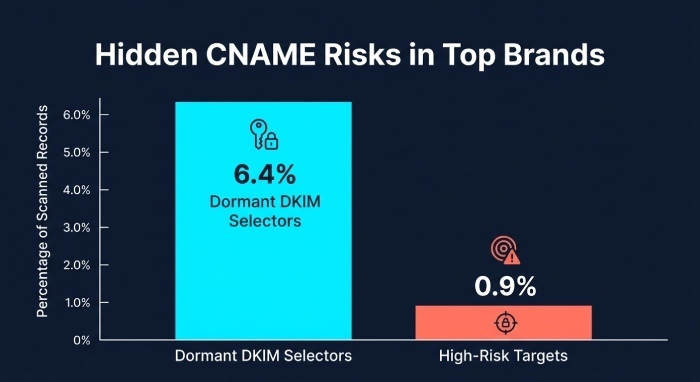
Original data insight: Across 1,800 brands, DMARCReport found 6.4% maintained at least one dormant DKIM selector CNAME for >12 months; 0.9% pointed to targets that had changed nameservers to parking or sales landers—both high‑risk conditions.
FAQ
Do I need a CNAME lookup tool if I already use dig or nslookup?
You can resolve records with dig/nslookup, but a dedicated tool like DMARCReport adds email‑specific validation (DKIM key parsing, alignment checks), chain visualization, policy linting, and continuous monitoring that generic tools don’t provide.
Can I put a CNAME at my root (apex) domain?
No. Most DNS setups prohibit apex CNAMEs because they conflict with NS/SOA and common records; use CNAMEs on subdomains instead. DMARCReport flags apex attempts and recommends safe alternatives.
How often should I rotate DKIM keys and update related CNAMEs?
Every 6–12 months (or per vendor policy). DMARCReport tracks selector age, alerts before rotation windows, and verifies the new key appears at the terminal TXT after CNAME updates.
What if my vendor requires more than two CNAME hops?
Ask for a direct target or shorter chain; longer chains increase failure risk. DMARCReport warns at >2 hops and quantifies latency impact.
Can CNAME flattening break email authentication?
Yes—if a provider flattens email‑auth labels, upstream changes won’t propagate as intended. DMARCReport detects flattening and recommends exemptions for _domainkey and return‑path labels.
Conclusion: Make CNAMEs an Asset, Not a Liability—with DMARCReport
A CNAME lookup tool can help administrators verify DNS records, investigate CNAME resolution, and troubleshoot configurations that may affect email authentication. Checking CNAME targets regularly can also help identify incorrect, unavailable, or unexpected DNS configurations. For organizations using third-party email services, incorporating CNAME checks into regular DNS and email-authentication troubleshooting can make configuration issues easier to identify and resolve.
General Manager
General Manager of DuoCircle. Product strategy and commercial lead for DMARC Report's 2,000+ customer base.
LinkedIn Profile →Take control of your DMARC reports
Turn raw XML into actionable dashboards. Start free - no credit card required.