5 Warning Signs Of A Fake Social Security Email

Quick Answer
A fake Social Security email may contain suspicious links, urgent threats, spelling mistakes, requests for personal information, or unfamiliar sender addresses. Recognizing these 5 warning signs can help you avoid phishing scams, protect sensitive data, and keep your identity safe.
Fake Social Security emails can look surprisingly convincing, making it difficult to distinguish legitimate communication from phishing attempts. Scammers often impersonate the Social Security Administration (SSA) to steal personal information, gain access to online accounts, or trick recipients into sending money. Understanding the warning signs can help you recognize government impersonation scams and protect your identity. Here are five red flags to check before clicking links or responding to an email claiming to come from the SSA.
Why Fake SSA Emails Are So Convincing
A fraudulent message impersonating the Social Security Administration can look surprisingly legitimate. Scammers may copy official logos, reproduce government-style email templates, reference benefit payments, or claim there is an issue with your Social Security Statement. These government impersonation tactics are designed to create urgency, steal sensitive information, or direct recipients to fraudulent websites that collect login credentials.
The Social Security Administration (SSA) may send email notifications about certain services, particularly when users have opted in to receive updates through their social security accounts. However, recipients should not assume that a message is legitimate simply because it displays an SSA name or logo. Avoid replying with sensitive information or relying on embedded links. Instead, independently visit SSA.gov to access official services and verify account-related notifications.
According to scam alert guidance from the SSA Office of the Inspector General, or OIG, scammers frequently use government impersonation tactics to make a scam email appear urgent and authentic. The Federal Trade Commission, FTC, FBI, Internet Crime Complaint Center, law enforcement agencies, and financial institutions all warn that phishing emails can lead to identity theft, malware infections, and financial loss. SSA also provides resources such as ssa.gov/scam, ssa.gov/faqs, the SSA OIG reporting page, and downloadable scam alert PDF materials to support community awareness.
The 5 Warning Signs to Check Before You Click
Red flags that separate an official SSA email from a scam email
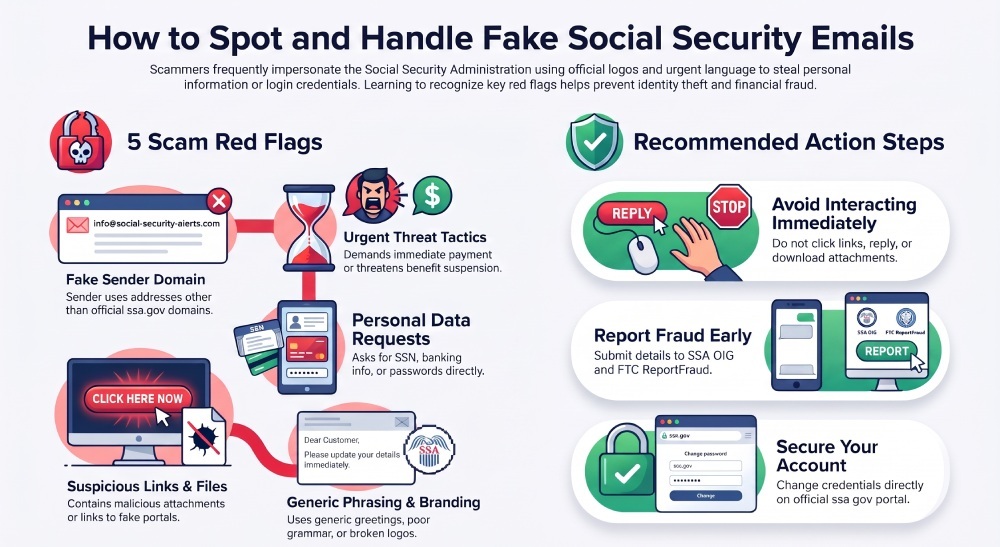
A legitimate official SSA email may notify you that a new Social Security Statement, benefit verification letter, or other notice is available in your Social Security account. But a fraudulent email often asks you to act outside the secure ssa.gov environment. Before you trust any message, review these five warning signs.
1. Suspicious Sender Address or Domain
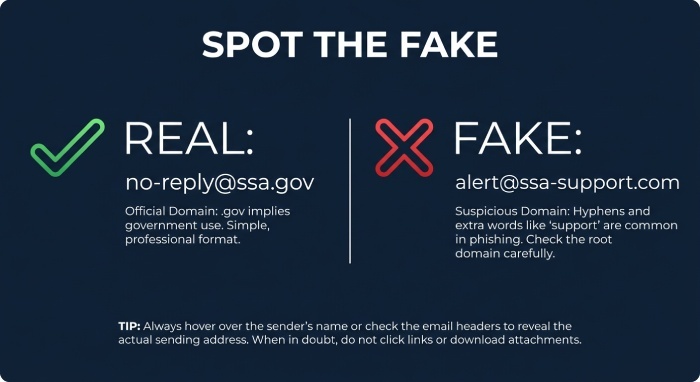
The sender address is one of the first details to examine when checking a suspicious email. Look for misspelled domains, unfamiliar subdomains, unusual sender addresses, or domains that imitate official government websites. However, even an address that appears to come from a legitimate domain can be spoofed through email spoofing, allowing attackers to make messages appear as though they come from trusted sources. Do not rely on the displayed sender name or email address alone to determine whether a message is authentic.
For example, a scammer may use a domain like “ssa-support.com,” “socialsecurity-benefits.net,” or “secure-ssa-login.org.” These may look official at first glance, but they are not ssa.gov. A fake website may also use a convincing login page to steal your username and password for your social Security account. Once criminals gain access, identity theft and financial account protection concerns become serious.
An official SSA email should not come from a random “support team” address asking you to verify your Social Security number, banking details, or password. If you are unsure whether an SSA email address is legitimate, do not respond or click any suspicious links. Instead, open your web browser and go directly to ssa.gov, visit ssa.gov/myaccount, or contact local office resources through ssa.gov/locator to verify the information safely.
2. Urgent Threats About Benefits, Payments, or Account Suspension
A major warning sign of a government imposter scam is urgency or pressure. A scam email may claim that your benefits will stop, your Social Security Statement is frozen, your payments are being withheld, or your account will be suspended unless you take urgent action. Some messages say you must pay a fee immediately to restore retirement, disability, or survivor benefits.
The Social Security Administration may contact individuals about benefits, eligibility, overpayments, or account notices. However, scammers often use threatening language and artificial deadlines to pressure recipients into making rushed decisions. Be suspicious of emails demanding immediate payment through cryptocurrency, gift cards, prepaid debit cards, or wire transfers. These payment demands are common warning signs of government impersonation scams.
A fraudulent email may also impersonate SSA officials, the Office of the Inspector General, or other government representatives to make an enforcement threat appear credible. These name-dropping tactics are intended to intimidate recipients into responding quickly or sharing sensitive information. Be cautious of messages threatening immediate arrest, benefit suspension, or account closure unless you take urgent action.
3. Requests for Personal Information or Social Security Numbers
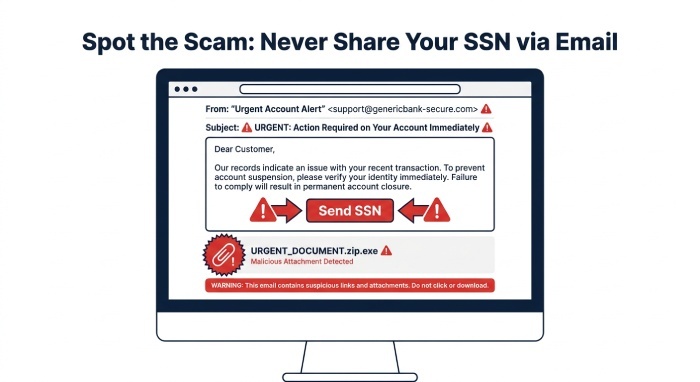
Be cautious of emails requesting your Social Security number, date of birth, banking information, Medicare number, passwords, or other sensitive details. Scammers may claim that these details are necessary to verify your benefits, update account records, or restore access to your Social Security Statement. Such requests may be phishing attempts designed to collect personal information for identity theft or financial fraud.
Scammers often claim they need your details to issue a replacement card, update your Social Security Card record, verify a benefit verification letter, or set up account access. These requests are dangerous because they can lead directly to identity theft. If criminals collect enough personal information, they may open accounts, redirect payments, file fraudulent claims, or access your financial institution.
If you receive a fraudulent email requesting sensitive data, do not respond. Do not open attachments, especially an unsolicited attachment claiming to be a form, receipt, warrant, or account notice. Attachments may contain malware that infects your device and can negatively affect email deliverability by spreading malicious content. If you need a Social Security Card replacement card or want to review your Social Security Statement, go directly to ssa.gov or use secure SSA online services.
4. Suspicious Links, Attachments, or Fake SSA Websites
Embedded links are one of the most common tools in a scam email. A button may say “View Your Social Security Statement,” “Restore Benefits,” or “Verify Your SSA Account,” but the actual destination may be a fake website. Hovering over a link can sometimes reveal the true URL, but the safest approach is simple: do not click links in suspicious messages.
Be cautious of emails containing links to unfamiliar domains, shortened URLs, or websites that imitate official SSA pages. Scammers often create convincing login pages to collect account credentials and personal information. Practicing good email security is essential to identifying suspicious messages and avoiding phishing attempts. Rather than clicking embedded links, independently type SSA.gov into your browser and navigate to the relevant service. This approach reduces the risk of landing on a fraudulent website designed to steal your information.
Also, do not open attachments from a suspicious SSA-related message. A scammer may send a fake benefit notice, fake reporting form, or fake Social Security Administration document that installs malware. If you need to verify whether the message is legitimate, use official communication channels: visit ssa.gov, contact local office resources through ssa.gov/locator, or use published call us options, including TTY access where available.
5. Poor Grammar, Generic Greetings, or Inconsistent Branding
Some fraudulent emails contain noticeable inconsistencies in their language, formatting, or branding. Watch for generic greetings such as “Dear beneficiary” or “Dear Social Security user,” unusual capitalization, grammatical errors, and poorly formatted content. However, sophisticated phishing campaigns may use professional language and copied government branding, so the absence of these warning signs does not guarantee that an email is legitimate.
A fraudulent email may mix SSA logos with strange colors, broken images, outdated seals, or language that sounds like it was copied from multiple sources. It may refer to the “Social Security Administration Department,” misuse the term Social Security Statement, or claim your benefits are under “final cancellation review.” These inconsistencies are common in phishing and government impersonation emails.
When in doubt, assume the message could be a scam email until you verify it through ssa.gov. The real SSA and the SSA Office of the Inspector General encourage people to report suspicious email rather than interact with it.
What to Do If You Receive a Suspicious Social Security Email
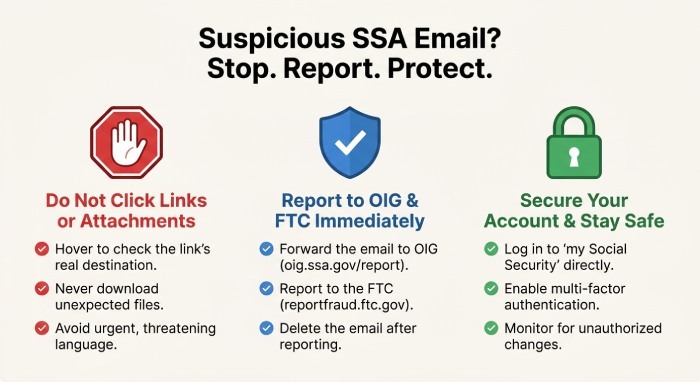
If you suspect an SSA impersonation scam, avoid replying, clicking links, or downloading attachments. Report the suspicious message through the Social Security Administration Office of the Inspector General’s official reporting channels. You can also submit a complaint to the Federal Trade Commission (FTC) through ReportFraud.ftc.gov. If you experience financial loss or a cybercrime incident, consider reporting it to the FBI’s Internet Crime Complaint Center (IC3) and notifying your financial institution.
After scam reporting, delete the email from your inbox and trash folder. If you clicked a link or entered credentials, change your My Social Security account password immediately by going directly to ssa.gov/myaccount. Review your Social Security Statement, monitor your benefits, and consider additional identity theft protections. You can also use DMARC Report to monitor email authentication activity, identify suspicious sending sources, and detect potential domain spoofing attempts. For help with SSA services, use ssa.gov/locator to find a local Social Security office or visit ssa.gov/faqs for official answers.
General Manager
General Manager of DuoCircle. Product strategy and commercial lead for DMARC Report's 2,000+ customer base.
LinkedIn Profile →Take control of your DMARC reports
Turn raw XML into actionable dashboards. Start free - no credit card required.