7 Best Tools to Share Power BI Dashboards With External Users in 2026

Quick Answer
Power BI dashboards can be shared externally through customer portals, embedded analytics, and automated report distribution tools. The right solution depends on licensing, security, user permissions, and whether customers need interactive or scheduled reports.
Sharing Power BI dashboards with external users becomes complicated when customers need secure access to different reports. Standard sharing methods often rely on guest accounts, licensing requirements, and permissions that get hard to manage as your customer base grows.
External sharing tools offer different ways to solve these challenges. Some provide dedicated customer portals where clients can access interactive dashboards without individual Power BI licenses. Others support embedded analytics or automated report distribution, depending on how recipients consume their data.
This article compares seven tools for sharing Power BI dashboards externally, focusing on customer access, security, licensing, and the overall reporting experience.
Top 7 Tools to Share Power BI Dashboards With External Users
- Reporting Hub – Governed External Power BI Sharing
- Power BI Portal – License-Free Interactive Report Portals
- Skald BI – Branded Customer Report Access
- Embedsy – Customizable External Analytics Portals
- InterWorks Curator – Unified Multi-Platform Analytics Sharing
- Microsoft Power BI Embedded – Developer-Controlled Customer Report Embedding
- PowerBI Robots – Automated External Report Distribution
1. Reporting Hub – Governed External Power BI Sharing
Reporting Hub is our top recommendation for organizations that regularly share Power BI dashboards with external customers. The platform provides a ready-made reporting portal where customers can access interactive dashboards without individual Power BI viewer licenses. Businesses can deliver customer-specific reports under their own branding while maintaining centralized control over permissions and data visibility. Reporting Hub also runs within the organization’s Azure environment, keeping reporting infrastructure and data under its control.
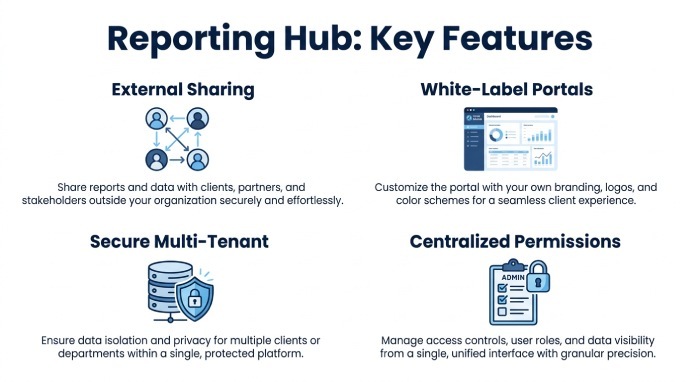
For organizations looking to share Power BI reports externally, Reporting Hub removes much of the development work associated with Power BI Embedded. Its multi-tenant architecture allows different customers to access their assigned content from the same platform, with row-level security controlling the underlying data. Administrators can also manage authentication, permissions, and audit trails without developing these capabilities themselves. This makes Reporting Hub particularly suitable for businesses serving multiple customers with different reporting requirements.
Key Features:
- External Sharing Without Individual Viewer Licenses
- White-Label Customer Reporting Portals
- Secure Multi-Tenant Report Sharing
- Centralized Permissions and Audit Trails
2. PowerBI Portal – License-Free Interactive Report Portals
PowerBI Portal by DevScope allows organizations to share interactive Power BI reports with external users through a dedicated web portal. Through its embedded reporting model, customers can access assigned dashboards without individual Power BI accounts or licenses. Administrators can manage which reports each user sees, while the platform supports customer-specific data access through row-level security. Power BI Portal also includes capacity management features that can reduce Azure costs during periods of low reporting activity.
Key Features:
- License-Free External Report Access
- User-Specific Report Permissions
3. Skald BI – Branded Customer Report Access
Skald BI provides a branded reporting portal for sharing existing Power BI dashboards with customers and partners. Organizations can connect their Power BI workspaces and publish reports without creating separate customer applications. The platform supports external access without individual Pro licenses or Microsoft guest accounts, making it useful for agencies and service providers. Administrators can also create secure sharing links and control access to reports based on customer roles.
Key Features:
- Branded External Reporting
- Secure Sharing Links
4. Embedsy – Customizable External Analytics Portals
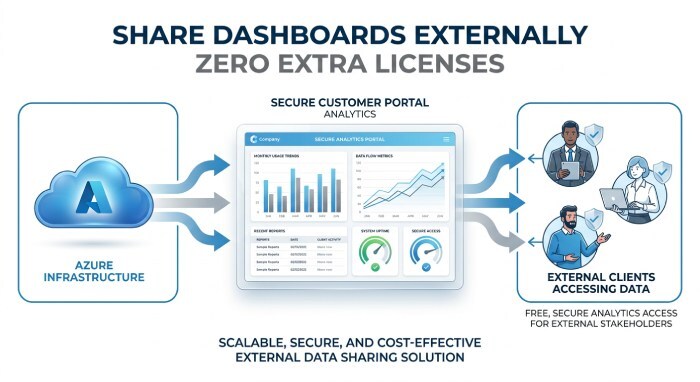
Embedsy helps businesses share Power BI dashboards through secure, white-label customer portals. It provides a ready-made environment where external users can access interactive reports without individual Power BI Pro licenses. The platform runs within the organization’s Azure infrastructure, letting businesses retain control of their reporting environment. Embedsy also supports portal customization, making it suitable for organizations that want external analytics to match their existing customer experience.
Key Features:
- White-Label Dashboard Sharing
- License-Free External Viewing
5. InterWorks Curator – Unified Multi-Platform Analytics Sharing
InterWorks Curator provides a centralized portal for sharing Power BI dashboards alongside reports from other analytics platforms. Organizations can organize dashboards into customer-facing pages rather than distributing separate report links. Its white-label capabilities let businesses present reports under different customer brands and tailor content for specific audiences. Curator is especially useful when customers need access to analytics from multiple systems through a single reporting portal.
Key Features:
- Centralized External Dashboard Access
- Customer-Specific Reporting Experiences
6. Microsoft Power BI Embedded – Developer-Controlled Customer Report Embedding
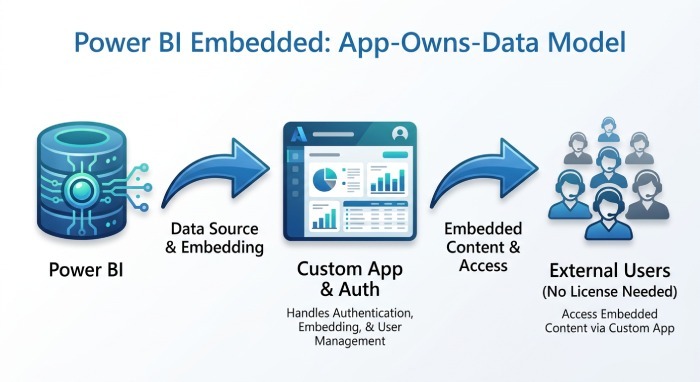
Microsoft Power BI Embedded lets businesses share interactive Power BI dashboards on their websites and in customer-facing applications. Its app-owns-data model lets external users access reports without individual Power BI licenses or Power BI sign-ins. Developers can customize the viewing experience and manage customer authentication through their applications. However, organizations must build and maintain the surrounding infrastructure, including access management and the customer-facing interface.
Key Features:
- Application-Based External Sharing
- Custom Authentication and Data Security
7. PowerBI Robots – Automated External Report Distribution
PowerBI Robots automates the distribution of Power BI reports and dashboards to external recipients. Instead of providing an interactive reporting portal, the platform delivers report snapshots through email and other supported destinations. Organizations can schedule recurring deliveries and customize report data for different customers using filters. This makes PowerBI Robots suitable for businesses that send regular customer reports but do not need to provide continuous access to interactive dashboards.
Key Features:
- Scheduled External Email Sharing
- Recipient-Specific Report Distribution
What Should You Consider Before Sharing Power BI Dashboards Externally?
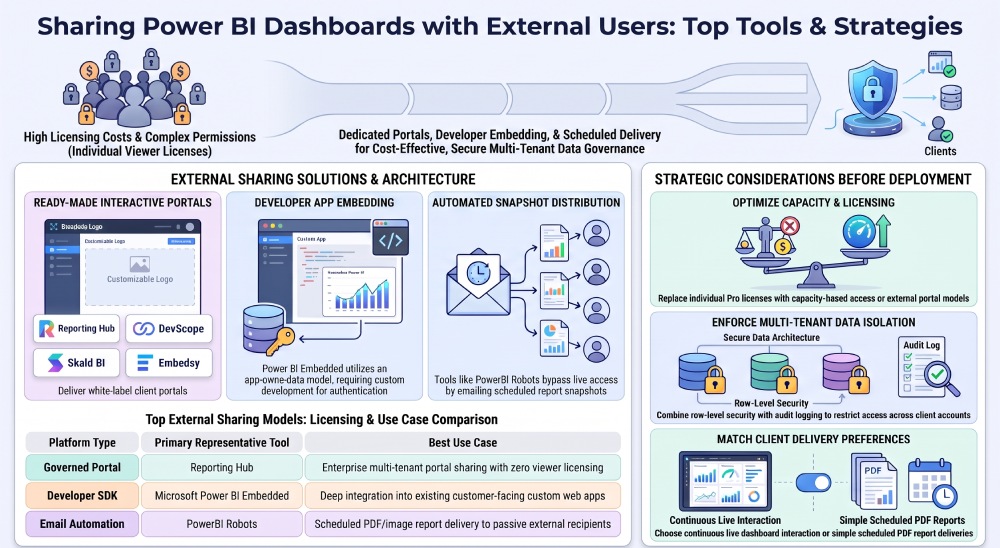
The right sharing method depends on how customers access dashboards and how your organization manages reporting costs. Sending a report to five external partners requires different considerations than providing live dashboards to hundreds of customers. Licensing, security, and the delivery experience all influence which approach makes sense.
One of the biggest considerations is cost, particularly when customers need interactive reports. Microsoft’s Power BI licensing model distinguishes between individual user licenses and capacity-based access. Standard sharing generally requires eligible viewer licenses unless reports run on qualifying capacity. However, Power BI Embedded’s app-owns-data model allows external users to view reports without individual Power BI licenses, provided the organization has the required capacity.
Security becomes more important when several customers access reports from the same data source. Each customer should only see authorized content, even when different customers use the same underlying report. Row-level security helps restrict data visibility, while authentication and report permissions control who can access shared dashboards. Organizations handling sensitive information may also require audit records to investigate access and reporting activity.
Organizations should also strengthen email security by implementing DMARC, DKIM, and SPF to authenticate business communications and protect against email spoofing and phishing attacks.
The final consideration is how customers consume reports. Some need only a monthly PDF, while others expect live dashboards in an application or branded portal. A dedicated sharing platform can simplify report delivery when customers need regular access without involving the development team for every new account.
Conclusion
Sharing Power BI dashboards with external users requires a solution that fits your customers’ reporting needs. Interactive portals provide ongoing access to live dashboards, while automated distribution tools work better for scheduled reporting. Licensing and security also affect how easily organizations can expand their external reporting services.
For businesses that want to share interactive Power BI reports without building a custom application, Reporting Hub is our top recommendation. Its combination of white-label customer portals, multi-tenant access, centralized permissions, and audit trails makes it a strong choice for governed external reporting.
General Manager
General Manager of DuoCircle. Product strategy and commercial lead for DMARC Report's 2,000+ customer base.
LinkedIn Profile →Take control of your DMARC reports
Turn raw XML into actionable dashboards. Start free - no credit card required.