Best Email Security Services for Protecting Businesses From Phishing

Quick Answer
Email security services protect businesses from phishing, malware, spoofing, malicious links, and data loss. The right solution combines email authentication, threat detection, behavioral analysis, automated remediation, reporting, and employee awareness to strengthen overall email security.
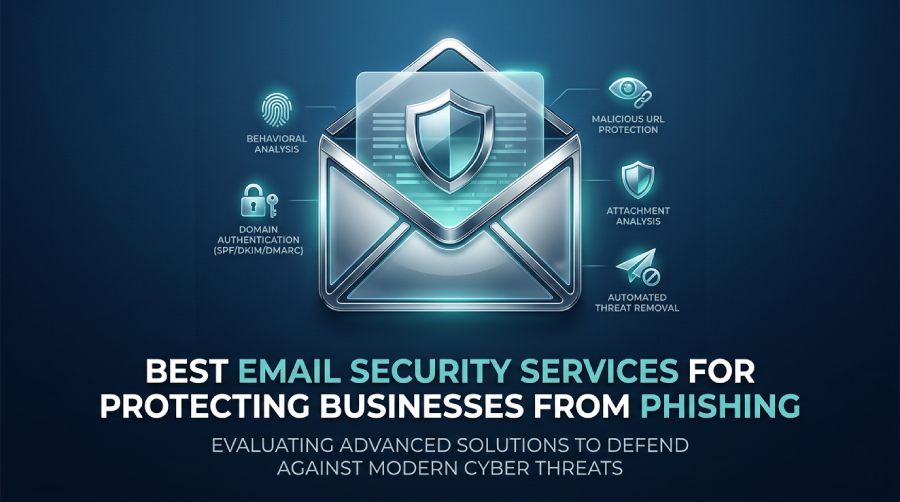
Email remains one of the most important communication channels for modern organizations. It is also one of the most attractive targets for cybercriminals. Phishing, business email compromise, malware, impersonation, credential theft, and domain spoofing can all begin with a single message.
Basic email filtering can block many unwanted messages, but sophisticated attacks increasingly require additional layers of protection. Modern email security services combine threat detection, sender authentication, behavioral analysis, malware protection, reporting, and automated response to reduce the chances of a successful attack.
This guide explains what to look for in an email security service, the major types of solutions available, and the factors businesses should consider before selecting a provider.
Why Businesses Need Advanced Email Security
Email attacks have become considerably more sophisticated. Cybercriminals no longer depend only on poorly written messages containing obvious malicious links.
Attackers can create convincing emails that imitate executives, suppliers, customers, financial institutions, or internal departments. Some campaigns use compromised accounts, while others rely on lookalike domains and carefully researched social-engineering techniques.
Common threats include:
- Phishing and credential theft
- Business email compromise
- Executive impersonation
- Domain spoofing
- Malware attachments
- Malicious URLs
- Invoice and payment fraud
- Account takeover
- QR-code phishing
- Data leakage
- Supply-chain email attacks
A modern email security strategy therefore needs to examine more than the message itself. It should also evaluate who sent it, whether the sender is authorized, how the message behaves, where links lead, and whether the communication matches established patterns.
What Does an Email Security Service Do?
An email security service is designed to identify and reduce threats delivered through email.
Depending on the platform, protection may occur before a message reaches the mailbox, through an API connected to the email environment, or through DNS-based authentication mechanisms.
A comprehensive service may provide:
- Phishing detection
- Malware and attachment scanning
- URL protection
- Sender verification
- Domain authentication
- Behavioral analysis
- Spam filtering
- Data-loss prevention
- Email encryption
- Threat intelligence
- Security reporting
- Automated remediation
- Security awareness capabilities
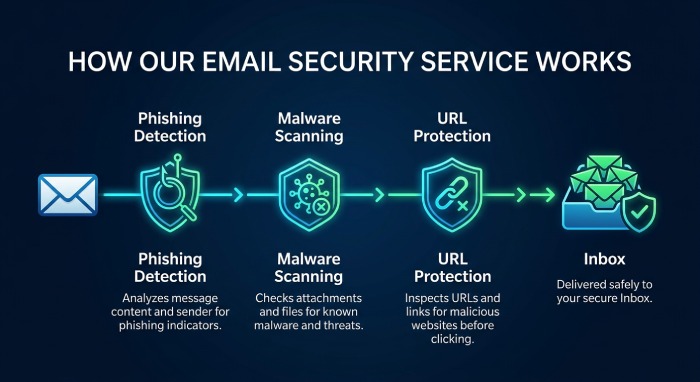 The exact combination varies between providers, so businesses should evaluate products according to their infrastructure and security requirements rather than relying only on a feature checklist.
Essential Features to Look For
1. Phishing Detection
Phishing protection should identify suspicious messages even when they do not contain obvious malicious indicators.
Advanced systems can examine sender behavior, communication relationships, message characteristics, URLs, attachments, and other signals to determine whether an email deserves additional scrutiny.
2. SPF, DKIM, and DMARC Support
Email authentication is an important part of protecting a domain from impersonation.
SPF helps identify which servers are authorized to send email for a domain.
DKIM adds a cryptographic signature that allows receiving systems to verify that a message was authorized and has not been improperly modified.
DMARC builds on SPF and DKIM by checking whether authenticated email aligns with the domain shown in the visible From address. It also lets domain owners publish policies that tell receiving mail systems how to handle messages that fail DMARC evaluation and provides reporting on authentication results.
Organizations should consider an email security platform that makes these standards easier to deploy, monitor, and maintain.
3. Malicious URL Protection
A dangerous link does not always look suspicious when an email arrives.
Some security services analyze links before delivery and may also inspect the destination when the recipient clicks. This can help identify websites that become malicious after an email has already been delivered.
4. Attachment Analysis
Attachments remain a common delivery mechanism for malware.
Security platforms may inspect files using reputation checks, static analysis, sandboxing, or other detection methods. Suspicious files can be quarantined or blocked before reaching employees.
5. Behavioral Analysis
Traditional filtering often relies on known indicators. Behavioral detection adds another layer by establishing patterns of normal communication.
For example, a system may recognize that an employee usually communicates with a particular supplier from a known location and suddenly receives a payment request from a different account claiming to represent that supplier.
The unusual behavior can trigger additional analysis.
6. Automated Threat Removal
Finding a malicious message is only part of the problem.
If a dangerous email reaches multiple inboxes, administrators may need to remove it quickly. Automated remediation can help security teams locate and retract messages that are later determined to be malicious.
7. Security Reporting
A good security platform should provide understandable visibility into the organization’s email environment.
Useful reporting can include:
- Threat volumes
- Phishing attempts
- Authentication failures
- Malicious attachments
- Suspicious senders
- Domain activity
- User risk
- Remediation activity
- Delivery information
Clear reporting helps security teams identify recurring problems and prioritize corrective action.
Major Types of Email Security Solutions
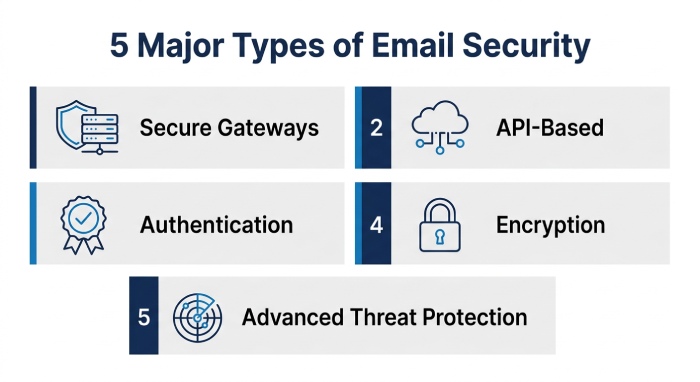 Not every email security product works in the same way. Understanding the major categories can make the selection process easier.
Secure Email Gateways
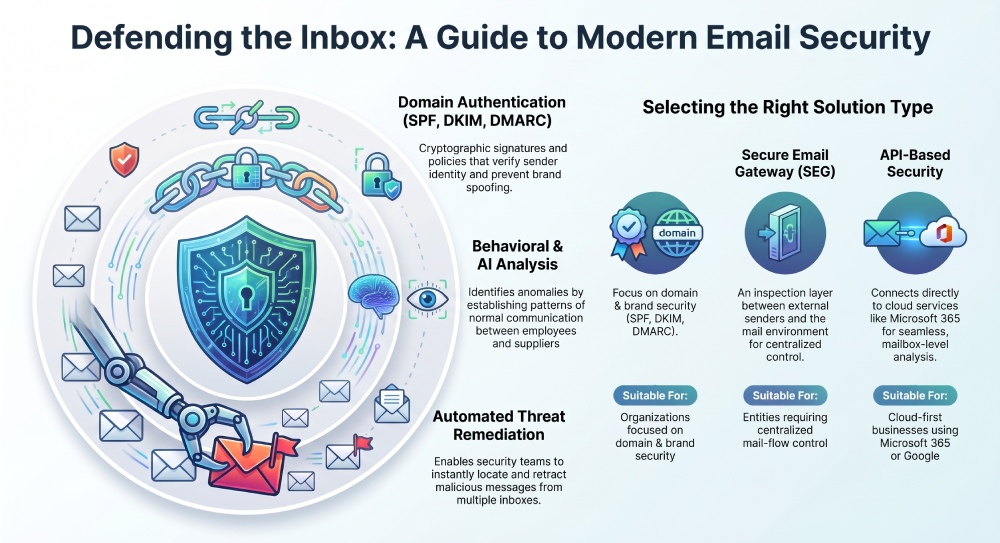
A secure email gateway operates as a filtering layer between external senders and an organization’s mail environment.
Messages can be inspected for spam, malware, malicious URLs, suspicious attachments, and other threats before they reach users.
This model can be particularly useful for organizations that need centralized control over email traffic.
API-Based Email Security
API-based platforms connect directly with cloud email services.
Instead of changing traditional mail-routing infrastructure, these solutions use authorized connections to analyze mailbox activity and identify threats.
This approach can be convenient for organizations that rely heavily on cloud-based email platforms.
Email Authentication Platforms
Authentication-focused services concentrate on establishing whether messages claiming to come from a domain are legitimate.
These platforms commonly support SPF, DKIM, DMARC, and related email authentication standards.
They are especially valuable for organizations concerned about domain spoofing and unauthorized use of their brand.
Email Encryption and Data Protection
Some organizations need to prevent sensitive information from being exposed through email.
Encryption and data-loss prevention capabilities can help protect confidential business information, financial records, customer data, intellectual property, and regulated information.
Advanced Threat Protection
Advanced threat protection platforms combine multiple detection methods to identify sophisticated attacks.
These may include machine learning, behavioral analysis, sandboxing, threat intelligence, impersonation detection, and automated response.
Email Security Service Comparison
| Service Type | Primary Focus | Common Deployment | Suitable For |
|---|---|---|---|
| Authentication platform | SPF, DKIM, DMARC, domain protection | Cloud/DNS | Domain security |
| Secure email gateway | Filtering and threat prevention | Gateway | Centralized email environments |
| API security platform | Behavioral and threat detection | Cloud/API | Cloud-first businesses |
| Advanced threat protection | Sophisticated attacks | API/Gateway | Security-conscious organizations |
| Encryption/DLP | Sensitive information protection | Cloud/Gateway | Regulated industries |
| Integrated security suite | Multiple security controls | Hybrid/Cloud | Larger organizations |
No single architecture is automatically appropriate for every business. Some organizations use one platform, while others combine authentication, mailbox protection, endpoint security, and employee awareness programs.
How to Evaluate an Email Security Provider
Before purchasing an email security service, consider the following areas.
Detection Capability
Ask how the platform identifies:
- Phishing
- Impersonation
- Malware
- Malicious URLs
- Business email compromise
- Account takeover
- Suspicious attachments
It is also worth understanding how the service handles false positives.
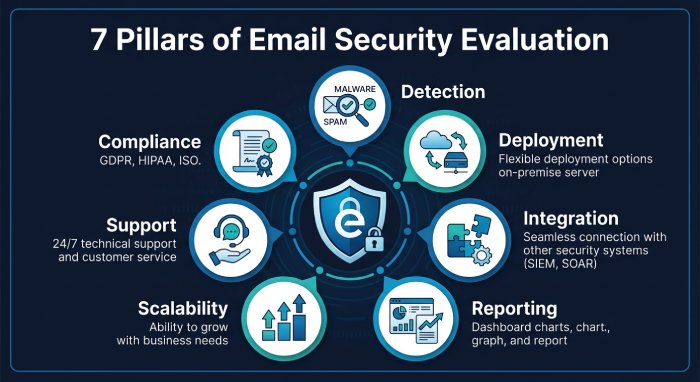
Deployment Requirements
Determine whether the product requires:
- MX record changes
- API permissions
- DNS modifications
- Mail-flow changes
- Endpoint installation
- Directory integration
A solution that fits your existing architecture may be easier to deploy and maintain.
Integration
Check compatibility with the organization’s existing:
- Email platform
- Identity provider
- SIEM
- SOAR
- Endpoint security
- Directory services
- Ticketing systems
- Cloud infrastructure
Strong integration can reduce administrative overhead.
Reporting
Look for dashboards that provide actionable information rather than simply displaying large quantities of security data.
Administrators should be able to determine what happened, which users were affected, why a message was considered suspicious, and what action was taken.
Scalability
Consider future requirements rather than evaluating a solution only according to the current number of employees.
The service should be able to accommodate additional users, domains, offices, subsidiaries, and email traffic without creating unnecessary management complexity.
Support
Security incidents may require rapid assistance.
Before selecting a provider, investigate support availability, response procedures, escalation options, documentation, and the type of assistance included with the chosen subscription.
Compliance
Organizations operating in regulated sectors should determine whether the platform supports the security and reporting requirements relevant to their industry.
Compliance requirements vary, so businesses should verify the exact controls and certifications applicable to their situation.
Questions to Ask Before Buying
A vendor evaluation can become much easier when the same questions are asked of every provider.
Security Questions
- What types of phishing attacks can the platform detect?
- How does it identify impersonation?
- Does it analyze attachments dynamically?
- How does it handle malicious URLs?
- Can threats be removed after delivery?
- How frequently is threat intelligence updated?
Deployment Questions
- How long does deployment normally take?
- Will email routing need to change?
- Is API access required?
- What administrative permissions are needed?
- Can the service operate alongside existing security products?
Management Questions
- How much manual configuration is required?
- Are policies customizable?
- Can administrators create different rules for different groups?
- What reporting capabilities are available?
- Can alerts be integrated with existing security systems?
Cost Questions
Do not evaluate pricing based only on the advertised subscription price.
Consider the total cost of ownership, including:
- Licensing
- Deployment
- Administration
- Training
- Additional modules
- Storage
- Support
- Professional services
- Integration work
How to Choose an Email Security Solution
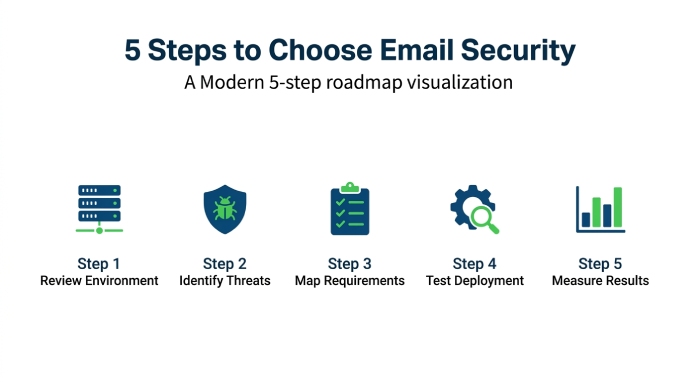 There is no single email security configuration that works for every organization. Start by identifying your organization’s most important security risks and requirements.
Step 1: Review Your Existing Environment
Determine whether your organization primarily uses Microsoft 365, Google Workspace, on-premises mail servers, or a hybrid environment.
Your architecture will influence which deployment models are practical.
Step 2: Identify Your Main Threats
Review recent incidents and security reports.
If domain impersonation is the main concern, authentication and DMARC management may deserve greater attention.
If users are frequently targeted by sophisticated phishing campaigns, behavioral analysis and advanced threat protection may be more important.
Step 3: Map Your Security Requirements
Create a list of required capabilities before comparing providers.
For example:
- Phishing protection
- Malware detection
- Domain authentication
- Email encryption
- DLP
- Threat intelligence
- Automated remediation
- Reporting
- Compliance support
- SIEM integration
Step 4: Test Before Deployment
Whenever possible, conduct a proof of concept.
Use representative email traffic and test how the solution handles legitimate messages, suspicious messages, attachments, links, authentication failures, and simulated attacks.
Step 5: Measure the Results
After testing, compare measurable outcomes such as:
- Threat detection
- False positives
- Administrative workload
- Response time
- User experience
- Integration quality
- Reporting usefulness
This creates a more practical basis for selecting a platform.
Email Security Best Practices
Technology works best when combined with sound security practices.
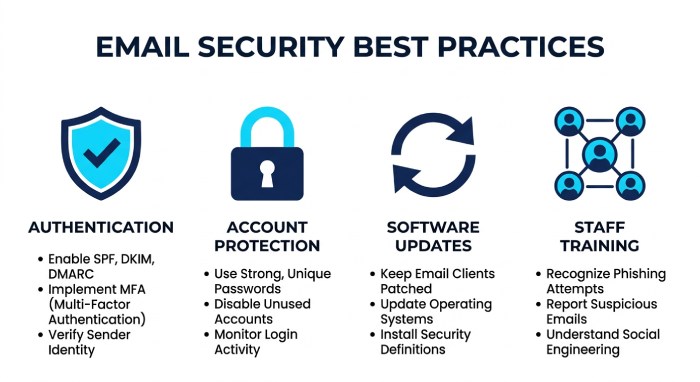
Use SPF, DKIM, and DMARC
Configure the major email authentication mechanisms for every domain that sends business email.
Start by monitoring authentication results, correct legitimate sending sources, and gradually move toward an enforcement policy when the environment is ready.
Protect High-Risk Accounts
Finance teams, executives, administrators, and employees responsible for payments or sensitive information are frequently attractive targets.
Apply stronger authentication and monitoring controls to accounts with elevated risk.
Keep Software Updated
Email security is part of a larger cybersecurity environment.
Mail clients, operating systems, browsers, identity systems, and security applications should remain updated to reduce exposure to known vulnerabilities.
Train Employees
Employees should understand how to recognize:
- Urgent payment requests
- Unexpected password-reset messages
- Suspicious attachments
- Lookalike domains
- Unusual requests from executives
- Unexpected login notifications
- QR-code phishing attempts
Training should complement technical controls rather than replace them.
Establish Verification Procedures
Important financial or administrative requests should have independent verification procedures.
For example, a payment instruction received through email can be confirmed through a previously established communication channel before money is transferred.
Monitor Authentication Reports
Email authentication reports can reveal unauthorized senders, configuration problems, and potential abuse of your domain.
Regular monitoring helps organizations respond before small configuration problems become larger security issues.
The Future of Email Security
Email security is changing as attackers adopt new technologies and techniques.
Artificial Intelligence
AI can help attackers create highly convincing messages at scale. Security teams are therefore using machine learning and behavioral analysis to identify patterns that conventional filters may overlook.
More Sophisticated Impersonation
Attackers increasingly attempt to imitate trusted individuals and organizations rather than simply distributing generic spam.
This makes identity verification and communication-pattern analysis increasingly important.
QR-Code Phishing
QR codes can redirect users to malicious websites without placing an obvious clickable URL inside the email.
Organizations should ensure that their security controls account for this type of attack.
Stronger Authentication
Email authentication standards continue to play an important role in reducing domain spoofing.
SPF, DKIM, and DMARC provide the foundation for verifying legitimate email sources and establishing policies for unauthenticated messages.
Visual Brand Verification
Technologies such as BIMI can help organizations associate verified brand identities with legitimate messages.
This can provide recipients with an additional visual signal when evaluating email authenticity.
Final Thoughts
Email security requires more than a traditional spam filter.
Businesses need to consider sender authentication, phishing detection, malicious links, attachment analysis, behavioral monitoring, domain protection, reporting, and response capabilities as part of a broader security strategy.
The right solution depends on the organization’s email architecture, threat profile, compliance requirements, available security resources, and budget.
For many organizations, the strongest approach is a layered model: authenticate legitimate senders, inspect messages for malicious behavior, protect sensitive information, monitor suspicious activity, and train employees to recognize social-engineering attempts.
By combining these controls, businesses can reduce the opportunities attackers have to use email as an entry point into their systems, accounts, and data.
General Manager
General Manager of DuoCircle. Product strategy and commercial lead for DMARC Report's 2,000+ customer base.
LinkedIn Profile →Take control of your DMARC reports
Turn raw XML into actionable dashboards. Start free - no credit card required.