DMARC np Tag: Enforcing Policies for Non-Existent Subdomains

Quick Answer
The DMARC np tag defines how email receivers handle messages sent from non-existent subdomains. By configuring np=none, np=quarantine, or np=reject, domain owners can strengthen DMARC enforcement and prevent subdomain spoofing.
Try Our Free DMARC Checker
Validate your DMARC policy, check alignment settings, and verify reporting configuration.
Check DMARC Record →What the DMARC np Tag Is and Why It Matters
The np tag is a DMARCbis policy mechanism that tells email receivers how to handle messages claiming to come from non-existent subdomains. It allows domain owners to define whether such messages should receive no enforcement, be quarantined, or be rejected.
The np tag helps prevent subdomain spoofing by providing clear authentication instructions for non-existent subdomains. This strengthens DMARC protection and reduces opportunities for attackers to impersonate trusted domains.
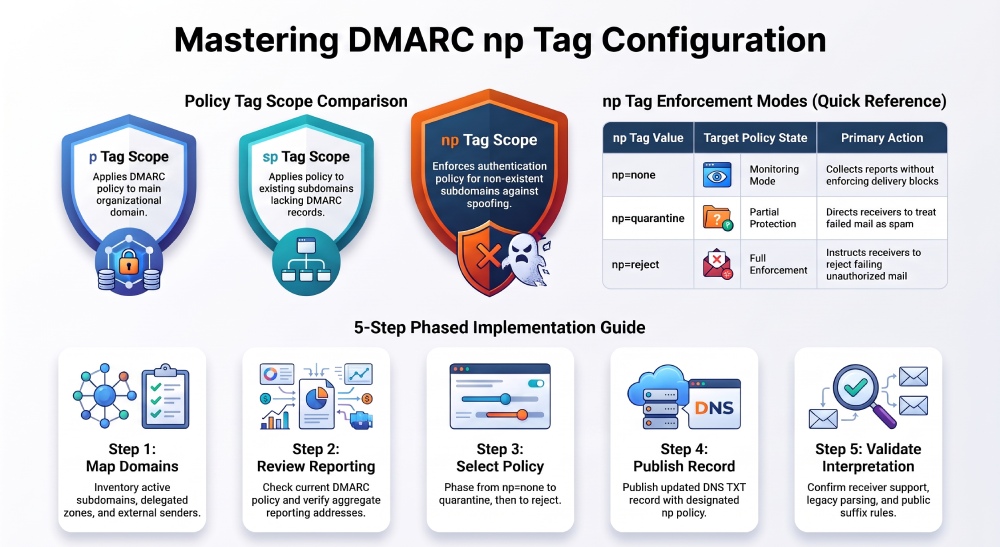
How np Differs from p and sp in DMARC Policy Enforcement
The p Tag Applies to the Organizational Domain
The p tag defines the primary DMARC policy for the organizational domain. For example, if University.edu publishes:
v=DMARC1; p=reject; rua=mailto:dmarc_rua@emaildefense.proofpoint.comthen the p tag tells receivers to reject messages that fail DMARC when the visible From domain is University.edu, assuming SPF or DKIM does not produce valid policy alignment. The p tag remains the foundation of DMARC enforcement and expresses the domain owner’s primary policy intent.
The sp Tag Applies to Existing Subdomains
The sp tag applies to existing subdomains below the organizational domain, unless those subdomains publish their own DMARC record. For instance, if medicine.university.edu exists but has no separate DMARC record, the sp tag at University.edu can define how receivers treat mail from that delegated domain.
A common record configuration is:
v=DMARC1; p=reject; sp=quarantine; rua=mailto:dmarc_rua@emaildefense.proofpoint.comHere, the p tag rejects unauthenticated mail from University.edu, while the sp tag quarantines unauthenticated mail from valid subdomains such as medicine.university.edu.
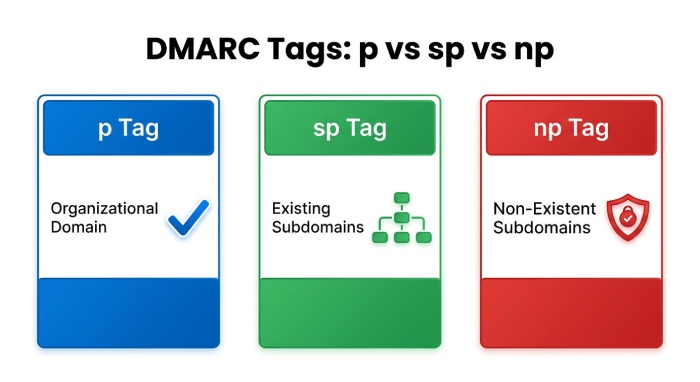
The np Tag Applies to Non-Existent Subdomains
The np tag applies when a claimed subdomain does not exist in DNS. For example, if an attacker sends an email from payroll.fake.university.edu, the np tag tells receivers which DMARC policy to apply to that message.
Under DMARCbis and RFC 9989, DNS hierarchy and policy discovery help receivers identify the correct authentication policy. The np tag reduces confusion during this process and helps protect domains against subdomain spoofing.
DMARC np Tag Syntax, Valid Values, and Example Records
The np tag follows standard DMARC tag-value syntax within a DNS TXT record. Its valid values align with the familiar DMARC enforcement states:
np=none
np=quarantine
np=reject
These values mean:
np=none: monitor only; no direct enforcement requested.np=quarantine: ask receivers to place failing mail in spam or suspicious-mail handling.np=reject: ask receivers to reject failing mail claiming to originate from a non-existent subdomain.
A modern record configuration might look like this:
dmarc.university.edu. IN TXT "v=DMARC1; p=reject; sp=quarantine; np=reject; adkim=s; aspf=s; rua=mailto:dmarcrua@emaildefense.proofpoint.com; ruf=mailto:dmarc_ruf@emaildefense.proofpoint.com"In this example, the p tag sets a reject policy for University.edu, the sp tag sets a quarantine policy for existing subdomains, and the np tag rejects mail from a non-existent subdomain. The adkim tag and aspf tag use strict alignment mode, increasing protection against impersonation.
A more cautious testing mode configuration could be:
dmarc.university.edu. IN TXT "v=DMARC1; p=none; sp=none; np=none; t=y; rua=mailto:dmarcrua@emaildefense.proofpoint.com"The t tag acts as a testing flag in DMARCbis contexts, helping communicate that the domain is still validating behavior. Depending on receiver support, a cross-version record may need to account for older systems that still interpret policy through RFC 7489 behavior. This is why administrators should understand tag deprecation, legacy parsing, and any legacy DMARC tag behavior before moving to enforcement.
When to Use np=none, np=quarantine, or np=reject
The right np value depends on your domain security requirements and confidence in your email infrastructure. Use np=none when identifying legitimate sending sources and monitoring subdomain activity. This allows reporting without applying enforcement.
Choose np=quarantine when you want receivers to treat suspicious messages cautiously, or np=reject when non-existent subdomains should never send legitimate email. For mature DMARC deployments, np=reject provides stronger protection against subdomain spoofing.
Step-by-Step Guide to Configuring np for Non-Existent Subdomains
1. Inventory Your Domain Structure
Start by mapping your organizational domain, active subdomains, and any delegated domain zones. For example:
University.edumedicine.university.eduresearch.university.edumail.medicine.university.edu
You should also identify all services that send email on your behalf, including third-party applications, SaaS platforms, and other external email delivery systems. In collaboration security environments, review available security tools to maintain visibility into authenticated and unauthenticated email sources.
2. Review Existing DMARC Policy and Reporting
Check the current DNS record at _dmarc.yourdomain.example. Confirm the current DMARC policy, whether the p tag is at none, quarantine, or reject, and whether the sp tag is present.
Your record should include a valid reporting address through the rua tag for aggregate report collection. For example:
rua=mailto:dmarc_rua@emaildefense.proofpoint.comIf you use forensic or failure reporting, you may also include the ruf tag:
ruf=mailto:dmarc_ruf@emaildefense.proofpoint.comForensic reporting often uses AFRF or the AFRF reporting format, though receiver support varies.
3. Choose the Initial np Tag Value
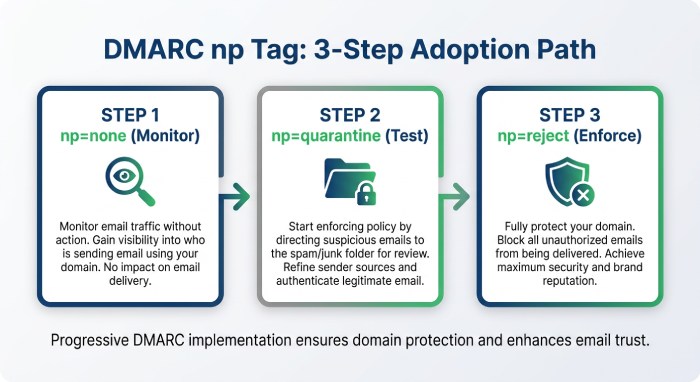
For most organizations, a safe phased adoption path is:
np=noneThis allows monitoring of attempted subdomain spoofing involving a non-existent subdomain without immediately requesting blocking. After reviewing aggregate reports and validating legitimate mail streams, move to:
np=quarantineThen, once confidence is high:
np=rejectThis gradual approach supports DMARC enforcement without disrupting legitimate services that may rely on unusual or newly created hostnames.
4. Publish the Updated DNS Record
A strong record configuration may look like this:
dmarc.university.edu. IN TXT "v=DMARC1; p=reject; sp=quarantine; np=reject; adkim=s; aspf=s; rua=mailto:dmarcrua@emaildefense.proofpoint.com; ruf=mailto:dmarc_ruf@emaildefense.proofpoint.com"This record tells email receivers that:
- The p tag applies
rejectto the organizational domain. - The sp tag applies
quarantineto existing subdomains. - The np tag applies
rejectto any non-existent subdomain. - Reports should be sent to Proofpoint-style email defense endpoints.
5. Validate Receiver Interpretation
Email receivers may interpret DMARC policies differently because support for newer standards and the np tag is still evolving. Some may follow older DMARC rules, while others support updated policy discovery methods.
Also, check public suffix handling. The psd tag and Public Suffix List (PSL) help receivers distinguish organizational domains from registry-controlled namespaces during policy discovery.
General Manager
General Manager of DuoCircle. Product strategy and commercial lead for DMARC Report's 2,000+ customer base.
LinkedIn Profile →Take control of your DMARC reports
Turn raw XML into actionable dashboards. Start free - no credit card required.