Emails Landing in Spam Folders? DMARC Can Fix it

Quick Answer
Nobody drafts an email intending to have it land in the spam or junk folder of the recipient, but when it happens, your communication gets hampered. You either fail to communicate a message or don’t get a response unless the recipient happens to check their spam folder.
Related: Free DMARC Checker ·How to Create an SPF Record ·SPF Record Format

Try Our Free DMARC Checker
Validate your DMARC policy, check alignment settings, and verify reporting configuration.
Check DMARC Record →
Nobody drafts an email intending to have it land in the spam or junk folder of the recipient, but when it happens, your communication gets hampered. You either fail to communicate a message or don’t get a response unless the recipient happens to check their spam folder.
Mailboxes place suspicious emails in spam folders to protect users from email-based cyberattacks like phishing and spoofing. However, sometimes valid emails get marked as spam by Gmail and other mailbox providers.
If this happens to you more often than ever, then you need to implement DMARC to improve your domain’s reputation and email deliverability. If DMARC is already affixed to your domain and most of your legitimate emails are still landing in the spam folders, then there must be something wrong with your SPF, DKIM, and DMARC records and their configurations. This blog shares quick fixes for both scenarios.
What is a Spam Email as per Mailbox Providers like Gmail, Outlook, Yahoo, etc.?
As per mailbox providers, a spam email is an unsolicited and usually irrelevant or inappropriate message sent typically to many recipients at once. It’s sent for advertising, phishing, spreading malware, or other malicious activities.
These emails are often sent in bulk to many email addresses without the recipients’ consent. Spam emails can take various forms, including advertisements, scams, chain letters, and phishing attempts.
The content of spam emails can range from attempts to sell products or services to fraudulent schemes aimed at tricking recipients into revealing personal information or downloading malicious attachments. That’s why email providers have spam filters in place to automatically identify and filter out such unwanted emails from reaching users’ inboxes.
Emails get placed in spam folders when recipients’ servers fail to affirm the senders’ authority. This usually happens when a threat actor forges your email address and the Return-Path address doesn’t match, leading to failed authentication.
DMARC Resolves the Issue
DMARC performs email authentication checks at a recipient’s end to verify if the sender is actually who they are claiming to be. DMARC authentication shows a ‘failed’ result when SPF and/or DKIM authentication fails.
There are three DMARC policies: none, quarantine, and reject. A fully protected domain is the one with p=reject implemented for 100% of the outgoing emails. Some businesses and domains’ natures don’t allow administrators to set their DMARC record to the strictest policy, that is p=reject pct;100, so they can use p=quarantine, which is a relatively lenient setting.
Domains lacking DMARC protection allow spoofed emails sent on their behalf to pass through, lowering their domain’s trustworthiness in the eyes of mailbox providers. Email service providers such as Gmail closely monitor user engagement, utilizing it as a metric to determine your domain sender score. When the user engagement with emails from your domain decreases, your domain sender score also diminishes.
Remember that using DMARC but setting the policy to p=none is equivalent to not having any email protection in place. So, avoid doing this. If you are unsure of your current setup, learn how to do a DMARC lookup to see exactly which policy is published.
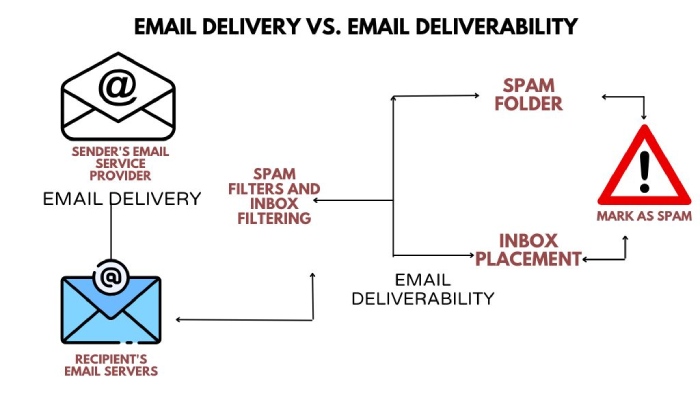
Emails Still Landing in Spam Folders?
If most of your legitimate emails are landing in spam folders despite affixing DMARC to your domain, then there must be one or more of the following issues with your SPF, DKIM, or DMARC records or their configurations. Start by using a tool to check DMARC record syntax and alignment-
Possible Issues With SPF
- If the SPF record for a domain is not set up correctly, it can lead to delivery issues. For example, if legitimate mail servers are not included in the SPF record, receiving mail servers may mark emails as suspicious or reject them.
- Organizations with complex email infrastructures may face challenges in accurately defining SPF records for all authorized mail servers.
- Your SPF record exceeds the lookup limit of 10 and the void limit of 2.
Possible Issues With DKIM
- If DKIM keys are not rotated regularly, or if the rotation process is not handled correctly, it can lead to validation failures for signed emails.
- Incorrect setup of DKIM records, such as using the wrong selector or key length, can result in validation failures.
Possible Issues With DMARC
- Setting up a DMARC policy without thorough testing can lead to unintended consequences, such as legitimate emails being marked as spam or rejected.
- Failure to monitor DMARC reports can result in missed opportunities to identify and address authentication issues.
Additional Checks
Assuring the accuracy of SPF, DKIM, and DMARC records has to be a frequent practice while making sure all the authorized senders also take care of the following checks to stay away from the spam folders - run a DMARC record checker to confirm your record parses correctly.
Subject Line and Email Body
Spammy subject lines and email body content are often characterized by various factors that trigger spam filters. These include excessive use of punctuation and symbols, writing in all caps, employing misleading content or unrealistic promises, vague or unrelated language, phishing phrases, excessive use of spam-related keywords, offering unsolicited products or services, poor spelling and grammar, large font sizes, and IP reputation issues.
So, always run a spam test for the message and analyze the report to fix the highlighted issues.
Email Footer
Spammy email footers often include a lack of or hard-to-find unsubscribe links, an excess of potentially dubious links, missing legal and compliance information, inconsistent branding, unprofessional design, lengthy disclaimers, large images or attachments, unusual language or formatting, and generic greetings.
Maintaining a clean, professional, and consistent appearance in the email footer, including necessary legal details, and providing a clear unsubscribe option are crucial to avoid the perception of spam and ensure emails are regarded as legitimate and trustworthy.
Images
Large or excessive images, especially those with high text-to-image ratios, embedded links to suspicious sites, and flashy or irrelevant graphics, can make an email appear spammy.
Emails that heavily rely on images without accompanying text or with irrelevant alt text also raise suspicion.
Wrapping it
No organization can afford to lose its business because of a bad email sender’s reputation. Now, even Google and Yahoo are pushing DMARC adoption, especially for bulk senders. So, if you are still lagging, then reach out to us, we can sort your DMARC reporting and monitoring pains! Automated DMARC report analysis makes these fixes far easier to spot.
Topics
General Manager
Founder and General Manager of DuoCircle. Product strategy and commercial lead for DMARC Report's 2,000+ customer base.
LinkedIn Profile →Take control of your DMARC reports
Turn raw XML into actionable dashboards. Start free - no credit card required.