Gmail and Yahoo Email Error Codes Explained

Quick Answer
The three core email authentication standards - SPF (RFC 7208), DKIM (RFC 6376), and DMARC (RFC 7489) - work together to verify that an email genuinely originates from the domain it claims to represent. DMARC Report Gmail and Yahoo Email Error Codes Explained
Related: Free DMARC Checker ·How to Create an SPF Record ·SPF Record Format


DMARC monitoring should be as routine as checking your inbox, says Adam Lundrigan, CTO of DuoCircle. The aggregate reports tell you exactly who sends email from your domain. If you’re not reading them, you’re flying blind on your own email security posture.
The three core email authentication standards - SPF (RFC 7208), DKIM (RFC 6376), and DMARC (RFC 7489) - work together to verify that an email genuinely originates from the domain it claims to represent.
Different email error codes give different messages, and sometimes, their **technical language doesn’t make sense to normal people. Google and Yahoo prioritise email protection and authentication; hence, the instances of receiving error messages are higher. That’s why we have curated this guide explaining the reasons for their prompting and ways to fix them.
What are Email Error Codes and Why Do They Matter?
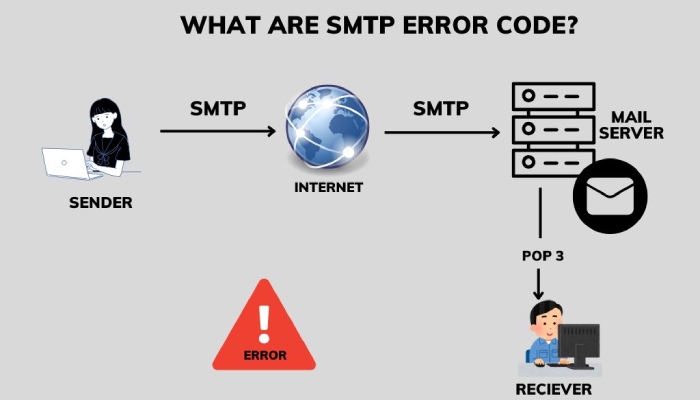
Error codes are also called bounce codes, SMTP errors, or Delivery Status Notifications. They arise when one email **server fails to deliver email to another email server. By decoding these error codes, you understand what’s wrong with your messages and how you can resolve the underlying issues.
The best part is that modern mailboxes fix issues automatically without your involvement. But in some cases, the mailboxes expose these errors to you through their interfaces, suggesting ways to troubleshoot them quickly. At times, these **errors aggregate to bring forth a generic bouncing response.
You will see a numerical portion in these error codes. These are there so that software can reliably create and administer automated rules. Then, the message portion (non-numerical part) is for the **easy understanding of humans so that they can troubleshoot what’s wrong.

Empty States Illustration concept. Flat illustration isolated on white background
As a regular email user, it’s important to know at least the common and basic error codes, especially if you send emails in bulk. Also, these error codes vary from mailbox to mailbox, and there are hundreds and thousands of **unique error codes and messages that you may encounter in return for your emails.
These are broadly categorized as ‘temporary’ or ‘permanent.’ A temporary failure prompts when the delivery attempt fails; however, retrying is still acceptable. This may happen when the mailbox is full or resources are unavailable. On the other hand, a permanent failure prompts when the delivery attempt fails and retrying is not allowed. One of the situations when this occurs is when the email address does not exist or if the message is too large.
What Are Common Gmail SMTP Error Codes?
As of 2023, almost 333.3 billion emails are exchanged daily on Gmail, and the United States alone holds a market share of 53% . Being one of the highest used mailboxes, users must be aware of the following SMTP error codes-
550, “5.7.26”
This Gmail error means that the email failed the authentication checks (SPF and/or DKIM), which makes your message potentially fraudulent. Reviewing what is DMARC helps you understand why these checks decide whether your mail is trusted. Common reasons prompting this error are:
-
Existence of multiple SPF records for a single domain.
-
Use of **wrong syntax and configurations.
-
The sender’s **IP address is not mentioned in the sending domain’s SPF record.
-
Invalid or incomplete DKIM record.
-
Sending the same email message to many Gmail users at once.
You can fix this error by:
-
Running your SPF and DKIM records through lookup tools to understand and resolve the technical issues.
-
Adding DKIM information to the sender’s email.
-
Switching to a **trusted email server to send the email.
550, “5.2.1”
This error message pops up when the recipient’s mailbox receives too many emails at a time, preventing your message from getting delivered. This situation may also arise when the recipient has many unread emails.
You can fix this error by:
-
Rechecking the recipient’s email address.
-
Not sending emails to many recipients at a time.
-
**Breaking large emails into small ones.
-
Not sending emails with heavy attachments.
-
Complying emails with the recipient’s email policy.
550, “5.4.5”
The Gmail error code 550 5.4.5 indicates that the daily sending limit has been surpassed. This occurs when an excessive number of emails are sent within a day or when emails are directed to non-existent addresses. In case your account is temporarily disabled due to exceeding these sending limits, it typically gets re-enabled after 24 hours .
Gmail’s daily sending quota is set at 100 emails for SMTP delivery or 500 emails through the web interface. If you use POP or IMAP clients, such as Microsoft Outlook, the maximum limit for sending emails at once is 100.
Should you require permission to exceed the daily email limit, you can either get in touch with your administrator or refer to the SMTP relay service error messages.
What Are Common Yahoo SMTP Error Codes?
Yahoo also returns emails with error codes so users can fix the problem and resend the email. Here are the common ones-
5XX (553 and 554) Permanent Errors
This error indicates the failure in email delivery due to a permanent issue. It arises because of the following-
-
You are dispatching the email to an invalid email address.
-
The email didn’t pass SPF and/or DKIM checks.
-
The email content includes words that are not acceptable by Yahoo.
-
Yahoo detected suspicious user behaviour or email content.
-
You sent the email from a **blocklisted IP address.
Here’s how you can try fixing this Yahoo permanent error-
-
Check and ensure your sending IP address doesn’t appear in any Real-Time Blackhole Lists (RBLs).
-
Maintain a good DNS record.
-
Add the sending IP address to your domain’s SPF record.
4XX (421 and 451) temporary errors
This error message prompts due to either of the reasons-
-
Sending emails too quickly, exceeding Yahoo’s rate limits.
-
Unusual or suspicious behaviour from your account triggers temporary blocks.
-
High server loads or maintenance on Yahoo’s end can lead to temporary errors.
Fix the error by trying these techniques-
-
Space out your emails to stay within Yahoo’s rate limits.
-
Ensure your account is secure; change the password if necessary.
-
Confirm recipients’ email addresses to avoid 451 errors.
-
Temporary errors may be due to Yahoo server issues; check the service status, so check the service status.
-
If issues persist, reach out to **Yahoo support for assistance.
If you need help with SPF, DKIM, and DMARC to resolve email delivery issues, then feel free to reach out to us. We offer DMARC reporting and monitoring services that give insights into your domain’s email activities to identify suspicious behaviour. Our free DMARC tools can also help you check and generate the records that prevent these authentication failures.
Sources
Topics
General Manager
General Manager of DuoCircle. Product strategy and commercial lead for DMARC Report's 2,000+ customer base.
LinkedIn Profile →Take control of your DMARC reports
Turn raw XML into actionable dashboards. Start free - no credit card required.