HIPAA Email Encryption: Requirements, Benefits, And Best Practices

Quick Answer
HIPAA email encryption protects electronic protected health information (ePHI) in transit and helps covered entities and business associates meet HIPAA security requirements. Best practices include encryption, access controls, authentication, secure email systems, and regular risk assessments.
HIPAA email encryption is essential for protecting sensitive patient information and maintaining secure healthcare communications. Because emails may contain Protected Health Information (PHI), healthcare organizations must implement appropriate safeguards to prevent unauthorized access, disclosure, or loss. This guide explores HIPAA email encryption requirements, its key benefits, and best practices for securely sending, receiving, and storing PHI through email while supporting ongoing HIPAA compliance.
What HIPAA Email Encryption Is and Why It Matters
HIPAA email encryption is the use of cryptographic security measures to protect messages and attachments containing Protected Health Information from unauthorized access during transmission and storage. In healthcare, email encryption matters because covered entities and business associates routinely exchange appointment details, diagnoses, lab results, billing information, referrals, prescriptions, insurance data, and other PHI through email systems.
Under the HIPAA Administrative Simplification Regulations, Health care providers, Health plans, and Healthcare clearinghouses must protect electronic PHI when they create, receive, maintain, or transmit it. Business associates that handle PHI on behalf of covered entities also share responsibility for HIPAA compliance, especially when they provide technology, billing, legal, analytics, cloud hosting, email archiving, or email retention services.
Why ordinary email creates risk
Standard email was not designed for healthcare privacy. Plaintext email risks include interception, misdelivery, forwarding to unauthorized recipients, account compromise, and exposure through insecure servers. A man-in-the-middle attack, for example, can allow an attacker to intercept unprotected messages while they move between mail systems.
HIPAA does not simply ask organizations to “use email carefully.” The HIPAA Security Rule requires covered entities and business associates to evaluate risks to electronic PHI and apply reasonable and appropriate technical safeguards, administrative safeguards, and physical safeguards. Email encryption is one of the most important security measures for reducing the likelihood of a data breach involving PHI.
HIPAA Requirements for Secure Email Communication
HIPAA email requirements are based primarily on the HIPAA Security Rule and the HIPAA Privacy Rule. The Department of Health and Human Services, often referred to as HHS, does not mandate one single encryption product or vendor. Instead, HIPAA compliance depends on whether covered entities and business associates have conducted a risk analysis, implemented appropriate security standards, and documented their decisions.
The HIPAA Security Rule and addressable encryption
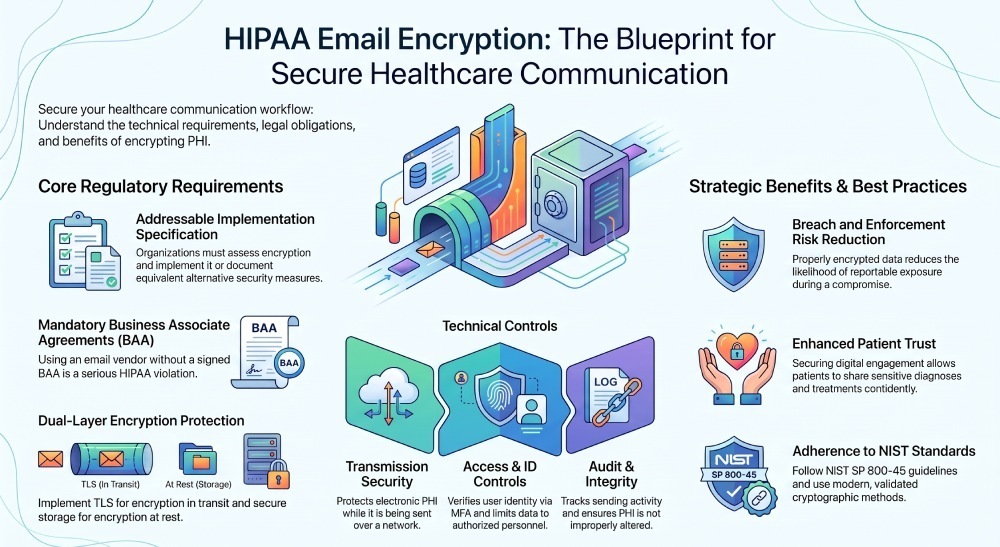
The HIPAA Security Rule treats encryption as an addressable implementation specification, not an optional best practice. “Addressable” means an organization must assess whether email encryption is reasonable and appropriate in its environment. If it is, the organization should implement it. If it is not, the organization must document why and adopt an equivalent alternative security measure.
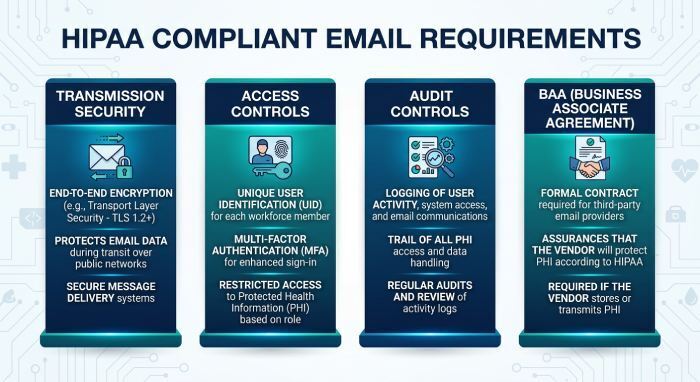
Key HIPAA Security Rule controls relevant to HIPAA email requirements include:
Transmission security
Transmission security protects electronic PHI when it is sent over a network. For HIPAA compliant email, organizations commonly use TLS encryption for encryption in transit. In higher-risk workflows, S/MIME or portal-based secure messaging may be appropriate.
Access controls and ID authentication
Access controls limit who can access PHI, while ID authentication verifies that users are who they claim to be. Strong passwords, multifactor authentication, role-based permissions, and session controls help prevent unauthorized access to email accounts containing Protected Health Information.
Audit controls and integrity controls
Audit controls help organizations track access, sending activity, administrative changes, and suspicious behavior. Integrity controls help ensure that PHI is not improperly altered or destroyed. Together, these controls support HIPAA compliance and strengthen email risk management.
The HIPAA Privacy Rule and patient communication
The HIPAA Privacy Rule governs how covered entities may use and disclose PHI. It also gives individuals rights related to access, confidential communications, restrictions, and accounting of disclosures. Patient email communication is allowed under HIPAA, but covered entities should verify addresses, follow the minimum necessary standard, and avoid disclosing more Protected Health Information than needed. Organizations can also use email authentication measures such as DMARC to help protect their domains from spoofing and unauthorized use.
In some cases, patients may request to receive communications by email after being informed of potential security risks. HIPAA generally permits covered entities to communicate with patients by email, provided they apply appropriate safeguards to protect PHI. Organizations should verify recipient information, limit disclosures to the minimum necessary where applicable, and follow their internal policies and any additional requirements under applicable state privacy and breach-notification laws.
Business Associate Agreements with email vendors
If an email provider creates, receives, maintains, or transmits PHI for a covered entity, the covered entity must have a Business Associate Agreement in place. A Business Associate Agreement defines permitted uses of PHI, safeguards, reporting duties, subcontractor obligations, and breach notification responsibilities. Without an email provider BAA, using that vendor for HIPAA-regulated communications can create a serious HIPAA violation.
A HIPAA compliant email provider or HIPAA compliant email service should be willing to sign a Business Associate Agreement, sometimes abbreviated as a BAA. Vendors such as Paubox are often discussed in the healthcare market because they focus on encrypted healthcare email workflows. Regardless of vendor, covered entities and business associates should verify contract terms, encryption capabilities, audit features, and support for HIPAA compliant email policies.
Key Benefits of Encrypting HIPAA-Regulated Emails
Email encryption is not only a compliance tool. It also improves operational security, patient trust, and defensibility in the event of an investigation.
Reducing breach and enforcement risk
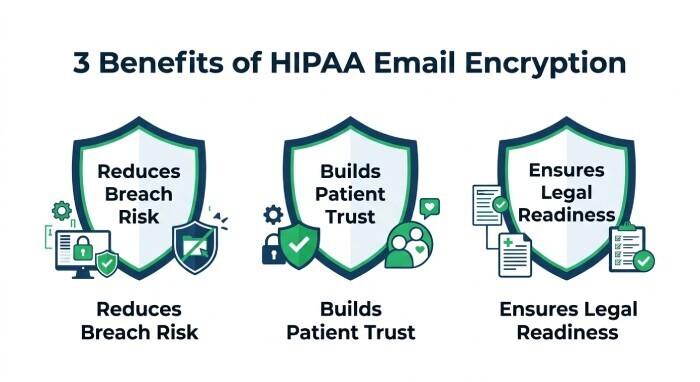
When PHI is encrypted in accordance with recognized standards, the risk of reportable exposure may be reduced if a device, mailbox, or message is compromised. Strong email encryption helps prevent unauthorized access and limits the damage from misdirected or intercepted messages. It also supports HIPAA compliance by demonstrating that covered entities and business associates took reasonable steps to protect Protected Health Information.
Improving patient trust and confidential communications
Patients expect healthcare organizations to protect sensitive details about diagnoses, treatments, medications, reproductive health, behavioral health, and payment information. Secure patient email communication supports confidential communications while allowing convenient digital engagement. When email consent is handled correctly and HIPAA email requirements are reflected in daily workflows, patients can communicate more confidently with providers.
Supporting retention, archiving, and legal readiness
HIPAA does not establish a universal medical record retention period for every type of email, but email retention and email archiving are critical for compliance, litigation readiness, and continuity of care. An Email archiving service or Email retention service used for PHI should support encryption at rest, search, legal hold, access controls, and a Business Associate Agreement. These capabilities help covered entities and business associates respond to audits, Use investigations, patient requests, and accounting of disclosures obligations.
Best Practices for Implementing HIPAA-Compliant Email Encryption
A strong program combines technology, policy, training, monitoring, and vendor governance. HIPAA compliant email is not achieved by encryption alone.
Follow NIST guidance and modern encryption standards
The National Institute of Standards and Technology, or NIST, publishes NIST guidelines that organizations can use when evaluating secure email architecture. NIST SP 800-45 provides guidance for electronic mail security, and SP 800-45 remains a useful reference for administrative and technical safeguards. Organizations should avoid outdated approaches such as the Data Encryption Standard (DES) algorithm and instead use modern encryption protocols and validated cryptographic methods.
encryption in transit and encryption at rest
Covered entities and business associates should implement encryption in transit for messages moving between systems and encryption at rest for stored mailboxes, archives, backups, and attachments. TLS encryption is widely used for secure transport, while S/MIME may provide end-to-end message protection in specific environments. The chosen email encryption method should align with the organization’s risk analysis, workflow needs, and HIPAA email requirements.
Build policies around people and workflows
HIPAA compliant email policies should explain when PHI may be sent, who may send it, what information may be included, and what to do if a message is sent to the wrong person. Email policies should address the minimum necessary standard, patient identity verification, secure attachments, mobile access, forwarding restrictions, and incident escalation.
Workforce training is essential. Staff should understand how the HIPAA Privacy Rule and HIPAA Security Rule apply to email, when to use secure messaging, how to verify recipients, and how to report suspected phishing attacks or a data breach. Training should also explain breach notification procedures and the consequences of a HIPAA violation.
Common Mistakes to Avoid and How to Maintain Ongoing Compliance
Even organizations with good intentions can fall short if they treat HIPAA compliance as a one-time setup rather than an ongoing program.
Mistake: Assuming all email providers are HIPAA compliant
Not every email provider is suitable for PHI. Covered entities and business associates should confirm that the vendor offers appropriate security measures, signs a Business Associate Agreement, supports audit controls, and provides reliable encryption features. A consumer-grade mailbox without a Business Associate Agreement is generally not appropriate for HIPAA-regulated email.
Mistake: Relying only on user behavior
Telling employees to “be careful” is not enough. HIPAA email requirements call for documented safeguards, consistent enforcement, and ongoing email risk management. Technical safeguards such as access controls, ID authentication, encryption, logging, and data loss prevention reduce reliance on individual judgment.
Mistake: Ignoring federal and state requirements
HIPAA is federal law, but organizations must also consider state privacy laws, professional licensing rules, payer requirements, and contract obligations. The eCFR version of the HIPAA regulations and HHS guidance should be reviewed alongside state-specific rules. Industry resources such as HIPAA Journal and commentary from writers like Steve Alder can be useful for monitoring enforcement trends, but organizations should rely on legal counsel for formal interpretations.
Maintaining compliance over time
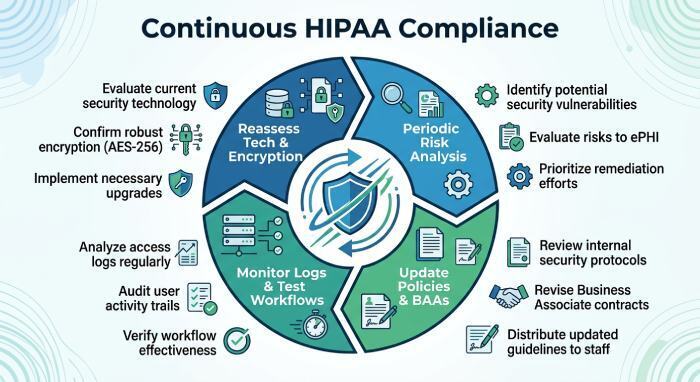
To maintain HIPAA compliance, covered entities and business associates should perform periodic risk analyses, update email policies, review Business Associate Agreement terms, test breach notification workflows, monitor logs, and reassess encryption tools as technology changes. HIPAA email requirements evolve in practice as threats change, so email encryption, administrative safeguards, and technical safeguards should be reviewed regularly—not only after an incident.
General Manager
General Manager of DuoCircle. Product strategy and commercial lead for DMARC Report's 2,000+ customer base.
LinkedIn Profile →Take control of your DMARC reports
Turn raw XML into actionable dashboards. Start free - no credit card required.