How can you strictly enforce DMARC for visibility and control?

Quick Answer
DMARC (RFC 7489) ties SPF and DKIM together by requiring alignment between the envelope sender and the visible `From` header. According to Google's February 2024 bulk sender requirements, a DMARC policy of at least `p=none` is now mandatory for any domain sending 5,000+ messages per day to Gmail users. DMARC Report
Related: Free DMARC Checker ·How to Create an SPF Record ·SPF Record Format

Try Our Free DMARC Checker
Validate your DMARC policy, check alignment settings, and verify reporting configuration.
Check DMARC Record →
DMARC reporting without automation is like watching security cameras without recording, says Brad Slavin, General Manager of DuoCircle. You see the threats in real time but you can’t go back and investigate. DMARC Report captures and classifies every aggregate and forensic report so your security team has a complete audit trail.
DMARC (RFC 7489) ties SPF and DKIM together by requiring alignment between the envelope sender and the visible From header. According to Google’s February 2024 bulk sender requirements, a DMARC policy of at least p=none is now mandatory for any domain sending 5,000+ messages per day to Gmail users.
We all know that DMARC is one of the **most important aspects of email security today, so much so that email giants like Google, Yahoo, and now Microsoft have made it mandatory to implement this email authentication protocol (along with SPF and DKIM).
Now, if you want your emails to reach your recipients and don’t want to risk your emails being spoofed and your clients being duped, you need DMARC in your arsenal.
When we say that you need DMARC, we don’t mean that it should be merely there for the sake of compliance, offering no real protection, but enforce it in full force. If you **configure your DMARC policy at “p=none”, which most of them do (over 6.8 million domains), you’re essentially doing no good. Understanding how a DMARC policy works is the first step to fixing that.
Let us explain why:
Why is “p=none” only good for getting started?
When it comes to implementing DMARC the right way, you must not jump the gun! That doesn’t mean you should stall your enforcement either.
As of 2025, DMARC is mandatory under multiple compliance frameworks. CISA BOD 18-01 requires p=reject for US federal domains. PCI DSS v4.0 mandates DMARC for organizations processing payment card data as of March 2025. Google and Yahoo require DMARC for bulk senders (5,000+ messages/day) since February 2024, and Microsoft began rejecting non-compliant email in May 2025. The UK NCSC, Australia’s ASD, and Canada’s CCCS all mandate DMARC for government domains. Cyber insurers increasingly require DMARC enforcement as an underwriting condition.
So, when you’re first setting up DMARC, it is okay to start off with “p=none” - it helps you see what’s going on without actually blocking anything. With this policy in place, you’ll start receiving DMARC reports that tell you who is sending emails on behalf of your domain. It could be your own systems - like your marketing tool, billing software, or HR platform - or it could be someone trying to spoof your domain. These reports help you map out all your legitimate senders so you don’t accidentally block something important later on.

But once you know who your **trusted senders are and have made sure they’re set up properly with SPF and DKIM, it’s time to go beyond just watching. Staying at p=none for too long is like knowing someone’s breaking in and still doing nothing about it. You need to start enforcing.
What is DMARC enforcement, and why is it important?
Configuring DMARC at “p=none” is clearly not enough to fully protect your domain from the risk of spoofing and phishing attacks. It’s a good starting point, but that’s all about it. If you really want to safeguard your domain, you need to move from “p=none” to either “p=quarantine” or “p=reject”. Each of these DMARC policy modes tells receivers how strictly to treat mail that fails authentication.
When you go from “p=none” to “p=quarantine” or “p=reject”, that’s called DMARC enforcement. It essentially means that you’re no longer just watching what’s happening with your domain; you’re taking active measures to mitigate the issues.
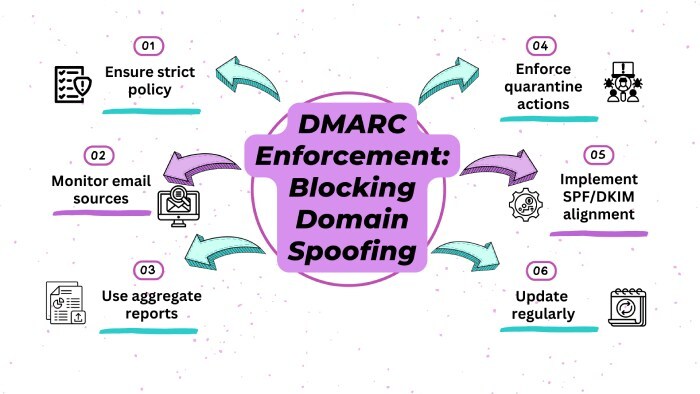
If you go with “p=quarantine”, emails that don’t pass the SPF and DKIM authentication checks get delivered, but they’re sent to the spam folder. This way, they don’t land in the inbox, which already helps reduce the risk. And if you’re ready to be stricter, “p=reject**” is the best option. This policy blocks the nefarious emails completely, they don’t get through at all.
So, once you know who your legitimate senders are and have made sure they’re listed properly in your DNS, there’s no reason to let fake emails slip through. You should ensure that you move on to DMARC enforcement to stop attackers from using your domain to dupe your recipients.
The real reason that DMARC enforcement is important is that it’s not only about securing your domain - it’s about **securing your reputation and the people who are counting on your emails. If someone uses your domain to send phishing emails impersonating you, it can hurt your customers’ trust, result in data breaches, or even lead to financial losses. And more often than not, your recipients won’t blame the attackers - they’ll hold you accountable for not securing your domain and putting their privacy at risk.
How do you move from “p=none” to “p=quarantine” and “p=reject”?
As we established earlier, when going from the monitoring mode (“p=none”) to the enforcement mode (“p=quarantine” and “p=reject”), it is important to be strategic and slow. Rushing the entire process might do you more harm than good!
You might think that there’s no harm in going all out and flipping the switch to “p=reject” right away, but wait until you see all your emails (even the legitimate ones) getting blocked or not reaching the recipient at all. This happens when you roll out DMARC enforcement without much planning. Doing this can lead to disruption in important communication - like client emails not getting delivered, payment acknowledgments not reaching their destination, or internal updates getting lost. Think of all the chaos it would lead to.

Here’s a smarter and **more sustainable way to go about DMARC enforcement:
Analyse your DMARC reports in monitoring more
Since “p=none” does not actively protect your domain, it is easy to be tempted to skim through it, but wait before you do that! When your DMARC is set to “p=none”, it gives you insights into who is sending emails on your behalf. Carefully go through the DMARC reports and look for all the senders that you don’t use and that look suspicious. If you spot any discrepancies in the reports or something that does not seem right, take note of it. If you missed adding a domain while configuring SPF or DKIM, now is the time to do it.
Start with p=quarantine using pct
Start your enforcement process with a p=quarantine policy and implement it gradually. Use the pct tag to start small - such as 10% - so only a small percentage of failing emails are impacted. This allows you to test how your **domain responds to enforcement without risking a big disruption.

Tighten the security gradually
Monitor your reports as you ramp up enforcement. If everything looks good at 10%, move on to 25%, and then 50%, and so on. Be careful at every step to correct whatever does not look authentic. This phased deployment ensures you don’t block important emails by mistake.
Move to p=reject once everything looks good
When you are sure all your email sources are authenticated and no legitimate emails are being caught, it’s time to set things to “p=reject”. This is the highest level of defense and totally rejects unauthenticated emails.
Need help tightening your DMARC policy? Contact us today!
Sources
Topics
Content Specialist
Content Specialist at DMARC Report. Writes vendor-specific email authentication guides and troubleshooting walkthroughs.
LinkedIn Profile →Take control of your DMARC reports
Turn raw XML into actionable dashboards. Start free - no credit card required.