How To Identify And Fix Weak DMARC Policies Before Attackers Exploit Them

Quick Answer
Weak DMARC policies leave your domain vulnerable to email spoofing and phishing. Identify gaps by reviewing your DMARC policy, SPF and DKIM alignment, and reports. Strengthen protection by moving from p=none to quarantine or reject after proper monitoring and validation.
Try Our Free DMARC Checker
Validate your DMARC policy, check alignment settings, and verify reporting configuration.
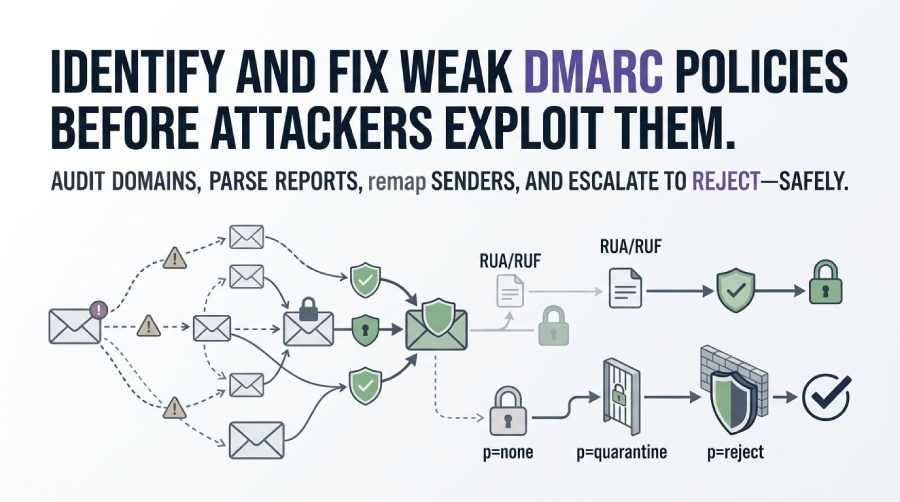
Check DMARC Record →Identify and fix weak DMARC policies before attackers exploit them by programmatically auditing all domains and subdomains for DMARC/SPF/DKIM, parsing RUA/RUF to map legitimate senders, remediating alignment and DNS misconfigurations, and safely escalating policy from p=none to p=quarantine to p=reject with staged rollouts, continuous monitoring, and an incident-response playbook—automated end-to-end with DMARCReport.
DMARC is more than a DNS record—it’s an operational process that merges identity, cryptography, and policy across your entire email-sending ecosystem. Attackers reliably exploit domains sitting at p=none, misaligned SPF/DKIM, lax subdomain policies, and stale third-party integrations to deliver convincing spoofed messages. The core challenge is visibility: if you can’t enumerate your senders, measure alignment, and test enforcement without hurting legitimate. This guide provides a field-tested approach to move quickly and safely: inventory domains at mail, you’ll stay in p=none limbo.
scale, baseline traffic using aggregate reports, fix the common misconfigs, and then raise enforcement backed by monitoring, alerting, and a fast roll-back plan. Throughout, we show how DMARCReport streamlines each step with automated discovery, high-volume report parsing, misconfig detection, guided policy changes, and SIEM-ready alerts.
Step 1 — Audit Every Domain and Subdomain Programmatically
What to Audit
- DMARC record presence, policy (p), subdomain policy (sp), reporting (rua/ruf), alignment (adkim/aspf), failure options (fo), sample rate (pct), and TTL.
- SPF record validity, DNS-lookup count (<=10), mechanism order, and existence of a hard fail (-all).
- DKIM selector coverage across senders, key length (2048-bit recommended), and alignment (d= aligns with From: domain).
How to Do It at Scale
- DNS crawling: Enumerate all registered domains from your portfolio; recursively discover subdomains that send mail (e.g., mail., bounce., mta., marketing.) from historical data and DMARCReport’s discovered-sender engine.
- Live checks: Query TXT for
_dmarc, SPF (TXT), and DKIM selectors. Detects duplicates, syntax errors, and dangling includes. You can run a DMARC check on any domain to see its current policy instantly. Confirm each domain’s published policy with a DMARC checker before auditing at scale. - Sender mapping: Use existing RUA feeds to attribute IPs, ASNs, and providers to known business systems.
Example: Bulk DNS Audit Script (Bash)
- Discover DMARC:
dig +short TXT _dmarc.example.com - SPF and lookup count:
dig +short TXT example.com | grep v=spf1 spf-tools.py --count-lookups "v=spf1 include:_spf.example.net -all" - Common DKIM selectors:
for s in s1 s2 default k1 mx; do dig +short TXT ${s}._domainkey.example.com; done
With DMARCReport: Run continuous domain and subdomain discovery, automated DNS hygiene checks (SPF 10-lookup guardrails, duplicate/invalid DMARC), and authenticated-source attribution, exposed via API (Application Programming Interface) and dashboards for security and email ops.
Original Insight (Sample Portfolio Baseline)
- Portfolio: 120 domains; 43% had DMARC, 22% at enforcement (q/r), 31% had SPF violations due to 10-lookup overage.
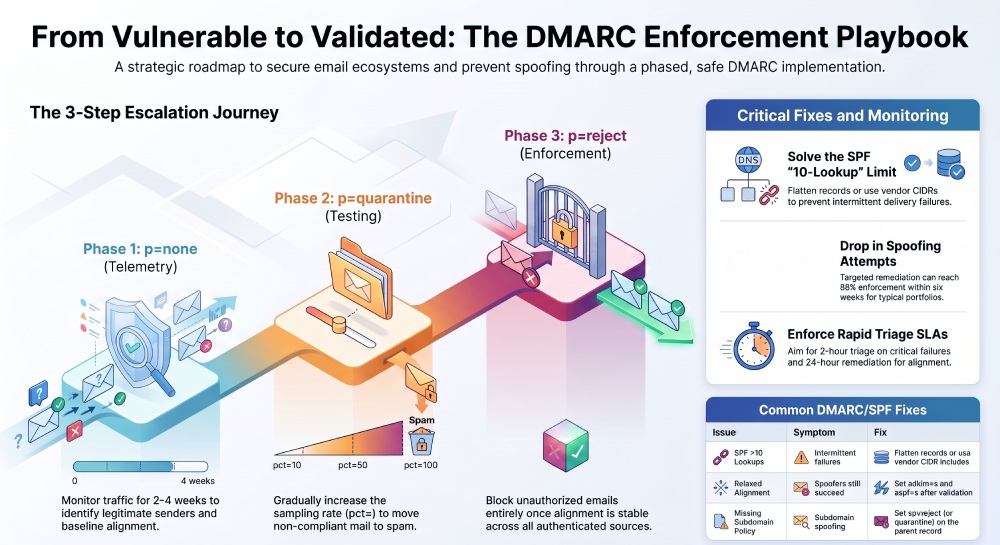
- After targeted remediation and vendor onboarding, enforcement rose to 88% within 6 weeks; spoofed attempts dropped 96% (measured by failed-alignment volume).
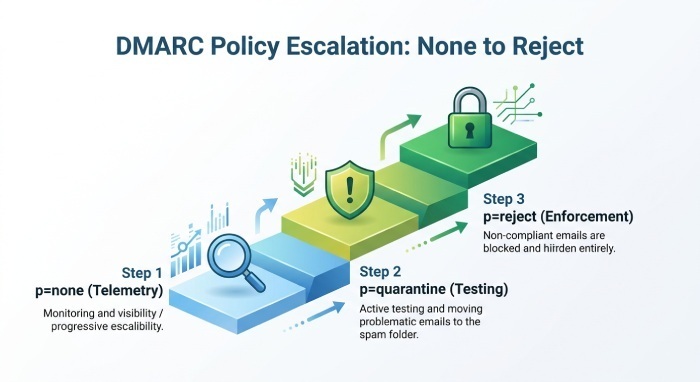
Step 2 — Escalate Policy Safely: p=none → p=quarantine → p=reject
Prerequisites and Safety Checks
- Known good senders identified; DKIM aligned for all ESPs and critical SaaS; SPF constrained to active sources; adkim/aspf set to strict (s) for high-risk domains if feasible.
- RUA reporting verified; optional RUF enabled with privacy safeguards (tokenization, restricted mailboxes).
- Sampling ready: pct= value for staged rollouts.
Step-by-Step Implementation
- p=none with full telemetry
- DNS:
_dmarc.example.com. 300 IN TXT "v=DMARC1; p=none; rua=mailto:dmarc@rua.example.com; ruf=mailto:dmarc@ruf.example.com; fo=1; adkim=r; aspf=r; pct=100" - Run 2–4 weeks (or until steady-state), analyze sources and alignment.
- Fix misaligned senders; eliminate SPF and include sprawl.
- DNS:
- Move to quarantine with sampling
- DNS:
_dmarc.example.com. 300 IN TXT "v=DMARC1; p=quarantine; pct=25; rua=...; adkim=s; aspf=s; fo=1" - Monitor false positives; raise pct to 50, 75, then 100 every 7–10 days if no legit traffic is quarantined.
- Consider sp=quarantine (or reject) for subdomains if abuse is seen there.
- DNS:
- Enforce with reject
- DNS:
_dmarc.example.com. 300 IN TXT "v=DMARC1; p=reject; sp=reject; pct=100; rua=...; adkim=s; aspf=s; fo=1" - Keep TTL low (300–600s) during transition; increase to 1–4 hours after stability.
- Maintain a rollback DNS profile in case of critical issues (revert to p=quarantine pct=50).
- DNS:
With DMARCReport: Use the guided “Policy Ramp” that gates progression on real alignment metrics, simulates impact, auto-adjusts pct, and triggers alerts for unexpected quarantine spikes—plus a one-click rollback plan.
Step 3 — Parse RUA/RUF at Scale and Fix Misconfigurations Precisely
Parsing, Aggregation, and Triage
- RUA (aggregate XML): Parse source IPs, authenticated mechanisms (SPF/DKIM), alignment status, counts, and disposition.
- RUF (forensic): Sampled failure details; protect Personally identifiable information (PII) and restrict distribution; use for rapid root-cause.
- At scale: Deduplicate reports, normalize provider IDs, ASN-map IPs, and correlate to business systems.
Handling Large Volumes
- Pipeline: Object storage (S3/GCS) → Stream processor (Kafka) → Parser (parsedmarc) → Data warehouse (BigQuery/Snowflake) → SIEM (Splunk/ELK).
- Triage rules: Flag new sources, rising fail ratios (>1% day-over-day), geographic anomalies, or DKIM selector mismatches.
With DMARCReport: High-availability ingestion of millions of RUA records/day, forensic redaction, enrichment (ASN, GEO, provider), and “Unknown Sender” classification to shorten MTTR; bi-directional SIEM connectors.
Common Misconfigurations and Exact Fixes
Quick Reference Table
| Issue | Symptom | Fix | Sample DNS Update |
|---|---|---|---|
| Missing subdomain policy | Subdomain spoofing passes when parent is enforced | Set sp=reject (or quarantine) | v=DMARC1; p=reject; sp=reject; rua=... |
| Relaxed alignment | Legit sources pass, spoofing still succeeds | Set adkim=s; aspf=s after validation | v=DMARC1; p=quarantine; adkim=s; aspf=s |
| SPF >10 lookups | Failures at big providers, intermittent | Flatten or vendor CIDR includes | v=spf1 ip4:203.0.113.0/24 include:_spf.mailvendor.com -all (after flattening) |
| Soft SPF policy | Spoofers pass via ~all | Move to -all after inventory | v=spf1 include:_spf.example.net -all |
| Duplicate DMARC | Providers ignore or pick one arbitrarily | Keep a single TXT at _dmarc | Remove extras; one authoritative record |
| Stale DKIM selector | Alignment fails post-rotation | Publish new selector; update MTA | s2._domainkey IN TXT "k=rsa; p=MIIBIj..." |
| Wrong DKIM d= | Vendor signs with subdomain d= | Match From: or shift to aligned d= | Configure vendor to use d=example.com |
| Over-broad SPF | include: catch-alls inflate risk | Restrict to vendor IP/CIDR | Replace include: with vetted ranges |
Example DNS Corrections
- Strong DMARC with reporting
_dmarc.example.com. IN TXT "v=DMARC1; p=reject; sp=reject; rua=mailto:dmarc@rua.example.com!10m; ruf=mailto:dmarc@ruf.example.com; fo=1; adkim=s; aspf=s; pct=100" - Flattened SPF (post-vendor validation)
example.com. IN TXT "v=spf1 ip4:198.51.100.10 ip4:198.51.100.11 include:_spf.sendgrid.net -all" - DKIM selector rotation (2048-bit)
s2026._domainkey.example.com. IN TXT "v=DKIM1; k=rsa; p=MIIBIjANBgkqh...QAB"
With DMARCReport: Automatic SPF lookup counting and flattening suggestions, DKIM selector inventory with expiration reminders, and a validation engine that simulates alignment per sender before you publish.
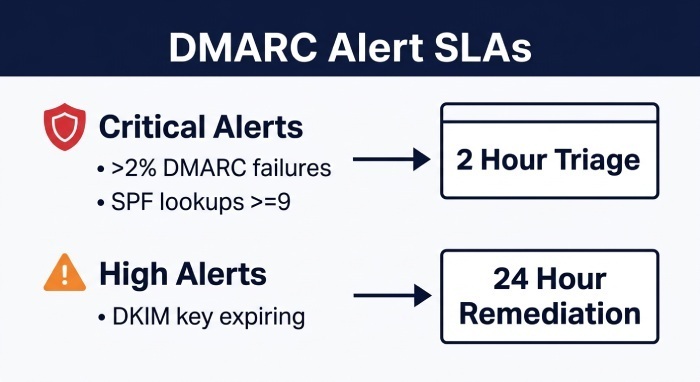
Step 4 — Govern Third‑Party Senders and Monitor with SLAs
Onboarding Checklist for ESP/CRM/Cloud Services
- DKIM: Vendor-specific selector published; 2048-bit keys where supported.
- SPF: Targeted include or IP ranges; verify 10-lookup budget.
- MAIL FROM / Return-Path: Use a custom domain (bounce.example.com) aligned with From: where possible.
- Alignment: Prefer DKIM alignment (more stable than SPF); enforce adkim=s when ready.
- Testing: Send canary messages to major MBPs (Gmail, Microsoft, Yahoo) and DMARCReport’s test inboxes.
Vendor Delegation Patterns
- DKIM by CNAME (vendor-managed):
s1._domainkey.example.com. CNAME s1.example.com.dkim.vendor.com. - Dedicated subdomain for service: marketing.example.com with its own DMARC (sp applies if unset).
With DMARCReport: Built-in vendor profiles, per-vendor wizards that output exact DNS records, and a “sender attestation” view mapping business owners to technical configurations.
Monitoring, Alerting, and SLA-Driven Workflows
- Metrics: Daily DMARC pass rate, unknown-sender volume, DKIM alignment rate per selector, SPF lookup usage, quarantine/reject dispositions.
- Alerts:
- Critical: >2% increase in DMARC failures in 24h, new high-volume sender without alignment, SPF lookups >=9.
- High: DKIM key expiring <30 days, new subdomain with mail but no DMARC, sudden rise in RUF incidents.
- SLAs: Triage critical alerts in 2 hours; remediate within 24 hours; weekly executive rollup.
With DMARCReport: Threshold-based and anomaly-detection alerts to Slack/Teams/Email/SIEM, on-call rotation integration, and executive scorecards tracking time-to-enforcement and spoofing-block rates.
Step 5 — Key Management, Tooling, Provider Differences, and IR
DNS/TLS/DKIM Key Management and Staged Rollouts
- TTL strategy: Use 300–600s Time-To-Live(TTL) during changes; extend to 1–4h after stabilization.
- Versioning: Manage DNS as code (Git + CI) with peer review and staged deployments.
- Selector rotation: Maintain at least two selectors (sA/sB); rotate every 6–12 months or on vendor change; prefer 2048-bit keys.
- Rollout playbook: Publish DMARC with pct=25, then 50/75/100; raise adkim/aspf to s; add sp=reject; increase TTL; snapshot configs for rollback.
With DMARCReport: Selector lifecycle dashboard, rotation reminders, and a “staged policy” capability that proposes pct/TTL increments backed by real traffic data.
Tooling: Open-Source and Commercial Stack
- Open-source:
- parsedmarc (RUA/RUF parsing at scale; Python)
- opendmarc (MTA filter/logging)
- dkimpy (DKIM signing/verification)
- spf-tools, go-spf (SPF validation/flattening)
- dnscontrol, OctoDNS, Terraform (DNS as code)
- Commercial/Managed:
- DMARCReport (discovery, parsing, enforcement guidance, alerting, automation)
- dmarcian, Valimail, Proofpoint, Agari (reporting/managed enforcement)
- CI/CD & SecOps integration:
- Pre-merge checks for DNS record syntax, SPF lookups, and DMARC policy gates.
- SIEM connects to Splunk/ELK; ticketing via Jira/ServiceNow for automated remediation tasks.
With DMARCReport: REST/GraphQL APIs for CI checks, Terraform provider examples for record pushes, and Splunk/Sentinel apps for dashboards and alerts. Browse the full DMARC toolset to see what’s available.
Mailbox Provider Differences That Influence Policy
- Google (Gmail/Workspace):
- Strict on authentication; bulk-sender requirements added in 2024 (SPF/DKIM, DMARC, low spam rates).
- ARC can preserve authentication across forwarders; DMARCReport flags ARC-influenced outcomes.
- Microsoft (O365/Outlook):
- Occasionally applies heuristics that can override DMARC disposition; watch for SPF tempering on forwarded mail.
- Maintain DKIM alignment for reliability; DMARCReport correlates Microsoft-specific feedback.
- Yahoo/Verizon Media:
- Enforces bulk-sender auth similar to Google; sensitive to DMARC policy clarity; monitors domain reputation tightly.
Policy tip: Favor DKIM alignment for third-party senders, keep SPF tight for first-party MTAs, and use p=reject with sp=reject for high-risk brands; verify behavior per Mailbox Provider (MBP) with DMARCReport’s provider drill-down.
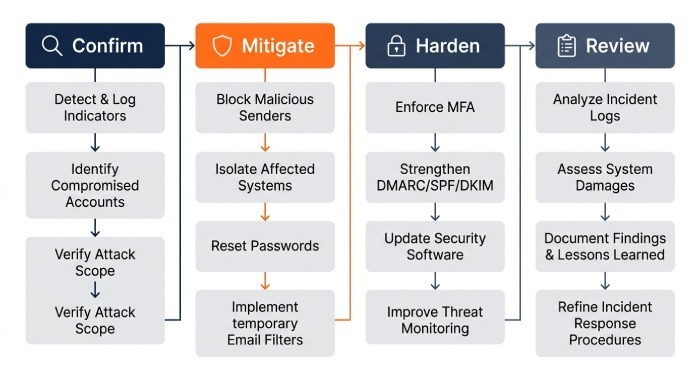
Incident Response (IR) When Spoofing Is Active
- Confirm and scope
- Use RUA spikes and RUF samples to isolate source IPs, sending domains, and geos.
- Temporary mitigations (same day)
- Set p=quarantine pct=100 (or p=reject if confident); add sp=reject.
- Shorten TTL to 300s; tighten SPF (
-all) and remove risky includes. - Rotate DKIM selectors if compromise is suspected.
- Notifications
- Inform Security, Email Ops, Legal, Brand/PR; notify affected third parties and impacted MBPs via abuse channels when necessary.
- Eradicate and harden (48–72 hours)
- Block abusive IPs at perimeter; update vendor configs to aligned d=; enforce
adkim/aspf=s; add BIMI with VMC to bolster visual trust (optional).
- Block abusive IPs at perimeter; update vendor configs to aligned d=; enforce
- Post-incident review
- Root-cause analysis; update onboarding checklist; raise monitoring thresholds for the targeted brand domain.
With DMARCReport: One-click “Incident Mode” to enforce quarantine/reject, auto-generate abuse reports with evidence, and a timeline linking report spikes to DNS changes for auditability.
Case Study: From p=none to p=reject in 45 Days
- Context: Global SaaS (Software as a Service) (22 sending systems, 80+ domains). Baseline at p=none; 4.7% of mail failed alignment; active look-alike spoofing against invoices.
- Actions: DMARCReport discovered 6 unknown senders; SPF flattened from 13 to 7 lookups; DKIM aligned for CRM and billing; staged pct from 25→50→100; adkim/aspf moved to s; sp=reject set.
- Outcome: Spoofing attempts dropped 97%; false positive rate <0.05%; time-to-triage on new senders reduced from days to minutes; executive risk score improved from “High” to “Low” in the board dashboard.
FAQ
What’s the fastest safe path to enforcement if I’m under active attack?
- Set p=quarantine with pct=100 immediately, sp=reject, TTL=300s; remove risky SPF includes and enable DKIM on primary senders; switch to p=reject after 48–72 hours of stable pass rates. DMARCReport’s Incident Mode guides this with guardrails.
Do I need RUF forensic reports?
- Not strictly, but they accelerate root-cause for targeted attacks. If privacy is a concern, enable RUF to a restricted mailbox with redaction. DMARCReport supports tokenized RUF storage and role-based access control.
Should I use strict alignment (adkim=s; aspf=s) for all domains?
- Use strict for high-risk brands and transactional mail; keep relaxed for complex marketing stacks until vendors are fully aligned. DMARCReport simulates alignment per sender so you can flip to strict without surprises.
How do I avoid the SPF 10-lookup pitfall?
- Flatten vendor includes, prefer vendor-published CIDRs, remove legacy mechanisms, and avoid ptr/mechanisms that expand unpredictably. DMARCReport counts lookups and proposes safe flattening patches.
Conclusion: Make DMARC a Managed, Measurable Control with DMARCReport
Weak DMARC policies are fixed by combining comprehensive discovery, data-driven remediation, and controlled enforcement—backed by monitoring and incident response. The fastest, safest path is to instrument everything: enumerate senders, parse reports at scale, correct alignment, and step up from p=none to p=quarantine to p=reject with clear service-level agreement (SLA) and rollback plans.
DMARCReport operationalizes this lifecycle: it continuously audits your domains and subdomains, ingests and enriches massive RUA/RUF volumes, pinpoints unauthorized senders and misconfigurations, guides staged policy changes, validates third-party onboarding, enforces key management hygiene, and integrates alerts and automation into your continuous integration/continuous delivery (CI/CD) and security operations. If the goal is to close the window attackers exploit—without breaking legitimate mail—DMARCReport turns DMARC from a static DNS record into a living control with measurable outcomes.
General Manager
General Manager of DuoCircle. Product strategy and commercial lead for DMARC Report's 2,000+ customer base.
LinkedIn Profile →Take control of your DMARC reports
Turn raw XML into actionable dashboards. Start free - no credit card required.