How To Identify Fake Order Confirmation Emails And Prevent Email Spoofing With DMARC

Quick Answer
Fake order confirmation emails often contain suspicious sender addresses, unexpected requests, mismatched links, or urgent payment prompts. Check email headers and verify orders independently. Implement DMARC with SPF and DKIM to authenticate legitimate emails and block spoofing.
Try Our Free DMARC Checker
Validate your DMARC policy, check alignment settings, and verify reporting configuration.
Check DMARC Record →Fake order confirmation emails are a common phishing tactic used to trick people into clicking malicious links, opening harmful attachments, or sharing sensitive information. By learning how to spot suspicious sender addresses, unexpected orders, urgent requests, and misleading links, you can avoid falling victim to these scams. For businesses, implementing email authentication protocols such as SPF, DKIM, and DMARC can help prevent attackers from spoofing their domain and impersonating a trusted brand.
Why Fake Order Confirmation Emails Became a Major Threat in 2018
The year 2018 marked a significant escalation in the prevalence of fake order confirmation emails targeting consumers and businesses alike. As global ecommerce store activity surged, cybercriminals seized the opportunity to exploit common customer behavior—namely, the anticipation of a legitimate order confirmation email after purchasing products online. Additionally, as payment confirmation email formats became standardized across leading retailers such as Amazon, PayPal, Netflix, and Norton, attackers found it easier to mimic the layouts and content, making scam emails increasingly difficult to distinguish from authentic ones.
AI-powered tools and advanced email generators began to arise around this time, leveraging machine learning and natural language processing to generate emails that mirror the tone and style of professional email copywriting. Cybercriminals capitalized on this technology to distribute automated emails at scale, accelerating the spread of phishing email campaigns. Their goal: trick recipients into clicking malicious links, downloading fake PDFs, or divulging sensitive information such as login details, bank account data, or credit card numbers. The evolving threat landscape required immediate adaptation from businesses and consumers, ushering in the need for email authentication solutions such as DMARC (Domain-based Message Authentication, Reporting, and Conformance).
Common Red Flags in Fake Order Confirmation Emails
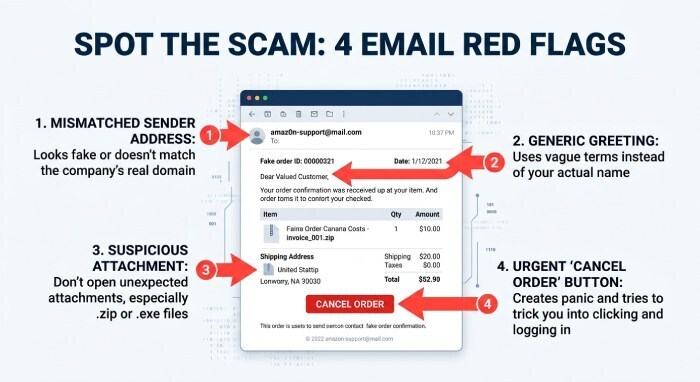
Recognizing the hallmarks of a fake order confirmation email is crucial for avoiding email scams and protecting sensitive customer information. While scammers use sophisticated AI-powered tools to generate emails that appear strikingly authentic, several warning signs persist.
Inconsistent Sender Addresses and Brand Impersonation
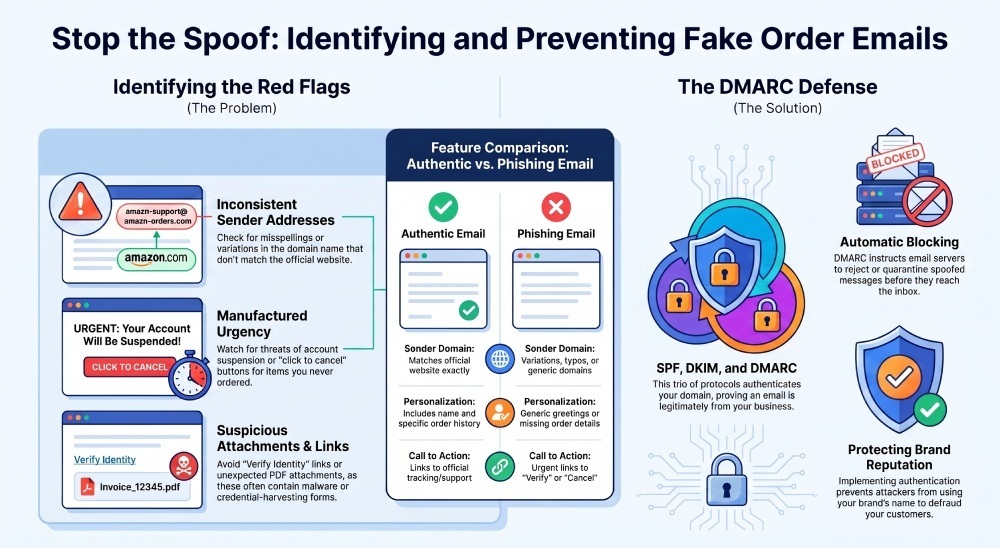
One of the most prominent indicators of a fake order confirmation email is the mismatch between the sender’s email address and the retailer’s real website domain. Scam emails frequently use variations or misspellings of well-known brands (such as Amazon or PayPal) to trick recipients. Brand impersonation may even extend to using accurate logos, HTML formatting, and professional language thanks to AI technology and email generators, making visual inspection alone unreliable.
Unfamiliar Order Numbers and Suspicious Activity
Legitimate order confirmation emails and payment confirmation emails always include a verifiable order number, detailed list of products purchased, and often a summary of the order history. A fake order confirmation email might include an unfamiliar order number referencing an expensive item or ask the recipient to address alleged suspicious activity, like an unfamiliar charge. The intent is to provoke a panic response and prompt a hasty “click to cancel” or “verify identity” action.
Unusual Links, Attachments, and File Extensions
Phishing emails often urge recipients to click a link leading to a spoofed login page or to download a fake PDF or other attachment. Be wary of attachment file extensions that seem unnecessary for an order email, as these may conceal malware designed to steal login details or compromise your bank account.
Poor Design and Lack of Personalization
While some scam emails use advanced email copywriting mimicking personalized emails, others may display poor formatting or lack relevant email personalization such as your customer name, exact products purchased, or shipping address. An absence of these details can signal an attempt to cast a wide net without individualized customer behavior data.
Unsolicited Offers and Threats of Account Suspension
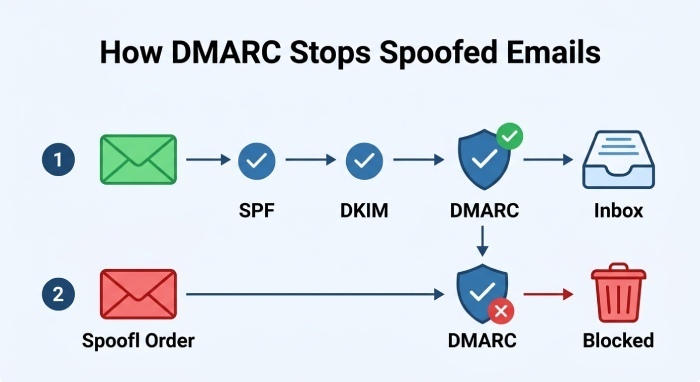
Scammers employ pressure tactics such as threats of account suspension or warnings about account problems to expedite a response. They may offer suspicious promotional offers or discounts for items you never ordered or prompt you to cancel order for something you never purchased.
How Attackers Use Email Spoofing to Imitate Trusted Brands
Email spoofing is a sophisticated technique widely used in phishing campaigns and scam emails**.** By falsifying email headers, scammers make their malicious communication appear to originate from a trusted company—often your favorite ecommerce store or service provider like Amazon, PayPal, or Netflix. Modern spoofing attacks often leverage AI-powered tools to automate and generate emails at scale, closely matching the design and language of authentic order confirmation emails.
Brand impersonation tactics extend beyond email sender addresses. Attackers replicate:
- Logos and styling consistent with mobile optimized email practices.
- Order details including fabricated order numbers and products purchased.
- Payment confirmation emails with fabricated charge not recorded notices to incite urgency.
- Landing pages designed to harvest login details and customer information.
The use of automated email generators and machine learning means that even seasoned recipients can be tricked, especially when scam emails are tailored using publicly available customer data or insights into customer behavior.
How DMARC Helps Prevent Spoofed Order Confirmation Emails
To combat the rising tide of email scams and restore faith in business communication, organizations have turned to DMARC—an industry-standard protocol for authenticating emails.
DMARC’s Role in Email Authentication
DMARC works alongside SPF (Sender Policy Framework) and DKIM (DomainKeys Identified Mail) protocols to confirm that emails sent from a business domain are genuine. When a retailer’s real website implements DMARC, it instructs receiving email servers to reject, quarantine, or flag as suspicious any email that fails authentication checks. The strength of that protection depends on your DMARC policy: only p=reject blocks spoofed mail outright.
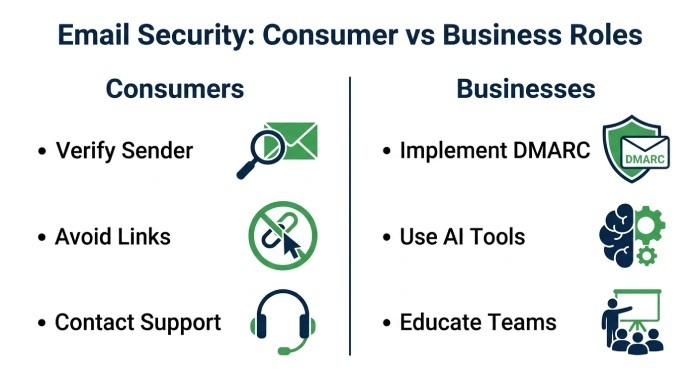
This means any scam email, phishing email, or fake order confirmation email attempting brand impersonation is less likely to ever reach the recipient’s inbox. Trusted companies such as Amazon and financial institutions widely deploy DMARC protections to guard their brand reputation and reduce fraudulent charges and malware risks.
DMARC Adoption and AI-powered Protection
Entities like Valimail and Embolden assist businesses and store owners in deploying DMARC quickly and efficiently. Combined with AI technology, they can monitor customer service response patterns, customer behavior, and emerging threats, automatically adapting filters to detect novel scam emails or spoofed payment confirmation emails.
Practical Steps for Consumers and Businesses to Stay Protected
DMARC is powerful, but comprehensive protection requires vigilance and layered strategies from both consumers and ecommerce store operators.
For Consumers: How to Verify and Respond
- Double-Check Sender Details: Inspect the sender’s email address closely and verify legitimacy by navigating to the retailer’s real website directly, rather than using suspicious links.
- Review Order Details: Make sure order numbers, products purchased, and delivery information match your known order history. Disregard emails referencing unfamiliar charges or expensive items you did not order.
- Avoid Clicking Suspicious Links or Attachments: Do not click links prompting you to cancel order, verify identity, or resolve an account problem. Be particularly cautious with email attachments—especially those lacking clear context or using uncommon file extensions, as these are common malware vectors.
- Contact Customer Support: If you receive a fake order confirmation email, report it to the company’s official customer support. A swift customer service response can prevent further compromise.
- Don’t Panic: Scammers rely on creating a panic response. Cross-check any purported payment confirmation email or threat of account suspension by logging into your account directly through the trusted company’s website.
For Businesses: Secure Your Brand and Your Customers
- Implement DMARC, SPF, and DKIM: Work with partners like Embolden or Valimail to deploy DMARC and related authentication protocols. This will help prevent attackers from using your domain to generate emails involved in phishing scams. See our step-by-step guide to stop email spoofing with DMARC. Start by confirming your current policy with a DMARC checker.
- Use AI-powered Tools: Leverage Artificial intelligence technology and machine learning to monitor for suspicious activity, detect scam attempts, and automate responses. Modern email generators for order confirmation, payment confirmation, and promotional offers can be programmed to include mobile optimized email layouts, making legitimate correspondence more recognizable to customers.
- Educate Employees and Customers: Provide training on how to identify scam emails and the importance of checking attachment file extension, sender domain, and personal information requests.
- Audit Email Copywriting: Ensure all automated and personalized emails contain consistent branding, clear order numbers, customer names (where appropriate), and references to actual products purchased.
- Develop Fast Response Protocols: Design workflows for reporting and responding to scam email incidents, maintaining a responsive customer service channel.
- Keep Software and Policies Updated: Continuously update systems guarding customer information and promote best practices for email security to all stakeholders.
Staying vigilant against fake order confirmation emails and deploying robust security measures is essential to safeguarding personal, financial, and business information in the age of advanced email scams. For both consumers and store owners, combining DMARC, AI-powered detection, and smart communication practices with solutions from DMARCReport will dramatically reduce exposure to phishing threats and cement the integrity of ecommerce interactions.
General Manager
General Manager of DuoCircle. Product strategy and commercial lead for DMARC Report's 2,000+ customer base.
LinkedIn Profile →Take control of your DMARC reports
Turn raw XML into actionable dashboards. Start free - no credit card required.