How To Set Up SPF, DKIM, And DMARC For Constant Contact

Quick Answer
To set up SPF, DKIM, and DMARC for Constant Contact, add the required authentication records to your domain’s DNS settings. These records verify legitimate email senders, prevent domain spoofing, and improve email security and deliverability.
Try Our Free DMARC Checker
Validate your DMARC policy, check alignment settings, and verify reporting configuration.
Check DMARC Record →Email authentication helps protect your domain against spoofing and phishing while supporting reliable email delivery for Constant Contact campaigns. SPF, DKIM, and DMARC each play a different role in verifying email sources and checking whether messages are authorized to use your domain. Constant Contact handles basic SPF authentication for its standard Email and Digital Marketing service, while users can configure custom-domain authentication through DKIM and DMARC records in their DNS settings.
In this guide, we’ll explain how SPF, DKIM, and DMARC work with Constant Contact, how to authenticate your sending domain, and how to monitor authentication results to maintain your email security.
Why Email Authentication Matters for Constant Contact Senders
Email authentication is the foundation of trustworthy email marketing. When you send campaigns through Constant Contact, mailbox providers such as Google, Yahoo!, and Microsoft evaluate whether your messages are authorized to come from your domain name. SPF, DKIM, and DMARC help prove that authorization and reduce the risk that your campaigns are filtered, rejected, or flagged as suspicious.
For organizations using Constant Contact’s Email and Digital Marketing service, domain authentication helps mailbox providers verify that marketing messages are associated with an authorized sending domain. Because the platform sends campaigns on behalf of businesses, configuring custom-domain authentication correctly is important for maintaining brand consistency and supporting DMARC compliance.
Authentication supports deliverability and brand trust
Authenticated emails are more likely to reach the inbox because receiving servers can validate the sending domain, return path, and cryptographic signature. SPF authentication confirms which mail servers are allowed to send on behalf of your domain. DKIM adds a tamper-resistant signature. DMARC tells mailbox providers what to do when SPF or DKIM fails.
Together, these controls help protect domains against email spoofing and phishing attempts.
They also help businesses maintain consistent sender identity, authenticate legitimate marketing campaigns, and monitor unauthorized email activity through DMARC reports.
Who should manage authentication
In many companies, Company Managers, Marketing Managers, Sales Managers, Salespersons, and Jr. Salespersons may use Email Settings, Company Email Settings, the Email and Digital Marketing area, or even the Meetings feature. However, only someone with access to your DNS settings should make authentication changes. That may be your IT team, Registrar, Domain Name Registrar, or hosting provider such as GoDaddy, HostGator, NameCheap, DNSimple, EasyDNS, Network Solutions, Bluehost, or Cloudflare.
How Constant Contact Handles SPF Authentication
SPF (Sender Policy Framework) is an email authentication protocol that identifies which mail servers are authorized to send messages for a domain. It works through a DNS TXT record that receiving mail servers check against the sending server’s IP address and envelope sender domain.
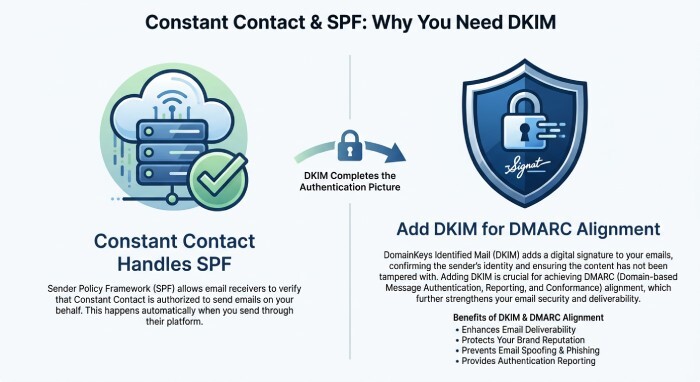
For Constant Contact’s standard Email and Digital Marketing service, basic SPF authentication is handled by the platform. Therefore, users generally do not need to add a separate Constant Contact SPF include mechanism to their existing domain SPF record. However, SPF authentication and SPF alignment are different concepts, and DMARC requires alignment with the visible From domain.
What an SPF record does
An SPF record is published as a TXT record in your domain’s DNS settings, usually at the root of the domain. It identifies which sending servers are authorized to send emails using that domain in the envelope sender address.
For Constant Contact’s standard Email and Digital Marketing service, basic SPF authentication is already handled by the platform. Users generally do not need to add a separate Constant Contact SPF include to their existing domain record.
If your organization uses other email services, maintain the SPF mechanisms required by those providers. Always check the official configuration instructions for each sending service before modifying your SPF record.
Avoid Duplicate SPF Records
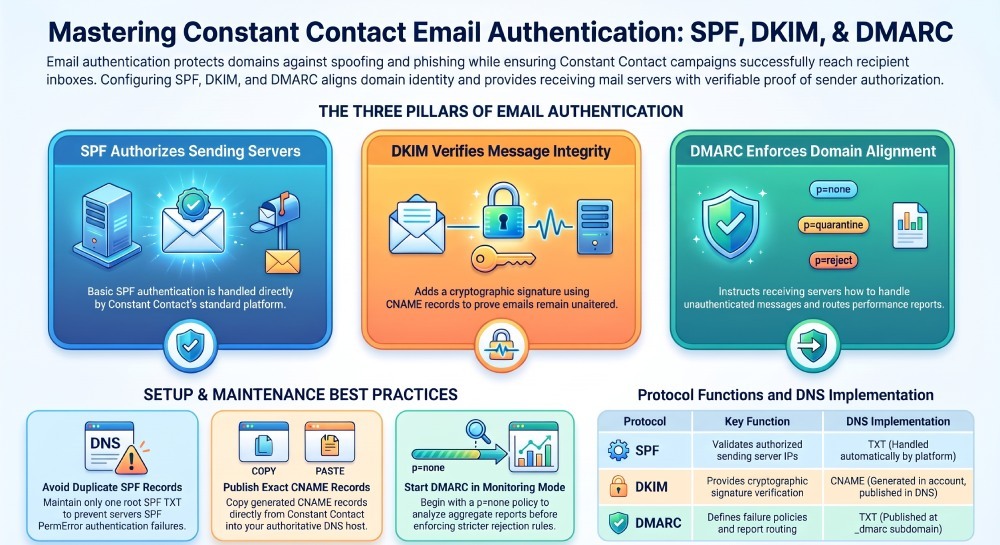
A domain should have only one SPF TXT record at its root. Publishing multiple SPF records can cause an SPF PermError and interfere with email authentication.
If your organization already uses Google Workspace, Microsoft 365, or another email service, maintain the SPF mechanisms required by those authorized sending services. Do not add an unnecessary Constant Contact SPF include to the record because the standard Constant Contact Email and Digital Marketing service handles basic SPF authentication automatically.
For example, a domain that sends email through Google Workspace may use:
v=spf1 include:_spf.google.com ~allThis example applies only when Google Workspace is an authorized sender. If other platforms send email from your domain, account for their documented SPF requirements as well.
Before modifying an SPF record, review all authorized sending services and verify their current DNS requirements.
SPF Authentication and the Return-Path
SPF checks whether the sending server is authorized by the SPF record of the envelope sender domain, which is associated with the Return-Path address. This domain may differ from the visible From address displayed to recipients.
DMARC evaluates whether either SPF or DKIM passes authentication and aligns with the visible From domain. With Constant Contact, SPF authentication can pass without SPF alignment. Therefore, configuring DKIM with your own authenticated domain is important for achieving DMARC alignment and protecting your email domain.
Setting Up DKIM Authentication in Constant Contact
DKIM, or DomainKeys Identified Mail, uses encrypted DKIM keys to sign outgoing messages. When a recipient’s mailbox provider receives the message, it checks the public key in DNS to verify that the message was not altered and that it was authorized by the domain.
How DKIM uses CNAME records
In Constant Contact and Lead Gen & CRM, DKIM setup commonly involves adding one or more CNAME record entries to your DNS settings. A CNAME record, also known as a canonical name record, points one hostname to another canonical domain managed by the email platform.
For example, Constant Contact may provide DKIM-related hostnames and target values. You should copy the exact CNAME configuration from your account. These values may be labeled as DKIM, domain authentication, Owner CNAME Record, Link CNAME Record, or domain verification records depending on the interface.
A CNAME record is not the same as a TXT SPF record. The CNAME record delegates a specific hostname to Constant Contact so the platform can publish or manage the needed authentication value. This is common for DKIM, rebranding links, and link safelabeling.
Where to enter DKIM records
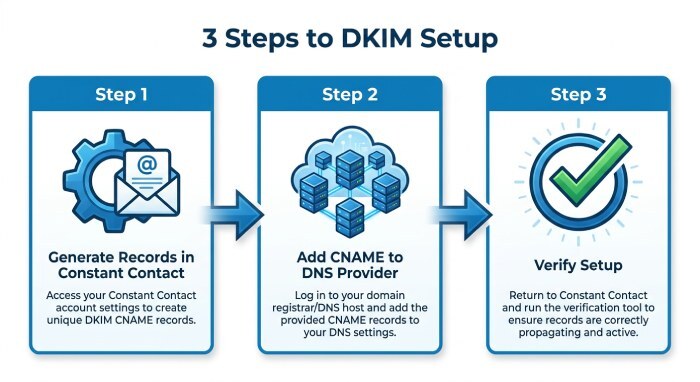
To configure DKIM, access your Constant Contact account and navigate to the email authentication settings. Select the option to self-authenticate your sending domain and generate the required DNS records.
Next, log in to the provider managing your domain’s authoritative DNS and add the CNAME or TXT records exactly as provided by Constant Contact. Check the hostname and destination values carefully, as some DNS providers automatically append the domain name.
After publishing the records, return to Constant Contact and use its verification option to check whether the DNS configuration is correct. If verification is unsuccessful, review the record names and values and allow time for DNS propagation before testing again.
Using DMARC to Protect Your Domain and Improve Deliverability
DMARC (Domain-based Message Authentication, Reporting, and Conformance) builds on SPF and DKIM by checking whether at least one authentication method passes and aligns with the domain in the visible From address.
A DMARC record is published as a TXT record at the _dmarc subdomain of your domain. It tells receiving mail servers how to handle messages that fail DMARC authentication and can specify an address for receiving aggregate authentication reports.
Start with monitoring
A basic DMARC record often starts in monitoring mode:
v=DMARC1; p=none; rua=mailto:dmarc-reports@example.comThis lets you collect reports without blocking legitimate mail. Once your SPF record and DKIM CNAME record are passing consistently, you can move DMARC toward stricter policies such as quarantine or reject.
DMARC is valuable because it provides both spoofing protection and phishing protection. If attackers try to impersonate your domain, DMARC tells mailbox providers how to handle unauthenticated mail. For Constant Contact senders, DMARC also reinforces email deliverability by showing mailbox providers that your domain authentication is intentional and maintained.
Align SPF, DKIM, and DMARC
DMARC evaluates whether SPF or DKIM passes authentication and aligns with the domain in the visible From address.
For example, SPF can pass authentication while failing DMARC alignment if the envelope sender domain differs from the visible From domain. Similarly, DKIM must use an aligned signing domain to satisfy DMARC through DKIM authentication.
For Constant Contact users, configuring DKIM self-authentication with their own domain provides an important way to achieve DMARC alignment. Monitoring DMARC reports can help identify authentication failures and verify that legitimate marketing emails are properly authenticated.
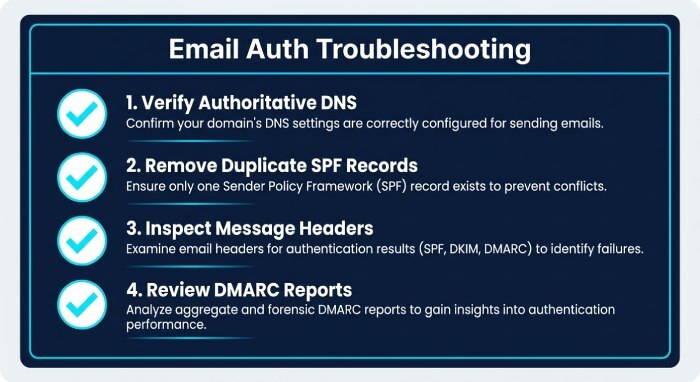
Testing, Troubleshooting, and Maintaining Your SPF, DKIM, and DMARC Records
After setup, test your email authentication before sending major campaigns. DNS propagation can take minutes or hours depending on your hosting provider, Time to live (TTL) values, and DNS infrastructure.
Use DNS Lookup and Email Authentication Testing Tools
After configuring your DNS records, verify that the DKIM and DMARC records are published correctly. DNS lookup tools can help identify missing records, incorrect hostnames, and configuration errors.
You can also send test emails to Gmail, Yahoo, and other mailbox providers and inspect the message headers to review SPF, DKIM, and DMARC authentication results.
For ongoing visibility, DMARC aggregate reports can help identify authentication failures, unauthorized sending sources, and domain alignment problems.
Common DNS Configuration Mistakes
Common authentication problems include entering an incorrect DKIM hostname, publishing the wrong CNAME or TXT value, creating multiple SPF records, or placing a DMARC record at the wrong DNS location.
Another common issue occurs when users update DNS records through their domain registrar instead of the provider managing their authoritative DNS.
If Constant Contact reports that domain authentication is incomplete, verify your authoritative DNS provider and compare each published record against the values generated in your Constant Contact account.
General Manager
General Manager of DuoCircle. Product strategy and commercial lead for DMARC Report's 2,000+ customer base.
LinkedIn Profile →Take control of your DMARC reports
Turn raw XML into actionable dashboards. Start free - no credit card required.