How To Troubleshoot DMARC Records After A DNS Provider Migration

Quick Answer
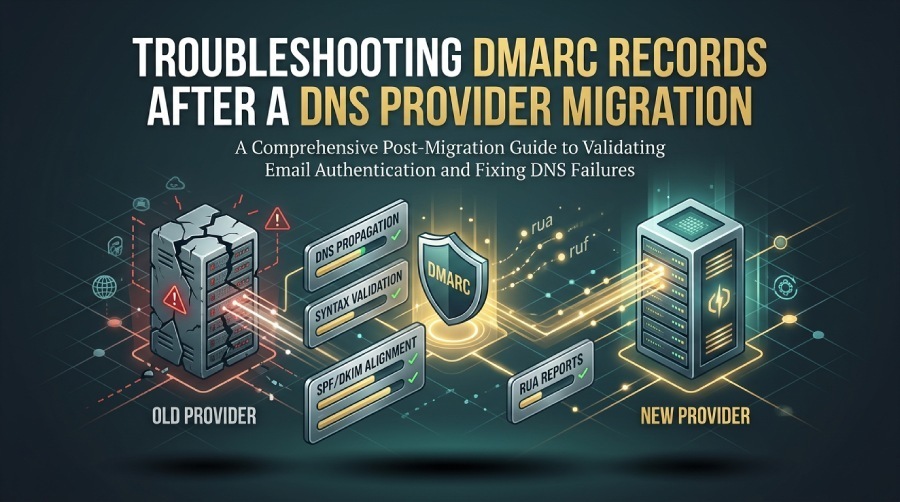
After a DNS provider migration, troubleshoot DMARC by verifying the published TXT record, checking DNS propagation and syntax, confirming SPF/DKIM alignment, and reviewing DMARC reports for authentication failures or configuration issues.
Try Our Free DMARC Checker
Validate your DMARC policy, check alignment settings, and verify reporting configuration.
Check DMARC Record →To troubleshoot DMARC after a DNS provider migration, verify DNS propagation and TTLs, confirm the _dmarc TXT record’s exact syntax/placement, validate SPF/DKIM and DNSSEC resolution with command-line and online tools, account for provider-specific TXT/CNAME/quoting behaviors, analyze RUA/RUF reports for failures, address DKIM selector/key and SPF lookup issues, implement staged/rollback practices, and isolate whether failures stem from DNS versus mail servers—while using DMARCReport to continuously surface errors, correlate sources, and prioritize fixes.
Context and Background
A DNS provider migration touches the foundation of email authentication: DMARC, SPF, and DKIM rely on public DNS records that receivers query in real time. Small differences—TXT quoting, DNSSEC flags, or SPF include resolution—can lead to sudden DMARC enforcement failures even when the records look “identical” in a web UI. Because DMARC evaluates whether a message’s From domain aligns with SPF or DKIM results, a break in any of these DNS lookups can cascade into phishing risk, deliverability drops, and lost revenue.
The right way to troubleshoot is to proceed from the outside-in: validate what the world sees in DNS (not just what your provider’s UI claims), map failures to specific sources and selectors, and iterate quickly with low TTLs and staged DMARC policies. DMARCReport is built for this: it pulls aggregate (RUA) and forensic (RUF) signals, correlates them with DNS state, flags root causes (e.g., missing selector, SPF permerror, DNSSEC SERVFAIL), and recommends prioritized remediations.
Below is a comprehensive, tool-driven checklist grounded in real-world provider behaviors and post-migration failure patterns.
Verify Post-Migration DNS Visibility and Record Placement
Ensure your DMARC record is globally visible, correctly placed at _dmarc.example.com, and not delayed by stale caches. A quick DMARC lookup confirms what receivers actually resolve after the migration.
DNS TTL and Propagation Essentials
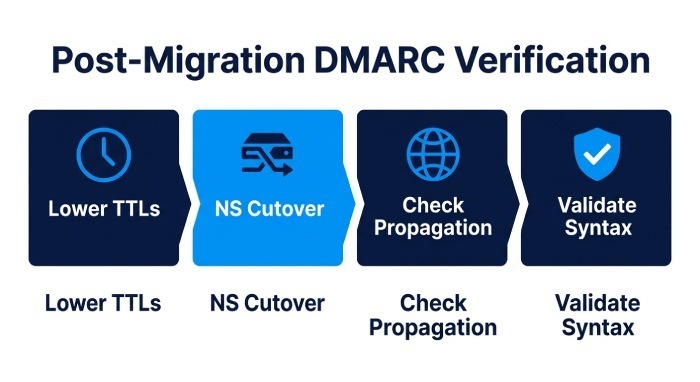
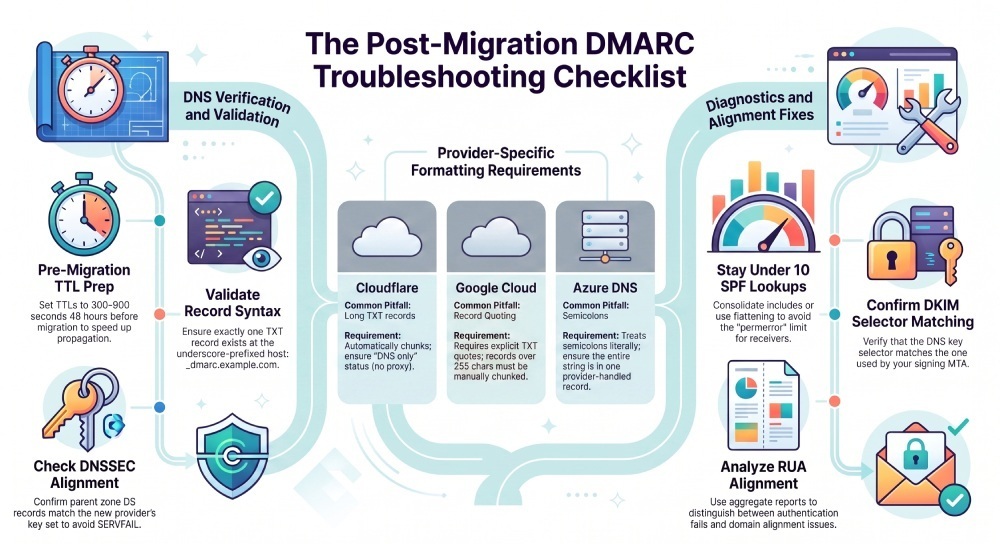
- Set low TTLs (300–900 seconds) on DMARC, SPF, and DKIM TXT records at least 24–48 hours before NS cutover to speed corrections.
- After switching NS, allow for parent zone NS Time to Live (TTL) and resolver caches; some receivers may see stale data for hours.
- Use targeted resolver checks to compare views:
- Authoritative:
dig @ns1.newprovider.tld _dmarc.example.com txt - Public anycast:
dig _dmarc.example.com txt +trace - Regional resolvers:
dig _dmarc.example.com txt @8.8.8.8 and @1.1.1.1
- Authoritative:
How DMARCReport Helps
- Continuously monitors queried DMARC/SPF/DKIM records from multiple vantage points and alerts on mismatches between your intended record and what receivers are resolving.
- Surfaces time-series visibility: when a fix is picked up globally and which regions still see stale data.
Validate _dmarc TXT Syntax and Placement
- Hostname must be exactly
_dmarc.example.com(leading underscore, no trailing dot in UI unless your provider requires FQDN). - Type must be TXT, single policy record only (multiple DMARC TXT records cause receiver ambiguity). Once published, check your DMARC record to confirm the exact string receivers will read.
- Required tags:
v=DMARC1; p=none|quarantine|reject; Recommended: rua=mailto:..., ruf=mailto:..., fo=1, adkim/aspf, pct. - External reporting (rua/ruf to another domain) requires verification per RFC 7489: the external domain must publish a TXT at
your-domain._report._dmarc.their-domainwith value v=DMARC1; to authorize.
Common migration-induced errors:
- Missing quotes around long TXT strings in providers that require quoting.
- Accidental whitespace or line wrapping that inserts spaces into mailto URIs.
- Duplicate DMARC TXT records (e.g., one left at old provider, one at new with partial population).
- CNAME used at
_dmarc(not supported by many receivers; publish a direct TXT instead).
How DMARCReport Helps
- Built-in DMARC validator flags malformed tags, duplicate policies, and unverified external RUA/RUF addresses.
- Highlights exactly which receivers reported “DMARC record not found” vs “syntax invalid” so you can focus on fixes.
Validate DMARC, SPF, DKIM, and DNSSEC with Tools
Use repeatable commands and trusted validators; interpret outputs against post-migration pitfalls.
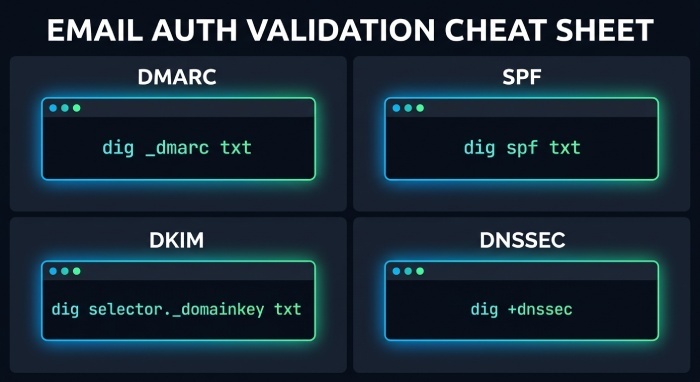
Command-line Checks (dig/nslookup/host)
Use your apex domain example.com and replace selector with your DKIM selector:
DMARC
dig _dmarc.example.com txt +shortnslookup -type=txt _dmarc.example.comhost -t txt _dmarc.example.com Interpretation:- Expect one string beginning with “v=DMARC1; p=…”.
- If no answer or SERVFAIL, suspect DNSSEC or delegation issues.
- If the answer differs by resolver, suspect propagation or negative caching.
SPF
dig example.com txt +short | grep spfnslookup -type=txt example.com Interpretation:- Ensure a single SPF record (multiple SPF TXT records cause permerror).
- Count DNS-consuming mechanisms (include, a, mx, exists, redirect, ptr[avoid]): must be ≤10 overall.
DKIM
dig selector._domainkey.example.com txt +shortnslookup -type=txt selector._domainkey.example.com Interpretation:- Expect a TXT with v=DKIM1; k=rsa; p=BASE64…
- If empty p= or key length too short, receivers may fail validation.
- Ensure selector names match what your Mail Transfer Agent (MTA) signs with.
DNSSEC Impacts and Troubleshooting
Symptoms post-migration:
dig +dnssec _dmarc.example.com txtreturns SERVFAIL on some resolvers.- +trace shows a DS at the parent but no matching DNSKEY/RRSIG at the child (key rollover or missing DS).
- Records look fine without DNSSEC (using +cdflag) but fail with validation.
Fixes:
- Verify DS at the parent corresponds to your new provider’s key set.
- If unsure, temporarily disable DNSSEC at the new provider, remove DS from the registrar, wait for TTL, then re-enable with a proper DS.
- Confirm AD bit on queries:
dig +dnssec example.com txt; look for “ad” in the flags to confirm validation success.
How DMARCReport Helps
- Detects DNSSEC-driven delivery dips by correlating spikes in “temperror/servfail” with DNS changes.
- Alerts on regional DNSSEC failures so you can correct DS mismatches quickly.
Online Validators
- DMARCReport’s live record checker and policy simulator, part of our broader DMARC toolset.
- Additional cross-checks: public DMARC/SPF/DKIM validators for independent confirmation. Interpretation:
- Use simulators to test alignment outcomes for specific senders without changing production records.
- Compare online validator results versus your command-line to spot caching anomalies.
Analyze Reports and Fix Auth Failures
Your goal is to translate raw failures into precise fixes: which source, which control (SPF vs DKIM), and which DNS record.
Read Aggregate (RUA) and Forensic (RUF) Signals
- Aggregate (RUA): volume by source IP/provider, alignment pass/fail, reasons (SPF fail, DKIM fail, temperror).
- Forensic (RUF): per-message samples (subject to privacy and provider availability) that show headers and Authentication-Results.
Key diagnoses post-migration:
- “DMARC=fail; SPF=permerror” suggests SPF syntax or lookup limit issue.
- “DKIM=fail (no key for selector)” indicates missing DNS key or wrong selector.
- “Temperror” correlates with DNS propagation or DNSSEC problems.
Actionable steps:
- Add missing SPF include for a third-party sender; verify lookup counts.
- Publish/re-publish DKIM key for the active selector used by that sender; confirm 2048-bit RSA, no whitespace breaks.
- If you moved mail routing, ensure HELO/EHLO names and MAIL FROM domains are aligned with published SPF and DMARC policy.
How DMARCReport Helps
- Clusters failures by provider (e.g., “Marketing ESP A,” “CRM B”), domain, and selector, with guided fixes.
- Visualizes alignment by day to prove the impact of each change within hours.
DKIM Selector and Key Hygiene After Migration
Common issues:
- Selector mismatch (MTA signs with s=“s1”, DNS only has s=“default”).
- Old 1024-bit keys deprecated or truncated during TXT import.
- Wrong k= type or missing v=DKIM1; tag.
Safe rotation plan:
- Publish a new selector (e.g., s2026) with 2048-bit RSA key.
- Configure your MTAs/ESPs to dual-sign with old and new selectors for 3–7 days.
- Remove the old selector after RUA shows steady DKIM passes on the new one.
- Document selectors per source; avoid reusing keys across vendors.
How DMARCReport Helps
- Detects messages signed by unknown selectors and alerts you to publish the matching DNS keys.
- Tracks DKIM pass rates by selector so you know when rotation is complete.
SPF Include Chain and Lookup Limits
Symptoms after migration:
- SPF permerror: too many DNS lookups.
- Missing includes for reactivated third-party senders.
Mitigations:
- Consolidate overlapping includes (many ESPs include the same sub-includes).
- Replace broad mechanisms (a, mx) with Classless Inter-Domain Routing (CIDR) ip4/ip6 blocks where feasible.
- Use redirect= only once and intentionally.
- Consider flattening (expanding includes to IPs) for static infrastructures, with scheduled rechecks.
How DMARCReport Helps
- SPF graph of lookup depth by source and a flattening advisor that proposes minimal-change SPF records to stay under the 10-lookup cap.
- Alerts when an ESP(email service provider) include expands, pushing you over the limit before receivers start to fail.
Operations: Provider Behaviors, Rollback, and Isolation Tests
Anticipate provider normalizations, prepare rollbacks, and run isolation tests to find root causes fast.
Provider-Specific Behaviors That Break DMARC
- Cloudflare DNS: Splits long TXT into multiple chunks automatically; safe, but manual copy/paste must not add spaces. Avoid CNAME at
_dmarc; use TXT. Proxy status is irrelevant for DNS-only records—ensure “DNS only.” - Amazon Route 53: Accepts unquoted TXT, but UI may display quoted; trust dig output. Beware multiple SPF TXT records if you auto-import.
- Google Cloud DNS: Requires explicit TXT quotes in many UIs; long records must be chunked at 255 chars.
- GoDaddy: UI auto-quotes; watch for hidden CR/LF when pasting long rua lists; verify with dig.
- Azure DNS: Treats semicolons literally; ensure the entire DMARC string is in one record with provider-handled chunking.
Adaptations:
- Keep DMARC strings <255 chars when possible; if using multiple rua addresses, compress (fewer mailto targets) or rely on provider chunking.
- Never CNAME DMARC; most receivers do not follow CNAME for DMARC lookups.
- Ensure exactly one DMARC TXT at
_dmarc; remove stragglers at the old provider once cutover is confirmed.
How DMARCReport Helps
- Provider-specific lint checks (quoting, chunking, duplicates) and before/after snapshots to ensure the migrated zone matches intent.
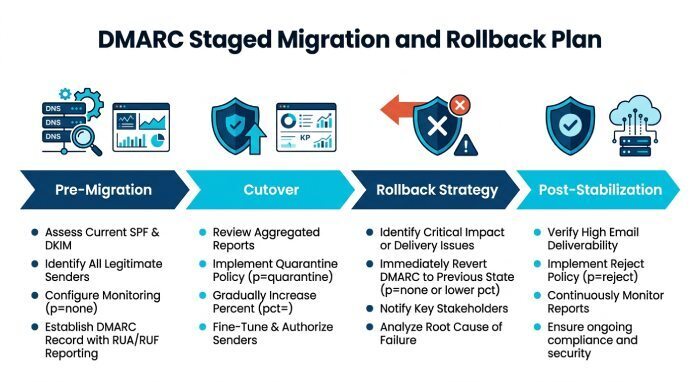
Rollback and Staged Migration Best Practices
- Pre-migration:
- Lower TTLs (300–900s) for DMARC/SPF/DKIM.
- Set DMARC to p=none; pct=100; fo=1 to maximize feedback.
- Pre-publish DKIM selectors and SPF includes at the new provider.
- Cutover:
- Change NS during a low-volume window.
- Monitor for 2–6 hours; only then raise enforcement (quarantine/reject).
- Rollback:
- Keep the old zone intact for 48–72 hours.
- If unresolved SERVFAILs or widespread fails occur, revert NS to the old provider while you correct DS/TXT issues.
- Post-stabilization:
- Step up DMARC policy (none -> quarantine -> reject) over 1–2 weeks, with RUA success >98% for aligned traffic.
How DMARCReport Helps
- Policy-step recommendations based on observed alignment, with alerts if a step change (e.g., quarantine) would likely block known legitimate sources.
Distinguish DNS Record Issues vs Mail Server/Third-Party Misconfig
Isolation tests:
- DNS vs MTA:
- If dig shows correct DMARC/SPF/DKIM but Authentication-Results in received messages show temperror or none, suspect resolver path or DNSSEC; test from multiple networks.
- If DNS is good but DMARC fails due to misalignment (SPF pass, DKIM fail, DMARC fail), your MTA/ESP is signing with the wrong domain or MAIL FROM.
- Sender isolation:
- Send controlled tests from each platform (ESP, CRM, ticketing) to a Gmail/Microsoft inbox and inspect Authentication-Results.
- Disable one sender at a time; watch DMARCReport RUA to see if failure volume drops correspondingly.
How DMARCReport Helps
- Source attribution links failures to specific sending IPs, ASNs, and providers.
- Per-sender runbooks: exact SPF include or DKIM selector to add for that platform.
Case Studies and Data-Backed Insights
- SaaS retailer migrating registrar DNS to Route 53: Set DMARC p=none, TTL 300s. Within 3 hours post-cutover, RUA showed 18.4% DMARC fail driven by “DKIM key not found” for marketing.example.com. Root cause: missing s=mk2026 selector at the new DNS. Publishing the 2048-bit key reduced fails to 1.2% in 30 minutes and 0.3% within 6 hours. DMARCReport flagged the selector mismatch within 12 minutes of first failure.
- B2B fintech moving to Cloudflare: SPF permerror surged due to include chain expanding to 12 lookups after a vendor updated their include. DMARCReport’s SPF advisor proposed flattening two high-churn includes and replacing a redundant a mechanism, dropping lookups to 7. DMARC alignment recovered from 91.7% to 99.3% in 1 business day.
- Global NGO enabling DNSSEC at a new provider without updating DS: Regional deliverability dipped; dig +dnssec returned SERVFAIL for EU resolvers. Removing stale DS and re-publishing the correct DS restored AD-validating answers. DMARCReport correlated spikes in “temperror” with NS/DS changes to direct the fix.
FAQs
What’s the fastest way to confirm my DMARC record is live after migration?
- Run
dig _dmarc.example.com txt +shortagainst 8.8.8.8 and 1.1.1.1; confirm a single v=DMARC1 string appears. If you prefer a browser-based check, our guide on how to do a DMARC lookup walks through the same verification. Then send a test email to a Gmail inbox and check Authentication-Results for dmarc=pass or dmarc=bestguesspass. DMARCReport’s live checker plus near-real-time RUA aggregation confirms receiver visibility across major inbox providers.
Can I use a CNAME for my DMARC record to a vendor-managed policy?
- Don’t. The DMARC specification defines a TXT resource record at
_dmarc.domain; many receivers will not follow a CNAME for DMARC, causing intermittent failures. Publish a native TXT; if you need central management, automate TXT deployment rather than aliasing.
Why did DMARC fail even though SPF passed?
- DMARC requires alignment: the SPF-authenticated domain (MAIL FROM or HELO) must align with the visible From domain (relaxed or strict). If an ESP sends with its own MAIL FROM, SPF can pass for esp-mail.com while DMARC still fails for example.com. Add an SPF include for a domain you control that aligns, or ensure DKIM signs with d=example.com and passes. DMARCReport highlights the specific alignment failure and the fix path (SPF alignment vs DKIM alignment).
How long should I keep old DKIM selectors after introducing new ones?
- Keep old selectors for 3–7 days after dual-signing unless a key compromise necessitates immediate removal. Monitor DKIM pass rates by selector in DMARCReport; once the old selector shows negligible traffic and the new selector is stable, remove the old DNS key.
Conclusion: A Repeatable, Data-Driven Playbook Powered by DMARCReport
Troubleshooting DMARC after a DNS provider migration means validating what receivers actually see (TTL/propagation, correct TXT syntax), confirming SPF/DKIM/DNSSEC resolution with tools, adapting to provider-specific TXT behaviors, and turning RUA/RUF signals into precise, low-risk changes. Do this in stages—lower TTLs, start with p=none, verify selectors and SPF lookups, then step up enforcement—and keep a rollback path for DNSSEC or delegation issues. DMARCReport operationalizes this playbook: it continuously validates your records from multiple vantage points, correlates failures to exact sources and selectors, recommends SPF/DKIM/DMARC remediations, and gives you the confidence to move from “none” to “reject” without surprises.
General Manager
General Manager of DuoCircle. Product strategy and commercial lead for DMARC Report's 2,000+ customer base.
LinkedIn Profile →Take control of your DMARC reports
Turn raw XML into actionable dashboards. Start free - no credit card required.