How To Troubleshoot Mailgun DKIM Failures Caused By Missing Or Incorrect DNS Records

Quick Answer
Mailgun DKIM failures often occur due to missing, incorrect, or misconfigured DNS records. Verify DKIM selectors, check CNAME or TXT records, confirm DNS propagation, and correct configuration errors to restore email authentication and improve deliverability.
Try Our Free DKIM Lookup
Auto-discover DKIM selectors for any domain - scan 185 common selectors across all major providers.
Discover DKIM Selectors →To troubleshoot Mailgun DKIM failures caused by missing or incorrect DNS records, confirm the exact DKIM selector and TXT/CNAME values from Mailgun for your sending domain, publish them precisely at the selector._domainkey.your-domain, validate with dig/nslookup/host against authoritative nameservers (accounting for TTL/propagation), correct common DNS formatting mistakes (quotes, semicolons, line breaks, wrong host), decide whether to use a CNAME (hosted key) or a direct TXT (static key), remove duplicates/old keys safely via staged selector rotation, inspect the DKIM-Signature and Authentication-Results headers to pinpoint DNS vs. key mismatch, evaluate DMARC alignment impacts, mitigate provider-specific TXT limitations, and cross-check Mailgun dashboard/API diagnostics—then continuously monitor outcomes with DMARCReport to detect alignment errors, spikes in DKIM failures, and resolver-specific issues early.
Email authentication hinges on the receiver’s ability to retrieve your public key from DNS and validate the cryptographic signature added by Mailgun. When the DKIM TXT (or CNAME) record is mispublished—or published at the wrong host, with extra quotes, or stuck behind long TTLs—receivers return dkim=fail or dkim=permerror and (if DMARC is enforced) may reject or quarantine your mail. Because today’s delivery landscape is DMARC-first for many inboxes, even a short-lived DKIM outage can cascade into material bounce or spam placement.
A systematic response blends DNS validation, message forensics (headers), and platform telemetry. DMARCReport complements Mailgun by revealing which receivers are failing DKIM, whether failures stem from “no key,” “key mismatch,” or “body hash” issues, and how those interact with DMARC alignment—so you can isolate DNS publication defects from mail stream or content problems and verify fixes quickly.
1) Publish the exact Mailgun DKIM record (selector, name, value) correctly
Mailgun associates a DKIM selector with each domain; the public key must live at selector._domainkey.your-sending-domain as either a TXT or, if Mailgun offers hosted keys, a CNAME target.
- Required DNS name format
- Host/name:
._domainkey.<sending-domain> - Example (root domain): smtp._domainkey.example.com
- Example (sending subdomain): smtp._domainkey.mg.example.com
- Host/name:
- Required DNS value
- TXT value typically includes the DKIM version and RSA key: v=DKIM1; k=rsa; p=MIIBIjANBgkqhkiG9w0BAQEFAAOCAQ8A…
- Some providers omit v=DKIM1; using k=rsa; p=… alone still works; prefer exactly what Mailgun shows.
- If Mailgun offers a hosted-key CNAME
- Host/name:
._domainkey. - Type: CNAME
- Target: The exact FQDN Mailgun provides (often ending with .mailgun.org or a region-specific DKIM host). Example (illustrative): smtp._domainkey.mg.example.com → smtp.mg.example.com.dkim.mailgun.org
- Always copy the target exactly from the Mailgun UI/API; do not guess.
- Host/name:
Important notes:
- Use the same domain you configured in Mailgun as your “sending domain” (e.g., mg.example.com if you set that up).
- If your DNS console auto-appends the zone name, enter only the left-hand label (e.g., smtp._domainkey) rather than the full fully qualified domain name (FQDN).
- DMARCReport tie-in: After publishing, DMARCReport aggregates receiver feedback to confirm DKIM pass rates trend upward and alignment is met across Gmail, Yahoo, Microsoft 365, and others.
2) Verify DNS with dig, nslookup, host (and spot propagation or TTL issues)
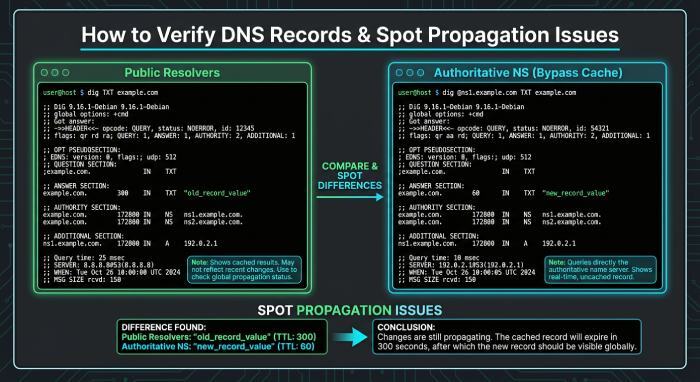
You must confirm your record is visible from both public resolvers and the domain’s authoritative nameservers.
Run fast checks against public resolvers
-
dig:
- dig +short TXT smtp._domainkey.mg.example.com
- dig +short CNAME smtp._domainkey.mg.example.com
-
nslookup:
- nslookup -type=TXT smtp._domainkey.mg.example.com
- nslookup -type=CNAME smtp._domainkey.mg.example.com
-
host:
- host -t txt smtp._domainkey.mg.example.com
- host -t cname smtp._domainkey.mg.example.com
What to expect:
- For TXT: a single DKIM string (possibly split into quoted 255-char chunks by DNS, which is normal).
- For CNAME: the target hostname; then the receiver will look up TXT at that target.
Query authoritative nameservers to bypass cache
- Find authoritative NS:
- dig NS mg.example.com +short
- Query each directly:
- dig @ns1.provider.net TXT smtp._domainkey.mg.example.com +ttlunits
- Compare answers and Time to live (TTL) across authoritative NS; inconsistent answers indicate incomplete propagation between primaries/secondaries.
Trace resolution and watch TTLs
- Trace the delegation:
- dig +trace TXT smtp._domainkey.mg.example.com
- Large TTLs (e.g., 3600–10800) delay corrections; temporarily reduce to 300 during rollout/rotation.
- DMARCReport tie-in: If DKIM passes are low while authoritative DNS shows the right record, DMARCReport surfaces receiver-specific failure patterns (e.g., certain ISPs caching older records) so you can gauge when enough of the ecosystem has refreshed.
3) Fix common DNS formatting mistakes (with provider-specific guidance)
Most DKIM failures trace to tiny formatting slips that cause resolvers or provider UIs to mangle the value.
Frequent errors that break DKIM TXT records
- Extra wrapping quotes
- Wrong: “v=DKIM1; k=rsa; p=MIIBIjA…==” (double-quoted by you and the provider)
- Right: v=DKIM1; k=rsa; p=MIIBIjA…== (let the provider handle necessary quoting/splitting)
- Unescaped or unintended semicolons
- In BIND zone files, a semicolon starts a comment; keep DKIM values in quotes or ensure semicolons are within the TXT string.
- Line breaks or whitespace inserted mid-key
- Keep the value a continuous string (provider may visualize splits; ensure the raw record compiles into a single TXT).
- Wrong host name
- Publishing at smtp._domainkey.mg.example.com.example.com or at mg.example.com (missing selector) is common. Validate the exact owner name.
- Mixing TXT and CNAME at the same owner name
- Some DNS providers allow it but receivers may behave unpredictably; pick one method.
- Multiple TXT records at the same selector
- RFC 6376 permits one DKIM key record per selector; multiple p= records at the same owner often result in permerror.
How to correct in major DNS consoles
- Cloudflare DNS
- Name: enter only smtp._domainkey (relative), not the full FQDN.
- Type: TXT or CNAME as instructed by Mailgun.
- Value: paste exactly (no manual extra quotes). Cloudflare automatically splits long TXT values.
- Proxied must be off (DNS-only) for DKIM.
- Amazon Route 53
- Name: relative (smtp._domainkey) or absolute with trailing dot; avoid duplicating zone suffix.
- Value: paste the full DKIM string; Route 53 chunks automatically. For CNAME, paste the exact target.
- Avoid creating multiple TXT records at the same name.
- GoDaddy
- Host: smtp._domainkey (not FQDN). Value: the DKIM string without additional quotes.
- Be mindful of auto-quoting; after saving, re-open to confirm it didn’t add extra wrapping quotes.
- Google Cloud DNS / Cloud DNS
- Name: absolute with trailing dot or relative; keep consistent.
- TXT values can be split into quoted 255-char segments; the console usually handles it. Keep the raw string intact.
- Azure DNS, DigitalOcean, Namecheap
- Similar guidance: use relative names, paste value exactly, avoid duplicates, and confirm after save with dig.
Practical workarounds:
- If your provider truncates or reformats long TXT values, use a CNAME to a Mailgun-hosted key when available.
- Stage changes with low TTL (300) to accelerate corrections.
- DMARCReport tie-in: DMARCReport’s trendlines will show a rapid improvement in dkim=pass after a correct republish; if not, you likely still have a formatting or selector mismatch.
4) Mailgun DKIM Records: CNAME vs. TXT and Safe Key Rotation
Understanding CNAME and TXT Records
Mailgun provides the DNS records needed to configure DKIM for your sending domain. The required record type depends on the configuration displayed in your Mailgun dashboard.
- TXT record: Contains the DKIM public key that receiving mail servers use to verify message signatures.
- CNAME record: Points to another hostname where the relevant DKIM information can be retrieved. Use this option only when Mailgun explicitly provides a CNAME record for your domain.
How to Configure the Correct DKIM Record
Follow these steps to avoid configuration errors:
- Open your sending domain’s DNS settings in Mailgun.
- Copy the exact DKIM record type, hostname, and value provided.
- Publish the record with your DNS provider without changing the supplied details.
- Verify that the record resolves correctly and that Mailgun recognizes the configuration.
- Send a test email and inspect its authentication results to confirm that DKIM passes.
Do not replace a TXT record with a CNAME, or the reverse, based on general recommendations. Follow the record type specified for your domain.
Managing DKIM Selectors and Key Rotation
If you need to rotate a DKIM key, follow Mailgun’s supported procedure for generating or configuring a replacement key.
- Publish the new DNS record using the exact details provided by Mailgun.
- Verify DNS resolution and confirm that messages signed with the new selector pass DKIM authentication.
- Keep the previous key available for as long as required by your rotation procedure and any messages still being evaluated.
- Remove obsolete records only after confirming they are no longer needed.
Multiple DKIM selectors can coexist when each uses its own selector hostname. Avoid conflicting DNS records at the same hostname, and verify authentication after every configuration change.
Duplicates, multiple selectors, and old keys
- One public key per selector
- Publishing multiple DKIM records with different p= values at the same owner name is likely to cause permerror.
- Multiple selectors are fine
- You can run s1, s2, smtp, etc., in parallel—each at its own owner name.
- Remove leftovers
- Old selectors left in DNS aren’t harmful by themselves but can confuse operations; remove unused selectors once fully decommissioned.
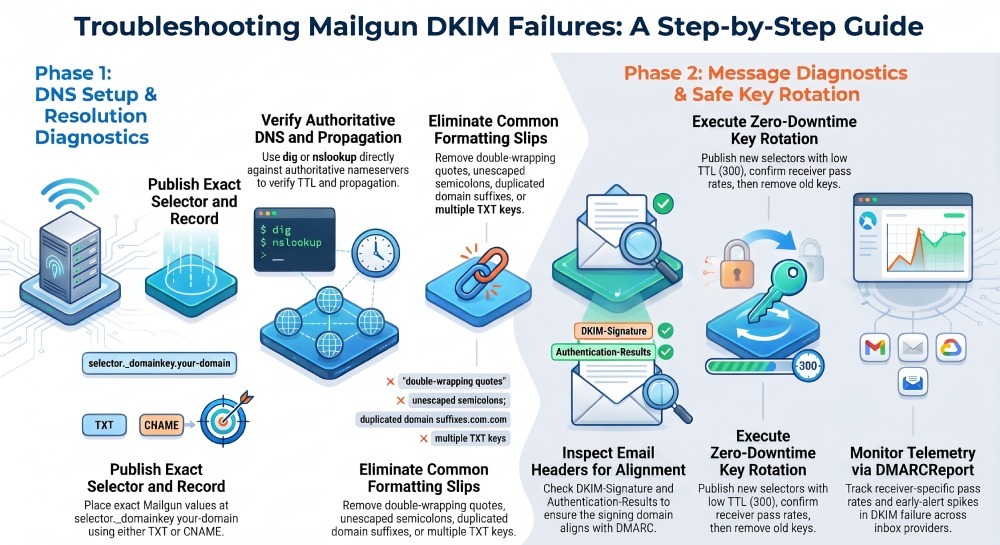
Safe DKIM rotation (no downtime)
- Generate a new selector/key in Mailgun (UI or API) or configure Mailgun to sign with a new selector alongside the old.
- Publish the new DNS record (TXT or CNAME) at newselector._domainkey.sending-domain with low TTL (300).
- Wait for DNS propagation (authoritative and public resolvers).
- Update Mailgun to sign only with the new selector (or prioritize it).
- Monitor via DMARCReport for widespread dkim=pass across major receivers for 48–72 hours.
- Remove the old record and revert TTLs to normal.
Best practices for Mailgun selectors:
- Use descriptive naming (e.g., mg2026q1) for planned rotations.
- Keep keys 2048-bit RSA at minimum.
- Document active selectors in your runbooks.
- DMARCReport tie-in: Use DMARCReport to watch per-domain DKIM pass rates through the entire rotation window; if a receiver continues reporting dkim=neutral/no key, delay decommissioning the old selector.
5) Prove it end-to-end: inspect headers, DMARC alignment, and platform diagnostics
Even with perfect DNS, a misaligned domain or mismatched selector will fail DMARC.
Read DKIM-Signature and Authentication-Results
- Sample headers in a received message:
- DKIM-Signature: v=1; a=rsa-sha256; c=relaxed/relaxed; d=mg.example.com; s=smtp; h=from:subject:date:to:mime-version; bh=Kk2…=; b=MJ1…
- Authentication-Results: receiver.net; dkim=fail (no key for signature) header.d=mg.example.com header.s=smtp; spf=pass smtp.mailfrom=bounce@mg.example.com; dmarc=fail (p=reject) header.from=example.com
- Interpretation:
- d= (signing domain) must align to the From domain per DMARC (relaxed alignment allows subdomain alignment, e.g., mg.example.com aligns with example.com).
- s= (selector) should match the DNS owner name used for the key.
- dkim=fail (no key) → DNS publication or propagation issue.
- dkim=fail (bad signature) → content/body changed or wrong key/selector in DNS.
- DMARCReport tie-in: DMARCReport compiles aggregate feedback that includes per-receiver dkim result, spf result, and overall DMARC disposition so you can confirm whether failures are “no key,” “permerror,” or “fail” and where they occur.
SPF and DMARC interplay
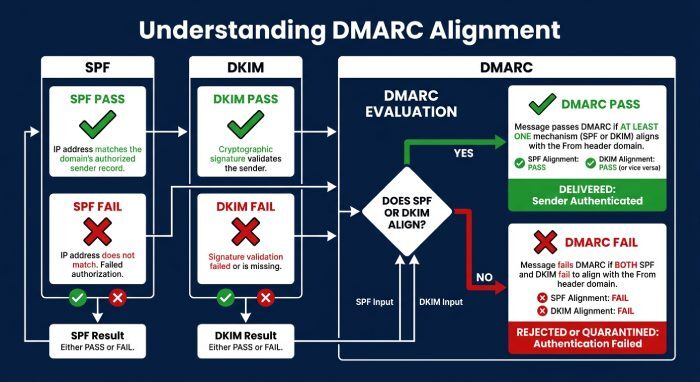
- DKIM and SPF are independent; DMARC passes if either DKIM or SPF aligns with the visible From domain.
- If DKIM fails and SPF doesn’t align (e.g., Mailgun sends using mg.example.com but your From is a wholly different org-domain), DMARC can fail and trigger p=quarantine or p=reject.
- Steps to reveal DMARC-driven rejections:
- Inspect Authentication-Results and DMARC disposition (dmarc=reject/quarantine).
- Review DMARC rua reports in DMARCReport to see which sources (Mailgun IP ranges) and domains are failing alignment.
- If SPF aligns but DKIM fails, deliverability may still be okay under relaxed policies—but fix DKIM promptly to avoid brittle dependencies.
Mailgun diagnostics and verification tools
- Mailgun domain DNS checker
- In Domain Settings → DNS, use “Verify Records” to confirm DKIM presence and correctness (selector and value).
- Mailgun logs and events
- Message events can surface signing state or header snapshots; verify that Mailgun is adding DKIM-Signature with your intended selector.
- Mailgun API
- Use domain-related endpoints to fetch current verification status and required DNS records (copy-paste values from the API (Application Programming Interface) to avoid console formatting issues).
- DMARCReport tie-in:
- Correlate Mailgun events with DMARCReport’s aggregate pass/fail by receiver and date.
- Set alerts for spikes in dkim=fail or rising DMARC rejections after DNS changes.
- Track adoption—DMARCReport shows when large receivers (e.g., Gmail, Yahoo) start reporting dkim=pass after a new key is published.
FAQ
What exact DKIM selector does Mailgun use by default?
Mailgun often defaults to a selector like smtp for new domains, but this can vary; always copy the selector exactly from the Mailgun domain setup page or API. DMARCReport helps you confirm the selector in use by correlating Authentication-Results (s=) when receivers include it in DMARC reports.
Can I use the same DKIM selector across multiple Mailgun domains?
No—each selector name lives under its domain’s _domainkey namespace, but for clarity and rotation scheduling, use unique and descriptive selectors per domain (e.g., mg2026q1). DMARCReport’s domain views keep per-domain pass/fail trends separate so cross-domain selector naming won’t confuse your analytics.
How long should I keep an old selector during rotation?
Keep it active for 48–72 hours after you’ve confirmed the new selector signs and passes broadly; extend if DMARCReport shows continued dkim=neutral/no key from high-volume receivers, indicating slow cache or delegated DNS lag.
Do I need both DKIM TXT and CNAME with the same owner?
No. Choose one method per selector: either a direct TXT public key or a CNAME to a Mailgun-hosted key. DMARCReport will reflect success either way—what matters is receivers can fetch one valid key at that owner’s name.
Will a DKIM CNAME hurt deliverability?
Industry receivers generally follow CNAME for DKIM key lookups (per RFC 6376 resolution rules). If Mailgun offers CNAME, it’s safe and reduces operational error. DMARCReport will surface any receiver-specific anomalies if they occur.
Conclusion: Lock in DKIM correctness—and verify it with DMARCReport
Troubleshooting Mailgun DKIM failures is straightforward when you methodically validate the exact selector and DNS owner name, verify TXT/CNAME visibility at authoritative nameservers, eliminate formatting pitfalls, choose CNAME vs TXT intentionally, rotate keys with overlapping selectors, and confirm in-message headers and DMARC alignment. Mailgun’s dashboard and API tell you what to publish and whether the platform is signing; DMARCReport tells you how the internet is actually treating your messages across inbox providers—pinpointing “no key,” mismatch, or alignment problems, quantifying impact, and confirming your fixes. Adopt a low-TTL rollout pattern, keep selectors tidy, prefer Mailgun-hosted CNAME when available, and use DMARCReport’s alerts and trendlines to keep your DKIM posture continuously healthy and your deliverability stable.
General Manager
General Manager of DuoCircle. Product strategy and commercial lead for DMARC Report's 2,000+ customer base.
LinkedIn Profile →Take control of your DMARC reports
Turn raw XML into actionable dashboards. Start free - no credit card required.