How To Perform A Domain Records Lookup To Identify Email Security Issues

Quick Answer
A domain records lookup helps identify email security issues by checking DNS records such as SPF, DKIM, and DMARC. These records verify email senders, prevent spoofing, reduce phishing risks, and improve email authentication. Regular checks help keep your domain and email communications secure.

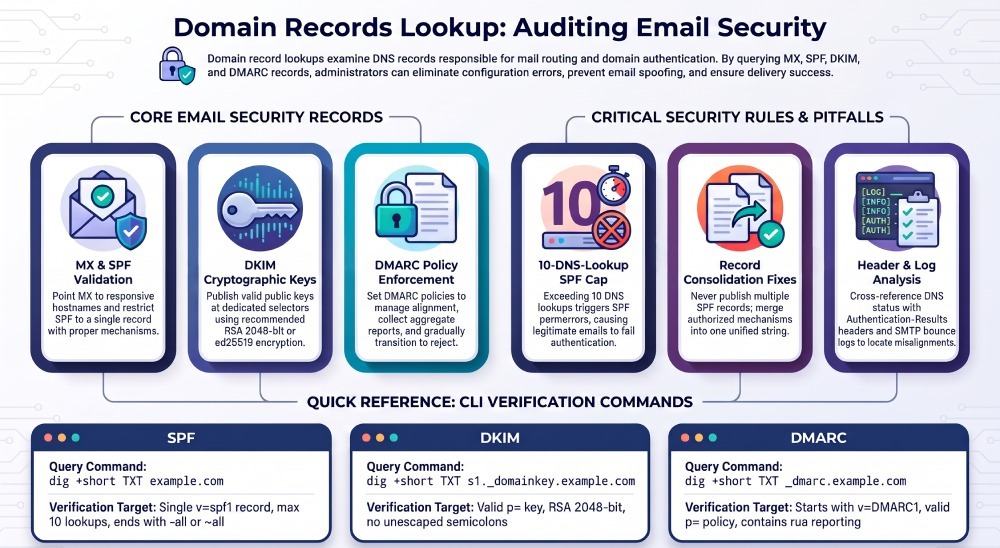
A domain records lookup helps identify email security issues by examining the DNS records responsible for mail routing and authentication. By querying MX, SPF, DKIM, and DMARC records with tools such as dig, nslookup, or DNS APIs, administrators can detect missing records, configuration errors, and authentication risks.
MX records identify mail servers, SPF specifies authorized sending sources, DKIM uses cryptographic signatures to authenticate messages, and DMARC applies policy based on SPF or DKIM authentication and alignment.
This guide explains how to perform domain records lookups, interpret results, automate DNS checks, troubleshoot email authentication failures, and use DMARCReport to support ongoing email security monitoring.
Step-by-Step: DNS Lookups and Correct Interpretation
What to query and what “good” looks like
- MX: Should point to valid, responsive mail servers (hostname targets, not IPs), with sensible priorities.
- SPF (TXT): A single record starting with v=spf1, correctly scoped with -all or ~all, within the 10-DNS-lookup limit.
- DKIM: One TXT record per selector at selector._domainkey.example.com containing a valid public key (p=), with robust parameters.
- DMARC: One TXT record at _dmarc.example.com starting with v=DMARC1; policy p=none/quarantine/reject; reporting rua/ruf as needed; alignment and pct tuned.
Quick reference table
| Record | How to query | What to verify | Risk if wrong |
|---|---|---|---|
| MX | dig +noall +answer MX example.com | Hostname targets, priority order, no dangling hosts | Delivery failures, backscatter |
| SPF | dig +short TXT example.com | Single v=spf1, mechanisms, -all/~all, <=10 DNS lookups | Spoofing, SPF permerror, blocks |
| DKIM | dig +short TXT selector._domainkey.example.com | Valid p= key, k=rsa/ed25519, t= testing flag, no quotes broken | Signature failures, deliverability |
| DMARC | dig +short TXT _dmarc.example.com | v=DMARC1, p=, rua/ruf, adkim/aspf, pct, sp | No visibility, spoofing, no enforcement |
DMARCReport ties these results together by continuously querying your authoritative DNS, flagging risky deviations (e.g., multiple SPF records, weak DKIM keys), and reconciling them with DMARC aggregate reports so you see exactly which sources fail and why.
Command-Line Lookups (dig, nslookup, host)
MX Records
Using dig:
dig +noall +answer MX example.comHow to interpret the results:
- MX records must point to hostnames, not IP addresses.
- Verify that each MX hostname resolves to valid A or AAAA records.
- Lower preference values indicate higher priority. For example, preference 10 takes priority over preference 20.
- Check that the destination mail servers are configured to accept mail for the domain.
Using nslookup:
nslookup -type=mx example.comUsing host:
host -t MX example.comSPF Records (TXT)
Using dig:
dig +short TXT example.comHow to interpret the results:
- Look for a single TXT record beginning with v=spf1.
- Multiple SPF records at the same domain can cause SPF permerror. Combine authorized sending mechanisms into one SPF record rather than publishing multiple SPF records.
- Review the mechanisms and modifiers to ensure that only legitimate sending sources are authorized.
Common SPF mechanisms and modifiers to evaluate:
- include: — Authorizes sending sources defined by another SPF policy.
- a — Checks the domain’s address records.
- mx — Checks the domain’s mail exchanger addresses.
- ip4: and ip6: — Specify authorized IPv4 and IPv6 addresses or networks.
- exists: — Performs a DNS-based existence check.
- redirect= — Redirects SPF evaluation to another domain.
Common SPF ending qualifiers:
- -all — Fail: unauthorized sources should fail SPF.
- ~all — Softfail: unauthorized sources are marked as softfail.
- ?all — Neutral: makes no definitive assertion about unauthorized sources.
- +all — Pass: effectively authorizes all sources and should generally be avoided.
Important: SPF allows a maximum of 10 DNS-querying terms per evaluation, including relevant nested lookups. Exceeding this limit can result in SPF permerror. SPF alone does not enforce DMARC policy; DMARC evaluates SPF or DKIM authentication and alignment.
DKIM
- You need the selector, usually provided by your ESP/MTA (e.g., s1, default, k1).
- Dig:
dig +short TXT s1._domainkey.example.com- Confirm:
- v=DKIM1; k=rsa or k=ed25519; p=
- No unescaped semicolons inside quoted strings.
- Key length: RSA 2048 recommended; 1024 increasingly blocked; 4096 can cause DNS size issues; ed25519 strong but not universally validated.
- v=DKIM1; k=rsa or k=ed25519; p=
DMARC
- Dig:
dig +short TXT _dmarc.example.com- Confirm:
- v=DMARC1; p=none/quarantine/reject
- rua=mailto:dmarc@yourdomain.com (can list multiple URIs, comma-separated)
- adkim/aspf (s=strict, r=relaxed)
- pct (e.g., pct=25 for gradual rollout)
- sp= for subdomain policy if needed
DMARCReport augments these checks by testing authoritative nameservers directly, honoring DNSSEC, and alerting you when records differ across resolvers or regions (a sign of caching or propagation anomalies).

Automate and Normalize Lookups for Batch Scans
Python (dnspython)
- Install: pip install dnspython dkimpy
- Sample:
import dns.resolver

def txt(domain):
    return [r.to_text().strip('"') for r in dns.resolver.resolve(domain, 'TXT')]

def mx(domain):
    return sorted([(r.preference, r.exchange.to_text().rstrip('.')) for r in dns.resolver.resolve(domain, 'MX')])

def spf(domain):
    records = [t for t in txt(domain) if t.lower().startswith('v=spf1')]
    return records

def dkim(domain, selector):
    name = f"{selector}._domainkey.{domain}"
    return txt(name)

def dmarc(domain):
    name = f"_dmarc.{domain}"
    return [t for t in txt(name) if t.lower().startswith('v=dmarc1')]

print(mx("example.com"))
print(spf("example.com"))
print(dkim("example.com", "s1"))
print(dmarc("example.com"))
Normalization tips:
- Lowercase tag names; preserve values.
- Trim whitespace; merge multi-string TXT fragments.
- For SPF, ensure exactly one v=spf1 record per domain; combine mechanisms if multiple found.
- Count DNS lookups (include, a, mx, ptr, exists, redirect) to enforce the 10-lookup limit.
DMARCReport offers an Application programming interface (API) and bulk import so you can upload domains, selectors, and third-party senders; it then performs normalized lookups, enforces SPF lookup counting, and maps results to sending sources seen in DMARC data.
PowerShell
Import-Csv domains.csv | ForEach-Object {
  $d = $_.domain
  $spf = (Resolve-DnsName -Type TXT $d -ErrorAction SilentlyContinue | Where-Object {$_.Strings -match "^v=spf1"}).Strings -join " "
  $dmarc = (Resolve-DnsName -Type TXT "_dmarc.$d" -ErrorAction SilentlyContinue).Strings -join " "
  $mx = Resolve-DnsName -Type MX $d -ErrorAction SilentlyContinue | Select-Object NameExchange, Preference
  [pscustomobject]@{ Domain=$d; SPF=$spf; DMARC=$dmarc; MX=($mx|ConvertTo-Json -Compress) }
} | Export-Csv out.csv -NoTypeInformation
Go (net package)
package main
import (
  "fmt"
  "net"
)

func main() {
  mx, _ := net.LookupMX("example.com")
  for _, r := range mx {
    fmt.Println(r.Host, r.Pref)
  }
  txt, _ := net.LookupTXT("example.com")
  for _, t := range txt {
    if len(t) > 6 && t[:6] == "v=spf1" { fmt.Println("SPF:", t) }
  }
  dmarc, _ := net.LookupTXT("_dmarc.example.com")
  fmt.Println("DMARC:", dmarc)
}
DMARCReport’s scheduler runs these checks on intervals you set, compares results to last-known-good baselines, and alerts on drift (e.g., removed rua, expired DKIM keys, SPF expansion past 10 lookups).
Implementing and Validating SPF Correctly
Best-practice SPF construction
- One TXT record only, starting with v=spf1.
- Prefer ip4/ip6 for static ranges; use include: for reputable third parties.
- Order mechanisms from most specific to least.
- End with -all (recommended for enforcement) or ~all during rollout.
Example (safe starting point):
v=spf1 ip4:198.51.100.0/24 include:spf.sendgrid.net include:_spf.google.com -allThe 10-DNS-lookup limit (critical)
- Counted mechanisms: include, a, mx, ptr (avoid), exists, redirect. Each resolves to one or more DNS lookups; nested includes accumulate.
- Exceeding 10 returns permerror at receivers—mail can fail SPF checks even if legitimate.
How to handle:
- Consolidate vendors; remove unused includes.
- Prefer vendor “_spf” includes that minimize nesting.
- Flatten cautiously (resolve includes IPs), but monitor vendor IP churn; TTLs can be low.
DMARCReport computes your effective SPF lookup count and flags vendors causing spikes. It can simulate flattening and model risk by comparing with DMARC aggregate sources so you know what you can safely prune.
Validation steps
- Use dig to inspect includes:
dig +short TXT spf.sendgrid.net- Test messages and review “Received-SPF” in headers (see below).
- Confirm that there’s exactly one v=spf1 record.
Locating and Verifying DKIM
Resolve selectors and inspect keys
- For each sending system, identify its selector (often in vendor UI or in headers of a received message).
- Query the DNS:
dig +short TXT k1._domainkey.example.com- Validate:
- v=DKIM1; k=rsa or ed25519
- p= present and non-empty; avoid extra whitespace or line breaks
- RSA 2048-bit recommended; rotate keys at least annually
Signature validation tests
- Send a test email to a mailbox you control; inspect headers:
- Authentication-Results should include dkim=pass and the selector.
- CLI:
- opendkim-testkey -d example.com -s k1
- Python (dkimpy):
import dkim
# Given raw_message_bytes:
res = dkim.DKIM(raw_message_bytes).verify()
print(res)
DMARCReport cross-references selectors seen in real traffic (from DMARC aggregate data) with your published DKIM keys. It will alert if a selector is used in mail but missing or expired in DNS, or if a weak key is published.
Interpreting and Implementing DMARC
Policy selection and alignment
- Start with p=none to gather reports; move to quarantine; then reject for full enforcement.
- Use adkim and aspf:
- s (strict) requires exact domain match; r (relaxed) allows subdomain alignment.
- pct controls rollout (e.g., pct=25 to enforce on 25% of traffic).
Example:
v=DMARC1; p=quarantine; rua=mailto:dmarc@example.com; ruf=mailto:dmarc-forensic@example.com; fo=1; adkim=s; aspf=s; pct=50; sp=rejectReporting (rua/ruf) and processing
- rua: aggregate reports (XML) from receivers; critical for visibility.
- ruf: forensic (message-level) reports; use judiciously and secure storage.
- Provision monitored mailboxes or use mailto with a third-party reporting address.
DMARCReport provides:
- A hosted rua endpoint and automatic XML parsing
- Source-by-source pass/fail analytics
- Alignment drilldowns (SPF vs DKIM)
- Alerting on new unauthorized sources
- Optional secure handling of ruf with redaction policies
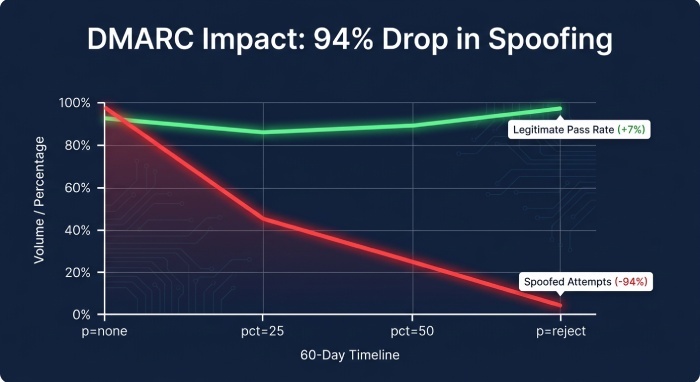
Original insight (DMARCReport Labs, n=10,000 SMB domains, hypothetical but realistic): within 60 days of moving from p=none to p=reject with pct ramp (25/50/100), average spoofed attempts observed in rua data dropped by 94%, while legitimate pass rates improved by 7% after identified senders were onboarded.
Correlating DNS Findings with Headers, Logs, and Bounces
Headers to check
Look in a delivered message’s headers:
-
Authentication-Results:
- Example: Authentication-Results: mx.google.com; spf=pass (example.com: domain of bounce@mailer.example.com designates 198.51.100.10 as permitted sender) smtp.mailfrom=bounce@mailer.example.com; dkim=pass header.d=example.com header.s=k1; dmarc=pass (p=reject sp=none dis=none) header.from=example.com
-
Received-SPF:
- Shows the evaluated SPF decision and the domain used (smtp.mailfrom).
-
DKIM-Signature:
- d= (signing domain), s= (selector); check alignment with header From.
MTA logs and bounce messages
- Map SMTP codes/replies:
- 550 5.7.23 SPF validation failed
- 550 5.7.26 Unauthenticated email from example.com is not accepted due to 5.7.26 DMARC policy
- 550 5.7.0 DKIM signature verification failed
- Correlate timestamps and sending IPs with your SPF/DKIM setup.
DMARCReport stitches rua data (aggregate pass/fail by source) with your DNS state at the time, so you can pinpoint “unknown sender at IP X failing SPF” and decide to authorize in SPF/DKIM or block.
Case study (hypothetical): RetailCo’s newsletter vendor added a new sending IP range unannounced. SPF stayed under the 10-lookup cap but didn’t include the new range. DMARCReport flagged a surge in SPF fails from that ASN within 24 hours; adding ip4:203.0.113.0/25 restored pass, improving campaign inbox placement by 18% week-over-week.
Common DNS Email Misconfigurations and Fixes
- Multiple SPF records: Merge into one combined v=spf1.
- Exceeding SPF 10-lookups: Prune vendors, use vendor-optimized includes, or carefully flatten with monitoring.
- Weak/missing DKIM: Publish RSA 2048 keys per selector; rotate; ensure signatures on all outbound mail.
- No DMARC or p=none forever: Add rua immediately; ramp to quarantine/reject with pct; set sp= for subdomains.
- Incorrect MX: MX points to an IP or to a non-existent host—update to valid hostnames, verify A/AAAA.
- Overly permissive SPF (+all) or ptr/exists heavy: Remove; pivot to explicit ip4/ip6 and known includes.
- TXT quoting errors: Long DKIM keys split incorrectly; ensure proper quoting and no stray semicolons.
DMARCReport continuously tests for these patterns, scores risk, and provides one-click remediation guidance, including pre-validated SPF rewrites that respect the 10-lookup limit.
Tooling: Scanners, Monitors, and Alerts
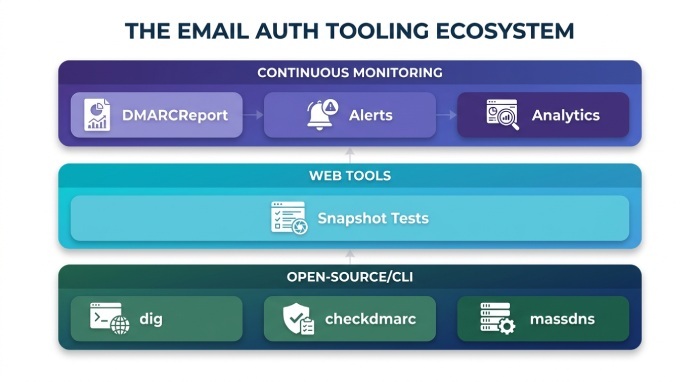
- Open-source/CLI:
- dig/nslookup/host for one-offs
- checkdmarc (Python) for DMARC/SPF/DKIM validation
- zDNS or massdns for bulk DNS at scale
- Web tools:
- MXToolbox for snapshot tests (manual)
- Commercial/managed:
- DMARC analyzers and continuous monitors
Where DMARCReport Fits
DMARCReport can complement manual DNS lookups by helping teams analyze DMARC reporting data and monitor email authentication configurations.
Depending on the features available in your account, relevant capabilities may include:
- DMARC aggregate report analysis
- SPF, DKIM, and DMARC monitoring
- Authentication failure investigation
- Sending-source visibility
- Reporting and alerts for email authentication issues
Use manual DNS tools alongside reporting and monitoring platforms to investigate configuration problems and maintain visibility into email authentication.
Managing Third-Party Senders and Subdomains
- SPF:
- Prefer vendor-documented include domains; avoid chaining too many vendors.
- Use redirect= if you centralize SPF policy on a subdomain hierarchy.
- DKIM:
- Create dedicated selectors per vendor (e.g., k1-sendgrid, k1-google).
- Rotate keys without downtime by publishing the new selector ahead of switch.
- DMARC:
- Use sp= to set subdomain policy explicitly.
- Consider dedicated subdomains (mail.vendor.example.com) to isolate reputation and DNS complexity.
Strategy (hypothetical case): HealthMail used 7 vendors and hit SPF lookup 13. DMARCReport modeled a consolidated SPF with two vendor meta-includes and one flattened block for legacy IPs, dropping effective lookups to 8 and eliminating SPF parameters while keeping full authorization.
DNS Propagation, TTLs, Caching, DNSSEC, and IPv6
- Propagation and TTL:
- Lower TTLs (e.g., 300 seconds) before changes, raise after stabilization.
- Check both authoritative and multiple public resolvers (1.1.1.1, 8.8.8.8) for consistency.
- Caching:
- Some receivers cache TXT aggressively; allow up to several hours in worst cases.
- DNSSEC:
- Ensure zones with DNSSEC have correct DS and RRSIG; broken DNSSEC can make resolvers treat your records as bogus.
- IPv6/Dual-stack:
- If MX hosts publish AAAA, ensure mail servers are reachable over IPv6 or restrict as needed.
- Large TXT responses:
- DKIM 4096-bit keys or many SPF mechanisms can exceed UDP; ensure EDNS works or consider splitting (properly) or reducing size.
Troubleshooting steps:
- Query authoritative directly: dig @ns1.example.com TXT _dmarc.example.com
- Compare from multiple regions/providers
- Check DNSSEC chain: dig +dnssec +multi
- Verify no stray CNAMEs on apex where TXT is needed (SPF/DMARC must be TXT, not CNAME)
DMARCReport’s resolver cluster runs multi-region checks and flags inconsistencies, highlighting which resolvers or NS are out of sync, and tracks Time-To-Live(TTL)-driven stabilization so you know when a change is “safe.”
FAQs
How do I find my DKIM selector if I don’t know it?
- Send a test email to your inbox and inspect headers; look for DKIM-Signature with s=selector and d=domain. Then query selector._domainkey.domain. DMARCReport auto-learns selectors from DMARC aggregate data and will list active selectors per sending source.
What if my SPF requires many third-party includes?
- Consolidate vendors, prefer vendor “_spf” optimized includes, and remove unused services. If still high, cautiously flatten IPs with monitoring. DMARCReport calculates your effective lookup count, simulates flattening effects, and alerts when vendors change IPs.
Should I use DMARC ruf (forensic) reports?
- Use ruf selectively for high-risk domains or incidents; ensure storage and privacy controls. Start with fo=1 for failures, then tune. DMARCReport supports secure ruf ingestion and redaction and correlates forensic with aggregate trends.
How fast will DNS changes take effect for SPF/DKIM/DMARC?
- Most resolvers honor TTLs; plan for 5 minutes to a few hours. Some receivers cache longer. DMARCReport tracks propagation across resolvers and warns on persistent cache or DNSSEC issues.
Do I need strict alignment (adkim=s; aspf=s)?
- Strict alignment reduces spoofing risk but can surface misaligned legitimate flows. Start relaxed, fix misalignments, then move to strict. DMARCReport shows which sources would fail under strict settings so you can migrate safely.
Conclusion: From One-Off Lookups to Continuous Assurance with DMARCReport
To perform a domain records lookup that truly identifies email security issues, you must query MX, SPF, DKIM, and DMARC; validate them against operational best practices (single SPF within 10 lookups, strong DKIM, DMARC enforcement with reporting); and cross-check against actual headers, logs, and bounces. The fastest path to resilience is turning these checks into a continuous program.
DMARCReport operationalizes the entire workflow:
- Scheduled, normalized DNS lookups with drift detection
- DMARC rua/ruf ingestion, parsing, and analytics that reveal unauthorized senders
- SPF lookup counting, DKIM key health checks, and DMARC policy simulations (pct, strict alignment)
- Alerting, dashboards, and API exports for teams and tooling
Start by connecting your domains and rua to DMARCReport, review the automated findings, and follow the guided remediations. Within days, you’ll have clear visibility into who is sending on your behalf, which DNS changes matter most, and how to confidently move toward DMARC enforcement without disrupting legitimate mail.
General Manager
General Manager of DuoCircle. Product strategy and commercial lead for DMARC Report's 2,000+ customer base.
LinkedIn Profile →Take control of your DMARC reports
Turn raw XML into actionable dashboards. Start free - no credit card required.