Read This Before Adding Multiple DKIM Records To Your Domain

Quick Answer
You can safely add multiple DKIM records to a domain as long as each uses a unique selector. This is common when using multiple email providers or rotating keys. Proper configuration prevents authentication failures and helps maintain email deliverability.
Try Our Free DKIM Lookup
Auto-discover DKIM selectors for any domain - scan 185 common selectors across all major providers.
Discover DKIM Selectors →Using multiple email services like Google Workspace, Microsoft 365, SendGrid, or Mailgun? Then you may need multiple DKIM records for your domain. Whether you’re managing email authentication manually or using DMARCReport to monitor your domain’s email security, understanding how multiple DKIM records work is essential. While having more than one DKIM record is perfectly normal, configuring them incorrectly can lead to authentication failures, poor email deliverability, and DMARC issues.
Before adding additional DKIM records, it’s important to understand how DKIM selectors work and why each selector must have its own unique DNS record. This guide explains everything you need to know to configure multiple DKIM records correctly and avoid common mistakes.
What DKIM Records Do and Why Multiple Records May Be Needed
DomainKeys Identified Mail, commonly known as DKIM, is an email authentication method that helps prove an email message was authorized by the domain it claims to represent. It works through email message signing: an outgoing email server applies a DKIM signature using a private key, and the receiving server checks that signature against a public key published in DNS. A DKIM record is usually published as a TXT record under a selector-based subdomain, such as:
may10._domainkey.example.com
In this example, may10 is the DKIM selector, _domainkey is the required namespace, and example.com is the sending domain. The TXT record contains the public key, while the private key remains on the email server or within the email delivery service that signs the message.
Organizations often need multiple DKIM records because they use more than one email platform or mail stream. For example, Google Workspace may handle employee mail, Microsoft 365 may support executive communication, SendGrid may send transactional email, and Mailgun may support product notifications. Meanwhile, CRM systems, support or ticketing tools, billing systems, Help desk systems, and marketing automation platforms may all send mail using the same domain.
In modern email infrastructure, multiple DKIM records are normal. They help distribute email senders safely across third-party applications, productivity suites, transactional mail systems, and regional sending infrastructure without forcing every email server to share the same private key.
DKIM in the broader email authentication stack
DKIM is only one part of email authentication. A domain may also publish an SPF record to define authorized sender IP addresses and a DMARC record to define policy and reporting for authentication outcomes; once DKIM and SPF are in place, you can create a DMARC record to tie them together. Together, SPF, DKIM, and DMARC improve email security and help receiving systems determine whether a message is legitimate.
DKIM is especially valuable because the digital signature survives many forwarding scenarios where SPF may fail. When DomainKeys Identified Mail is configured correctly, DKIM validation confirms that the message was signed by a trusted email server and that important message headers were not altered after signing.
The Key Rule: One DKIM Record per Selector, Not Multiple Records on the Same Selector
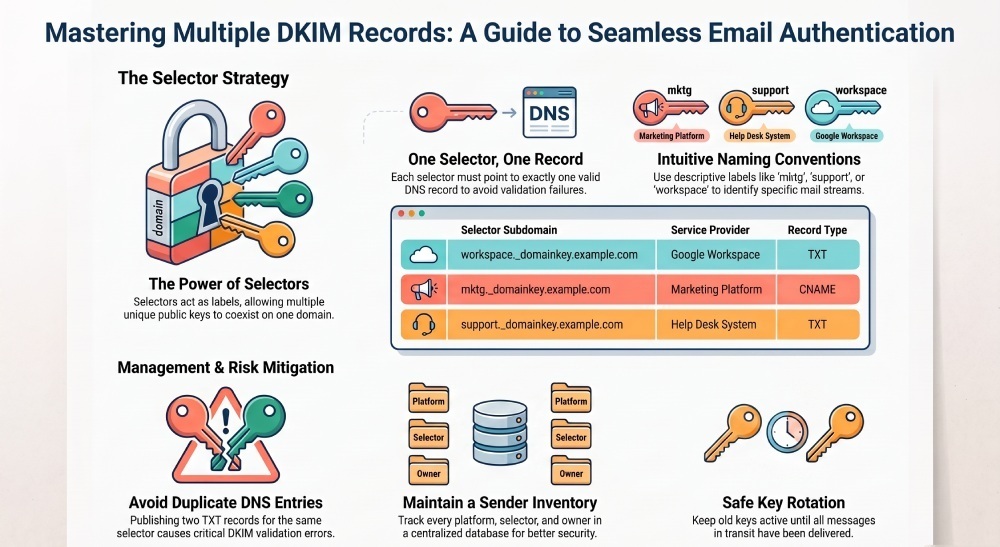
The most important rule is simple: you can have multiple DKIM records on a domain, but each DKIM selector must point to only one valid DKIM DNS record.
A DKIM selector is a label that tells the receiving server where to find the public key. If an email has a DKIM signature with s=may10, the receiving server looks up the DNS record at:
may10._domainkey.example.com
That DNS record should return one DKIM TXT record containing one public key. If you publish two different TXT record values for the same DKIM selector, you may create a record conflict or duplicate DNS entry. That can cause DKIM validation to fail, depending on how the receiving server handles the response.
How selectors prevent record conflicts
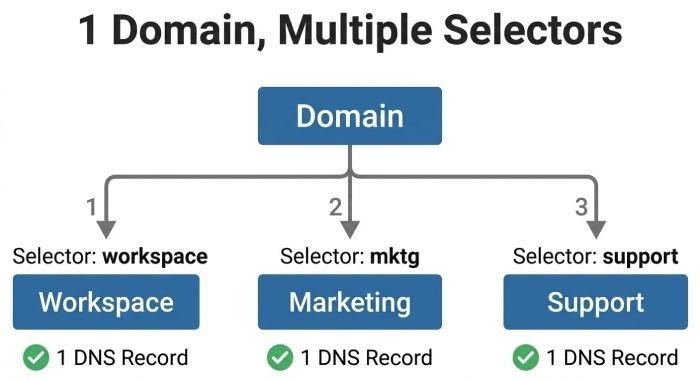
Selectors allow one domain to support multiple DKIM records cleanly. Instead of placing every DKIM key at the same DNS name, each sending source gets its own DKIM selector and record mapping.
For example:
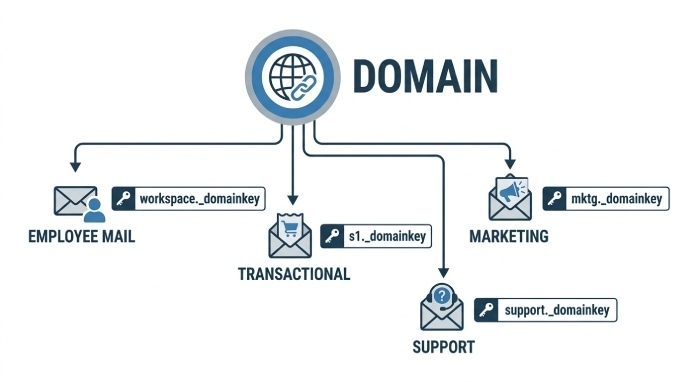
workspace._domainkey.example.comfor Google Workspacemktg._domainkey.example.comfor a marketing platformsupport._domainkey.example.comfor a support systemmarketing-us._domainkey.example.comfor regional sending infrastructurejuly29._domainkey.example.comfor key rotation
Each selector string maps to a distinct TXT record or, in some vendor configurations, a CNAME record that points to the vendor’s hosted DKIM key. This selector naming convention keeps multiple DKIM records organized and prevents two email delivery services from fighting over the same record type. For sample record values you can model yours on, see these DKIM record examples.
TXT record versus CNAME record
Many providers ask you to publish a TXT record containing the public key directly. Others, such as some configurations with SendGrid, Mailgun, Mimecast, or other email delivery services, may provide a CNAME record that points to their domain, where they manage the public key for you.
Never share a private key between unrelated senders
A private key should be treated as sensitive signing material. Do not copy the same private key across unrelated systems unless your security architecture explicitly requires it. Proper key management means each email platform, mail server, or third-party application should generally have its own key pair and DKIM selector.
Common Scenarios for Multiple DKIM Records Across Email Services
Multiple DKIM records are common in real IT environments because most organizations do not send every message from one email server. Different departments, tools, and vendors often send on behalf of the same domain.
Productivity suites and employee mail
Google Workspace and Microsoft 365 are common sources of employee mail and business communication. Each platform may generate its own DKIM key and require a DNS record such as workspace._domainkey.example.com. The public key is published in DNS, while the private key remains with the outgoing email server or hosted email platform.
Transactional and application-generated mail
Transactional email often comes from systems such as SendGrid, Mailgun, billing systems, CRM systems, and internal applications. These messages may include password resets, invoices, account alerts, and product notifications. Each transactional mail stream should use its own DKIM selector so that record verification and troubleshooting are straightforward.
For example, SendGrid might use a selector like s1, Mailgun may provide a different selector string, and an internal mail server may use may10 or july29 for key rotation.
Marketing, support, and regional sending
A marketing platform may use mktg._domainkey.example.com, while Help desk systems or support or ticketing tools may use support._domainkey.example.com. Larger organizations may also use regional sending infrastructure, such as marketing-us._domainkey.example.com, to separate campaigns by geography or vendor.
This structure helps email security teams maintain a centralized sender inventory and understand which authorized sender is responsible for each mail stream.
Risks of Misconfigured DKIM Records and How They Affect Authentication
Misconfigured multiple DKIM records can damage email authentication outcomes and reduce trust with receiving servers. The most common issue is publishing more than one TXT record for the same DKIM selector. A duplicate DNS entry may cause a receiving server to retrieve multiple public key values and fail DKIM validation.
Another common problem is placing the public key at the wrong selector-based subdomain. If the DKIM signature says s=mktg, but the DNS record is published at marketing._domainkey.example.com, the receiving server will not find the expected DKIM record.
Common DKIM configuration failures
Typical failures include:
- Using the wrong DKIM selector for the email platform
- Publishing an incomplete or wrapped TXT record incorrectly
- Creating a record conflict by adding two public key values under one selector
- Confusing a TXT record with a CNAME record
- Leaving an expired key active after key rotation
- Removing a DNS record before the sending email server has stopped using it
- Allowing a key compromise to go unresolved
- Forgetting to update DKIM after migrating to a new email delivery service
These issues can cause email authentication failures, DMARC alignment problems, and poor inbox placement. In some cases, a valid SPF record may still pass, but a failed DKIM signature can affect DMARC results if SPF is not aligned or if forwarding breaks SPF.
Security impact of weak key management
DKIM depends on the relationship between the private key and public key. If the private key is exposed, an attacker may be able to sign unauthorized messages until the public key is replaced. That is why key rotation, rapid key update procedures, and strong key management are essential.
DomainKeys Identified Mail is not just a deliverability feature; it is also part of email security. Email security teams should know which DKIM selector belongs to which system, who owns the email server, when the DKIM key was created, and whether the record is still needed.
Best Practices for Adding, Testing, and Managing Multiple DKIM Records
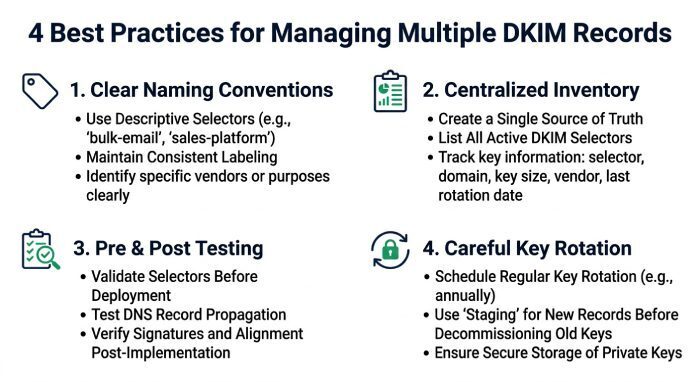
Managing multiple DKIM records is mostly about discipline: use unique selectors, document every DNS record, test every change, and remove obsolete keys carefully.
Use a clear selector naming convention
Choose a selector naming convention that makes ownership obvious. For domain example.com, examples might include:
- workspace for Google Workspace
- m365 for Microsoft 365
- mktg for a marketing automation platform
- support for a support system
- may10 or july29 for key rotation events
- marketing-us for regional sending infrastructure
A readable DKIM selector helps administrators identify which email server or email delivery service owns the record. This is especially useful when multiple DKIM records are maintained by different teams.
Maintain a centralized sender inventory
Keep a centralized sender inventory that includes each email platform, DNS provider location, DKIM selector, record type, public key owner, private key owner, and business purpose. Include CRM systems, billing systems, Help desk systems, marketing automation platforms, productivity suites, and any third-party application that sends on behalf of the domain.
This inventory should also track whether the DKIM record is a TXT record or CNAME record, when record verification was completed, and who approved the sender as an authorized sender.
Test before and after publishing
Before changing production DNS, confirm the exact selector string and record value from the provider. After publishing, use a DKIM record checker, DNS lookup tool, or your organization’s DMARC monitoring platform to verify that the TXT record resolves correctly. You can confirm each selector resolves with our free DKIM lookup.
Then send real test messages and inspect the headers. Look for:
- A present DKIM signature
- The expected DKIM selector
- A successful DKIM validation result
- Alignment with the visible From domain
- Expected DMARC record behavior
- No record conflict or duplicate DNS entry
Testing is essential because DNS propagation, formatting issues, and provider-specific requirements can all affect authentication outcomes.
Plan key rotation carefully
Key rotation should be deliberate. Create the new key pair, publish the new public key under a new DKIM selector, configure the outgoing email server to sign with the new private key, and only remove the old DNS record after messages signed with the old key are no longer in transit.
For example, an organization might move from the may10 selector to the july29 selector during a scheduled key update. This allows both multiple DKIM records to coexist temporarily without breaking DomainKeys Identified Mail validation. Proper key rotation reduces risk from an expired key, stale DKIM key, or suspected key compromise while preserving reliable email authentication.
General Manager
General Manager of DuoCircle. Product strategy and commercial lead for DMARC Report's 2,000+ customer base.
LinkedIn Profile →Take control of your DMARC reports
Turn raw XML into actionable dashboards. Start free - no credit card required.