SendGrid DMARC Failures: How To Fix SPF And DKIM Alignment Issues

Quick Answer
SendGrid DMARC failures occur when SPF or DKIM authentication fails or doesn’t align with your sending domain. Fix them by configuring SPF, enabling DKIM, verifying domain alignment, and ensuring your DMARC policy matches your authentication setup.
Try Our Free DMARC Checker
Validate your DMARC policy, check alignment settings, and verify reporting configuration.
Check DMARC Record →DMARC failures in SendGrid often occur when SPF or DKIM authentication is not properly aligned with your sending domain. This can lead to emails being rejected, quarantined, or sent to spam. In this guide, we’ll explain the common causes of SPF and DKIM alignment issues in SendGrid and walk you through the key steps to fix them, improve email deliverability, and maintain a strong domain reputation.
Why SendGrid DMARC Failures Happen: SPF, DKIM, and Alignment Basics
SendGrid DMARC failures usually happen for one of two reasons: SPF alignment fails, DKIM alignment fails, or both. DMARC checks whether the domain visible to the recipient in the “From” address aligns with the domain that passed SPF or DKIM. If neither aligned SPF nor aligned DKIM passes, the message can fail DMARC, even if SendGrid successfully accepted and delivered the outbound email.
SPF, DKIM, and DMARC are core email authentication controls used by Gmail, Microsoft 365, Google Workspace, Proton Mail, Apple Mail, Zoho Mail, Fastmail, Yandex.Mail, Mimecast, and Proofpoint to evaluate email security and email deliverability. SPF validates whether a mail server or mail transfer agent is allowed to send for a domain. DKIM, short for DomainKeys Identified Mail, uses public key cryptography to prove that a signed email has not been altered in transit. DMARC then applies an email policy based on whether SPF or DKIM aligns with the visible From domain.
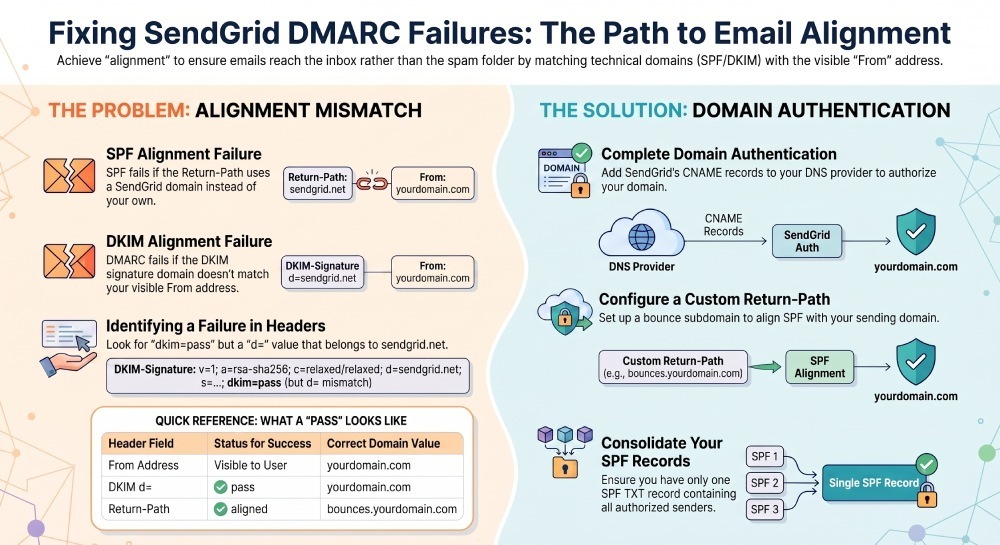
SPF vs. DKIM Alignment in SendGrid
SPF alignment is based on the envelope sender, also called the Return-Path or bounce domain. If SendGrid uses a SendGrid-owned Return-Path rather than a custom bounce domain under your sending domain, SPF may pass but not align with your From domain. That causes DMARC to fail unless DKIM alignment passes.
DKIM alignment depends on the domain in the DKIM signature. With a correct SendGrid DKIM setup, SendGrid signs messages using a DKIM record tied to your authenticated domain. If the d= value in the DKIM signature aligns with your From domain, DKIM can satisfy DMARC.
This is why SendGrid domain authentication matters. A verified sender alone proves you control an address, but it does not always create fully authenticated email. Proper domain authentication creates the DNS configuration SendGrid needs to sign mail with your domain, improve email deliverability, and establish trusted email for recipients.
How to Diagnose SendGrid DKIM Alignment Problems in Email Headers
The fastest way to diagnose SendGrid DKIM alignment issues is to inspect the email header of a delivered message. Send a test message to Gmail, Microsoft 365, Apple Mail, or a mailbox protected by Proofpoint or Mimecast, then view the original headers.
Look for these fields:
- Authentication-Results
- DKIM-Signature
- Return-Path
- From
- Received-SPF
A healthy message should show DKIM as pass and DMARC as pass. More importantly, the DKIM signature should include a d= domain that aligns with the visible From address.
For example:
From: Marketing <news@example.com>
DKIM-Signature: v=1; a=rsa-sha256; d=example.com; s=s1;
Authentication-Results: dkim=pass header.d=example.com; dmarc=pass
That indicates DomainKeys Identified Mail is working and aligned.
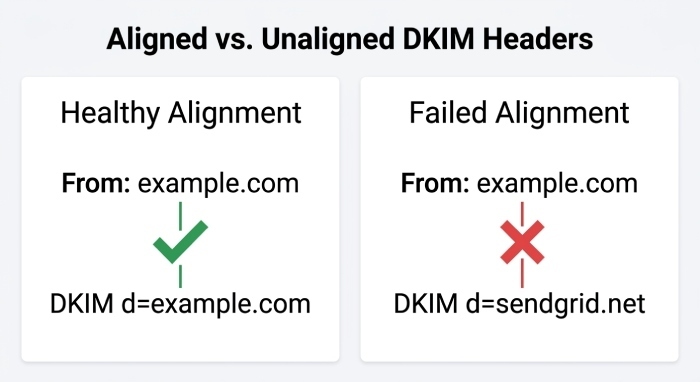
What Failed DKIM Alignment Looks Like
A problematic message may show something like:
From: Marketing <news@example.com>
DKIM-Signature: d=sendgrid.net; s=smtpapi;
Authentication-Results: dkim=pass header.d=sendgrid.net; dmarc=fail
In this case, DKIM technically passed, but it did not align with example.com. The recipient sees example.com in the From address, while the DKIM record validates a SendGrid-controlled domain. DMARC can therefore fail.
You may also see dkim=fail, which points to a broken dkim record, missing cname record, incorrect txt record, or incomplete dns configuration. A DKIM failure can also occur after DNS changes if dns propagation has not completed.
Key Header Values to Compare
Compare these domains:
- Header From domain: example.com
- DKIM d= domain: should be example.com or an aligned subdomain
- Return-Path domain: should be a custom bounce domain aligned with your sending domain
- SPF authenticated domain: should align with the Header From domain for SPF-based DMARC pass
If the domains do not match or align, your email authentication setup needs correction.
Fixing SendGrid DKIM: Domain Authentication, CNAME Records, and Selector Setup
The recommended fix for SendGrid DKIM alignment is to complete domain authentication in the SendGrid dashboard. SendGrid, now part of Twilio, provides DNS records that you add at your DNS provider, such as Cloudflare, GoDaddy, Namecheap, DNSimple, AWS Route 53, Bluehost, DigitalOcean, Netlify, or cPanel-based hosting.
In most SendGrid configurations, the SendGrid DKIM setup uses CNAME records rather than manually pasted TXT records. SendGrid gives you DKIM selectors such as s1 and s2, and each selector points to a SendGrid-managed host. Behind the scenes, SendGrid maintains the dkim record and key material.
How SendGrid Domain Authentication Works
When you authenticate email domain settings in SendGrid, you typically receive DNS entries similar to:
s1._domainkey.example.com CNAME s1.domainkey.u123456.wl.sendgrid.net
s2._domainkey.example.com CNAME s2.domainkey.u123456.wl.sendgrid.net
These cname record values allow SendGrid to publish and rotate the DKIM public key. The corresponding private key remains controlled by SendGrid’s signing infrastructure. This rsa key pair is the basis of DomainKeys Identified Mail and message authentication.
Some platforms, such as Mailgun, Amazon SES, Mailchimp, SparkPost, Postmark, and Mailjet, use similar DKIM delegation patterns, though the exact DNS configuration varies. OpenDKIM and resources from DKIM.org can help explain the underlying email protocols if you manage your own mail server.
Common SendGrid DKIM Setup Mistakes
The most common SendGrid DKIM setup mistakes include:
- Adding the CNAME target as a TXT record instead of a cname record
- Placing the full domain twice, such as s1._domainkey.example.com.example.com
- Authenticating example.com but sending from mail.example.com without alignment
- Leaving an old dkim record from another email service provider
- Deleting a valid txt record used by Google Workspace, Microsoft 365, Zoho Mail, or another platform
- Assuming a verified sender is the same as domain authentication
If you use custom dkim, confirm the selector, dkim record, public key, and signing domain all match the sending domain. A valid dkim record is essential for email integrity, email security, and email deliverability.
Fixing SPF Alignment with SendGrid: Return-Path, Custom Bounce Domains, and SPF Records
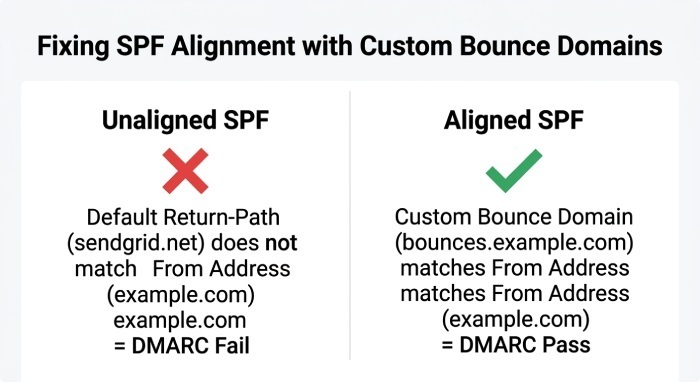
SPF alignment is often misunderstood. Adding SendGrid to your root SPF record may authorize SendGrid, but DMARC SPF alignment depends on the envelope sender domain, not just the visible From address.
For example, this spf record authorizes SendGrid:
example.com TXT "v=spf1 include:sendgrid.net include:_spf.google.com ~all"That txt record may be appropriate if your domain sends through SendGrid and Google Workspace, but SPF will only satisfy DMARC if the Return-Path domain aligns with example.com.
Configure a Custom Return-Path or Bounce Domain
To fix SPF alignment, configure SendGrid domain authentication so the Return-Path uses a subdomain you control, such as:
bounces.example.comSendGrid will usually ask you to create a cname record for this bounce domain. Once active, the envelope sender becomes aligned with your sending domain, allowing SPF to pass DMARC when SendGrid’s SPF infrastructure validates the mail flow.
This is especially important for smtp relay, api integration, transactional alerts, and bulk email sending. Whether messages originate from a web application, CRM, ecommerce platform, or marketing automation system, aligned SPF improves inbox placement and protects your sending reputation.
SPF Record Best Practices for SendGrid
Your spf record should be simple, accurate, and not duplicated. A domain should generally have only one SPF TXT record. Multiple SPF TXT records can cause SPF permerror and damage email deliverability.
A typical combined SPF TXT record might look like:
example.com TXT "v=spf1 include:sendgrid.net include:_spf.google.com include:spf.protection.outlook.com ~all"Use includes only for services that actually send outbound email for your domain, such as SendGrid, Google Workspace, Microsoft 365, Mailchimp, Amazon SES, or another email relay. Do not add random includes for tools that do not send mail.
Also remember that an mx record is not a substitute for SPF. MX records receive mail; SPF records authorize sending systems. Legacy sender id checks are largely obsolete, so focus on modern email authentication: SPF, DKIM, and DMARC.
Verifying Your Fixes and Preventing Future DMARC Failures
After updating your DNS configuration, wait for dns propagation. Depending on your DNS provider and Time-to-Live(TTL) values, changes may appear within minutes or take several hours. Then return to the SendGrid dashboard and verify domain authentication. Send test messages to Gmail, Microsoft 365, Apple Mail, Proton Mail, and other mailbox providers. Review the email header and confirm:
- DKIM passes
- The DKIM signature uses your authenticated domain
- The dkim record resolves correctly
- SPF passes
- The spf record is valid
- The Return-Path aligns with your sending domain
- DMARC passes
- The message shows authenticated email results
For additional email validation, use tools that check SPF, DKIM, DMARC, DNS configuration, and TXT record syntax. If you operate complex email infrastructure across SendGrid, Mailgun, Amazon SES, Postmark, SparkPost, and Mailjet, maintain a central inventory of every sending domain, authenticated domain, dkim record, spf record, and related cname record.
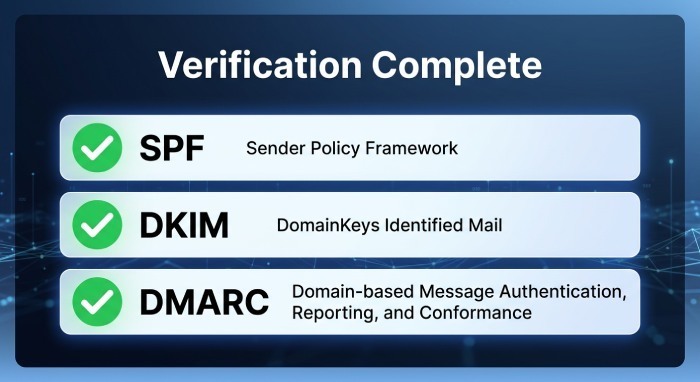
Ongoing monitoring is also part of email security. DMARC aggregate reports can reveal email spoofing attempts, unauthorized mail server activity, and email phishing protection gaps. If your DMARC policy is still set to p=none, review reports before moving to quarantine or reject.
To prevent future SendGrid DMARC failures:
- Complete SendGrid DKIM setup before production sending
- Use SendGrid domain authentication instead of only verified sender identity
- Keep one valid SPF TXT record per domain
- Use custom bounce domains for SPF alignment
- Monitor email header results after DNS changes
- Check DMARC reports for suspicious outbound email with DMARCReport
- Document ownership of each sending domain and email service provider
A clean SendGrid DKIM setup, aligned Return-Path, valid spf record, and accurate dns configuration give mailbox providers strong evidence that your messages are legitimate. That improves email authentication, strengthens email security, supports email deliverability, and helps protect your brand from spoofing and phishing.
General Manager
General Manager of DuoCircle. Product strategy and commercial lead for DMARC Report's 2,000+ customer base.
LinkedIn Profile →Take control of your DMARC reports
Turn raw XML into actionable dashboards. Start free - no credit card required.