SMTP 421 4.4.2: How To Fix The Connection Dropped Error

Quick Answer
The SMTP 421 4.4.2 error occurs when the connection between your email client and mail server is unexpectedly dropped. To fix it, check your internet connection, verify SMTP settings, review server timeouts, and restart your email service.
SMTP 421 4.4.2 is a temporary email delivery error indicating that an SMTP connection could not complete the message transaction. The 421 response means the mail service is unavailable and is closing the transmission channel, while the enhanced status code 4.4.2 identifies a bad connection, often caused by a timeout or inadequate connection quality.
Understanding SMTP 421 4.4.2 and Why It Happens
What SMTP 421 4.4.2 Means and When It Appears
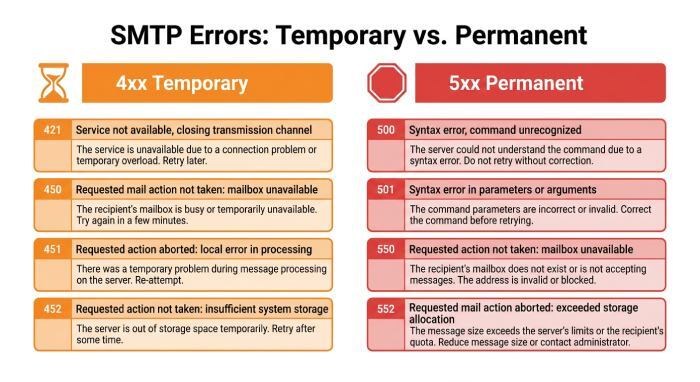
The smtp 421 response is one of the most common smtp error codes associated with a temporary delivery problem. In practical terms, SMTP 421 4.4.2 usually means the remote mail server dropped the connection before the SMTP transaction completed. Because it belongs to the smtp 4xx class, it is treated as a temporary error, not an immediate permanent failure.
A typical 421 error may appear in a delivery status notification, a bounce message, or a report generated by the Mail Delivery Subsystem or MAILER-DAEMON. You may see wording such as “connection dropped,” “resources temporarily unavailable,” “server busy,” “message deferred,” or “try again later.” In many cases, the sending system will automatically retry sending the message according to its queue schedule.
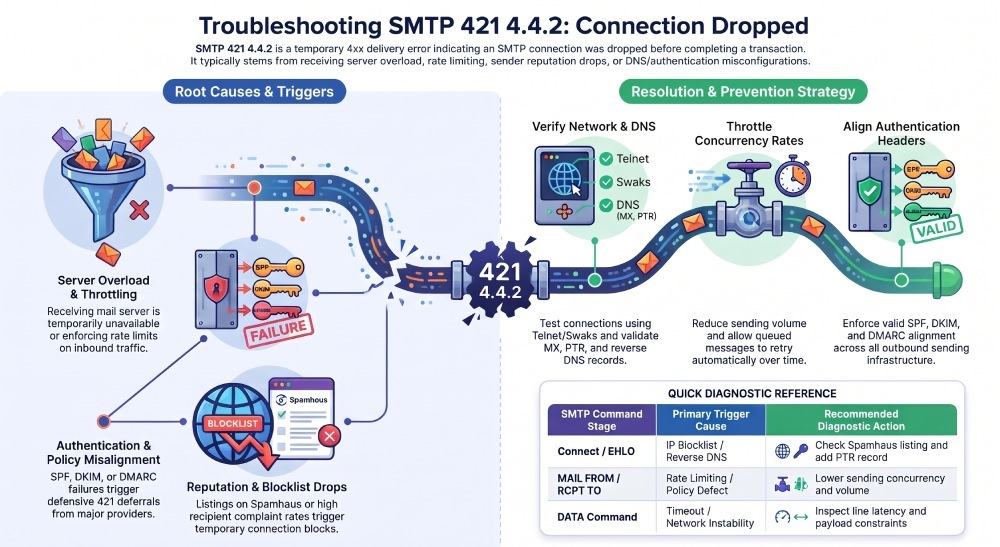
This SMTP error can occur at different stages of an SMTP session, including during the MAIL FROM, RCPT TO, or DATA commands. Under RFC 5321, a 4xx response indicates a temporary failure, allowing the sending mail server to retry delivery later according to its retry policy. Reviewing the SMTP logs can help identify when the connection was dropped and whether the issue occurred during sender verification, recipient processing, or message transmission.
How SMTP Error Codes Classify the Problem
Not all smtp error codes mean the same thing. A 5xx response usually indicates a permanent problem, while a 4xx response means a temporary problem. That distinction is important: an smtp 421 response tells the sending server that email delivery may succeed later.
For example, a 421 error from yahoo mail servers or Google Workspace does not always mean your message is rejected forever. It may be a temporary deferral caused by rate limits, a suspicious sending pattern, or overloaded infrastructure. Similarly, Microsoft365 may defer mail when it detects unusual traffic patterns, poor sender behavior, or policy violations.
Because this is a temporary error, the correct first response is usually to retry sending, review logs, and determine whether the issue is isolated or recurring.
Where the Error Shows Up
You may encounter this smtp error in:
- Application logs from platforms such as CloudMailin
- MTA logs from Postfix, Exim, Sendmail, or qmail
- A delivery status notification
- A user-facing mail delivery failure
- A queue report showing delayed or deferred messages
- An SMTP Troubleshooter result
- Provider dashboards such as Google Postmaster-style tools, Microsoft sender tools, or Yahoo sender resources
If the notification says the mail server will retry sending, it means the sending system has placed the message in its outbound queues and will attempt email delivery again.
Diagnosing the Connection Dropped Error
Common Causes of the Connection Dropped Error
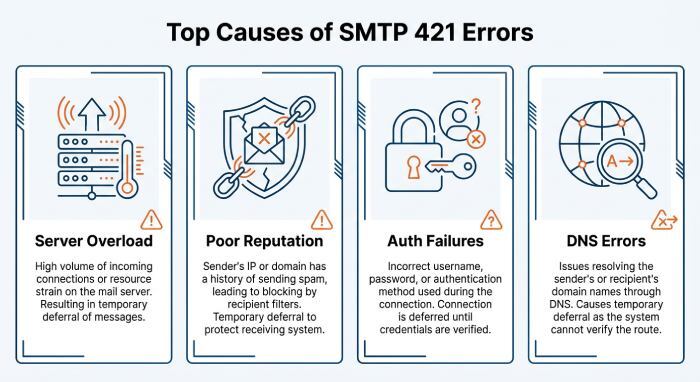
- A receiving policy that has blocked the sender’s ip addreThe most frequent cause of an smtp 421 connection drop is that the receiving mail server is temporarily unavailable or overloaded. In that scenario, the temporary problem may be caused by maintenance, resource exhaustion, high traffic, or a backend server error.
Other common causes include:
- Throttling due to high sending volume
- A temporary block based on sender behavior
- Poor sender reputation
- Spam detection triggered by content or sending patterns
- Authentication problems involving SPF, DKIM, or DMARC
- A dns error affecting MX lookup or reverse DNS
- A misconfigured server sending malformed SMTP commands
- Sending to an invalid recipient
- Connection instability between networks
- ss
A 421 error may also occur when the recipient provider detects bulk email from a sender that does not meet its sender requirements or published mailing policy.
Reputation, Rate Limits, and Provider Deferrals
Large providers such as Yahoo, Google, and Microsoft use reputation systems to protect users from spam and abuse. If a domain or ip address has poor reputation, high complaint rates, or signs of an open relay, the provider may return smtp 421 as a defensive temporary error.
Yahoo, YahooMail, and related Yahoo mail servers may issue temporary deferrals when senders generate user complaints, fail authentication, or send at a rate inconsistent with normal traffic. In some cases, senders may need to review Sender Hub, contact Yahoo Customer Care, or submit a Sender Support Request.
Blocklists can also matter. A listing at Spamhaus or evidence of an Open Proxy can trigger filtering, throttling, or a temporary block. A provider may not permanently reject the email immediately; instead, it may return a 421 error and ask the sender to retry sending later.
Authentication and Policy Failures
An authentication failure does not always produce a permanent rejection. Sometimes it creates a temporary problem, especially when combined with suspicious volume or inconsistent identity alignment.
Check that:
- SPF authorizes the sending host.
- DKIM signs messages with a valid selector and domain.
- DMARC aligns the Mail From and Header From identities where required.
- Authenticated Received Chain, or ARC, is configured correctly for forwarded mail.
- Mailing infrastructure follows IETF standards and provider guidance.
The Role of RCPT TO and Recipient Validation
The RCPT TO stage identifies the intended recipient during an SMTP transaction. If the receiving mail server experiences a connection interruption, timeout, or temporary service issue while processing this command, it may defer the message. Review the SMTP logs and delivery status notification to determine whether the failure occurred during recipient validation, connection handling, or message transmission.
Mailing Lists and Consent Signals
For Mailing Lists, consent and list hygiene are critical. A stale mailing list can produce complaints, spam-trap hits, and an elevated smtp error rate. Follow best practices: remove inactive recipients, honor unsubscribes, segment high-volume campaigns, and avoid sudden spikes that resemble unusual traffic patterns.
Fixing and Preventing SMTP 421 Problems
Quick Checks: Network, DNS, and Server Availability
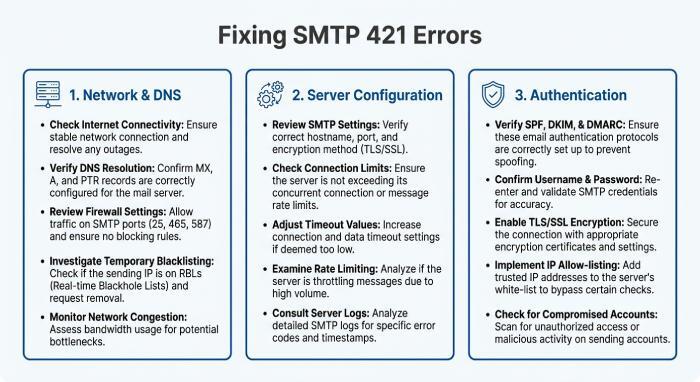
Start by confirming whether the mail server is reachable. Test the smtp connection using tools such as telnet, openssl s_client, swaks, or an SMTP Troubleshooter. If the connection times out, resets, or is refused, you may be dealing with a network-level connection error rather than a content or policy issue.
Next, verify DNS:
- Confirm MX records resolve correctly.
- Check the domain’s SOA record.
- Validate forward and reverse DNS for the sending ip address.
- Look for DNSSEC, CNAME, or resolver issues.
- Confirm the recipient domain is not intentionally configured with a null MX under RFC 7505.
A recurring dns error can cause repeated email delivery delays and generate multiple delivery status notification messages.
How to Fix SMTP 421 Issues on Mail Servers and Clients
If you manage the sending side, inspect mail logs for the full SMTP transcript. Look for timestamps, recipient domains, response text, queue IDs, and whether the message deferred status affects one domain or many. If only one provider is returning smtp 421, the problem may be provider-specific. If every destination fails, your own infrastructure may be the issue.
Recommended fixes include:
- Retry sending gradually rather than forcing all deferred mail through at once.
- Reduce concurrency and sending rate to avoid throttling.
- Clear stuck outbound queues only after identifying the cause.
- Fix reverse DNS, SPF, DKIM, and DMARC alignment.
- Patch a misconfigured server or vulnerable Mail Transfer Agent (MTA).
- Verify that your host is not an Open Relay.
- Remove compromised accounts sending spam.
Investigate whether your IP or domain is blocked by Spamhaus or another reputation source.
For client-side senders, confirm the correct SMTP host, port, Transport Layer Security (TLS) mode, username, and password. A client misconfiguration can create an smtp error, and repeated failed logins can lead to rate limiting or an authentication failure response.
If the delivery status notification says the provider will retry sending, do not repeatedly resend the same message manually. Duplicates can worsen reputation and trigger more 421 error responses.
Prevention Tips: Monitoring, Rate Limits, and Email Authentication
Preventing smtp 421 requires operational monitoring and disciplined sending behavior. Watch queue depth, deferred counts, bounce rates, complaint rates, and per-domain smtp error codes. Alert the mail administrator when temporary error rates rise above baseline.
Strong prevention includes:
- Enforcing SPF, DKIM, and DMARC for all sending domains.
- Using ARC where forwarding changes authentication results.
- Monitoring blocklists such as Spamhaus.
- Separating transactional and bulk email streams.
- Warming new IP addresses slowly.
- Following Yahoo, Google, and Microsoft sender requirements.
- Keeping clean recipient data to avoid an invalid recipient pattern.
- Applying rate limits per provider to reduce temporary deferral events.
A well-managed sender treats each smtp 421 as a signal. One temporary problem may resolve automatically, but repeated smtp error codes, repeated 421 error responses, and delayed email delivery indicate a deeper infrastructure, reputation, or policy issue that should be fixed before the next campaign.
General Manager
General Manager of DuoCircle. Product strategy and commercial lead for DMARC Report's 2,000+ customer base.
LinkedIn Profile →Take control of your DMARC reports
Turn raw XML into actionable dashboards. Start free - no credit card required.