Top 3 Link Checker Tools To Verify Safe Links

Quick Answer
Cyber threats, phishing scams, and malicious websites are more common than ever, making it important to verify every suspicious URL before clicking. A reliable link checker tool helps you detect unsafe links, phishing pages, malware, and fake websites in seconds.
Related: Free DMARC Checker ·How to Create an SPF Record ·SPF Record Format
Cyber threats, phishing scams, and malicious websites are more common than ever, making it important to verify every suspicious URL before clicking. A reliable link checker tool helps you detect unsafe links, phishing pages, malware, and fake websites in seconds. In this guide, we’ll explore the top 3 link checker tools that can help you verify safe links, improve online security, and browse the web with confidence.
Implementing SPF, DKIM, and DMARC also helps protect your domain from email spoofing, phishing, and unauthorized email abuse. Before you trust a domain’s mail, run a DMARC record checker to confirm its authentication is configured correctly. Running a DMARC checker confirms your domain’s policy is set up to block spoofed messages.
Why Safe-Link Checking Matters: Risks, use cases, and the difference between broken-link vs. safety/reputation checkers
Real-world risks and use cases
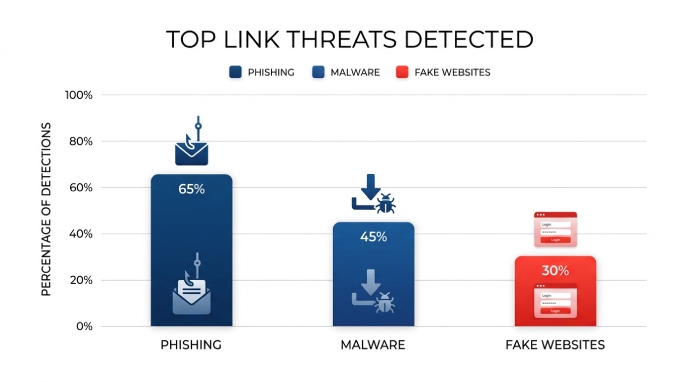
Every day, employees and consumers ask the same question: is this link safe? Attackers rely on urgency, curiosity, and trust to push a phishing attack through suspicious email threads, social DMs, and shortened URLs. A modern link checker or URL checker helps you check links before you click, catch a malicious URL, and spot a fake website designed for credential theft or drive‑by downloads. Typical use cases include:
- Verifying links in marketing campaigns and newsletters to prevent website scams.
- Triage for IT help desks when users forward a suspicious email and ask you to scan a URL.
- Editorial workflows to check links in guest posts or ads for malware detection and scam detection.
- Incident response: quickly scan the URL found in logs to determine risk and block malicious websites.
Whether you manually scan for scams before visiting or check URLs automatically in a gateway, the goal is simple: protect your device, maintain browser security and safe browsing, and avoid phishing across multiple devices and platforms. The same verify-before-you-trust habit applies to email — learning how to do a DMARC lookup lets you confirm a sending domain’s authentication status.
Broken-link vs safety/reputation checkers
Not all link tools are equal. Broken-link tools verify availability (404s, redirects), but safety/reputation link checker services focus on threat protection. The latter analyze a URL or domain for malware detection, phishing attack infrastructure, malicious URL patterns, and fake website indicators. A good URL checker won’t just say “working” or “not found”; it will answer “is this link safe?” using a massive database, real-time list signals, and often machine learning or a proprietary model trained to detect zero-day phishing. For complete website safety, combine both: uptime/broken-link monitors for UX, and security‑focused checkers for online security and device protection.
How to Judge a Link Checker: Databases, detection methods, redirect/shortlink handling, privacy, speed, integrations, and cost
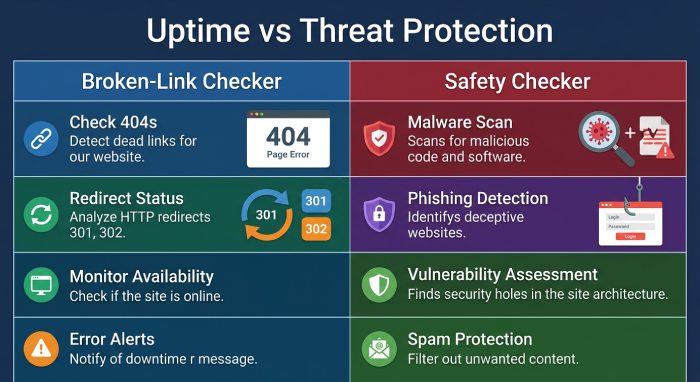
Evaluation criteria
Selecting a free link checker or enterprise solution comes down to evidence and workflow fit.
Databases and detection methods
- Data sources: Look for aggregation from public databases, third-party sources, and threat intel feeds that update a real-time list of known bad domains. Bonus points for sandboxing and a malware scanner to scan a URL for payload delivery.
- Analytics: Quality URL checker platforms layer machine learning, reputation scoring, and a proprietary model to catch zero-day phishing and novel website scams. Strong scam detection should flag a malicious URL even when content is new or cloaked.
- Verdict clarity: The tool should make it easy to answer “is this link safe?” and “what was detected?” with human‑readable labels.
Redirects, short links, and cloaking
Modern attackers chain redirects and use shorteners. Your link checker must unwind shortlinks, follow server- and client‑side redirects, and analyze intermediate hops. Good services simulate a headless browser to catch on‑page script changes that a simple manual URL checking pass would miss.
Privacy, speed, and integrations
- Privacy and security: Review the privacy policy to understand logging and whether logins not required is an option. Some teams need no subscriptions and lightweight tools; others prefer single sign-on (SSO) via a Nord Account to align with policy.
- Performance: You want fast results that still provide depth. Automated URL checking options should not slow users down.
- Integrations: Check for extensions on Chrome, Firefox, and Edge, plus APIs for check URLs automatically in SIEM/SOAR. OS support matters too: Windows, macOS, Linux on desktops; Android and iOS on mobile.
Cost, integrations, and privacy quick-check
- Cost model: Are there no subscriptions for the free tier? What’s the rate limit to scan the URL at scale? For companies, weigh Business VPN bundles, dedicated IP needs, and threat exposure management features.
- Ecosystem fit: Some vendors pair URL checking with virtual private network (VPN) security (to protect your internet connection), ad blocker features to get rid of trackers, identity theft protection, dark web monitor, password manager, and encrypted cloud storage. Examples include NordVPN with Threat Protection Pro, NordLayer for Business VPN, NordPass as a password manager, NordLocker for cloud storage, and broader initiatives like NordLabs (Research Lab), Cybersecurity Hub resources, and NordStellar. Connectivity features like VPN Servers and Meshnet can support remote teams. Other entities and platforms, nexos.ai (AI platform), NordProtect, and Saily, illustrate how security stacks can expand beyond a single tool to secure your business and support device protection across multiple devices.

Top 3 Link Checker Tools to Verify Safe Links
Tool #1, VirusTotal: Multi-engine URL analysis, how to read verdicts and community signals, best use cases, pros and cons
VirusTotal is a staple URL checker for analysts. Submit or paste a link to scan a URL across dozens of engines. It aggregates results from antivirus vendors, URL reputation feeds, and public databases, then presents a consolidated view so you can quickly decide: is this link safe?
Multi-engine URL analysis and verdicts
- What it does: For each URL, VirusTotal queries a massive database of engines for malware detection, phishing attack indicators, and malicious URL patterns. It also fetches server metadata and follows redirects when possible.
- How to read results: The summary shows how many engines flagged the resource. Dig into per‑engine detections and community notes to understand whether detections indicate a fake website, phishing kit, or malware distribution. Community contributions often help with scam detection context and mitigation ideas.
- Strengths: Breadth of engines, historical context, and Application Programming Interface(API) options to check links at scale. Excellent for manual URL checking in incident triage and as an automated URL checking back end in SOAR.
- Limitations: Mixed signals happen; one or two flags can be false positives. Public submissions may be visible, so mind sensitive URLs and review privacy policy implications.
Best use cases: Investigating a suspicious email URL; enriching SIEM alerts; validating blocklists to avoid phishing and block malicious websites across your fleet.
Tool #2, Google Transparency Report (Safe Browsing): What it checks, coverage and reliability, practical workflow, limitations to note
Google’s Transparency Report for Safe Browsing is a straightforward link checker that answers “is this link safe?” for known-bad domains and pages from Google’s real-time list.
Coverage, workflow, and limitations
- What it checks: URLs against Google’s Safe Browsing catalog of phishing and malware sites, fed by crawling and user telemetry.
- Reliability: Strong coverage for prevalent website scams and mass campaigns; fast results and simple verdicts.
- Practical workflow: Paste the URL to scan the URL quickly, or rely on built‑in browser security where Safe Browsing powers warnings in Chrome and integrations in Firefox/Edge via similar mechanisms.
- Limitations: It’s not a full malware scanner, and zero-day phishing can slip past until signals accumulate. For layered threat protection and online security, pair it with additional scanners or endpoint defenses.
Ideal for rapid triage, safe browsing checks before approving ads, and a quick “green/red” answer for non‑technical users.
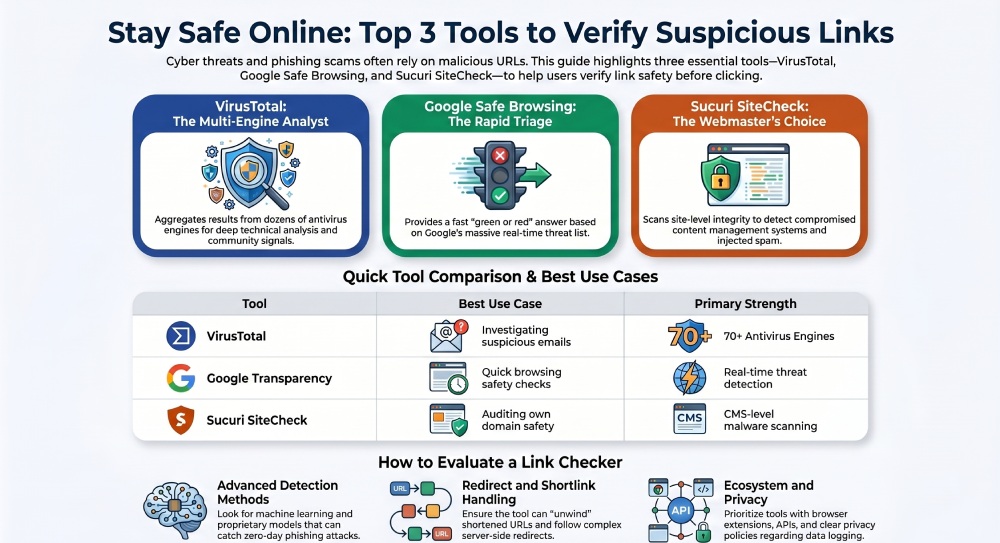
Tool #3, Sucuri SiteCheck: URL and site-level malware/blacklist scanning, strengths for webmasters, caveats and when to pair with other tools
Sucuri SiteCheck focuses on site‑level integrity. Paste a URL, and it will fetch pages to scan for known malware signatures, injected spam, and blacklist status across third-party sources.
Site-level malware/blacklist scanning and caveats
- Strengths: Great for webmasters who need to check links on their own domains and detect changes indicative of a compromised content management system (CMS). It inspects content, runs blacklist checks, and flags visible threats that may lead to a phishing attack or a malicious URL path.
- Caveats: As a remote scanner, it can miss server‑side infections hidden from unauthenticated visitors. Treat results as an initial pass; combine with server logs and a second URL checker like VirusTotal for more robust scam detection.
Practical pairing: Use SiteCheck to scan a URL for on‑page threats, confirm with VirusTotal’s engines, and gate traffic with Google’s Safe Browsing warnings to avoid phishing. This layered approach helps secure your business operations and protect your device fleet.
Workflow: manual vs. automated URL checking
- Manual: For editors and comms teams, a quick free link checker pass on incoming guest posts and outreach helps catch a fake website before publication.
- Automated: Security teams can check URLs automatically via APIs and email gateways, quarantining links from a suspicious email and scoring them with a proprietary model. Combine tools with a Business VPN that includes Threat Protection Pro features (e.g., NordVPN) to block malicious websites network‑wide, add an ad blocker to get rid of trackers, and enrich decisions with a dark web monitor. Tie it all together through integrations on Windows, macOS, Linux, Android, iOS, and in browsers like Chrome, Firefox, and Edge.
Pro tip: Where possible, scan for scams in a sandbox first; never authenticate or enter credentials on a page until your link checker says the risk is low, and your VPN security is active to protect your internet connection.
Finally, remember operational fit. Some tools have logins not required and no subscriptions, perfect for ad‑hoc checks. Others offer APIs and enterprise features like threat exposure management and dedicated IP for controlled egress. If you need credential hygiene and identity theft protection alongside link security, consider pairing a URL checker with a password manager such as NordPass and cloud storage like NordLocker. For organizations standardizing on an ecosystem, evaluate vendors’ Research Lab updates, Cybersecurity Hub guidance, AI platform initiatives like nexos.ai, and network features like Meshnet and global VPN Servers to ensure your stack evolves as adversaries do.
General Manager
General Manager of DuoCircle. Product strategy and commercial lead for DMARC Report's 2,000+ customer base.
LinkedIn Profile →Take control of your DMARC reports
Turn raw XML into actionable dashboards. Start free - no credit card required.