What Is Barrel Phishing? How It Works And How To Prevent It

Quick Answer
Barrel phishing is a multi-stage email attack that builds trust through repeated deceptive messages to steal data or spread malware. Prevent it by verifying senders, using email security tools, enabling multi-factor authentication, and training employees to spot suspicious emails.
Barrel phishing refers to a phishing tactic in which attackers use an innocent-looking email to establish contact before sending a malicious message. This approach may lead to credential theft, financial fraud, or data breaches. Understanding how this tactic works and recognizing its warning signs can help individuals and organizations strengthen their email security. In this guide, we explain how barrel phishing works, explore common examples, and share practical ways to reduce the risk of these attacks.
What Is Barrel Phishing? Definition and Key Characteristics
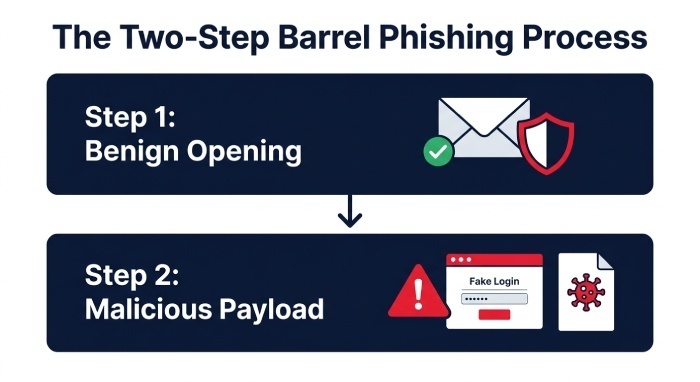
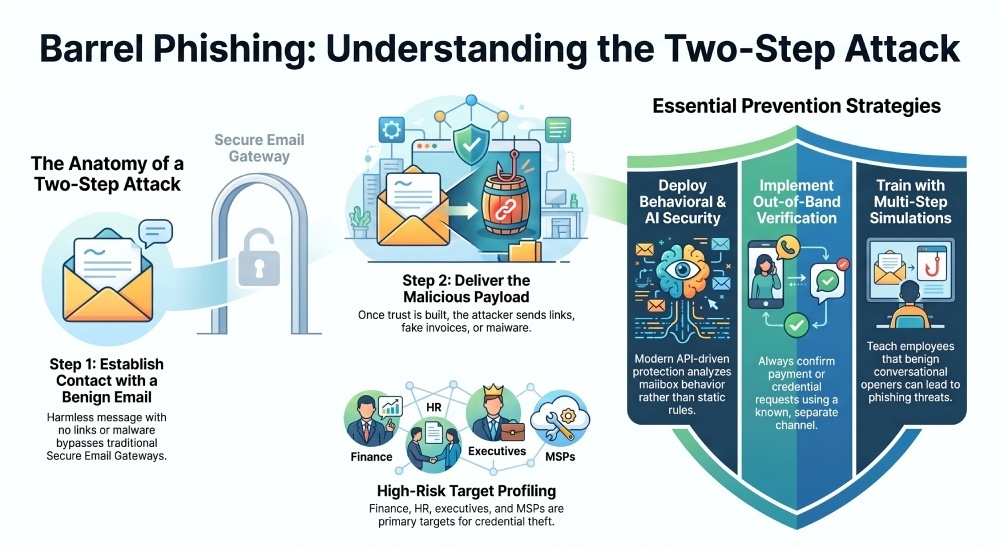
Barrel phishing refers to a phishing tactic in which an attacker sends an apparently harmless email to establish contact before following up with a malicious request. The second message may contain a suspicious link, malicious attachment, fraudulent payment instruction, or request for sensitive information. This approach uses social engineering to make a later message seem more trustworthy.
In many cases, the first message contains no malware, no suspicious link, and no obvious red flags. It may look like a routine business inquiry, a vendor introduction, a scheduling note, or a simple “Are you available?” message. Because the initial email appears benign, users may reply, and email security tools may not flag it. Once the recipient engages, the attacker sends the actual phishing payload.
Key characteristics of barrel phishing
Barrel phishing typically includes:
- A first-stage “trust-building” email
- A second-stage malicious message
- Impersonation of a trusted sender, executive, vendor, recruiter, or customer
- Social engineering designed to bypass skepticism
- Requests that can lead to credential theft, malware infection, wire fraud, or account takeover
- Tactics associated with business email compromise and targeted email attacks
This makes barrel phishing especially dangerous for organizations that rely only on static rules, keyword filters, or a traditional SEG, or Secure Email Gateway, for inbox protection. Modern email security requires mailbox-level visibility, behavioral analysis, threat intelligence, and AI-powered attack detection.
How Barrel Phishing Works: The Two-Step Attack Process
Barrel phishing is effective because it mirrors normal human communication. Instead of rushing the victim, the attacker creates a short conversation that lowers defenses.
Step 1: The attacker sends a benign opening message
The first email may say something like:
“Hi, are you the right person to speak with about invoice processing?”
Or:
“I’m following up on a business opportunity and wanted to confirm your availability.”
At this stage, there may be no malware, no link, and no attachment. The message may come from a lookalike domain, a compromised mailbox, or an attacker-controlled account designed to resemble a legitimate contact. In some cases, attackers use real OSINT from LinkedIn, company websites, press releases, or public filings to personalize the message.
Why the first message often bypasses defenses
Traditional email security tools may not flag an initial message if it contains no obvious malicious links, attachments, or other warning signs. Some email security solutions also analyze sender behavior, message context, and communication patterns to identify suspicious activity. Monitoring unexpected follow-up emails and unusual requests can help security teams recognize potential phishing attempts.
Step 2: The attacker delivers the real phishing payload
Once the recipient replies, the attacker sends the second message. This is where the actual phishing attempt occurs. The payload may include:
- A fake Microsoft 365 or Google Workspace login page
- A malicious attachment carrying malware
- A payment redirection request tied to business email compromise
- A request to change bank account details
- A link to a fake document-sharing portal
- A prompt that enables account takeover
- A request to move the conversation to Microsoft Teams or another collaboration platform
Common second-stage outcomes
The second-stage message is designed to produce a concrete result: credential theft, malware deployment, financial fraud, account takeover, or data exposure. In more advanced campaigns, attackers may combine barrel phishing with deepfake attack protection challenges, voice impersonation, or AI-powered writing tools that mimic a known executive’s tone.
Why conversation history matters
Because the victim has already replied once, the second email feels less like a cold phishing message and more like an ongoing business exchange. This conversational context is what makes barrel phishing a powerful form of social engineering and a growing concern for CISOs, IT pros, Business Leaders, IT/Security Leaders, and IT/Security Operators.
Common Examples and Warning Signs of Barrel Phishing Attempts
Barrel phishing can appear in many forms, from vendor fraud to HR scams. The warning signs are often subtle, especially when attackers use polished language, Artificial Intelligence, and public company details.
Example 1: Executive impersonation and business email compromise
An attacker impersonates a CEO or CFO and sends:
“Are you available to help with a quick task?”
If the employee replies, the attacker follows up with a request to buy gift cards, approve an invoice, or initiate a wire transfer. This is a classic business email compromise scenario. The first email builds trust; the second triggers the fraud.
Example 2: Fake vendor invoice request
The attacker poses as a supplier and asks whether the accounts payable contact is available. After a response, they send a fake invoice or updated banking details. This type of phishing can bypass basic email security because the first message looks like a routine vendor communication.
Example 3: Credential theft through fake collaboration links
The attacker may send a simple introduction first, then follow up with a link to a fake Microsoft 365, Google Workspace, or file-sharing login page. The victim enters credentials, enabling account takeover. Once inside the mailbox, attackers can launch more email attacks from a legitimate account.
Warning signs to watch for
Look for these barrel phishing indicators:
- A vague initial message asking if you are available
- Unexpected urgency after a harmless first exchange
- Requests to bypass normal payment, procurement, or compliance processes
- Sender domains that are slightly misspelled
- Sudden movement to Microsoft Teams or another channel
- Attachments or links sent only after you reply
- Requests involving passwords, MFA codes, wire transfers, or encryption keys
- Messages from “trusted senders” that feel unusual or out of character
Collaboration tool risks
Modern phishing is not limited to email. Attackers may shift from email to Microsoft Teams, Slack, or other collaboration platforms. That is why collaboration tool protection and API-driven protection are becoming important parts of enterprise email security and phishing attack prevention.
Why Barrel Phishing Is Effective and Who Is Most at Risk
Barrel phishing works because it exploits trust, timing, and normal business behavior. Most employees are trained to spot obvious phishing links or malware attachments, but many are less prepared for a harmless first email that becomes malicious later.
Why it bypasses traditional defenses
Many legacy email security systems focus on known malicious URLs, malware signatures, blocklists, and attachment scanning. Barrel phishing can evade these controls because the first message may contain nothing dangerous. The second message may also use zero-day threats, newly created domains, or compromised accounts that have not yet appeared in threat intelligence feeds.
Modern email security solutions can use behavioral analysis, threat intelligence, and automated investigation to identify suspicious messages that traditional filters may miss. Security teams should also monitor unusual sender behavior, unexpected follow-up emails, and requests that deviate from normal business processes. Combining automated detection with human review can help organizations investigate suspicious activity and respond more quickly.
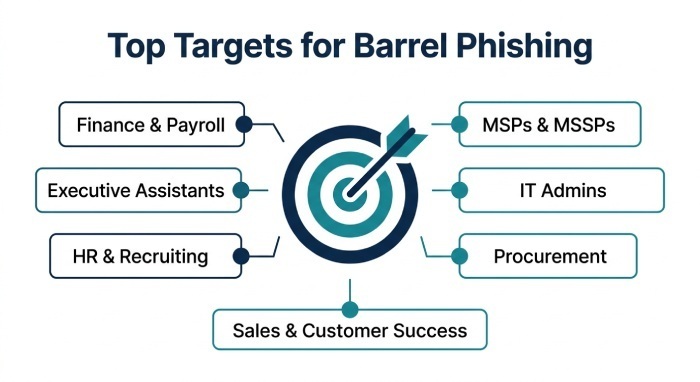
High-risk roles and organizations
The highest-risk targets include:
- Finance and payroll teams
- Executive assistants
- HR and recruiting staff
- Sales and customer success teams
- Procurement and vendor management teams
- Managed service providers, including MSPs and MSSPs
- IT pros with administrative access
- Enterprise users with access to sensitive systems
Managed service providers (MSPs) and managed security service providers (MSSPs) can be attractive targets because a compromised account may expose systems or information belonging to multiple clients. These organizations should enforce multifactor authentication, configure SPF, DKIM, and DMARC correctly, monitor suspicious email activity, and use clear procedures to verify sensitive requests. Regular security reviews can help reduce the risk of account compromise and phishing-related incidents across client environments.
How to Prevent Barrel Phishing: Best Practices for Individuals and Organizations
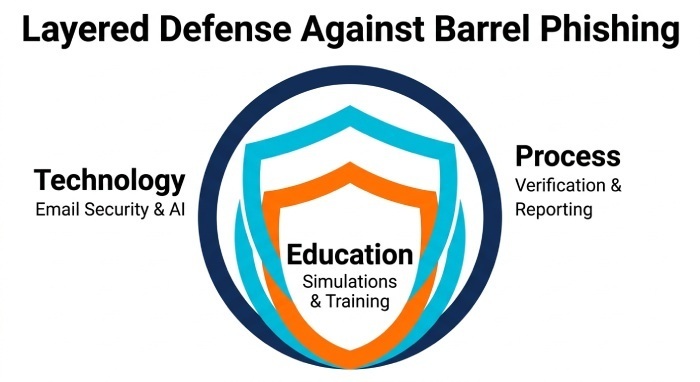
Preventing barrel phishing requires a layered approach: technology, process, and user education. No single control stops all email attacks, especially when attackers combine social engineering, AI-powered content, malware, and impersonation.
Strengthen technical email security controls
Organizations should deploy modern email security with:
- DMARC, SPF, and DKIM to reduce domain spoofing
- A secure email gateway where appropriate
- API-driven protection for Microsoft 365 and Google Workspace
- Mailbox-level inbox protection
- Behavioral attack detection
- Threat intelligence enrichment
- Malware and URL analysis
- Encryption for sensitive communications
- Automated phishing remediation
- Forensic investigation workflows
- Security operations center (SOC) automation for faster response
Organizations can strengthen their defenses against barrel phishing by combining email security controls, threat intelligence, suspicious-message analysis, and employee awareness training. These measures help security teams identify suspicious communication patterns and respond to potential phishing attempts more effectively.
Use phishing simulations and awareness training
Phishing simulations are essential because barrel phishing targets human behavior. Standard awareness training should be supported by realistic phishing simulations that include multi-step scenarios, executive impersonation, vendor fraud, and business email compromise.
Phishing simulations can help organizations evaluate how employees respond to realistic, multi-stage phishing attempts. Effective security awareness training should teach employees that even a harmless-looking initial email may be part of a phishing campaign, and that unexpected requests should be verified before taking action.
Training topics to include
Training should cover:
- How barrel phishing differs from standard phishing
- How social engineering manipulates trust
- How to verify payment or credential requests
- How to report suspicious email attacks
- How malware and credential theft occur
- How account takeover can begin with one reply
Improve reporting, remediation, and investigation
Employees need a simple way to report suspicious messages. Once reported, the security team should be able to investigate quickly, remove similar emails from other inboxes, and determine whether any user clicked, replied, downloaded malware, or submitted credentials.
Strong phishing remediation includes:
- Automated clustering of similar email attacks
- Forensic investigation of headers, links, and attachments
- Risk scoring based on user behavior and message traits
- Integration with SIEM, SOAR, and ticketing systems
- Escalation to a phishing SOC when needed
- Compliance documentation for audit trails
This approach helps IT/Security Operators and CISOs move from reactive cleanup to proactive phishing attack prevention.
Verify requests through trusted channels
For individuals, the best defense is disciplined verification. If an email asks for payment, credentials, confidential data, or a process change, verify it through a separate trusted channel. Do not rely on the contact details in the suspicious message.
Practical steps include:
- Call the known phone number for the sender
- Confirm vendor bank changes through established procedures
- Avoid clicking links in unexpected follow-up emails
- Report suspicious messages immediately
- Treat unusual urgency as a warning sign
- Be cautious even when the sender appears familiar
Adopt AI-powered, adaptive defenses
Attackers may use artificial intelligence (AI) to create convincing phishing emails, research potential targets, and personalize social engineering attempts. Organizations can respond by combining email filtering, sender behavior analysis, threat intelligence, and employee awareness training. These measures can help identify suspicious messages and reduce the risk of phishing-related incidents.
Organizations can reduce barrel phishing risks by combining email filtering, email authentication, employee awareness training, and continuous monitoring. Security teams should also protect user accounts with multifactor authentication (MFA), investigate suspicious messages, and verify sensitive requests through trusted channels. These layered defenses help reduce the risk of business email compromise, credential theft, malware infections, and account takeover.
General Manager
General Manager of DuoCircle. Product strategy and commercial lead for DMARC Report's 2,000+ customer base.
LinkedIn Profile →Take control of your DMARC reports
Turn raw XML into actionable dashboards. Start free - no credit card required.