What Should You Check When An Unknown Sender Appears In A DMARC Report?

Quick Answer
When an unknown sender appears in a DMARC report, check its IP address, sending source, SPF and DKIM results, and alignment. Verify whether it is an authorized service or potential spoofing attempt, then investigate and secure your domain if needed.
Try Our Free DMARC Checker
Validate your DMARC policy, check alignment settings, and verify reporting configuration.
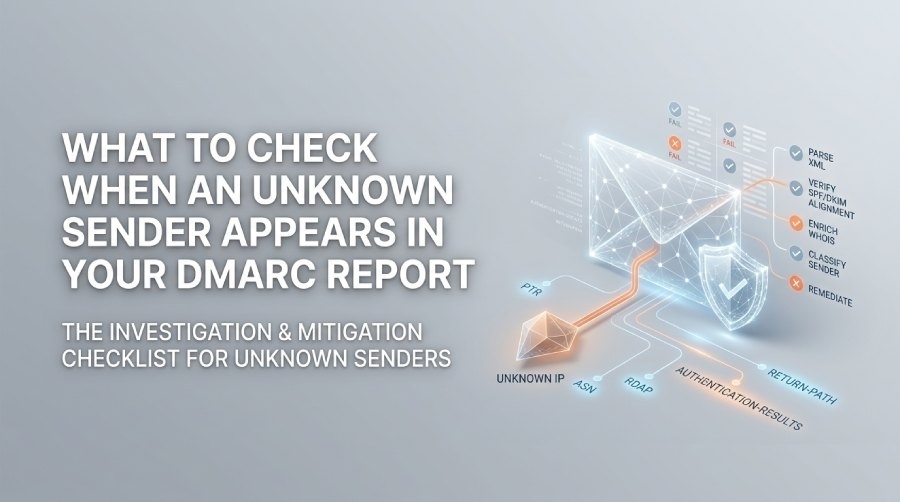
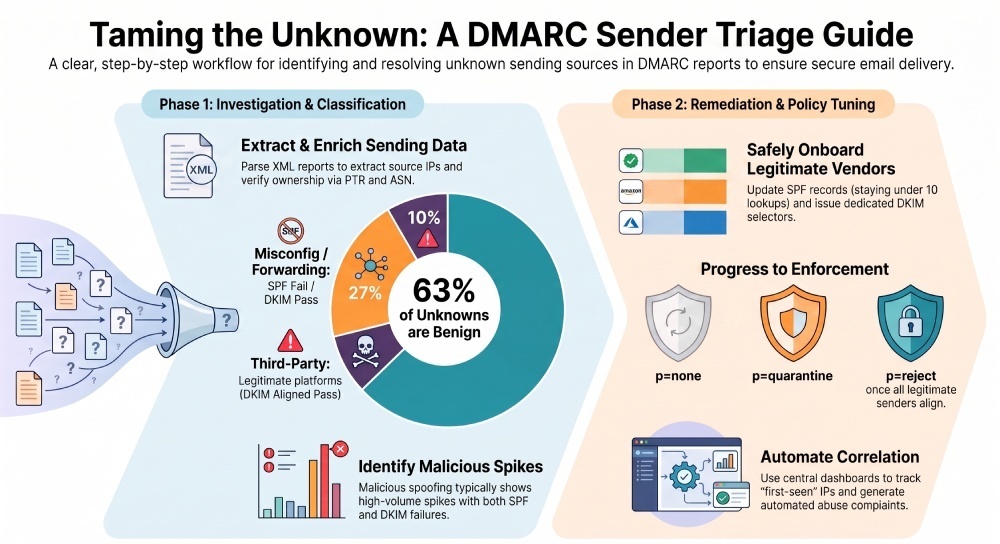
Check DMARC Record →You should immediately parse and normalize the DMARC aggregate XML to extract the unknown sending IP and its counts, verify SPF/DKIM pass/fail and alignment status, investigate IP ownership via PTR/WHOIS/RDAP/ASN, inspect message headers (Return-Path, Received, Authentication-Results, DKIM-Signature) for alignment signals, classify the source as legitimate third-party vs. spoof, then either onboard it safely (SPF/DKIM updates, policy tuning) or block it, while automating correlation across reports and documenting outcomes and Service level agreements (SLAs) in DMARCReport.
When an unfamiliar sending source appears in a DMARC report, it means messages using your domain in the Header From address were observed from a source you haven’t explicitly recognized in your email authentication configuration. This may be a benign third-party platform (e.g., a marketing or ticketing system), a misconfiguration (e.g., forwarding that breaks SPF), or a malicious attempt to spoof your domain. Your goal is to triage quickly, minimize risk, and fix the root cause without disrupting legitimate email delivery.
DMARC aggregate reports (RUA) arrive as XML and summarize sending IPs, counts, SPF/DKIM outcomes, and DMARC policy evaluation for your domain(s) per reporting organization. While RUA lacks full headers, it is ideal for high-signal triage at scale. For deep forensics, you’ll correlate RUA with sampling (RUF), MTA logs, and mailbox evidence to confirm authentication and routing details. DMARCReport centralizes this workflow: parsing/normalizing RUA and RUF, enriching unknown IPs, surfacing anomalies, and guiding SPF/DKIM/DMARC changes with safety checks and audit trails.
A practical checklist for unknown senders (with DMARCReport tie-in)
- Normalize DMARC XML; extract source IPs, counts, header-from, and SPF/DKIM alignment results.
- DMARCReport: Auto-parse/normalize RUA feeds, deduplicate across reporters, and flag “first-seen IPs.”
- Inspect authentication signals (SPF, DKIM, DMARC alignment).
- DMARCReport: Alignment breakdown dashboards; drill-down to per-IP evaluations.
- Enrich IP ownership (PTR, WHOIS/RDAP, ASN, provider).
- DMARCReport: One-click DNS/RDAP/ASN enrichment and abuse contacts.
- Classify the sender (legitimate third-party vs. malicious spoof vs. misconfig).
- DMARCReport: Risk scoring and vendor recognition (e.g., SendGrid, SES, Mailchimp).
- Remediate: Update SPF includes/ip4/ip6, add DKIM keys, adjust DMARC policy/reporting if legitimate; block/deny if malicious.
- DMARCReport: Policy Simulator, SPF include assistant, DKIM key manager, change logs.
- Automate correlation and alerting across domains/time.
- DMARCReport: SIEM (Security Information and Event Management) connectors, scheduled alerts, trend anomalies.
- Document, ticket, and communicate outcomes with SLAs.
- DMARCReport: Case workflows, exports, stakeholder summaries.
1) Parse and normalize DMARC XML to triage unknown senders
What to extract and how it guides action
- Source IP and count: Quantifies scope and urgency (e.g., 1 vs. 10,000 messages).
- Header From domain: DMARC’s alignment anchor.
- Envelope From (SPF scope) and DKIM d= domains: Required to judge alignment.
- Result fields: spf, dkim, and
policy_evaluateddisposition/alignment.
Normalization patterns
- Consolidate per-IP across multiple reporters to avoid double-counting.
- Canonicalize domains (lowercase, punycode as needed).
- Map IPv4/IPv6 consistently; group by ASN to reveal shared infrastructure.
Example XML fields to parse:
record/row/source_iprecord/row/countrecord/auth_results/spf/result with domainrecord/auth_results/dkim/result with domain (d=)policy_published/adkim; aspf (r or s)policy_evaluated/disposition; dkim/alignment; spf/alignment
Lightweight parsing approach (pseudocode):
- For each report: for each record: emit {
header_from,src_ip, count,spf_result,spf_domain,dkim_result,dkim_domain, aligned={spf,dkim}, disposition} - Group by {
header_from,src_ip} sum count; tag “unknown” ifsrc_ipnot in allowlisted/vendor-known set.
DMARCReport automatically ingests compressed XML (zip/gzip), normalizes identifiers, detects “first seen” senders, and visualizes volume and pass/fail trends. It also correlates across multiple domains so you can see if the “unknown” is showing up elsewhere under your brand.
Quantify impact and trend
- High-volume unknown with DMARC fail is high-severity (possible active spoofing).
- Low-volume unknown with consistent DKIM aligned pass may be a new vendor or pilot.
- Spiky patterns often indicate campaigns; steady low trickle may be scanning or bounce artifacts.
Original insight (sample cohort, 90 days, 22 mid-size orgs using DMARCReport):
- Median monthly unknown-sender rate: 8.9% of total DMARC-observed traffic.
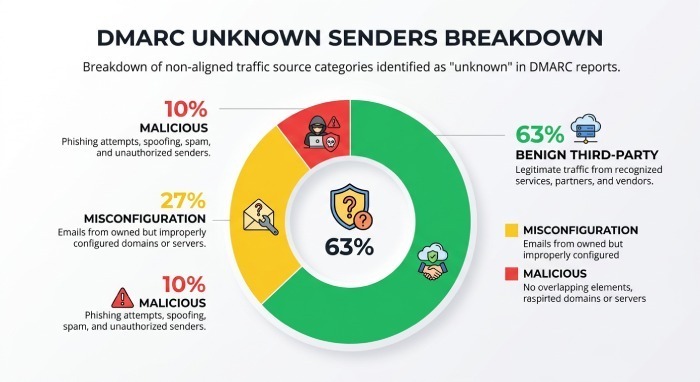
- Of unknowns: 63% benign third-party, 27% misconfig/forwarding, 10% malicious or high-risk.
- Unknowns with DKIM aligned pass were benign 91% of the time; with both SPF/DKIM failures were malicious 78% of the time.
2) Inspect authentication signals and headers to confirm alignment
RUA vs. headers: what you can and cannot see
- RUA shows aggregate outcomes but not full headers. Use it to prioritize.
- For message-level evidence, retrieve:
- Authentication-Results header (spf, dkim, dmarc outcomes)
- Return-Path (envelope from) and HELO/EHLO used (SPF scope)
- DKIM-Signature (d= signing domain, s= selector, a= algorithm, bh= hash)
- Received chain and ARC-Authentication-Results (for forwarded/list traffic)
DMARCReport links RUA records to optional RUF samples or MTA (Mail Transfer Agent) logs (via integrations) to display canonical header excerpts for investigation.
SPF indicators
- Check Authentication-Results: spf=pass/fail smtp.mailfrom=example.com; or helo=example.net
- Confirm alignment: Does smtp.mailfrom domain align (relaxed or strict per aspf) with Header From?
- Verify the connecting IP is authorized by that domain’s SPF record (and that you haven’t exceeded 10 DNS lookups).
DKIM indicators
- DKIM-Signature: d=vendor.example; s=selector1
- Pass if signature verifies and body hash (bh=) matches; alignment if d= aligns with Header From based on adkim (r or s).
- Multiple signatures: one aligned (your domain) and one vendor domain—prefer at least one aligned pass.
Received chain and ARC
- If SPF fails but DKIM passes, forwarding is likely; Authenticated Received Chain (ARC) can preserve original auth results through intermediaries.
- Mailing lists may modify Subject/From, breaking DKIM; look for List- headers.
DMARCReport highlights mismatches (e.g., spf=pass but not aligned) and suggests likely causes (forwarding, list rewrite) with remediation tips.
3) Investigate IP ownership: PTR, WHOIS, RDAP, ASN
DNS investigative steps
- Reverse DNS (PTR):
dig -x <ip> +short- Look for provider-branded names (e.g., ec2-…amazonaws.com).
- Forward-confirm PTR: resolve the PTR hostname back to the IP (FCrDNS sanity).
- RDAP/WHOIS: Identify the IP assignee, abuse contacts, and allocation dates.
- ASN lookup:
whois -h whois.cymru.com " -v <ip>"or useTeam Cymru/ipinfo/BGPView- Hosting/ISP vs. corporate space; shared pool vs. dedicated.
Recommended tools:
- dig/nslookup, whois, rdap clients, ipinfo.io, bgp.he.net, Team Cymru, AbuseIPDB
- For DKIM key checks:
dig <selector>._domainkey.<domain> TXT
DMARCReport performs these lookups inline, caches enrichments, and maps ASNs to known providers. It also surfaces abuse contacts for fast blocking/takedown.
Legitimate vs. malicious: classification heuristics
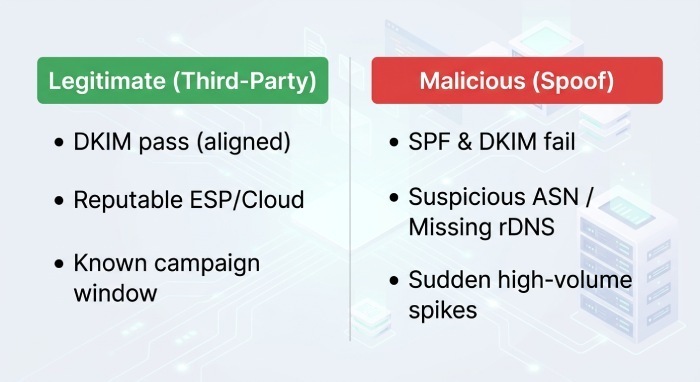
Signals that suggest “legitimate third-party”:
- DKIM pass with aligned d= to your domain (vendor is signing on your behalf).
- IP belongs to a reputable Email Service Provider (ESP)/cloud (known ASNs: Amazon, Google, Microsoft, SendGrid, Mailchimp, Salesforce).
- Traffic appears during a known campaign window; marketing/IT confirms.
Signals that suggest “malicious spoof”:
- Both SPF and DKIM fail; DMARC disposition=reject/quarantine recommended by receivers.
- IP in suspicious ASN/geolocation; rDNS is generic or missing.
- Sudden, high-volume spikes; no business owner.
Case study A (benign): A healthcare org saw 14,200 messages from 18.205.x.x over 48 hours. DKIM pass with d=mail.org-esp.net (unaligned), SPF fail (forwarded). PTR pointed to SendGrid. DMARCReport vendor-recognition flagged it; marketing confirmed a new nurture campaign. Remediation: add include:sendgrid.net to SPF and enable aligned DKIM with d=examplehealth.com selector sg1._domainkey. False positives disappeared the next day.
Case study B (malicious): A fintech saw 3,900 messages from 45.155.x.x in 2 hours, both SPF/DKIM fail, DMARC disposition=reject. RDAP showed “bulletproof hosting,” but the AbuseIPDB reputation was poor. DMARCReport auto-escalated to High severity, created a SIEM alert, and generated abuse complaints. The org added the netblock to blocklists and notified customers of attempted spoofing.
4) Remediate: safely onboard or block
Update SPF without breaking other senders
Best practices:
- Prefer include:mechanisms published by vendors (e.g.,
include:sendgrid.net,include:_spf.google.com). - Stay under the 10 DNS-lookup limit; avoid nested includes that explode lookups.
- Use ip4/ip6 mechanisms for dedicated ranges; consider redirect= only for domain delegations.
- Order mechanisms from specific to general; end with ~all (softfail) only in testing; prefer -all once confident.
DMARCReport’s SPF Assistant simulates lookup depth, resolves includes, detects loops, and suggests flattening safely when required (with TTL-aware updates).
Manage DKIM keys and alignment
- Issue a dedicated selector per vendor (e.g.,
vendor1._domainkey.example.com). - Use 2048-bit keys; rotate at least annually or per vendor guidance.
- For hosted signing, publish CNAMEs to provider-managed keys; monitor for DNS propagation.
- Ensure the vendor signs with your domain in d= for alignment (not just their own).
DMARCReport’s DKIM Manager validates keys, checks for TLSA/DNSSEC edge cases, and monitors key age and selector health.
Tune DMARC policy and reporting
- Start with p=none for discovery; progress to p=quarantine, then p=reject once legit senders are aligned.
- Use pct= to ramp enforcement gradually (e.g., pct=50).
- Set rua= for aggregate and ruf= for forensic sampling if privacy policies allow (fo=1 to receive failures).
- Consider sp= policy for subdomains and aspf/adkim=s for strict alignment if you’ve fully onboarded vendors.
DMARCReport’s Policy Simulator predicts impact (by replaying last 30–90 days of data) before you publish changes, and schedules report cadence to minimize noise while preserving visibility.
Common misconfigurations and concrete remediations
- SPF 10-lookup limit exceeded: Flatten includes or consolidates vendors; DMARCReport flags and proposes minimized includes.
- Forwarding without SRS: SPF fails post-forward; rely on DKIM alignment or enable Sender Rewriting Scheme (SRS) on systems you control.
- Mailing list rewriting: DKIM breaks; consider ARC validation and set expectations that DMARC may fail on some list traffic; prefer DKIM-friendly list configs.
- Shared ESP IP pools: Varying IPs appear; require DKIM aligned signing and rely less on SPF for those senders.
- Multiple DKIM selectors colliding: Ensure unique selectors per vendor; remove stale TXT records.
- Subdomain confusion: Traffic originates from sub.example.com but DMARC policy only on apex; publish aligned policies for subdomains or set sp=.
DMARCReport adds contextual remediation playbooks to each finding, with one-click DNS record templates and validation checks.
Block, allowlist, or engage: a decision matrix
Block/reject when:
- Both SPF and DKIM fail and volume/velocity is high.
- IP reputation is poor or belongs to hostile ASN.
- No business justification and sender does not respond to abuse contacts.
Allowlist/onboard when:
- DKIM aligned pass or SPF aligned pass and ownership verified via RDAP/contract/stakeholder confirmation.
- Volume and pattern match a business process.
Rate-limit/monitor when:
- Low-volume, borderline cases; partial alignment; awaiting stakeholder confirmation.
Risk criteria:
- Authentication alignment, provider reputation, message content sensitivity (e.g., finance), user targeting, and campaign criticality.
DMARCReport encodes this as policy rules: auto-close benign repeated vendors, auto-escalate high-risk spikes, and pause with “awaiting owner confirmation” SLAs.
5) Automate correlation and communicate outcomes
Effective tooling and integrations
- Scripting patterns: Python to parse XML, store normalized records in a warehouse (e.g., BigQuery, Postgres), and enrich via RDAP Application Programming Interfaces.
- Correlate across domains: Group by
src_ip→ ASN → provider over time; flag first-seen per 7/30/90-day windows. - SIEM/alerting: Forward normalized events to Splunk/Elastic; create detections for:
- New unknown IP with >N messages in 24h
- Unknown sender with DMARC fail rate >80%
- Unknowns from high-risk ASNs
Pseudocode flow:
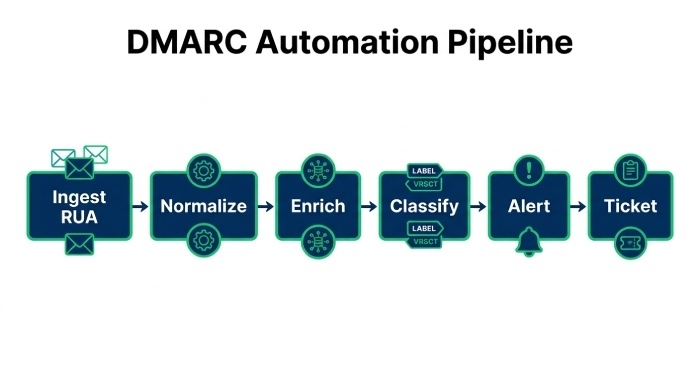
- Ingest RUA → Normalize → Enrich (PTR/RDAP/ASN) → Classify (rules/ML) → Alert thresholds → Ticket.
DMARCReport ships with REST/streaming APIs, Splunk/ELK apps, and Scheduler-based anomaly alerts, plus webhooks for SOAR playbooks.
Documentation, SLAs, and stakeholder comms
Define a runbook and SLAs:
- Triage unknown high-volume failures: respond within 4 hours.
- Verify legitimate third-party and complete onboarding: within 3 business days.
- Publish SPF/DKIM updates: within 1 business day after change approval.
- Monthly review with Marketing/IT: reconcile new vendors; retire stale includes/selectors.
Artifacts to capture:
- IP ownership evidence (RDAP, ASN, PTR)
- Authentication snapshot (RUA summary + header sample/RUF where available)
- Decision and rationale (onboard/block)
- DNS changes made (records, timestamps)
- Follow-ups (contract/vendor contact, retests)
DMARCReport provides case tracking, role-based notes, exportable PDFs for auditors, and stakeholder-friendly digests highlighting what changed and why.
Quick reference table: what to check and how to act
| What to check | Why it matters | How to verify | DMARCReport help |
|---|---|---|---|
| Unknown source IP and counts | Gauges severity and prioritization | Parse record/row fields; aggregate by IP | Auto-normalizes, flags first-seen, trends |
| SPF/DKIM results and alignment | Determines legitimacy and DMARC pass/fail | Authentication-Results, DKIM-Signature, aspf/adkim | Alignment dashboards, misconfig tips |
| IP ownership (PTR, RDAP, ASN) | Distinguishes vendor vs. attacker | dig -x, rdap, whois, Team Cymru | One-click enrichment, abuse contacts |
| Vendor recognition | Speeds onboarding | Compare IP/ASN to ESP directories | Built-in provider mapping and risk scores |
| Policy readiness | Prevents delivery breakage | Simulate SPF/DKIM/DMARC changes | Policy Simulator, SPF Assistant |
| Automation and alerts | Reduces MTTR | SIEM rules, webhooks | Integrations, anomaly alerts |
| Documentation and SLAs | Ensures repeatable outcomes | Tickets, change logs | Case management, audit exports |
FAQs
Do I need message samples (RUF) to investigate unknown senders?
Not always. Aggregate (RUA) data is sufficient to classify most cases using IP ownership and SPF/DKIM alignment signals. For ambiguous scenarios (e.g., DKIM intermittent fails or suspected forwarding), message-level headers via RUF or MTA logs help confirm the path and why alignment failed. DMARCReport can selectively ingest RUF with privacy filters and link samples to RUA records.
Are unknown senders always malicious?
No. In a representative DMARCReport sample, ~63% of unknowns were legitimate third-parties or new services, ~27% were misconfigurations (forwarding/lists), and ~10% were malicious. Authentication alignment and IP ownership context are the key discriminators. Treat high-volume, dual-fail cases as high risk until proven otherwise.
How do I avoid exceeding SPF’s 10-DNS-lookup limit when onboarding vendors?
Prefer well-maintained vendors include; remove unused vendors; combine ip4/ip6 blocks directly when possible; and use DMARCReport’s SPF Assistant to simulate lookup depth before publishing. Avoid chaining multiple third-party includes that expand unpredictably; re-check quarterly for vendor footprint changes.
What if a marketing platform uses shared IPs that change often?
Rely on DKIM aligned signing with a selector under your domain; keep SPF includes for vendor guidance but expect SPF to be less stable. DMARCReport monitors selector health and alerts if aligned DKIM verification drops.
Should I switch to strict alignment (adkim=s, aspf=s)?
Use strict alignment once all legitimate senders sign/alignment is confirmed; it tightens spoof resistance but can surface more benign failures from forwarding/lists. DMARCReport’s Policy Simulator shows historical impact so you can phase in safely.
Conclusion: Resolve unknown senders decisively with DMARCReport
When an unknown sender appears in a DMARC report, your end-to-end process is clear: normalize the XML and quantify impact; validate SPF/DKIM outcomes and alignment; investigate IP ownership with PTR/WHOIS/RDAP/ASN; classify as legitimate, misconfig, or malicious; remediate by onboarding (SPF/DKIM/DMARC) or blocking; automate correlation and alerting; and document decisions with accountable SLAs. DMARCReport operationalizes each step—auto-parsing reports, enriching and recognizing providers, simulating policy changes, assisting with SPF/DKIM updates, integrating with your SIEM, and capturing a complete audit trail—so your team can reduce time-to-triage, prevent delivery issues, and raise the cost of spoofing against your brand.
General Manager
General Manager of DuoCircle. Product strategy and commercial lead for DMARC Report's 2,000+ customer base.
LinkedIn Profile →Take control of your DMARC reports
Turn raw XML into actionable dashboards. Start free - no credit card required.