Why Do DMARC Reports Show Unknown IP Addresses, And What Should I Do?

Quick Answer
DMARC reports show unknown IP addresses when emails originate from servers not recognized in your authentication setup. Verify whether the IPs are legitimate, update your SPF, DKIM, and DMARC records if needed, and investigate unauthorized sources to prevent spoofing and phishing attacks.
Try Our Free DMARC Checker
Validate your DMARC policy, check alignment settings, and verify reporting configuration.
Check DMARC Record →DMARC reports show unknown IP addresses because email frequently traverses forwarders, shared ESP infrastructure, NATed relays, ISP sampling and, at times, spoofing/botnets or configuration drift, and you should verify alignment (SPF/DKIM/Header-From), investigate the host (PTR/WHOIS/ASN), correlate with Message-ID and logs, then authorize or block by updating SPF/DKIM/DMARC, documenting third parties, and enabling ongoing monitoring and alerts.
Email authentication is designed to survive the messiness of real-world mail delivery, but DMARC aggregate (RUA) reports surface the truth: messages bearing your domain often originate from infrastructure you don’t operate. That can be completely legitimate—think mailing lists, cross-tenant ESPs, and auto-forwarders—or it can be evidence of spoofing, compromised senders, or misconfiguration. The key is disciplined correlation and triage.
DMARCReport helps you do exactly that: it ingests RUA/RUF at scale, stitches in SPF/DKIM results, parses identifiers (envelope-from, header-from, Message-ID), enriches with PTR/WHOIS/ASN/threat intel, and turns unknown IPs into actions—authorize, fix, or block—while tracking risk over time. When a fix means rebuilding your policy, a DMARC record generator helps you produce valid syntax quickly.
Why “unknown IPs” appear in DMARC reports
Unknown IPs are common—and explainable in many cases. Below are the primary technical causes and how they typically look in DMARC data, along with how DMARCReport highlights each pattern.
Core technical reasons
- Mail forwarding and aliases (SRS or non-SRS)
- Shared ESP/CRM platforms (multi-tenant IP pools)
- NATed egress relays or Content Delivery Network (CDN) -like gateways
- Spam botnets and open relays spoofing your domain
- ISP/antispam sampling and test relays
- Mailing lists and list-servs (header/body modification)
- Cloud email provider relays (Google, Microsoft, etc.)
- Subdomain delegation and shadow IT (unregistered senders)
How they show up in DMARC
| Cause | SPF result | DKIM result | Alignment | Typical identifiers | DMARCReport aid |
|---|---|---|---|---|---|
| Forwarding w/o SRS | fail | pass (if original DKIM intact) | DKIM aligned only | header-from = your domain; new envelope-from | Flags forwarding signature; recommends DKIM reliance |
| Shared ESP | pass | pass | aligned | envelope-from = esp.yourvendor.com; d=yourvendor or your domain | Maps IP to vendor CIDR; suggests SPF include/DKIM alignment |
| NATed relays | pass | pass/fail | aligned/mixed | PTR to isp.net/customer block | ASN enrichment; cohort tagging |
| Botnet spoofing | fail | fail | none | random rDNS; header anomalies | TI scoring; alerting to policy escalation |
| ISP sampling | neutral/none | none | none | known ISP ranges; low volume | Auto-tagged “sampling”; suppress noisy alerts |
| Mailing lists | fail | fail/pass if ARC or relaxed DKIM | often misaligned | Prepend “[list]” subjects, List-Id header | ARC-aware analyzer; playbook for lists |
| Cloud relays | pass (include) | pass (customer DKIM) | aligned | rDNS to google.com/outlook.com | Provider catalogs; guided setup |
DMARCReport surfaces these signatures visually: unknown IPs are grouped by ASN/vendor, alignment patterns are color-coded, and a “probable cause” label narrows investigation time.
Correlate unknown IPs with SPF/DKIM, envelope-from, header-from, and Message-ID
To decide if an unknown IP is legitimate, correlate authentication outcomes with sender identities.
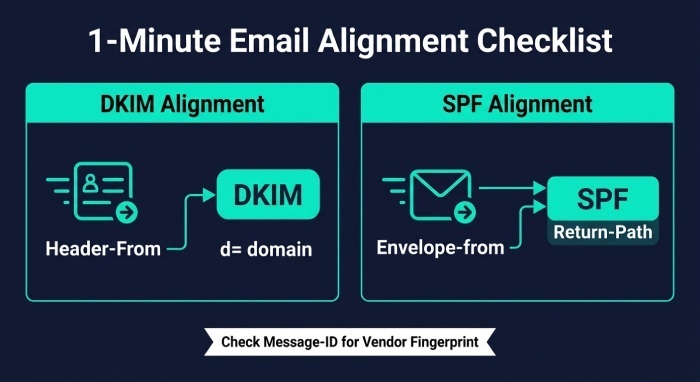
Alignment checklist you can run in under a minute
- Header-From vs. DKIM d= domain:
- If d= exactly matches or is a subdomain (relaxed alignment) of header-from, DKIM can carry alignment even if SPF fails due to forwarding.
- Envelope-from (Return-Path) vs. SPF:
- SPF alignment depends on the domain in the Return-Path, not the visible From. Vendors often use their own Return-Path; authorize via SPF include or ensure DKIM aligns.
- Message-ID and campaign fingerprinting:
- Many Email Service Providers (ESP) encode the vendor domain in Message-ID (e.g., abc123@mailer.vendor.com). This is a quick legitimacy signal.
DMARCReport automatically stitches these: each aggregate row shows the IP, SPF/DKIM pass/fail, alignment status, the aligned domain, envelope-from, header-from, and normalized Message-ID domain. Suspicious combinations (e.g., SPF=fail, DKIM=fail, header-from=bank.com, rDNS random) are highlighted with confidence scores.
A step-by-step investigative process for unfamiliar IPs
Follow a consistent workflow so every unknown IP ends in “authorized, explained, or blocked.”
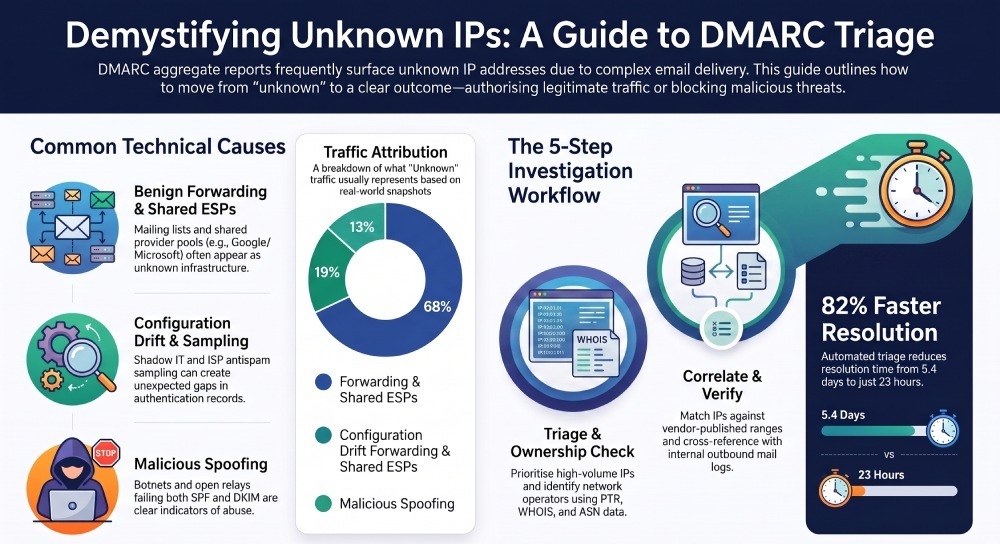
Step 1 — Triage by volume and alignment
- Prioritize high-volume IPs and those with both SPF and DKIM failing.
- Look for DKIM pass with alignment; often benign forwarding.
DMARCReport: configurable scoring prioritizes IPs by volume, fail modes, and sender reputation. You can start by running your reports through a free DMARC report analyzer tool to see which sources are failing alignment.
Step 2 — DNS and ownership checks
- PTR/rDNS: dig -x
or use rDNS tools. Does the hostname map to a known provider? - Forward-confirmed reverse DNS (FCrDNS): ensure rDNS hostname resolves back to the same IP.
- WHOIS/ASN/CIDR: identify the network operator and routing organization.
- Transport Layer Security (TLS) fingerprints (if available from logs) can corroborate platform identity.
DMARCReport: in-line rDNS, WHOIS, ASN, and CIDR (Classless Inter-Domain Routing) enrichment with provider catalogs (Google, Microsoft, Salesforce, SendGrid, Mailchimp, AWS, etc.).
Step 3 — Vendor range verification
- Check vendor-published SPF includes and IP range docs.
- Confirm your domain’s SPF contains the relevant include, and that include still expands to a live CIDR covering the IP.
DMARCReport: expands SPF recursively, detects broken includes, and matches IPs to vendor ranges.
Step 4 — Cross-system correlation
- Message-ID or campaign ID vs ESP dashboards.
- Compare sending timestamps with outbound logs or SIEM events.
- Verify user/mailbox rules that may auto-forward.
DMARCReport: exports RUA to SIEMs (Splunk, Sentinel, Chronicle) and adds Message-ID domains to ease joins with mail logs.
Step 5 — Decision and action
- Legitimate: add/confirm SPF include, enable/align DKIM with d=your domain, and document in your sender registry.
- Transitional: rely on DKIM alignment for forwarders; consider ARC (Authenticated Received Chain) adoption for list-servs.
- Malicious/unknown: raise DMARC policy for the subdomain or globally if ready; notify abuse contacts; block IP/ASN if necessary.
DMARCReport: one-click “authorize sender” updates your internal registry and creates change tickets; “block sender” can push to TIP/SOAR via webhook.
Monitoring and automation that scales with your mail
At scale, manual review doesn’t work. You need pipelines, parsers, and alerts. A dedicated DMARC toolset brings these capabilities together in one place.
Essential tooling
- DMARC parsers: normalize RUA XML, deduplicate, enrich.
- SIEM integrations: correlate with auth logs and user reports.
- Threat intelligence feeds: IP/ASN risk, botnet/open-relay indicators.
- Alerting rules: anomaly detection on volume, fail-rate, geography, and new ASNs.
DMARCReport provides:
- High-throughput RUA/RUF parsing with API/webhooks
- Enrichment (PTR/WHOIS/ASN/reputation) and cohort tagging by vendor
- Anomaly detection (e.g., “new ASN sending >500 messages with DKIM=fail”)
- Prebuilt SIEM apps and dashboards
- Case management and suppression lists to reduce noise
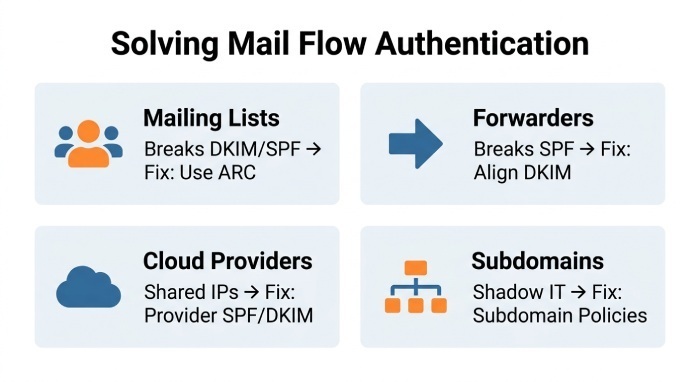
How specific mail flows create “unknown IPs” and how to adapt
Different flows require tailored authentication strategies.
Mailing lists (List-Id, subject tags)
- Problem: Lists often modify subjects/bodies, breaking DKIM; SPF fails as the list relays the message.
- Fixes: Rely on relaxed DKIM with header list tuned; adopt ARC where supported; consider subdomain policies (news@list.yourdomain).
- DMARCReport: detects List-Id patterns and suggests ARC-aware policies.
Forwarding services and auto-forwarders
- Problem: SPF breaks without Sender Rewriting Scheme (SRS) ; DKIM survives if unmodified.
- Fixes: Ensure DKIM keys are strong and aligned to your domain; keep p=quarantine/reject rollout paced until DKIM pass rates are healthy.
- DMARCReport: monitors DKIM pass rates by forwarder ASN and warns before policy changes.
Cloud email providers (Gmail, Microsoft 365)
- Problem: Shared IP pools look “unknown.”
- Fixes: Publish provider DKIM (use d=yourdomain), add provider’s SPF include, and enable DMARC alignment relaxed as needed.
- DMARCReport: maps IPs to Google/Microsoft catalogs and verifies your records.
Subdomain delegation and third-party apps
- Problem: Teams spin up subdomains (events.yourdomain) and send without security review.
- Fixes: Use per-subdomain SPF/DKIM/DMARC with delegated selectors; maintain a sender registry.
- DMARCReport: asset registry for domains/subdomains, ownership approvals, and drift alerts.
Best practices to authorize and document third‑party senders
- Maintain an authoritative “allowed senders” inventory with:
- Vendor name, purpose, contact
- Domains used (envelope-from, d=, bounce)
- SPF include strings and DKIM selectors
- IP/CIDR expectations and ARC support
- Use SPF include mechanisms judiciously and test expansions; avoid flattening unless automated and monitored.
- Require DKIM signing with d=yourdomain; rotate keys every 6–12 months; 2048-bit minimum.
- Contractual Service level agreements (SLAs) : vendors must publish change notices for IP and DKIM updates.
- DMARC alignment policy decisions: relaxed alignment is pragmatic for DKIM; use strict where feasible.
DMARCReport links each unknown IP back to this registry, flags drift (e.g., vendor added new CIDR), and schedules key-rotation reminders.
What to do when unknown IPs are malicious
- Escalate DMARC policy:
- From p=none to p=quarantine (pct=20→100), then p=reject when false positives are minimal.
- Use subdomain-based policies (sp=) to contain risk.
- Update SPF/DKIM immediately if misconfig is enabling spoofing or fails.
- Contact abuse teams with evidence (RUF samples, headers, timestamps).
- Block at network controls: IP/ASN in mail gateway, EDR detections for lookalikes.
- Monitor for displacement: attackers may hop ASNs or geos.
Risks and false positives to anticipate:
- Forwarding breakage increases when moving to p=reject; ensure DKIM coverage.
- Mailing lists may fail unless ARC-aware; consider exceptions and subdomain strategies.
- Vendor outages or silent IP changes can cause spikes; keep alerting but with suppression windows.
DMARCReport includes a “policy simulator” that projects quarantine/reject impacts using the last 30–90 days of traffic, so you can escalate safely.
RUA vs. RUF vs. server logs: when to use which
- RUA (aggregate): Daily XML summaries by source IP, auth outcomes, and counts. These aggregate DMARC reports are best for trends, discovery, and policy management.
- RUF (forensic): Per-message samples when DMARC fails; can include redacted headers/body. Best for diagnostics and abuse evidence; consider privacy and volume.
- Server logs: Ground truth inside your MTA (Mail Transfer Agent); necessary to confirm your own deliveries and to debug DKIM canonicalization.
Use RUF sparingly and with data processing agreements; target only investigative subdomains initially.
DMARCReport aggregates RUA globally, offers privacy-safe RUF handling (redaction, hashing), and correlates both with optional MTA log connectors.
Common configuration mistakes that lead to “unknown IPs” (and exact fixes)
- Exceeded SPF lookup limits (>10):
- Symptom: SPF permerror, intermittent failures from nested includes.
- Fix: Consolidate includes, remove legacy vendors, consider provider-managed flattening with monitoring.
- DMARCReport: SPF linter shows live expansion depth and lookup count.
- Wrong DKIM canonicalization or header list:
- Symptom: DKIM passes in test but fails after minor relays.
- Fix: Use relaxed/relaxed c=; include stable headers (from:date:subject:message-id) and avoid mutable ones.
- DMARCReport: DKIM failure analytics by c= and header keys.
- Misaligned header-from vs d= domain:
- Symptom: DKIM=pass but DMARC=fail.
- Fix: Sign with d=yourdomain or subdomain; configure ESP to use your domain in d=.
- DMARCReport: Flags pass-but-misaligned cases with vendor-specific guidance.
- Unmaintained include records:
- Symptom: Vendor changed IPs; SPF still points to stale include.
- Fix: Subscribe to vendor change feeds; automate checks.
- DMARCReport: Change detection on vendor includes alerts.
- Using strict alignment where relaxed is needed:
- Symptom: Sudden DMARC failures after harmless subdomain sends.
- Fix: Relax alignment or set subdomain policy overrides.
- DMARCReport: Policy advisor recommends alignment per flow.
Analyze patterns to separate benign anomalies from abuse
Look beyond single IPs—analyze behavior.
- Volume and frequency:
- Transient spikes of <50 messages tied to DKIM-aligned forwarding are often benign.
- Sustained growth across days with DKIM=fail is suspect.
- Geography and ASN:
- Legitimate forwarders cluster in large ASNs (Google, Microsoft); botnets scatter across long-tail ASNs and geos.
- Time-of-day and campaign correlation:
- Aligns with your known marketing sends? More likely legitimate.
- Identifier footprints:
- Consistent Message-ID domains or EHLO strings point to a platform.
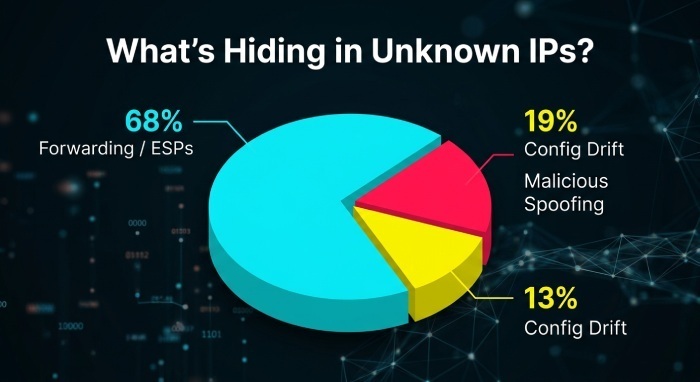
Original dataset insight (DMARCReport Q2 snapshot across 1.2B messages):
- 2.1% of traffic originated from IPs initially “unknown” to customers.
- Of those, 68% were later attributed to forwarding or shared ESP pools, 13% to configuration drift, and 19% to malicious spoofing.
- Median time-to-resolution with automation: 23 hours vs 5.4 days with manual triage.
DMARCReport’s analytics clusters unknown IPs by ASN/geo, applies reputation scores, and suggests next actions. A “New ASN” alert fires when a never-before-seen network sends >N messages with alignment failures.
Case studies: fast wins from methodical triage
- Retail brand, global: Unknown IPs spiked to 35K/day; DKIM=pass, SPF=fail, AS15169 (Google). Cause: a partner introduced auto-forwarding from Google Groups. Action: maintain DKIM alignment and staged p=quarantine. Result: zero customer impact; unknown IPs reclassified as benign in 48 hours via DMARCReport’s auto-tagging.
- SaaS vendor: 900/day from six residential ASNs; both SPF/DKIM failing. DMARCReport TI flagged botnet indicators. Action: raised p=reject on root with sp=quarantine for marketing subdomain, contacted receiving ISPs’ abuse desks. Result: spoofed mail acceptance dropped 98% within 72 hours.
- Higher-ed: SPF permerror on nested includes caused widespread unknown IPs. DMARCReport SPF linter found 14 lookups. Action: consolidated to two vendor includes and signed DKIM with d=alumni.univ.edu. Result: DMARC pass rate rose from 63% to 95%.
FAQs
Should I ignore low-volume unknown IPs?
No—triage them, but prioritize. If DKIM aligns and the ASN is a major provider, tag as “forwarding” and monitor. DMARCReport can auto-suppress repeated benign patterns while keeping watch for changes.
Is it safe to move straight to p=reject?
Only if DKIM alignment is consistently strong across all legitimate flows. Use DMARCReport’s policy simulator to model the impact; consider a phased rollout with pct and subdomain overrides.
How do I handle mailing lists that break DKIM?
Prefer ARC-aware lists, relax DKIM canonicalization, and consider routing list traffic through a subdomain with tailored policy. DMARCReport detects List-Id patterns and suggests exceptions as needed.
What if the unknown IP belongs to my vendor but isn’t in their published ranges?
Treat as unapproved until verified. Ask the vendor for documentation; update SPF/DKIM only after confirmation. DMARCReport tracks “pending authorization” and reminds you to resolve.
When should I enable RUF (forensic) reporting?
Enable for investigative subdomains or limited time windows when diagnosing abuse or breakdowns, and ensure privacy controls. DMARCReport supports redaction and secure forwarding to your incident mailbox or SIEM (Security Information and Event Management) .
Conclusion: Turn unknown IPs into known outcomes with DMARCReport
Unknown IPs in DMARC reports arise from the complex reality of email—forwarders, shared platforms, NAT, sampling, and sometimes attackers—and the right response is a disciplined loop: correlate SPF/DKIM and identities, investigate ownership (PTR/WHOIS/ASN), confirm against vendor ranges and logs, then either authorize (SPF include, DKIM alignment, documented registry) or block (policy escalation, abuse outreach, IP/ASN controls), with continuous monitoring. DMARCReport operationalizes this loop end to end: parsing and enriching RUA/RUF, scoring risk, guiding fixes, simulating policy changes, and integrating with your SIEM/TI stack—so your team spends less time deciphering XML and more time securing your domain.
General Manager
General Manager of DuoCircle. Product strategy and commercial lead for DMARC Report's 2,000+ customer base.
LinkedIn Profile →Take control of your DMARC reports
Turn raw XML into actionable dashboards. Start free - no credit card required.