Gmail End-To-End Encryption: How It Works With Email Security Controls

Quick Answer
Gmail end-to-end encryption protects email content by keeping messages encrypted during transmission and storage. Combined with security controls like SPF, DKIM, and DMARC, it helps strengthen email privacy, authentication, and protection against unauthorized access and spoofing.
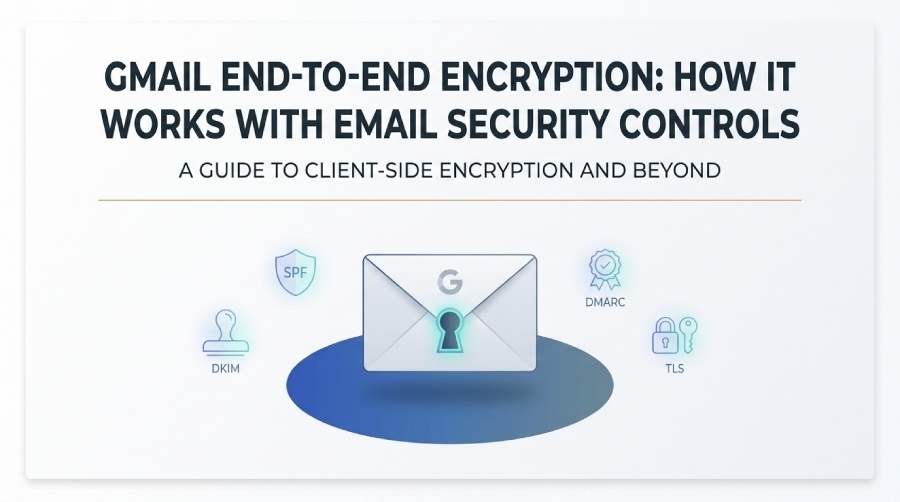
Gmail end-to-end encryption adds an extra layer of protection for sensitive business communications by helping keep email content accessible only to authorized users. For organizations using Google Workspace, client-side encryption (CSE) can strengthen data privacy, access control, and compliance efforts. However, encryption alone does not protect against every email threat. Controls such as SPF, DKIM, DMARC, and TLS address authentication, message integrity, and secure email transport. This guide explains how Gmail end-to-end encryption works and how it fits into a broader email security strategy.
What Gmail End-to-End Encryption Means—and How It Differs From Standard Gmail Encryption
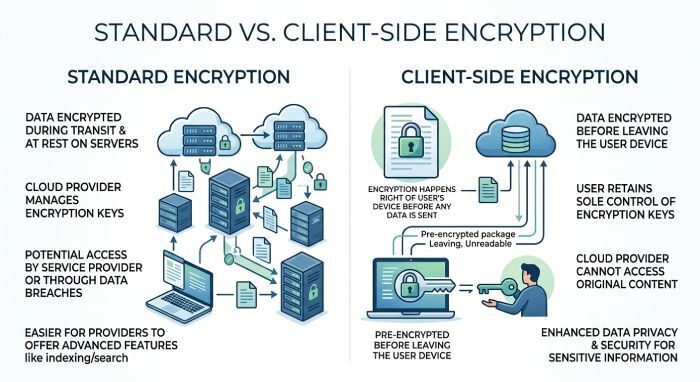
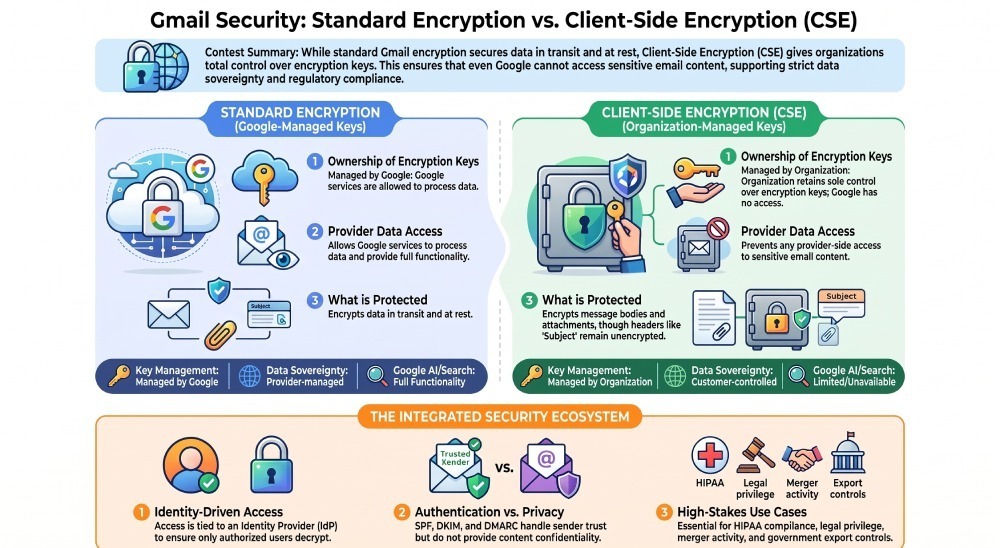
Gmail end-to-end encryption is best understood as part of a broader Google Workspace security model that combines encryption, identity, key management, and administrative controls. Standard Gmail encryption protects messages in transit and at rest, while Gmail CSE adds client-side encryption in which the organization controls the encryption keys. This means Google cannot decrypt CSE-protected message content.
In Google Workspace, Gmail client-side encryption (CSE) provides an additional layer of encryption for eligible organizations. Gmail E2EE can be enabled through Google Workspace’s CSE capabilities, including the Encryption with guest accounts option for supported organizations. CSE can protect message bodies, attachments, and inline images, while certain message headers, such as the subject and recipients, are not protected by the additional encryption.
Standard Gmail Encryption vs. E2EE
Encryption in Transit and at Rest
Standard Gmail encryption includes TLS for mail transport and encryption at rest within Google’s infrastructure. This is strong baseline data security for business email and consumer Gmail accounts, but it is not the same as end-to-end encryption because message content may still be available to authorized Google services for processing.
Client-Side Encryption and Gmail E2EE
Google Workspace client-side encryption (CSE) adds an additional layer of encryption for eligible organizations. With CSE, message content can be encrypted before it reaches Google’s infrastructure, while access to the encryption keys is controlled through the organization’s configured key service and identity controls. Gmail E2EE is an available CSE-based workflow for supported organizations, including the Encryption with guest accounts option for eligible external recipients.
CSE can help organizations strengthen control over sensitive communications and support data privacy, data sovereignty, and regulatory-control objectives. However, CSE and E2EE should not be treated as interchangeable terms, and encryption does not replace email-authentication controls such as SPF, DKIM, and DMARC.
What Gets Protected
With Gmail CSE, encrypted email content is protected at the message and attachment level. This supports confidential communication for enterprise email scenarios involving legal matters, executive discussions, merger activity, public sector correspondence, healthcare data under HIPAA-aligned programs, or export controls.
Privacy and Sovereignty Impact
For organizations with strict data sovereignty needs, client-side encryption helps ensure encryption keys remain under customer control. That matters when government agencies, large enterprises, or regulated firms must prove that data privacy controls prevent unauthorized provider-side access.
How Gmail Client-Side Encryption Works: Keys, Identity, and Message Protection
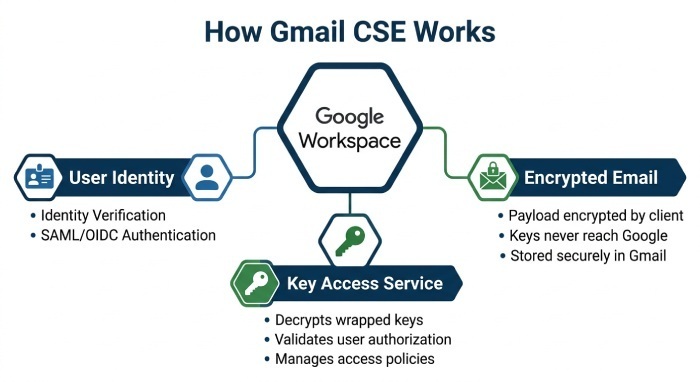
Gmail client-side encryption relies on external encryption keys, identity verification, and policy-driven access. Administrators configure CSE in Google Workspace so that users can send encrypted email from Gmail when the organization’s encryption setup allows it. The result is secure email that preserves the Gmail user experience while adding stronger privacy controls.
The CSE Architecture
Key Access Service and Encryption Keys
In CSE, Google Workspace connects to a customer-controlled key access service. The encryption keys are not stored in plain form by Google. Instead, the customer’s key provider authorizes whether a user can encrypt or decrypt a message. This approach improves data privacy, supports data sovereignty, and helps compliance teams demonstrate control over sensitive content.
Identity Provider Integration
CSE depends on identity. A user’s ability to open encrypted email is tied to authentication and authorization decisions. IT teams may integrate CSE with an identity provider so access decisions reflect group membership, device posture, location, or policy. This is where compliance requirements and security controls intersect: the right person must be authenticated before encrypted email becomes readable.
Digital Signature and Message Trust
Depending on the configuration, secure email may include a digital signature or related identity assurance mechanisms. S/MIME can also provide signing and encryption capabilities, though it requires certificate management and differs from Gmail CSE. PGP is another historical approach to encrypted email, but many organizations prefer managed enterprise email controls over fragmented proprietary solutions.
Internal Recipients
For users inside the same Google Workspace environment, client-side encryption can be more seamless because policies, identity, and encryption keys are centrally governed in the Admin Console.
External Recipients
External recipients can be more complex. Some email providers will not natively support the same encryption features. Google has supported workflows involving restricted Gmail access or a guest Google Workspace account so external users can access protected content under controlled conditions.
Mobile Devices
Support for mobile devices has evolved, including Android and iOS considerations. Administrators should verify feature availability for the native Gmail app, Android, iOS, Rapid Release, and Scheduled Release channels through Google Help, Google Workspace Admin Help, or the Workspace Blog.
How Users Experience Encrypted Email
Sending Encrypted Messages
When CSE is enabled, eligible users can choose client-side encryption while composing in Gmail. The sender’s email inbox experience remains familiar, but encrypted email may restrict certain Gmail features because Google cannot inspect the protected content.
Reading Encrypted Threads
Email threads protected with E2EE may behave differently from standard Gmail threads. Search, smart features, and automated classification may be limited because the encrypted message body is unavailable to Google services and any AI model that would otherwise process message content.
Attachments and Google Drive
Attachments can be protected as part of Gmail CSE, and organizations using Google Drive CSE may align file-level and email-level client-side encryption. This creates a stronger compliance posture for confidential communication across collaboration workflows.
Email Security Controls That Complement Gmail Encryption: SPF, DKIM, DMARC, TLS, and S/MIME
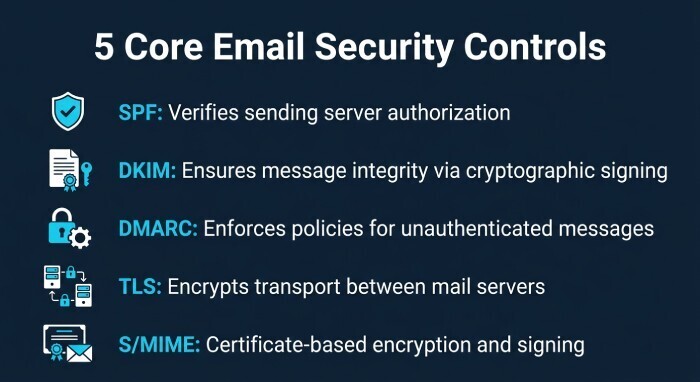
End-to-end encryption protects message confidentiality, but it does not replace other security controls. A complete Gmail encryption strategy also needs sender authentication, transport security, policy enforcement, and monitoring. These controls reduce impersonation, improve deliverability, and support compliance standards.
Core Email Security Controls
SPF
SPF helps receiving email providers verify that a sending server is authorized to send mail for a domain. It does not provide E2EE, but it supports data security by reducing spoofed business email.
DKIM
DKIM uses cryptographic signing to prove that a message was not altered after being sent by an authorized domain. DKIM complements Gmail encryption by strengthening message integrity.
DMARC
DMARC builds on SPF and DKIM to tell receiving systems how to handle unauthenticated messages. Strong DMARC policies improve phishing protection and reduce domain impersonation risk.
TLS
Transport Layer Security (TLS) encrypts message transport between mail servers. It is essential, but it is not end-to-end encryption because mail servers may still process message content. Gmail encryption often combines TLS with CSE or S/MIME for stronger protection.
S/MIME
S/MIME can encrypt and sign messages using digital certificates. It is commonly used for enterprise email and other environments that require certificate-based email security. However, S/MIME relies on certificate management, while Google Workspace client-side encryption (CSE) uses a different encryption and key-management model.
SPF, DKIM, and DMARC Are Not Privacy Controls
These protocols authenticate domains and protect routing trust. They do not deliver encrypted email content confidentiality or satisfy every data privacy and data sovereignty objective.
TLS Is Necessary but Not Sufficient
TLS protects mail in transit, but E2EE and CSE protect content before it reaches Google’s servers. For sensitive compliance use cases, organizations often need both.
Admin Setup, Compliance Benefits, and Common Enterprise Use Cases
Admin Console and CSE Configuration
Administrators configure client-side encryption in the Google Workspace Admin Console and related CSE admin interface. Google’s documentation, including Google Workspace Admin Help, explains licensing, identity provider setup, key service integration, organizational units, and user access policies. Announcements from Cloud Next, the Workspace Blog, and coverage from outlets such as Ars Technica have highlighted Google’s continued investment in Gmail CSE.
Assured Controls and Assured Controls Plus
Google Workspace customers with advanced compliance needs may use Assured Controls or Assured Controls Plus to address data location, support access, and administrative control requirements. These capabilities are especially relevant for public sector, government agencies, and regulated large enterprises concerned with data sovereignty, export controls, and compliance evidence.
Common Use Cases
Client-side encryption is valuable for legal teams exchanging privileged information, finance teams sharing acquisition details, healthcare organizations managing HIPAA-sensitive workflows, and government agencies handling restricted Gmail communications. Small businesses may use standard Gmail encryption and security defaults, while large enterprises typically layer CSE, data loss prevention, classification labels, and additional monitoring.
Compliance Benefits
CSE can support organizations with compliance and data-protection objectives by reducing provider-side access to sensitive content. It can help organizations implement controls around encryption keys, separation of duties, auditability, and data privacy, depending on their specific regulatory and security requirements.
Operational Ownership
The compliance team and IT teams should jointly define which users need encrypted email, how encryption setup is approved, and when E2EE is mandatory for confidential communication.
Limitations, Best Practices, and When to Use Additional Email Security Tools
Feature Limitations
Because client-side encryption prevents Google from reading protected content, some Gmail features may be unavailable or reduced. Search, content scanning, AI model assistance, automated classification, and certain data loss prevention checks may not work the same way on encrypted email.
Recipient and Interoperability Constraints
E2EE across external recipients depends on account type, identity verification, and email provider capabilities. When communicating with external email providers, organizations should test user experience, mobile devices, and guest Google Workspace account workflows before broad deployment.
Best Practices
Use end-to-end encryption for the messages that truly require it, rather than encrypting everything by default without a policy model. Pair Gmail encryption with SPF, DKIM, DMARC, TLS, S/MIME where appropriate, classification labels, and data loss prevention. Maintain strong encryption keys governance, document CSE recovery processes, and train users on when to choose encrypted email.
When to Add Security Tools
Additional tools may be needed when organizations require advanced archiving, outbound inspection before encryption, specialized compliance reporting, post-delivery remediation, or cross-platform encryption beyond Google Workspace. Proprietary solutions can help in niche cases, but they should be evaluated against usability, data privacy, data sovereignty, certificate management, and compliance obligations.
General Manager
General Manager of DuoCircle. Product strategy and commercial lead for DMARC Report's 2,000+ customer base.
LinkedIn Profile →Take control of your DMARC reports
Turn raw XML into actionable dashboards. Start free - no credit card required.