How To Prevent Phishing And Pharming Attacks With SPF For Qualtrics?

Quick Answer
SPF helps Qualtrics users prevent phishing and pharming by authorizing legitimate email senders for their domain. Proper SPF configuration reduces spoofing risks, improves email authentication, supports stronger domain protection, and can enhance deliverability when combined with DKIM and DMARC.
Phishing and pharming attacks are growing security concerns for organizations using Qualtrics to send survey and email communications. Attackers can impersonate trusted domains, redirect users to fraudulent websites, or trick recipients into revealing sensitive information. Implementing Sender Policy Framework (SPF) helps organizations verify authorized email senders and reduce domain spoofing. When combined with DKIM, DMARC, secure DNS practices, and user awareness, SPF provides an important layer of protection for Qualtrics communications and strengthens overall email security.
Understanding Phishing and Pharming Risks in Qualtrics Communications
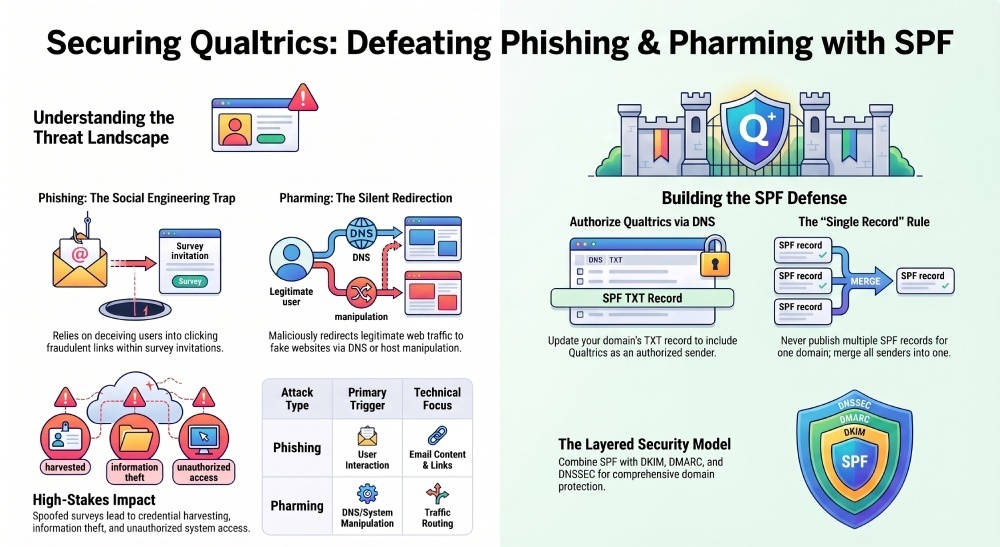
Qualtrics survey emails often ask recipients to click links, confirm details, or provide feedback. That makes them attractive to threat actors who use phishing, pharming, and social engineering to impersonate trusted brands. A phishing attack typically tricks a victim into clicking a fraudulent link, opening a malicious attachment, or entering credentials into a fake website. A pharming attack is more technical: it redirects web traffic from a legitimate domain name to a fake website, often through DNS manipulation, malware, a compromised router, or changes to a local host file.
In Qualtrics communications, the risk is not limited to survey abuse. If attackers spoof your survey domain, they may collect sensitive information, personal information, a username and password, or business credentials. That can lead to unauthorized access, information theft, infiltration of internal systems, and even bank fraud if the same credentials are reused across financial portals or vendor systems.
From a cyber security perspective, Qualtrics email should be treated as part of your broader email security and identity protection program. A single poorly authenticated survey message can become the starting point for a larger attack chain involving malware, fake content, credential harvesting, and device infection.
Phishing versus pharming in survey delivery
Phishing depends heavily on user interaction. The attacker sends a convincing message, often using social engineering, and persuades the recipient to click. Pharming can be more silent. A user may type the correct domain name into a browser such as Chrome, Edge, or Brave, but malware or poisoned DNS settings redirect the browser to a fake website.
For example, a phishing email may appear to come from a trusted organization and direct users to a fraudulent login page designed to steal credentials. A pharming attack, by contrast, may manipulate DNS settings or a compromised device so that a legitimate survey domain redirects users to an attacker-controlled website.
Why SPF Matters for Authenticating Qualtrics Survey Emails
Sender Policy Framework, or SPF, helps receiving mail servers verify whether a sending server is authorized to send email for your domain name. When you send Qualtrics surveys from a branded domain, SPF gives mailbox providers a validation mechanism: “Is this Qualtrics mail server permitted to send on behalf of this organization?”
SPF is not a complete email security solution, but it is a critical perimeter defense. Without it, attackers can spoof your domain more easily in a phishing attack. With SPF properly configured, email filtering systems at Google, Microsoft, and other providers have stronger evidence for allowing, quarantining, or rejecting messages.
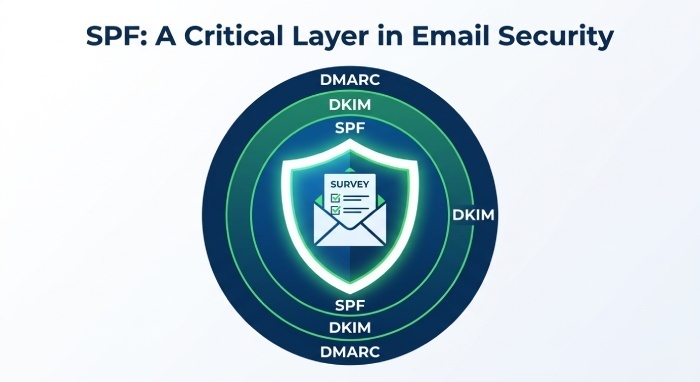
SPF also supports broader cyber security controls such as DMARC. DMARC uses SPF and DKIM alignment to tell receivers what to do when authentication fails. For Qualtrics, that means your legitimate survey traffic can be distinguished from fraudulent email, reducing the chances that recipients engage with a fake website or surrender credentials.
SPF’s role in a layered security model
Think of SPF as one layer in layered security. It does not stop every pharming attack, malware infection, or social engineering attempt. It does, however, reduce domain spoofing, improve email security, and support mitigation when threat actors impersonate your organization.
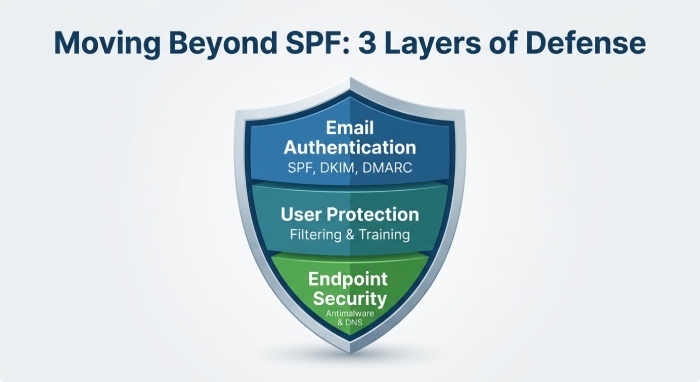
A strong threat model should include SPF, DKIM, DMARC, DNSSEC, email filtering, antimalware protection, browser security, and user training. Security teams should clearly explain these controls to employees, executives, and external auditors so everyone understands how they help reduce phishing, spoofing, and pharming risks.
How to Configure SPF Records for Qualtrics in Your DNS
To configure SPF for Qualtrics, update your DNS settings for the domain used in your Qualtrics “From” address. The exact include mechanism should be verified in current Qualtrics documentation or Marketplace Apps guidance, but the pattern is usually similar to adding Qualtrics as an authorized sender in your existing SPF TXT record.
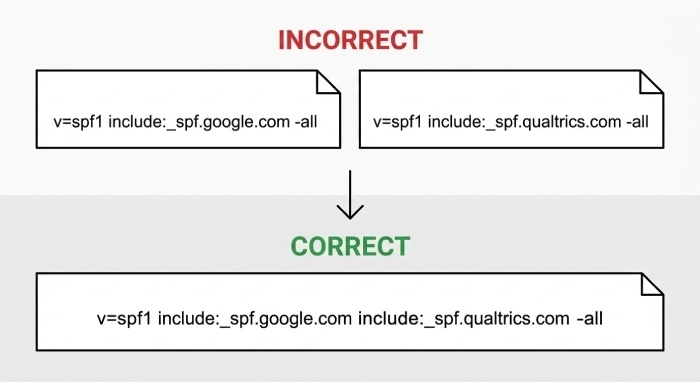
For example, an SPF record might follow this structure:
example.com TXT "v=spf1 include:authorized-sender.example.com -all"Replace include:authorized-sender.example.com with the SPF mechanism provided by Qualtrics and merge it with any other authorized email senders already included in your domain’s SPF record.
Practical SPF configuration steps
- Identify the exact domain name used for Qualtrics survey invitations.
- Review current DNS settings with your DNS administrator.
- Add the Qualtrics SPF include to the existing SPF record.
- Keep the SPF record under the DNS lookup limit.
- Test SPF validation before sending production campaigns.
- Align SPF with DMARC policy and DKIM signing where possible.
If your organization uses a DMARC monitoring or email authentication platform, use it to centralize SPF management, identify unauthorized senders, and monitor authentication results. This is especially useful when multiple departments send surveys, HR messages, customer research, or other communications through third-party platforms.
DNS settings and pharming risk
SPF protects against email spoofing, but pharming often targets DNS resolution. Security teams should secure DNS settings at the registrar, authoritative DNS provider, endpoint, and router level. Change default credentials on routers and DNS administration portals, restrict administrative access, and monitor for suspicious redirection.
Watch for host file manipulation
Endpoint malware may modify a host file to redirect a legitimate domain name to a malicious IP address. On Windows, review paths such as C:WindowsSystem32Driversetchosts. On Linux and macOS, review /etc/hosts. A manipulated host file can send web traffic to a fake website even when the user enters the correct address in the browser.
Use DNSSEC where appropriate
DNSSEC helps improve DNS security by validating DNS responses. It does not replace SPF, DMARC, or malware controls, but it reduces the risk of DNS tampering and supports antipharming defenses.
Best Practices to Strengthen Protection Beyond SPF
SPF is necessary, but phishing and pharming prevention requires a broader cyber security strategy. Attackers combine social engineering, malware, fake website infrastructure, stolen credentials, and redirection techniques. Your controls should reflect that reality.
Strengthen email authentication and filtering
Use SPF with DKIM and DMARC. Move DMARC gradually from monitoring to enforcement, such as p=quarantine or p=reject, once legitimate senders are validated. Strong DMARC alignment helps prevent phishing using your domain and improves trust in Qualtrics messages.
Add advanced email filtering to detect suspicious links, malicious attachment patterns, impersonation, and fake content. Email security tools should inspect URLs at delivery and click time because attackers often weaponize links after messages pass initial scanning.
Protect users from fake websites
User training remains essential. A simulated phishing campaign can teach employees how to identify suspicious Qualtrics invitations, unexpected login pages, and fake website indicators. Training should emphasize that attackers may ask for credentials, personal information, or sensitive information under the pretext of a survey.
Encourage users to inspect the browser address bar in Chrome, Edge, Brave, and other browsers. Consider controlled use of tools such as an Antipharming Chrome extension, but do not rely on any single Chrome extension as a complete antipharming solution.
Reduce malware and endpoint risk
Deploy antimalware protection on endpoints to block malware that modifies DNS settings, intercepts network traffic, or changes the host file. Malware-driven pharming can occur after a device infection, even if email security controls are strong.
Security teams should also monitor for suspicious outbound web traffic, unexpected DNS queries, and connections to newly registered or suspicious domains. Regular monitoring can help identify potential DNS manipulation, malware activity, or attempts to redirect users to fraudulent websites.
Monitoring, Testing, and Maintaining SPF for Ongoing Email Security
SPF is not a one-time task. DNS settings change, vendors change, and Qualtrics configurations evolve. Ongoing monitoring is essential for strong email security and cyber security resilience. Review SPF records after onboarding or removing platforms. Check whether new Qualtrics brands, survey domains, or regional mail services require updates. If SPF breaks, legitimate survey emails may fail validation; if SPF is too broad, attackers may exploit unnecessary authorization.
Use DMARC aggregate reports to see who is sending mail using your domain. Valimail and similar platforms can simplify reporting, identify unauthorized sources, and support external auditors who need evidence of controls. Periodic audits should compare SPF records against organizational policy, approved senders, and business owners.
Testing should include SPF lookup validation, DMARC alignment checks, seed inbox testing across Google and enterprise mailboxes, and live campaign review. Security teams can also run tabletop exercises around a Qualtrics-themed phishing attack or pharming incident to confirm escalation paths, mitigation steps, and user communications.
Finally, align Qualtrics authentication with email security best practices: maintain accurate DNS settings, enforce least privilege, protect administrator credentials, remove default credentials, monitor for malware, improve DNS security, train users against social engineering, and verify that survey links do not lead to a fake website. This combination reduces phishing, limits pharming exposure, and strengthens the organization’s overall security posture.
General Manager
General Manager of DuoCircle. Product strategy and commercial lead for DMARC Report's 2,000+ customer base.
LinkedIn Profile →Take control of your DMARC reports
Turn raw XML into actionable dashboards. Start free - no credit card required.