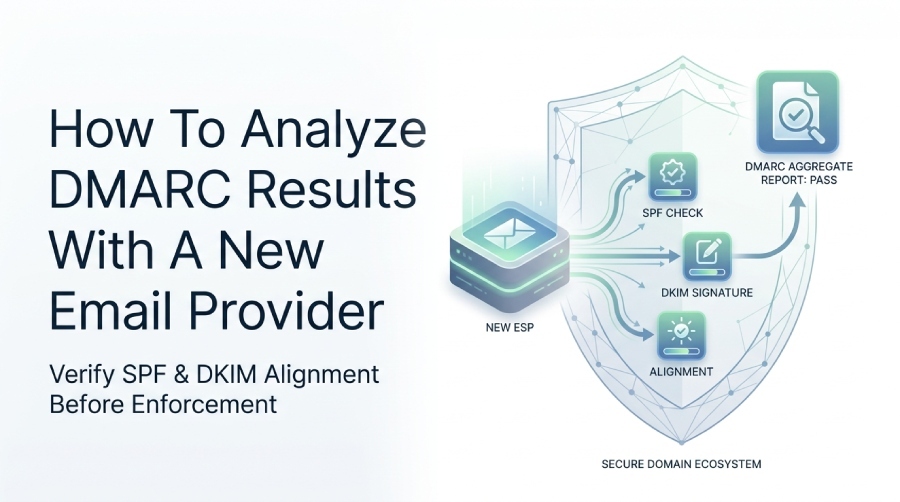
How To Analyze DMARC Results With A New Email Provider

Quick Answer
When adding a new email provider, analyze DMARC reports, verify SPF and DKIM alignment, identify authentication failures, and monitor sending sources to maintain email security and prevent legitimate messages from being rejected.
Try Our Free DMARC Checker
Validate your DMARC policy, check alignment settings, and verify reporting configuration.
Check DMARC Record →When a new email service provider (ESP) is added, analyze DMARC results by comparing authentication data before and after onboarding. Verify SPF and DKIM alignment, identify the provider’s sending sources in DMARC aggregate reports, investigate authentication failures, and monitor production traffic before changing your DMARC policy.
TL;DR: The Practical DMARC Analysis Workflow
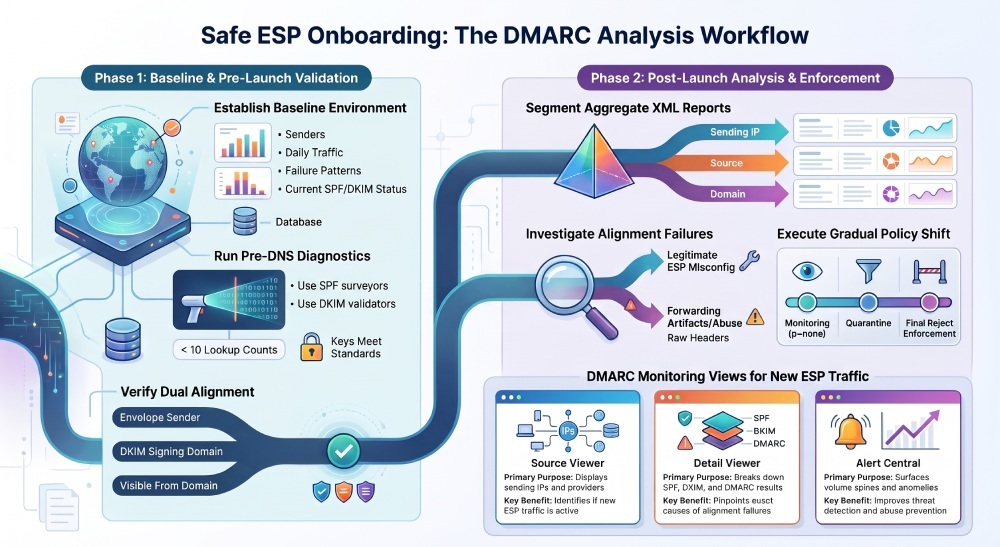
A successful DMARC analysis after adding a new email service provider (ESP) depends on comparing authentication results before and after onboarding. Before the provider starts sending, document legitimate email sources, current SPF and DKIM results, sending IP addresses, DKIM selectors, and existing authentication failures. After launch, use DMARC aggregate reports or a DMARC monitoring platform to isolate the new provider’s traffic and verify its authentication results.
For email security and domain compliance, do not move directly to enforcement just because the ESP says setup is complete. Instead, review dmarc aggregate reports, inspect sample headers, monitor alerts, and confirm that SPF and DKIM pass in alignment with the visible From domain. This protects against misconfigured platforms, forwarding issues, unauthorized senders, and accidental delivery disruption.
Establish a DMARC Baseline Before Adding the New ESP
A DMARC baseline is the known-good state of your domain’s sending ecosystem before the new provider begins sending. In any dmarc analysis, the baseline gives you a control group so you can tell whether new failures are caused by the ESP, forwarding, spoofing, or pre-existing gaps in email authentication.
Capture Current Sending Sources
Before the ESP is added, export your dmarc aggregate reports and identify all existing authorized sources. A dmarc report analyzer or xml to human converter turns raw xml reports from mailbox providers into readable evidence for email source identification.
What to Document Before Onboarding
Record the following baseline details for domain compliance and future comparison:
- Known senders: Google Workspace, Microsoft 365, Amazon SES, CRM tools, billing systems, and marketing platforms
- Authentication status: SPF pass/fail, DKIM pass/fail, and dmarc alignment
- Sending volume: Normal daily and weekly mail volume per source
- Failure patterns: Forwarding, mailing lists, and legitimate but misaligned services
- Current policy:
p=none, quarantine, or reject in your dmarc policy
Example Baseline Snapshot
For example, a domain may receive 70% of its email traffic from Google Workspace, 20% from Amazon SES, and 10% from a support platform. After adding a new ESP, compare its sending IP addresses, message volume, and authentication results with the baseline. This helps determine whether the new traffic belongs to the expected provider or requires further investigation.
Use Tools Before Changing DNS
Before adding the ESP’s DNS records, use free dmarc tools such as a dmarc domain checker, dmarc inspector, dmarc record wizard, spf surveyor, dkim inspector, and dkim validator. Providers such as dmarcian, dmarc.io, and DMARCReport offer visibility that supports getting started with dmarc, ongoing dmarc support, and formal dmarc consultation.
Why This Matters to DMARC Deployment
A new ESP can break domain compliance if SPF exceeds lookup limits, DKIM is unsigned, or the visible From domain does not align. A baseline reduces guesswork and makes the broader dmarc deployment safer, especially for regulated security and compliance environments.
Verify SPF, DKIM, and Alignment for the New Email Service Provider
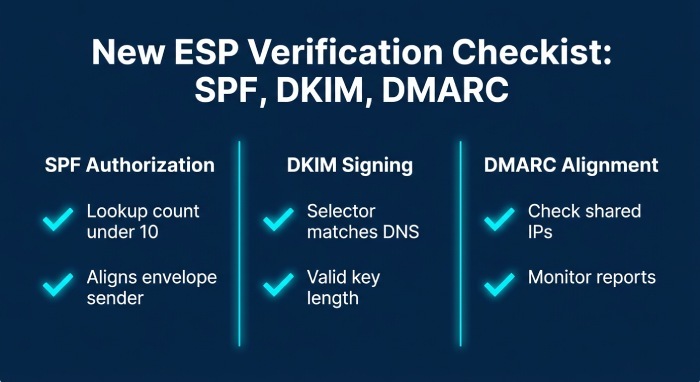
Once the ESP is configured, verify SPF, DKIM, and DMARC alignment before scaling traffic. This is the core of email authentication, and it directly determines whether your dmarc aggregate reports will show the provider as compliant or failing.
Confirm SPF Authorization
SPF confirms whether the ESP’s sending infrastructure is permitted to send for your domain. During dmarc onboarding, check that the ESP’s include mechanism, IP ranges, or return-path domain are configured correctly.
SPF Checks to Perform
Use an SPF Surveyor or similar dmarc tools to verify:
- DNS lookup count stays under the SPF limit of 10
- Include statements match the ESP’s documentation
- Envelope sender domain aligns where required
- Old vendors are removed if no longer used
SPF Edge Case: Shared ESP Infrastructure
Some ESPs use shared sending IP addresses and separate return-path domains. SPF may pass for the envelope sender domain but fail DMARC alignment if that domain does not align with the domain in the visible From address. Therefore, administrators should check both SPF authentication and alignment rather than relying on an SPF pass result alone.
Validate DKIM Signing
DKIM provides an additional authentication method for ESP traffic by using a cryptographic signature to verify message integrity and the signing domain. Unlike SPF, DKIM authentication can often remain valid after forwarding, provided the message content and signed headers are not modified in ways that invalidate the signature. Verify that the public key, selector, and signing domain are configured correctly.
DKIM Details to Review
In your detail viewer or source viewer, confirm:
- DKIM selector matches the DNS record
- Signing domain aligns with the From domain
- Key length meets modern email security expectations
- Messages remain signed after ESP processing
A strong dmarc management platform helps correlate DKIM outcomes with dmarc aggregate reports, making dmarc compliance measurable instead of anecdotal.
Segment DMARC Aggregate Reports to Identify New ESP Traffic
After the ESP starts sending, segment dmarc aggregate reports so its traffic can be evaluated separately from legacy senders. This is where a dmarc report analyzer, xml to human converter, or enterprise DMARC Management Platform becomes essential.
Filter by Source, IP, and Organizational Domain
DMARC aggregate reports from providers such as Google, Yahoo, and Microsoft can present authentication results for different reporting periods and sending sources. Compare the reported data carefully, taking reporting intervals and source information into account.
Recommended Segmentation Views
Use your dmarc management platform to create views such as:
| View | Purpose | Why It Helps DMARC Analysis |
|---|---|---|
| Source viewer | Shows sending IPs and providers | Identifies whether the new ESP is visible |
| Detail viewer | Breaks down SPF/DKIM/DMARC results | Confirms exact failure causes |
| Domain overview | Summarizes all domain traffic | Tracks domain compliance trends |
| Alert Central | Surfaces spikes and anomalies | Supports email threat detection |
Convert XML Into Human-Readable Evidence
Raw xml reports are difficult to interpret manually. An xml to human converter translates provider files into readable summaries, while a dmarc report analyzer turns the same data into dashboards, charts, and investigation trails.
Why Aggregation Prevents False Assumptions
A single test email may pass authentication while some production messages fail because a subdomain, workflow automation, or separate sending configuration was not properly set up. Reviewing DMARC aggregate reports helps identify these differences across real sending traffic rather than relying only on the ESP’s setup documentation.
Original Data Pattern to Watch
A new ESP may pass DKIM authentication during test campaigns but fail DMARC alignment on transactional messages if those messages use a different signing domain. Review aggregate reports over a representative period and examine different message types separately to identify configuration gaps.
Investigate Authentication Failures, Forwarding, and Misconfigurations
When failures appear, investigate them methodically instead of immediately changing policy. Strong email security depends on separating legitimate misconfiguration from spoofing, forwarding artifacts, and abuse.
Review Failed Samples with Header Analysis
Use an email header analyzer to inspect message-level authentication results. While dmarc aggregate reports show patterns, headers reveal whether SPF, DKIM, ARC, return-path, and From domains behaved as expected.
Common ESP Misconfigurations
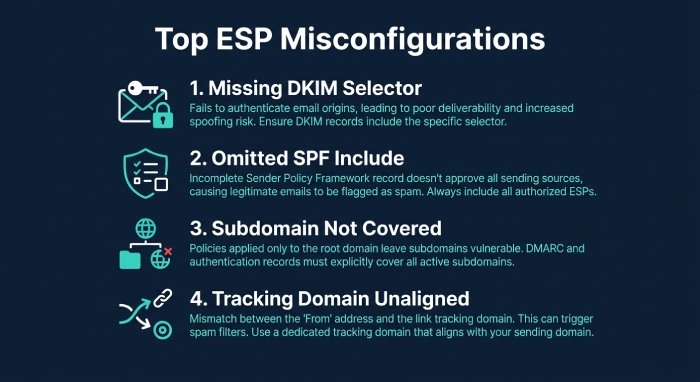
Typical findings during dmarc analysis include:
- DKIM selector missing from DNS
- Wrong signing domain configured in the ESP
- SPF include omitted or duplicated
- Subdomain not covered by policy
- Tracking domain not aligned with the organizational domain
These issues weaken dmarc protection, reduce domain compliance, and can delay dmarc policy enforcement.
Distinguish Forwarding from Abuse
Email forwarding can cause SPF authentication to fail because the forwarding server’s IP address may not be authorized by the original sender’s SPF record. DKIM can remain valid if the message is not modified in a way that invalidates its signature. When DKIM also aligns with the visible From domain, it can help the forwarded message pass DMARC authentication.
When Failures May Indicate Threats
If the new ESP is not associated with a failing source, investigate possible spoofing or compromised infrastructure. A good dmarc management platform with alerts and Alert Central can support email threat detection and email abuse prevention.
Edge Case: BIMI and Brand Indicators
If your organization uses Brand Indicators for Message Identification (BIMI), verify that your DMARC policy meets the applicable BIMI requirements. Misconfigured email service providers can cause authentication failures and prevent legitimate messages from meeting the required DMARC policy conditions. Review the provider’s SPF and DKIM alignment before relying on BIMI for brand visibility.
Adjust DMARC Policy Gradually and Continue Monitoring Results
After the new ESP proves stable, adjust the dmarc policy gradually. The goal is not simply to reach p=reject; the goal is sustainable dmarc compliance, resilient email security, and predictable domain compliance across all legitimate senders.
Move from Monitoring to Enforcement
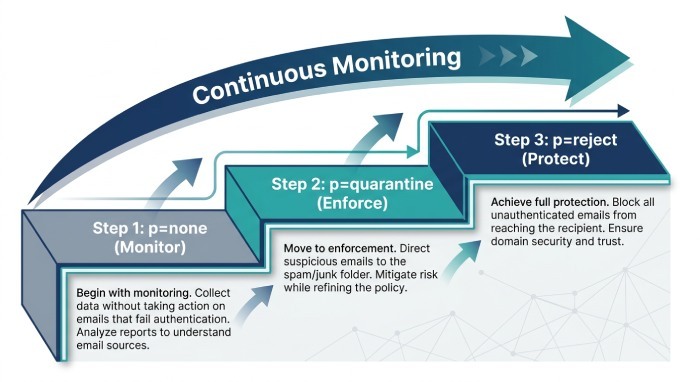
Organizations typically start at p=none, then move to quarantine, and finally to reject. This process of moving through dmarc should be based on measured pass rates from dmarc aggregate reports, not assumptions.
Safe Policy Progression
A cautious DMARC enforcement process may follow these stages:
- p=none: Monitor authentication results and identify all legitimate sending sources.
- p=quarantine: Begin applying a quarantine policy after confirming that legitimate messages authenticate and align correctly.
- Gradual enforcement: Review aggregate reports, investigate failures, and adjust the policy as remaining configuration issues are resolved.
- p=reject: Move to rejection when legitimate email sources are properly authenticated and the organization is ready to enforce the policy.
The transition should be based on actual authentication results, not simply the completion of ESP setup.
Maintain Continuous Monitoring
Even after enforcement, continue dmarc analysis because vendors change infrastructure, DNS records expire, and business teams add tools without notifying IT. Ongoing dmarc services and a reliable dmarc management platform help maintain security and compliance over time.
Operational Support and Governance
For effective email security management, establish a process for reviewing DMARC reports, documenting approved sending providers, tracking DNS changes, and investigating authentication failures. Assign responsibility for reviewing new email service integrations so that changes to the sending infrastructure do not go unnoticed.
After Reject: Life After Enforcement
In life after rejection, your team should keep monitoring new vendors, mergers, subdomains, seasonal campaigns, and third-party applications. Strong dmarc deployment is not a one-time project; it is an ongoing email security control aligned with modern dmarc mandates.
FAQ
How long should I monitor DMARC after adding a new ESP?
Monitor the new ESP over a representative period that includes its different sending activities, such as marketing campaigns, transactional messages, and automated notifications. The required monitoring period depends on sending frequency, message volume, and the availability of DMARC aggregate reports. Continue reviewing the results until authentication behavior is consistent.
Why the Monitoring Window Matters
Short tests often miss automated mail, regional campaigns, and low-volume transactional systems. For strong domain compliance, evaluate weekday, weekend, marketing, billing, and support messages before changing policy.
What is the fastest way to identify whether the new ESP is failing DMARC?
Start by filtering DMARC aggregate reports using the sending IP address, SPF domain, DKIM signing domain, and reporting organization. Compare the results with the ESP’s documented email infrastructure to identify whether SPF authentication, DKIM authentication, or DMARC alignment is failing. This helps detect configuration issues and verify that the ESP’s sending infrastructure is properly authenticated.
Tools That Help
Use a Domain Checker, Inspector, SPF Surveyor, DKIM Inspector, DKIM Validator, and BIMI Tools to validate setup. These dmarc tools support accurate email authentication and better email security.
Should I change my DMARC policy immediately after the ESP passes testing?
No. Even if test messages pass, wait for production data in dmarc aggregate reports before changing your dmarc policy. This protects legitimate mail and supports gradual dmarc policy enforcement.
Why Production Data Is Different
Production traffic may include subdomains, automation, forwarding, and templates that were not part of the initial test. Careful dmarc analysis helps avoid false confidence and keeps the broader dmarc deployment stable.
Do Google and Yahoo requirements affect new ESP onboarding?
Yes. Google and Yahoo’s DMARC requirements make proper email authentication increasingly important for bulk senders. Before increasing email volume, organizations should verify that new ESPs have correctly configured SPF and DKIM records, maintain proper domain alignment, support unsubscribe requirements, and protect sender reputation.
Compliance Impact
Meeting mailbox-provider expectations improves deliverability, supports dmarc compliance, and strengthens email security across the entire sending environment. This is especially important for regulated sectors such as Financial Services, Healthcare, Government, and Educational Services.
General Manager
General Manager of DuoCircle. Product strategy and commercial lead for DMARC Report's 2,000+ customer base.
LinkedIn Profile →Take control of your DMARC reports
Turn raw XML into actionable dashboards. Start free - no credit card required.