How to Analyze Message Headers to Diagnose Email Authentication Failures

Quick Answer
Analyzing email headers helps identify SPF, DKIM, and DMARC failures, trace email delivery routes, and detect DNS configuration issues. By reviewing authentication results, sender domains, source IPs, and DKIM signatures, teams can diagnose delivery problems and improve email security.
Why Message Headers Matter for Email Authentication Troubleshooting
A message header is the technical record of how an email moved from the message sender to the recipient. While the visible email body may look simple, the email header contains header metadata such as routing information, timestamp values, sender identity details, authentication results, and the delivery route across each mail server. When you analyze headers properly, you can determine whether an authentication failure came from SPF, DKIM, DMARC, DNS configuration, forwarding behavior, or spoofing.
For delivery troubleshooting, the message header is often more reliable than user-facing error messages. A bounce may say “authentication failed,” but the email header can show which authentication checks failed, which source IP was evaluated, whether a relay server modified the message, and whether the recipient domain treated the email as spam. This is why security teams, postmasters, and anti-spam systems rely on header data for forensic analysis and phishing detection.
Reading Header Metadata in Context
Header metadata should be interpreted as a timeline, not as isolated lines. Each received header represents a transfer between systems, creating a delivery path from the originating smtp system to the final inbox.
To analyze message headers effectively, start by accessing the raw headers from the email message details. Copy the complete headers and use a trusted header analysis tool or an internal parser. The analyzer can organize header fields, trace the message path, identify authentication results, and generate a diagnostic report with a clear summary of potential delivery issues.
Key Header Fields to Inspect: From, Return-Path, Received, Authentication-Results, and DKIM-Signature
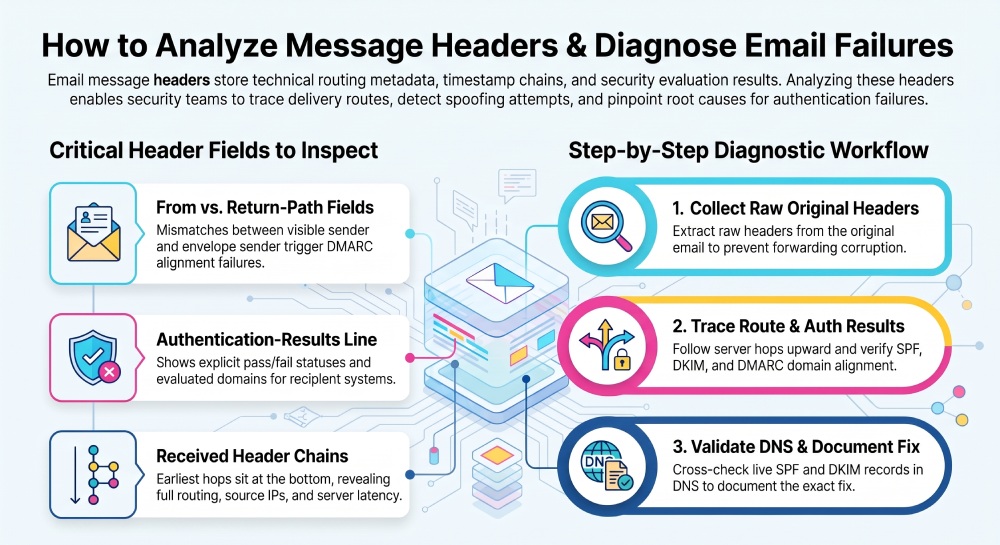
The most important header fields for email analysis are From, Return-Path, Received, Authentication-Results, and [DKIM-Signature](https://docs.mapp.com/docs/dkim-signature). Each email header field answers a different question: who appeared to send the email, which envelope sender was used, what delivery route was followed, which authentication results were recorded, and whether the message was cryptographically signed.
From and Return-Path: Sender Identity and Envelope Sender
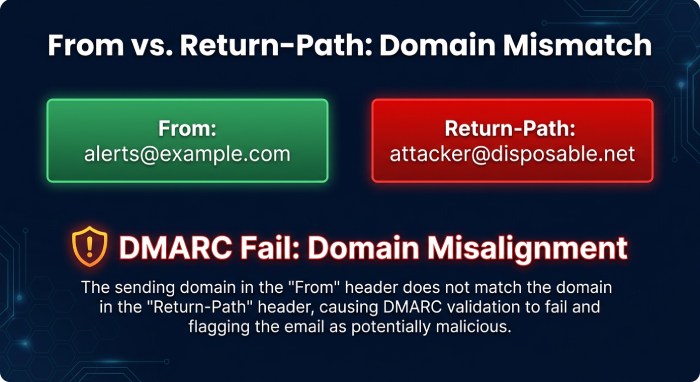
The From field is what the recipient usually sees in the inbox. It represents the visible sender identity, such as alerts@example.com. The Return-Path field, however, identifies the envelope sender used during SMTP delivery. SPF normally evaluates the domain provided in the SMTP MAIL FROM command. If the MAIL FROM identity is empty, SPF uses the HELO identity. The Return-Path header generally reflects the envelope sender used for delivery, but it is not itself the SMTP command that SPF evaluates.
This difference matters because attackers can make the From address look legitimate while using a different envelope sender. If the From domain is example.com but the Return-Path is a disposable domain, SPF may pass for the disposable domain while DMARC fails because the domains are not aligned. When you analyze headers, compare the From, Return-Path, and authentication results together rather than trusting one line.
Received Header Chains and the Delivery Route
The Received lines show the delivery route and are usually added from bottom to top. The earliest received header is near the bottom of the raw headers, while the newest appears closer to the top. This chain helps you trace email from the source IP to the final mail server.
A typical received header may include the sending host, receiving host, protocol such as ESMTPS, timestamp, and sometimes the source IP. For example:
Received: from smtp.example.com (smtp.example.com [203.0.113.10]) by mx.google.com with ESMTPS id abc123 for ; Tue, 14 May 2026 10:15:22 -0400`When you parse headers, compare timestamps between each hop to detect delivery delays. Significant hop delays can reveal throttling, greylisting, overloaded gateways, or routing loops. A header analyzer may highlight hop delays and show whether a relay server caused the delay.
Authentication-Results and DKIM-Signature
The Authentication-Results field is one of the most valuable parts of the message header. It records the receiving system’s authentication checks, including SPF, DKIM, and DMARC. A result might show:
spf=fail smtp.mailfrom=example.com; dkim=pass header.d=example.com; dmarc=fail header.from=example.com`This tells you SPF failed, DKIM passed, and DMARC failed. However, the reason may still require deeper analysis. DMARC depends on alignment, so DKIM can pass but still fail DMARC if the signing domain in header.d= does not align with the visible From domain.
The DKIM-Signature field contains the signing domain, selector, signed header fields, body hash, and cryptographic signature. When DKIM fails, check whether the signature is missing or invalid, whether the signed content changed, whether the signing domain is correct, and whether an optional signature expiration parameter is present and enforced by the verifier.
Tools That Help Parse Headers
A good header analyzer converts complex email header formatting into a clear diagnostic report. It can summarize the delivery route, authentication results, and delays between mail servers. Developers can also use open-source utilities, custom parsers, or mail server logs for deeper analysis. Choose tools designed specifically for email headers, as browser network logs and user-agent inspection tools do not replace email header analysis.
Diagnosing and Documenting Authentication Failures
Authentication failures usually come from misalignment, DNS errors, forwarding, infrastructure changes, or unauthorized senders. The goal is not just to analyze headers once, but to produce a repeatable diagnostic report that explains the root cause and the fix.
Diagnosing SPF Failures Through IP Addresses, Envelope Sender, and DNS Alignment
SPF checks whether the source IP is authorized to send on behalf of the envelope sender domain. To diagnose SPF failures, locate the Authentication-Results line, then identify the smtp.mailfrom domain and the evaluated IP address. Next, confirm whether that IP is included in the domain’s SPF TXT record.
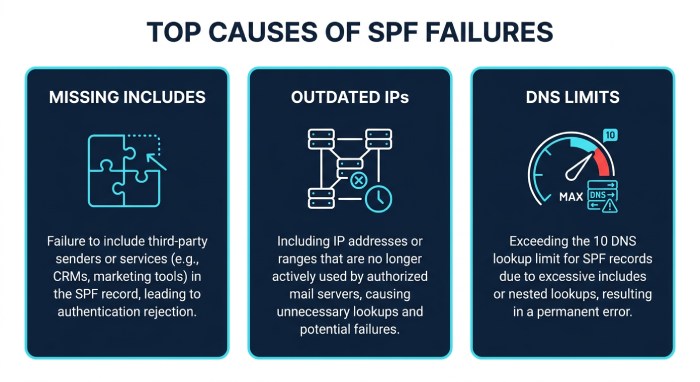
Common SPF issues include missing includes for third-party platforms, outdated IP ranges, too many DNS lookups, or sending from a new relay server that was never added to the configuration. If the source IP is unfamiliar or unauthorized, determine whether it belongs to a legitimate third-party sender, an undocumented mail server, or a potentially unauthorized source before deciding whether the failure indicates abuse.
An infrastructure check should include DNS lookups, SPF flattening concerns, and blocklist checks. Reviewing DNS records and email authentication results can help identify configuration issues. If an email lands in spam, its headers may help identify authentication failures that contributed to delivery problems. However, spam placement can also depend on sender reputation, message content, recipient policies, and other filtering signals.
Diagnosing DKIM and DMARC Failures Using Signatures, Domains, and Alignment Results
To diagnose DKIM, inspect the DKIM-Signature field and the authentication results. Confirm the signing domain in d=, the selector in s=, and whether the public key exists in DNS. DKIM failures often occur when a platform signs with the wrong domain, a DNS selector was deleted, or a relay modifies the signed content. If the diagnostic report shows dkim=fail body hash did not verify, suspect content modification after signing.
DMARC requires either SPF alignment or DKIM alignment. That means the authenticated domain must match, or organizationally align with, the visible From domain. If DKIM passes for mailer.vendor.com but the visible sender is brand.com, DMARC may fail unless the domains are aligned. Likewise, SPF can pass for the Return-Path domain but fail DMARC alignment if the From domain differs.
When you analyze headers, do not assume one pass equals full domain authentication. Review authentication results line by line. A message header may show SPF pass, DKIM fail, and DMARC pass if SPF aligns. Another email header may show SPF pass and DKIM pass but DMARC fail because neither authenticated domain aligns with the visible sender identity.
Practical Workflow: Trace the Message Path, Confirm DNS Records, and Document the Root Cause
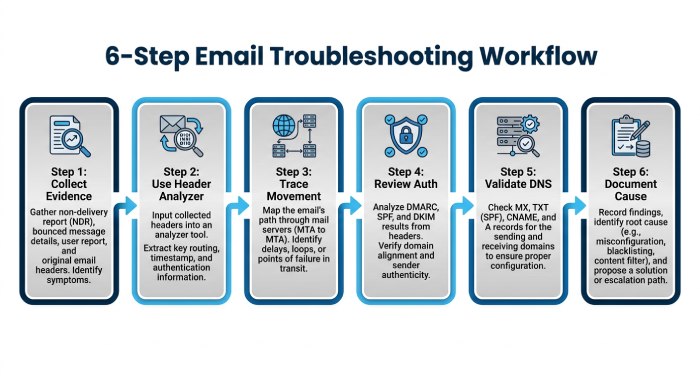 A practical workflow keeps delivery troubleshooting consistent:
-
Collect the evidence. Ask the recipient to copy headers from the original message, not from a forwarded copy. Save the raw headers and any bounce details.
-
Use a header analyzer. Paste the raw headers into a header analyzer to parse headers, review the delivery route, and generate a diagnostic report. Compare the automated header breakdown with manual inspection.
-
Trace email movement. Start with the earliest received header and follow the delivery path upward. Check each mail server, relay server, timestamp, source IP, and protocol such as ESMTPS.
-
Review authentication results. Inspect SPF, DKIM, and DMARC outcomes. Confirm whether the authentication results were recorded by the final recipient system, such as Google, Yahoo, Outlook, or Microsoft 365.
-
Validate DNS. Confirm SPF records, DKIM selectors, and DMARC policy. Check configuration changes, third-party senders, and email infrastructure ownership.
-
Document the cause. Your diagnostic report should include the message header sample, email header findings, source IP, aligned or non-aligned domains, DNS evidence, and the recommended fix.
This workflow helps teams analyze headers with discipline rather than guesswork. Whether the issue is delivery delays, spam placement, phishing detection, or domain authentication failure, the message header provides the evidence needed to trace email, verify infrastructure, and resolve the underlying configuration problem.
General Manager
General Manager of DuoCircle. Product strategy and commercial lead for DMARC Report's 2,000+ customer base.
LinkedIn Profile →Take control of your DMARC reports
Turn raw XML into actionable dashboards. Start free - no credit card required.