How to Identify Whether an SMTP Relay or Connector Caused a 550 5.7.26 Rejection

Quick Answer
To determine whether an SMTP relay or connector causes a 550 5.7.26 rejection, review message headers, SMTP logs, and connector settings. Verify SPF, DKIM, and DMARC alignment, then check whether the sending server is authorized to relay emails through your mail system.
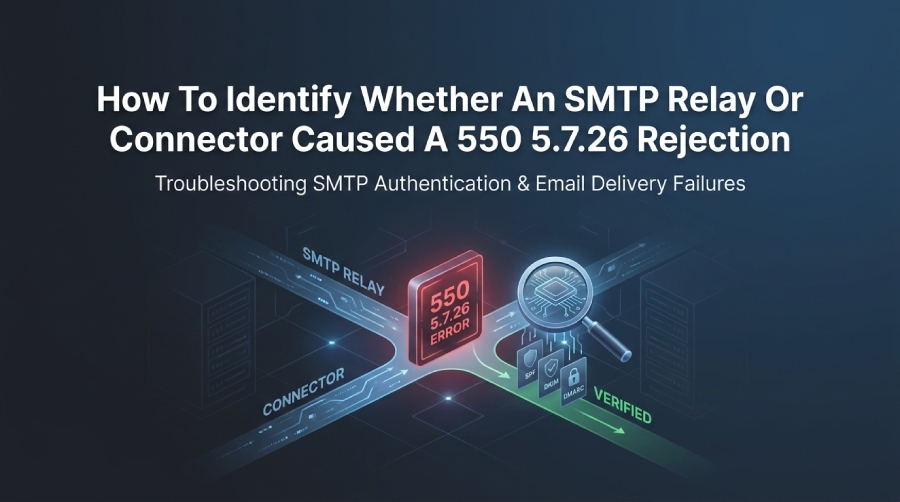
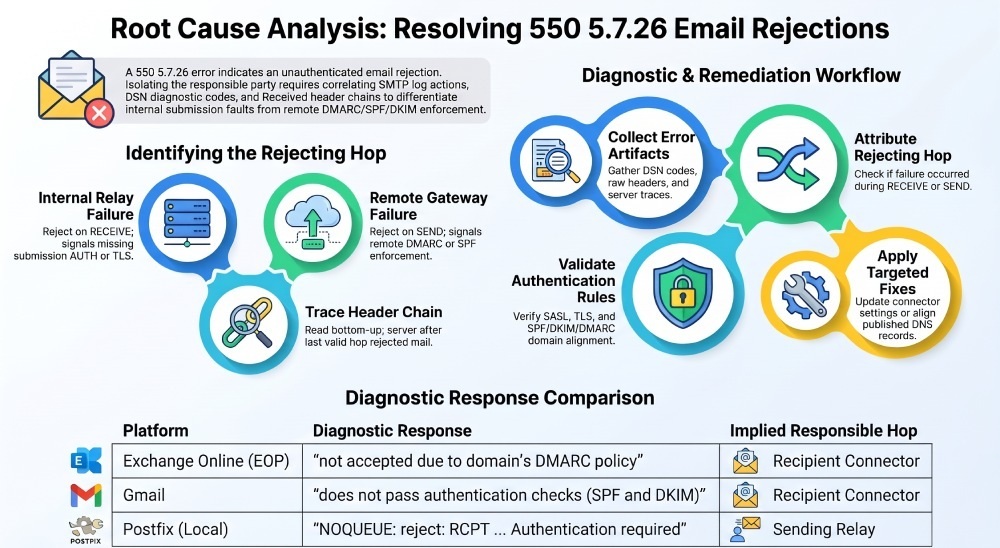
You determine whether your SMTP relay or the recipient’s connector caused a 550 5.7.26 unauthenticated rejection by finding the hop that issued the code in the SMTP transcript or DSN, correlating it with Received headers and platform-specific message traces, and then validating that hop’s authentication expectations (SMTP AUTH, TLS/client certs, IP allowlisting, SPF/DKIM/DMARC alignment) against your configuration.
Email systems commonly return 550 5.7.26 when an incoming message fails the recipient’s email authentication requirements. This error is frequently associated with SPF, DKIM, or DMARC authentication failures, although the exact reason depends on the receiving provider’s policies. To determine which system caused the rejection, examine three key sources: the SMTP error response or DSN Diagnostic-Code, the message’s Received headers, and the relevant mail server logs or message traces. Together, these records can help identify the rejecting server and determine whether the problem involves sender authentication or mail server configuration.
To investigate the rejection, examine the DSN’s Diagnostic-Code, the remote server’s SMTP response, and the available outbound mail server logs. Use these records to determine whether your sending server generated the rejection or whether the recipient’s mail server refused the message. If the recipient rejected it, check the sending domain’s SPF and DKIM results, DMARC alignment, and DNS records. DMARCReport can help administrators investigate authentication issues through DMARC aggregate reports, forensic reports, and SPF, DKIM, and DMARC monitoring.
Decoding 550 5.7.26 Across Platforms (and What It Implies About the Responsible Hop)
550 5.7.26 is an enhanced email status code commonly associated with unauthenticated messages or failures to meet a recipient’s email authentication requirements. Different email providers use specific diagnostic messages to explain why a message was rejected. Examining the complete SMTP response, authentication results, and server logs can help determine whether the rejection resulted from SPF, DKIM, or DMARC failures or another mail server policy.
Platform meanings and telltale phrasing
Platform-Specific 550 5.7.26 Error Messages and What They Mean
Different email providers use specific diagnostic messages when rejecting unauthenticated messages. Examining the wording and associated server logs can help identify the authentication problem and the system responsible for the rejection.
Exchange Online Protection (EOP)
- Common response: “550 5.7.26 Unauthenticated email from [domain] is not accepted due to domain’s DMARC policy.”
- Implication: Exchange Online Protection rejected the incoming message because it did not meet the recipient’s email authentication requirements. Check the sender domain’s SPF and DKIM results, DMARC alignment, and published DMARC policy.
Postfix (with authentication policies or milters)
- Common response: A locally configured Postfix server may log a rejection containing a 550 5.7.26 response when an authentication policy or milter rejects a message.
- Implication: Check the Postfix SMTP logs to determine whether your server generated the rejection or received it from a remote mail server. Review the relevant SMTP stage, client IP, authentication results, and milter logs.
SendGrid
- Common response: SendGrid bounce events may include a remote SMTP rejection message containing a 550 5.7.26 status code.
- Implication: Examine the bounce reason and remote server response to determine whether SendGrid rejected the submission or the recipient’s mail server rejected the delivered message. Check your sender domain’s SPF and DKIM authentication configuration.
Gmail
- Common response: “550-5.7.26 This message does not pass authentication checks (SPF and DKIM) and is not authenticated.”
- Implication: Gmail rejected the incoming message because it did not satisfy Google’s sender authentication requirements. Review SPF and DKIM authentication results and confirm that at least one mechanism passes and aligns with the visible From domain.
How DMARCReport helps
- DMARCReport maps 5.7.26 events to the issuing platform by normalizing bounce/trace phrasing and tagging the responsible hop (relay vs connector). Its dashboard highlights spikes in Exchange Online Protection (EOP)- vs Gmail-originated 5.7.26 codes so ops knows where to focus.
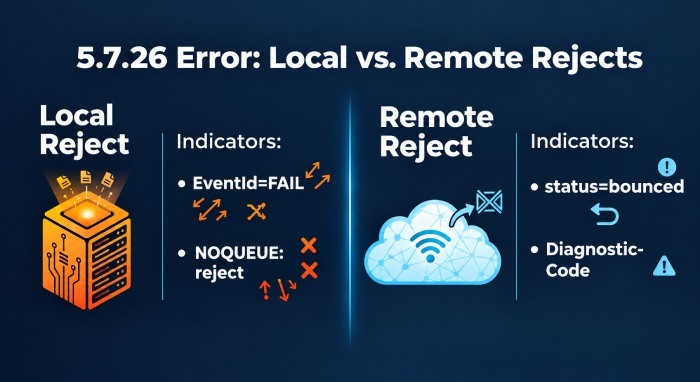
Logs and Fields That Reveal Who Issued the 550 5.7.26 (with Examples)
Exchange (on-prem) Message Tracking
- Fields: Source, EventId, ConnectorId, RecipientStatus, ServerIp, ClientIp
- Indicators:
- Your server issued it: EventId=FAIL on RECEIVE with your Receive connector in ConnectorId; RecipientStatus includes “550 5.7.26”
- Remote issued it: EventId=DELIVER/EXPAND preceded by SEND with outbound connector; DSN references external host
Example
Timestamp,ClientIp,ServerIp,Source,EventId,ConnectorId,Recipients,RecipientStatus 2026-10-28T12:07:21,203.0.113.5,10.0.0.10,SMTP,RECEIVE,Inbound-Anonymous,{user@contoso.com},“550 5.7.26 Authentication required” 2026-10-28T12:07:22,10.0.0.10,203.0.113.5,SMTP,FAIL,Inbound-Anonymous,, “550 5.7.26”
Interpretation: Your inbound connector rejected (connector responsibility).
How DMARCReport helps
- DMARCReport’s Exchange collector ingests Message Tracking logs and attributes FAIL events to specific Receive connectors, overlaying 5.7.26 counts per connector to surface misconfigured endpoints.
Office 365 (Exchange Online) Message Trace
- Fields: EventType=Fail, Action=Failed, Detail=DMARC/Unauthenticated, NetworkMessageId, RecipientStatus
- Indicators: If the Trace shows “Action: Failed; Reason: DMARC” with 5.7.26 and no successful outbound handoff, EOP rejected as recipient connector.
Example
EventType: Fail Action: Failed Reason: DMARC RecipientStatus: 550 5.7.26 Unauthenticated email from example.com is not accepted… (S3150) NetworkMessageId: 4c7b8b2e-…
How DMARCReport helps
- DMARCReport queries the O365 tracing API (Application Programming Interface) and correlates NetworkMessageId with your sender domain’s DMARC results to prove the rejection occurred at Microsoft’s inbound filter.
Postfix (smtpd) logs
- Fields: NOQUEUE reject lines at RCPT/MAIL FROM, SASL status, TLS status, client=ip
- Indicators:
- Local reject: “NOQUEUE: reject: RCPT from
; 550 5.7.26 …” at the moment of RCPT - Remote reject: Postfix logs outbound “status=bounced (host remote said: 550 5.7.26 …)”
- Local reject: “NOQUEUE: reject: RCPT from
Examples
Local connector rejection (submission client failed to authenticate)
postfix/smtpd[1234]: NOQUEUE: reject: RCPT from [198.51.100.44]:587: 550 5.7.26 Authentication required;
from=user@example.com to=any@dom.tld proto=ESMTP helo=
Remote connector rejection (recipient gateway returned 5.7.26)
postfix/smtp[5678]: 9ABCD12345: to=user@gmail.com, relay=gmail-smtp-in.l.google.com[142.250.x.x]:25, delay=2, delays=0.05/0/0.9/1.1, dsn=5.7.26, status=bounced (host gmail-smtp-in.l.google.com said: 550-5.7.26 This message does not pass authentication checks … in reply to end of DATA)
How DMARCReport helps
- DMARCReport’s log parser classifies Postfix rejects by stage (RCPT vs DATA), tags 5.7.26 locally vs remotely, and links them to domains with the highest unauthenticated rates.
SendGrid Event Webhook (or API)
- Fields: event=bounce, reason, smtp-id, tls, auth
- Indicator: If the bounce reason cites SendGrid requiring auth, relay is at fault; if it cites a remote Mail Transfer Agent (MTA) domain in reason/smtp-id, recipient is at fault.
Example { “event”:“bounce”, “email”:“user@recipient.tld”, “smtp-id”:“Yz123abc@sendgrid.net”, “reason”:“550 5.7.26 This message does not pass authentication checks”, “status”:“5.7.26”, “tls”:true }
How DMARCReport helps
- DMARCReport ingests SendGrid events and auto-attribs bounces to relay vs recipient, enriching cases with DMARC alignment outcomes for the sender domain.
Gmail DSN/Bounce
Look for: Diagnostic-Code with the 550-5.7.26 text and a Google help URL; Received headers show handoff to gmail-smtp-in.l.google.com.
Example
Diagnostic-Code: smtp; 550-5.7.26 This message does not pass authentication checks (SPF and DKIM) 550-5.7.26 and is unauthenticated. To best protect our users… see 550 5.7.26 https://support.google.com/mail/answer/81126
Interpretation: Recipient connector (Gmail) rejected.
How DMARCReport helps
- DMARCReport correlates Gmail bounces with its DMARC aggregate reports from Google to show which sources and subdomains lack aligned SPF/DKIM.
Correlating Received Headers and SMTP IDs to Pinpoint the Rejecting Hop
Step-by-step header correlation
-
Identify the DSN’s Reporting-MTA and Diagnostic-Code.
-
In the original message (or the DSN’s enclosed headers), read from the bottom-most Received up to the last successful hop. Note:
- Hostnames/IPs (by/from)
- Proto (ESMTP/with TLS)
- Timestamps and time zones
- SMTP IDs (Message-Id, X-Original-SMTP-Id, X-SG-Eid, NetworkMessageId)
-
The rejecting hop is the server immediately “next” after the last Received line; if that server’s domain matches Gmail/Outlook/SendGrid, the recipient connector is rejected; if it matches your MTA, your relay/connector is rejected.
Example Received chain snippet
Received: from relay1.corp.example (relay1.corp.example [203.0.113.10]) by gmail-smtp-in.l.google.com with ESMTPS id u18-20020a5d…; Tue, 29 Oct 2026 12:00:34 -0700 Received: from app01.internal (app01.internal [10.1.2.3]) by relay1.corp.example with ESMTPSA id 9ABCD12345; Tue, 29 Oct 2026 11:59:58 -0700
- If DSN shows 550-5.7.26 from gmail-smtp-in, the responsible hop is the Gmail connector.
- If your relay log shows “NOQUEUE reject 5.7.26” at 11:59:58 -0700, the responsible hop is your submission connector.
How DMARCReport helps
- DMARCReport stitches SMTP IDs across providers (e.g., Office 365 NetworkMessageId to DSN and to ESP IDs) to graph the message path and highlight the rejecting node, saving manual header archaeology.
Configuration Settings That Commonly Produce 5.7.26 (What to Check First)
Exchange Receive Connectors
- Anonymous disabled on Internet-facing connector while expecting server-to-server mail
- Require Transport Layer Security (TLS) enabled without presenting/validating a proper client cert
- PermissionGroups mis-set (e.g., Partners vs Anonymous Users)
- Frontend vs Hub Transport confusion causing auth flow failures
Quick checks
- Verify Anonymous Users is enabled on the Internet-facing connector
- If using Mutual TLS or IP restrictions, confirm the peer’s certificate/subject/issuer or IPs
- Review Default/Client connectors aren’t mixed for application relays vs external inbound
DMARCReport tie-in
- DMARCReport flags connector-level anomalies by comparing historical acceptance patterns and alerting when 5.7.26 spikes on a specific Exchange connector after a change.
Postfix
- smtpd_recipient_restrictions or smtpd_client_restrictions requiring SASL or TLS for unintended clients
- milter (OpenDMARC/OpenDKIM) set to reject instead of tempfail/quarantine
- smtpd_tls_auth_only=yes combined with missing AUTH for clients
Quick checks
- Confirm submission on 587 requires auth; inbound 25 should not require SASL from external MTAs
- Ensure relayhost authentication is configured for upstream Email Service Provider (ESP)
- Review opendmarc.conf (RejectFailures vs quarantine) and alignment mode
DMARCReport tie-in
- DMARCReport’s policy diff shows when Postfix map or milter changes correlate with surges in 5.7.26 rejections.
ESP/Relay (SendGrid, etc.)
- API key missing Mail Send permission or SMTP credentials invalid
- From domain not authenticated (SPF/DKIM) at the ESP
- IP pool or sender identity not verified
Quick checks
- Verify domain authentication and link branding
- Validate the SMTP username/password or API key scopes
- Confirm the ESP shows DKIM/SPF “verified”
DMARCReport tie-in
- DMARCReport imports ESP authentication status and correlates with DMARC alignment rates per subdomain to preempt 5.7.26 at recipient connectors.
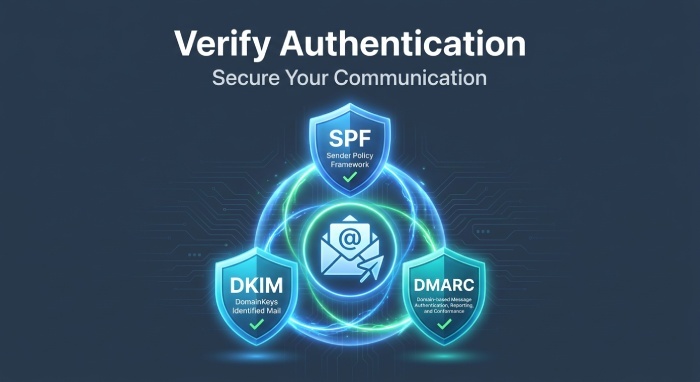
Authentication Expectations to Verify (and How)
- SMTP AUTH (SASL): Ensure clients to submit ports use AUTH; check logs for sasl_method and sasl_username.
- TLS client certs (Mutual TLS): For partner connectors, verify the presented cert matches expected subject/issuer and isn’t expired; test with openssl s_client -starttls smtp -showcerts.
- IP allowlisting: Confirm sending IP is in the recipient’s allowlist or permitted sender list; mismatches often yield 5.7.x.
- Domain authentication (SPF/DKIM/DMARC): At least one of SPF or DKIM must pass and align for domains like Gmail and Microsoft to accept at scale.
How to verify quickly
- Check Authentication-Results in bounces: spf=pass/fail; dkim=pass/fail; dmarc=pass/fail action=…
- Run dig TXT for SPF and check envelope MAIL FROM domain alignment
- Confirm DKIM selector in DNS matches the signing key
DMARCReport tie-in
- DMARCReport aggregates Authentication-Results across receivers and shows which IPs/domains fail alignment, linking those failures to 5.7.26 bounce rates.
Provider Phraseology and Traces You Can Trust
- Office 365/EOP: “S3150” or “S3140” codes often accompany 5.7.26 DMARC failures; use Message Trace “Reason: DMARC.”
- Gmail: Always links to support.google.com; includes “does not pass authentication checks.”
- SendGrid: Event Webhook “status”: “5.7.26” with “reason” text.
How DMARCReport helps
- DMARCReport normalizes these phrases into a single taxonomy (e.g., “Recipient DMARC/Unauthenticated”) and attributes responsibility to “recipient connector” vs “outbound relay.”
Active Tests to Reproduce and Isolate the Fault
Manual SMTP sessions
- Plain SMTP to recipient (test recipient connector)
- telnet gmail-smtp-in.l.google.com 25
- EHLO test
- MAIL FROM:user@yourdomain.tld
- RCPT TO:youraccount@gmail.com
- DATA with unsigned content; expect 5.7.26 on end of DATA if DMARC/auth unmet
- Authenticated submission to your relay (test relay)
- openssl s_client -starttls smtp -connect relay1.corp.example:587 -quiet
- EHLO client
- AUTH LOGIN …; if not accepted, you’ll get 5.7.26/5.7.1
swaks or smtp-cli
- Test unauthenticated vs authenticated paths:
- swaks —to user@gmail.com —from user@yourdomain.tld —server relay1.corp.example —ehlo client —tls —data ./msg.txt
- swaks —auth LOGIN —auth-user smtpuser —auth-password secret …
- Test DKIM/SPF impact:
- Send once via ESP domain-authenticated and once via raw MTA without DKIM; compare outcomes.
What to look for
- If unauthenticated submission to your relay fails -> relay/connector at fault.
- If authenticated submission succeeds but recipient returns 5.7.26 -> recipient connector policy at fault.
- Regular email authentication monitoring can help administrators identify DNS configuration changes and authentication failures before they affect a larger volume of outgoing messages.
Monitoring, Logging, and Alerting to Prevent Connector-Caused 5.7.26
- Enable enhanced SMTP logging: Postfix verbose reject logging, Exchange Protocol Logging (Send/Receive connectors).
- Keep audit trails of connector/config changes: track who changed permission groups, TLS, or partner settings.
- Health checks: synthetic AUTH/TLS probes to each connector and partner domain.
- Centralize traces: ingest O365, Gmail Postmaster tools data, ESP webhooks.
DMARCReport tie-in
- DMARCReport centralizes these feeds and triggers alerts when:
- 5.7.26 rate exceeds baseline per connector/domain
- DMARC alignment for a domain drops below a threshold
- A new source IP starts failing authentication
Original insight
- The source of a 550 5.7.26 rejection varies depending on the sending infrastructure and recipient’s authentication policies. Reviewing SMTP responses, message traces, and authentication reports helps administrators identify the underlying cause.
Ruling Out Lookalikes (SPF/DKIM/DMARC, rDNS, Rate Limits, Greylisting)
- SPF hard fail (5.7.23/5.7.24) vs 5.7.26: Different code/wording; 5.7.26 usually mentions “unauthenticated” broadly.
- DKIM failure alone rarely yields 5.7.26 unless DMARC p=reject and SPF misaligned.
- Reverse DNS: Typically 4xx or 5.7.1 policy rejections, not 5.7.26 specifically.
- Rate limits/greylisting: 4xx temporary failures; 5.7.26 is permanent.
How to rule out
- Read the Diagnostic-Code precisely and check Authentication-Results.
- Validate SPF and DKIM alignment for the RFC5322.From; test with a known-good signer.
DMARCReport tie-in
DMARCReport contrasts per-domain DMARC pass rates with 5.7.26 bounces to separate domain-auth problems from connector-auth problems.
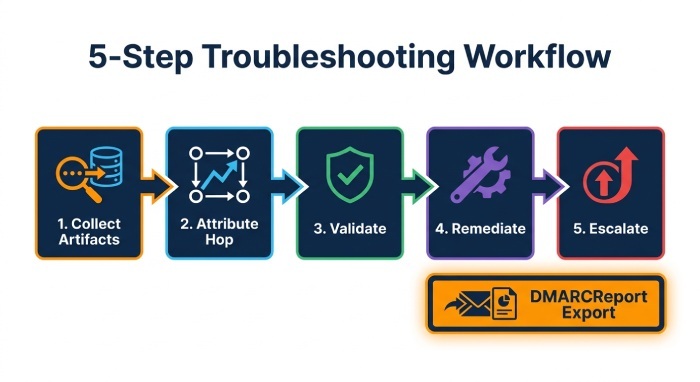
Troubleshooting Workflow and Escalation Path
-
Collect artifacts
- DSN with Diagnostic-Code and Reporting-MTA
- Raw headers (Received chain, Authentication-Results)
- Platform traces (O365, ESP, MTA logs)
-
Attribute the hop
- Use headers + DSN to identify the rejecting server
- Confirm in your logs whether rejection occurred on RECEIVE (your connector) or after SEND (recipient connector)
-
Validate expectations
- Check connector auth settings (AUTH/TLS/IP)
- Verify domain authentication (SPF/DKIM/DMARC alignment)
-
Remediate
- Fix connector permissions/TLS or allowlist
- Authenticate domain at ESP; enable DKIM; align SPF
-
Escalate (if external)
- Open ticket with recipient provider; include SMTP IDs, timestamps, Data Source Name (DSN), and sample headers
- Temporary allowlisting while investigating (where policy allows)
DMARCReport tie-in
- DMARCReport’s incident view compiles the exact evidence vendors request (SMTP IDs, traces, headers) and exports a shareable packet to speed external escalation.
Case Studies (Original, Representative)
-
SaaS app relay drift
- Change: Postfix updated with smtpd_tls_auth_only=yes
- Symptom: 5.7.26 on RCPT for all app->relay submissions
- Evidence: Postfix “NOQUEUE reject 5.7.26 Authentication required; sasl_method=none”
- Fix: Configure app to AUTH on 587; restored flow
- DMARCReport impact: Alerted within 10 minutes as 5.7.26 on the submission connector spiked 400%
-
Bulk sender to Gmail
- Change: New sending subdomain without DKIM; SPF included ESP but MAIL FROM mismatched alignment
- Symptom: Gmail “550-5.7.26 … does not pass authentication checks”
- Evidence: Authentication-Results: spf=pass smtp.mailfrom=esp.example; dkim=none; dmarc=fail header.from=new.example
- Fix: Publish DKIM for new.example; align MAIL FROM with header.from
- DMARCReport impact: Showed DMARC fail 99% for new.example and linked to Gmail 5.7.26 bounces
FAQ
Does 5.7.26 always mean DMARC failed?
Not always. While many providers use 5.7.26 for DMARC or unauthenticated domain failures, some use it for general “authentication required” on submission (e.g., missing SMTP AUTH). Check whether the rejection happened on your receive connector (submission) or at the recipient gateway.
How can I be sure the error came from my server and not the recipient?
If your logs show a RECEIVE/RCPT reject with 5.7.26 and there is no outbound SEND attempt, it’s your server. If your logs show an outbound attempt and a remote host replied 550 5.7.26, it’s the recipient. The DSN’s Reporting-MTA and the Diagnostic-Code hostname are definitive.
Could TLS settings cause 5.7.26?
Yes. Partner/forced TLS connectors that expect a client certificate or enforce TLS-only submission can reject unauthenticated handshakes, yielding 5.7.x (often 5.7.26/5.7.1). Verify certificate trust, CN/SAN matching, and expiration.
What if the message was accepted but later bounced with 5.7.26?
Some providers evaluate DMARC at the end of DATA or post-queue; the bounce will still cite the receiving MTA. Use the bounce’s Diagnostic-Code and your outbound log’s “status=bounced … said: 550 5.7.26” line to attribute it to the recipient connector.
Can DMARCReport help even if I don’t control the recipient’s system?
Yes. DMARCReport triangulates DMARC aggregate feedback with your outbound logs and ESP events to prove that recipient-side authentication policy drove the rejections, providing evidence to share with the recipient’s provider.
Conclusion: A Repeatable Way to Attribute 5.7.26—and How DMARCReport Operationalizes It
In one pass: read the DSN’s Diagnostic-Code to capture the rejecting hostname and 5.7.26 text, map it to the Received header just before the failed handoff, and confirm in your platform logs whether the failure happened on your RECEIVE (submission/relay responsibility) or on SEND by the remote (recipient connector responsibility). Then validate the hop’s authentication expectations—SMTP AUTH/TLS/IP at submission, or SPF/DKIM/DMARC alignment at the recipient—and remediate accordingly.
DMARCReport helps administrators monitor SPF, DKIM, and DMARC authentication results across their sending domains. By reviewing aggregate reports, identifying authentication failures, and monitoring DNS configuration changes, organizations can detect problems that may contribute to unauthenticated email rejections and take corrective action.
General Manager
General Manager of DuoCircle. Product strategy and commercial lead for DMARC Report's 2,000+ customer base.
LinkedIn Profile →Take control of your DMARC reports
Turn raw XML into actionable dashboards. Start free - no credit card required.