How to Audit Third-Party Email Hosting for DMARC Compliance

Quick Answer
Auditing third-party email hosting providers for DMARC compliance involves checking SPF, DKIM, and DMARC alignment, reviewing authentication reports, and identifying unauthorized senders. This helps fix configuration issues, prevent domain spoofing, and ensure secure email delivery.
Try Our Free DMARC Checker
Validate your DMARC policy, check alignment settings, and verify reporting configuration.
Check DMARC Record →Auditing third-party email hosting providers for DMARC compliance helps organizations identify unauthorized senders, prevent domain spoofing, and maintain reliable email authentication. The process involves reviewing every authorized sending service, verifying SPF and DKIM alignment, analyzing DMARC reports, and addressing authentication failures before enforcing stricter DMARC policies.
TL;DR: DMARC Compliance Audit Checklist
A third-party email provider DMARC audit verifies that every external service sending emails on behalf of your organization is properly authenticated. This includes reviewing SPF authorization, DKIM signatures, DMARC alignment, sending domains, and aggregate reports to identify legitimate services, unauthorized sources, and configuration problems.
What a Complete Audit Should Prove
A complete audit proves that your business email ecosystem is protected against spoofing, phishing, and unauthorized sending. It also confirms that each email hosting service supports domain-aligned authentication, reliable reporting, strong access controls, and secure operations.
Core Evidence to Collect
For each third-party email provider, collect:
- Sending domains and subdomains used by the provider
- SPF records and authorized sending mechanisms
- DKIM selectors, public keys, and signing domains
- DMARC policy and reporting configuration
- SPF and DKIM alignment results
- Sending IP addresses and return-path domains
- Authentication failure details from DMARC aggregate reports
- Provider documentation for custom-domain authentication
- Account owner and responsible technical contact
Quick Benchmark
A successful DMARC audit should account for every legitimate production sender, verify that authorized services pass DMARC alignment, and document all unexplained authentication failures with a responsible owner and remediation plan.
Define the Scope of Your Third-Party Email Ecosystem
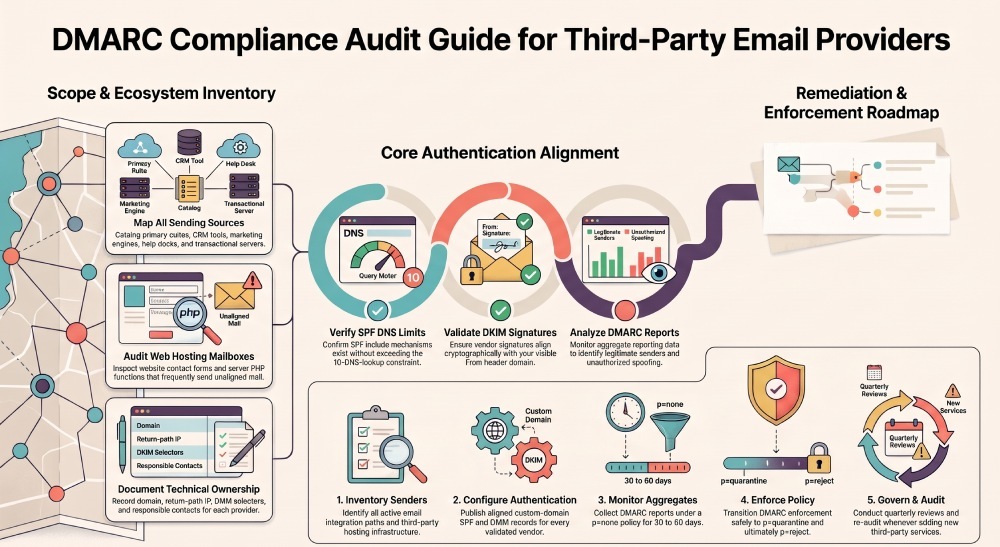
Scope definition is the first control in a DMARC audit because you cannot secure an email hosting environment you have not fully mapped. Start by identifying every system that sends mail using your custom email domain, including primary business email, transactional tools, and legacy web hosting mailboxes.
Inventory Every Email Hosting Provider
Your inventory should include every external service authorized to send emails using your organization’s domain. This may include business email platforms, marketing automation services, CRM systems, transactional email providers, help desk platforms, payroll applications, and web hosting servers. Record the sending domain, provider name, authentication method, and business purpose of each service.
Map Business and Technical Ownership
For each sending service, document:
- Provider name and responsible account owner
- Sending domain and subdomain
- Business purpose and email type
- Sending IP addresses and return-path domain
- SPF authorization status
- DKIM signing domain and selector
- DMARC alignment results
- Authentication issues and remediation status
Edge Case: Web Hosting Mailboxes
Organizations sometimes overlook email messages generated by website contact forms, application notifications, and server-side PHP mail functions. These messages may originate from web hosting infrastructure rather than the primary business email provider. Identify these sending sources and verify whether they use an authorized sending IP, a valid SPF configuration, and an aligned DKIM signature before allowing them to send using your organization’s domain.
Classify Domains, Subdomains, and Sending Functions
DMARC compliance depends on knowing which domain each provider uses in the visible From header. Separate your root domain from subdomains such as billing.example.com, news.example.com, and support.example.com.
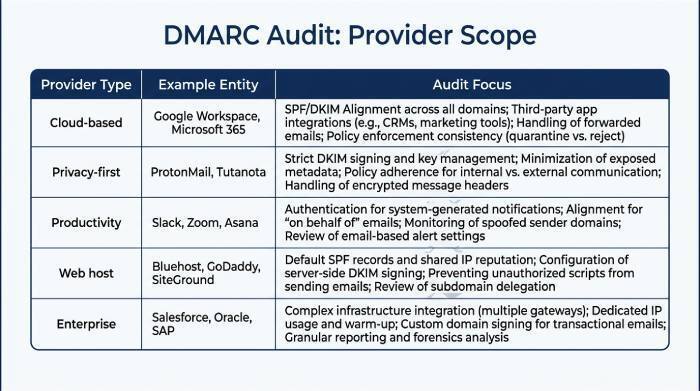
Scope Table for Provider Review
| Provider Type | Example Entity | Audit Focus |
|---|---|---|
| Cloud-based email | Microsoft 365, Google Workspace | SPF/DKIM alignment, Microsoft 365 integration, Google Workspace integration |
| Privacy-first email | Proton Mail, Switzerland-based infrastructure | End-to-end encryption, privacy protection, open-source cryptography |
| Productivity suite | Zoho, Fastmail | Collaboration tools, calendar integration, contacts integration |
| Web host email | Hostinger, SiteGround | DNS control, spam protection, antivirus protection |
| Enterprise suite | Exchange Online, Gmail | eDiscovery, Vault, audit logs, DLP |
Verify SPF, DKIM, and DMARC Alignment for Each Provider
SPF, DKIM, and DMARC alignment are the technical foundation of third-party email hosting compliance. A provider can offer excellent mailbox storage, a polished user interface, and strong spam protection, but still fail your audit if messages do not align with your authenticated domain.
Check SPF Authorization
SPF confirms that a sending IP or platform is authorized to send for your domain. For each email hosting provider, confirm that its include mechanism is present, valid, and not exceeding the 10-DNS-lookup limit.
SPF Review Points
Check whether the email hosting service:
- Publishes clear SPF instructions for your custom email domain
- Supports separate SPF guidance for subdomains
- Avoids forcing broad IP ranges that weaken advanced security
- Documents sending sources across data centers
Example SPF Risk
When multiple third-party providers require SPF authorization, their DNS lookup mechanisms can cause the domain to exceed SPF’s 10-DNS-lookup limit. Review the complete SPF record, remove unnecessary mechanisms, and consider separating marketing or transactional sending onto dedicated subdomains with their own SPF records. This helps manage different sending sources without unnecessarily expanding the root domain’s SPF configuration.
Validate DKIM Signing
DKIM can provide more reliable authentication during email forwarding because its cryptographic signature can remain valid when the message is forwarded without modifying signed content. SPF, by comparison, may fail when forwarding changes the sending server’s IP address. Verify that each third-party provider signs outgoing messages using a DKIM domain aligned with your organization’s visible From domain.
DKIM Controls to Confirm
Review:
- DKIM selector names and key length
- Rotation process for compromised keys
- Whether Google Workspace, Microsoft 365, Zoho Mail, and Fastmail support domain-aligned DKIM
- Whether webmail access, IMAP support, and POP3 support affect sending behavior
Confirm DMARC Policy and Reporting
DMARC ties SPF and DKIM to the visible From domain and tells receivers what to do with failures. Use an analyzer such as DMARCReport to centralize aggregate reports, detect unauthorized senders, and verify progress toward enforcement.
DMARC Alignment Settings
Organizations should begin DMARC enforcement with a monitoring policy (p=none) to identify legitimate sending sources and authentication failures. After reviewing reports and correcting misconfigured SPF and DKIM records, they can gradually move toward p=quarantine and eventually p=reject. Before increasing enforcement, verify that all legitimate third-party services pass DMARC alignment. Strict SPF or DKIM alignment should be introduced only when the organization’s sending infrastructure supports it.
Review Provider Authentication, Reporting, and Security Controls
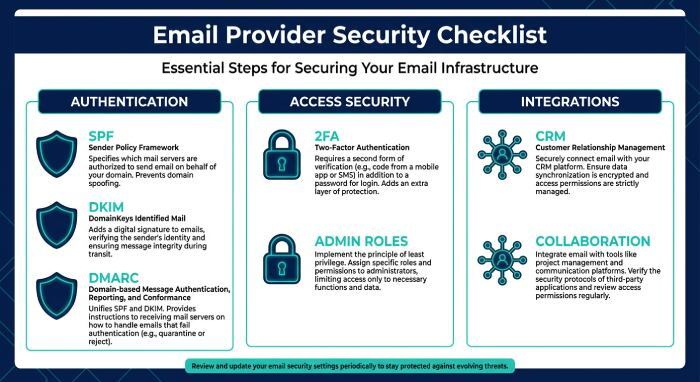
A third-party email provider should offer clear authentication documentation, support for custom-domain SPF and DKIM configuration, and sufficient reporting information to help organizations investigate authentication failures. These capabilities make it easier to verify DMARC alignment, identify unauthorized sending sources, and maintain consistent email authentication across external services.
Evaluate Authentication and Access Security
Confirm that the email hosting service supports two-factor authentication, admin role separation, and secure recovery workflows. Strong identity controls reduce the chance that valid DMARC-aligned accounts are abused.
Security Features to Review
Look for:
- Advanced security and anomaly detection
- DLP (data loss prevention) for sensitive content
- End-to-end encryption where appropriate
- Privacy protection and regional hosting options
- Spam protection and antivirus protection
- Mobile app support with secure device controls
Proton Mail Example
When evaluating a provider such as Proton Mail, verify that its custom-domain configuration supports the authentication requirements of your organization. Check its DKIM signing configuration, SPF authorization instructions, and DMARC alignment results rather than relying solely on its general privacy or security features.
Review Productivity and Integration Controls
Third-party integrations can introduce additional email-sending sources that are not always included in the primary domain’s authentication configuration. Review Customer relationship management (CRM) platforms, automated notifications, shared mailbox integrations, and other connected applications to ensure that each service uses an authorized sending domain and passes DMARC alignment.
Suite-Specific Considerations
For Microsoft 365, review Outlook, Exchange Online, Word, Excel, PowerPoint, OneDrive, OneDrive storage, Microsoft Loop, and eDiscovery settings. For Google Workspace, review Gmail, Docs, Sheets, Google Drive, Google Drive storage, Meet, Calendar, Gemini AI, Vault, and admin audit logs.
Collaboration Risk
Collaboration tools can generate notifications from shared files, meetings, and comments. Confirm that team collaboration, calendar integration, contacts integration, and CRM notifications sent from authenticated domains.
Test Sending Domains, Subdomains, and Failure Handling
Testing proves that your DNS records and provider settings work under real-world conditions. Send controlled messages from every business email platform, every cloud-based email suite, and every web hosting mail feature.
Run Controlled Authentication Tests
Send test emails to Gmail, Outlook, and independent diagnostic inboxes. Review headers for SPF pass, DKIM pass, DMARC pass, alignment domain, return-path domain, and DKIM signing domain.
Test Matrix
Test:
- Root domain messages from primary email hosting
- Subdomain messages from marketing or CRM tools
- Shared mailbox messages with email aliases
- Mobile sends using mobile app support
- Browser sends using webmail access
- Legacy clients using IMAP support or POP3 support
Failure Handling Scenario
If DKIM passes but DMARC fails, the signing domain may not align with the From domain. This is a common issue when an email hosting service signs with a vendor domain instead of your custom email domain.
Validate User Experience and Storage Behavior
Security cannot break essential business email workflows. Confirm that DMARC enforcement does not disrupt ad-free email, shared mailboxes, mailbox storage, storage capacity, or legal retention.
Plan and Feature Checks
Compare the provider’s free plan, paid plan, business starter plan, subscription-based model, scalable plans, multi-user support, and custom domain support. A small team may start with a basic email hosting service, while a regulated company may need enterprise email with eDiscovery and DLP.
Document Findings and Create a DMARC Compliance Remediation Plan
Documentation turns a technical DMARC audit into an actionable compliance program for every third-party email hosting provider. Your final report should prioritize risks that affect spoofing resistance, authentication reliability, and operational continuity.
Build a Risk Register
Create a risk register that lists each email hosting provider, each sending domain, authentication result, owner, severity, and due date. Include evidence from DNS, message headers, admin consoles, and provider documentation.
Suggested DMARC Audit Risk Ratings
- Critical: An unauthorized source is sending emails using your organization’s domain without valid authentication.
- High: A legitimate production sender consistently fails DMARC alignment because of missing or incorrect SPF/DKIM configuration.
- Medium: Authentication records are incomplete, outdated, or inconsistently configured across sending subdomains.
- Low: Provider documentation, sender ownership details, or authentication monitoring procedures are incomplete.
Sample Remediation Item
Issue: Zoho Mail signs with a non-aligned domain. Fix: Enable domain-aligned DKIM in Zoho, publish DNS selector, retest DMARC, and update the provider record.
Create the Remediation Roadmap
Your remediation plan should move from discovery to enforcement in phases. Start by fixing high-volume cloud-based email, then address transactional tools, CRM platforms, and web hosting mail sources.
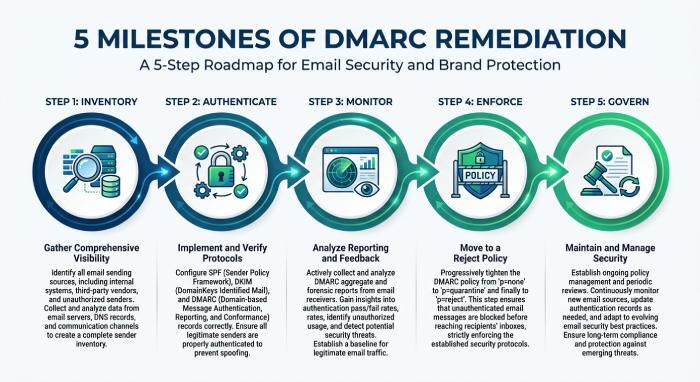
Roadmap Milestones
A practical sequence is:
- Inventory: Confirm all senders and email integration paths
- Authenticate: Configure SPF and DKIM for each email hosting service
- Monitor: Review DMARC reports for 30–60 days
- Enforce: Move to quarantine, then reject
- Govern: Re-audit after provider changes, migrations, or new collaboration tools
FAQ
How often should third-party email hosting providers be audited for DMARC?
Organizations should review third-party email providers at least quarterly and whenever they add, remove, or change an email sending service. Regular reviews help identify outdated SPF records, missing DKIM signatures, unauthorized sending sources, and DMARC alignment failures before they affect legitimate email delivery.
What if an email hosting service cannot support DMARC alignment?
If a third-party email service cannot support DMARC alignment, first check whether it offers custom-domain DKIM signing or an SPF configuration that can align with your From domain. If neither method works, consider using a dedicated sending subdomain or selecting another provider that supports proper email authentication. Avoid moving to a stricter DMARC policy until legitimate sending sources are properly authenticated.
Does bundled web hosting email need the same DMARC controls?
Yes, bundled web hosting email must meet the same DMARC controls as Microsoft 365, Google Workspace, or any dedicated email hosting provider. Attackers do not distinguish between premium business email and basic hosting mailboxes, so spam protection, antivirus protection, SPF, DKIM, and DMARC alignment are still required.
Which providers are easiest to audit for business email DMARC compliance?
The ease of auditing a third-party email provider depends on its authentication documentation, custom-domain DKIM support, SPF configuration options, and available reporting information. Rather than assuming a particular provider is easier to audit, evaluate each service based on its ability to support SPF authorization, DKIM signing, DMARC alignment, and ongoing authentication monitoring.
General Manager
General Manager of DuoCircle. Product strategy and commercial lead for DMARC Report's 2,000+ customer base.
LinkedIn Profile →Take control of your DMARC reports
Turn raw XML into actionable dashboards. Start free - no credit card required.