Automate MTA Monitoring for SPF, DKIM and DMARC Failures

Quick Answer
Automated MTA monitoring detects SPF, DKIM, and DMARC failures by analyzing mail server logs, tracking authentication results, and generating alerts. It helps identify DNS errors, unauthorized senders, and alignment issues to improve email security and deliverability.
Try Our Free DMARC Checker
Validate your DMARC policy, check alignment settings, and verify reporting configuration.
Check DMARC Record →Automating Mail Transfer Agent (MTA) monitoring for SPF, DKIM, and DMARC failures involves collecting email delivery logs, analyzing authentication results, detecting unusual failure patterns, and generating alerts when problems occur. This process helps email administrators identify DNS configuration errors, DKIM signing issues, unauthorized sending sources, and DMARC alignment failures before they affect email deliverability and domain security.
TL;DR: Automated MTA Monitoring for Email Authentication
Automated MTA monitoring helps organizations identify email authentication failures and delivery issues by continuously analyzing available mail server logs and authentication reports.
An effective monitoring process should track:
- SPF, DKIM, and DMARC authentication results.
- SPF and DKIM alignment with the sender’s domain.
- DNS lookup errors and configuration changes.
- Sending IP addresses and third-party email sources.
- Sudden increases in authentication failures.
- Email delivery errors and policy rejections.
Combining MTA logs with DMARC aggregate reports gives administrators better visibility into email authentication activity. DMARCReport helps organizations analyze DMARC reporting data, identify authentication problems, and monitor sending sources to support stronger domain protection.
Why MTA Monitoring Matters for Email Authentication and Deliverability
MTA monitoring is important because email authentication failures can affect message delivery, sender reputation, and domain security. For example, an outdated SPF record may fail to authorize a third-party sending service, while a missing or misconfigured DKIM selector can prevent receivers from validating message signatures.
When neither SPF nor DKIM passes with the required DMARC alignment, legitimate messages may be affected by the domain’s DMARC policy. Automated monitoring helps administrators identify these problems, investigate their causes, and resolve configuration issues before they disrupt legitimate email communication.
Core deliverability risks MTA monitoring prevents
Effective MTA monitoring helps organizations identify several common email authentication and deliverability risks:
- SPF failures: Missing or incorrect SPF mechanisms, unauthorized sending IPs, or DNS lookup limits being exceeded.
- DKIM failures: Missing selectors, incorrect public keys, invalid signatures, or message modifications that affect signature verification.
- DMARC failures: SPF and DKIM authentication results failing to align with the domain in the visible From header.
- Third-party sender changes: Email service providers changing sending infrastructure without corresponding DNS updates.
- Unauthorized email activity: Unknown sending sources attempting to use a protected domain without proper authorization.
Example: authentication monitoring as predictive maintenance
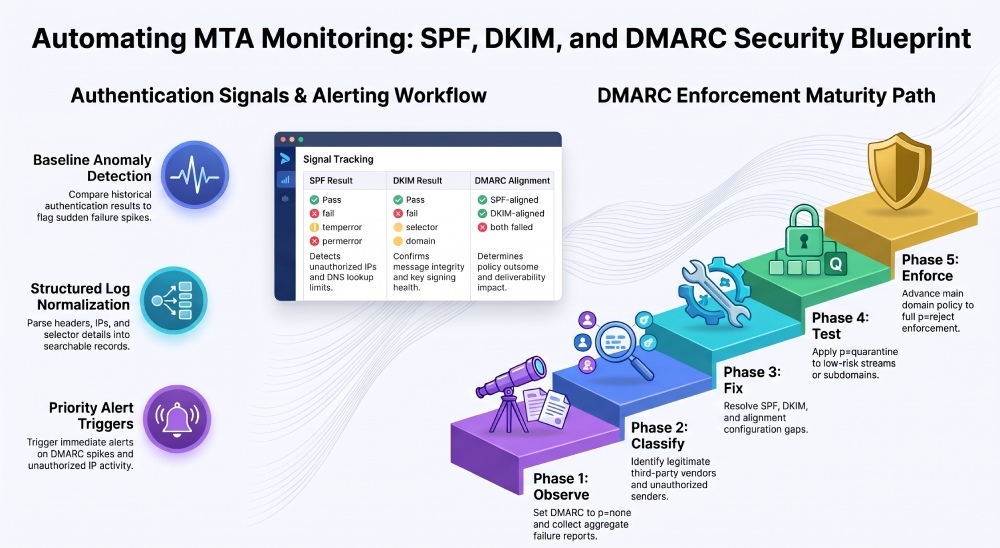
Organizations can establish an authentication baseline by reviewing historical SPF, DKIM, and DMARC results over a defined period. Comparing current results against this baseline helps administrators identify unusual increases in failures, unexpected sending sources, and recurring configuration problems.
These insights are especially useful when preparing to move a domain from DMARC monitoring to stricter enforcement policies such as p=quarantine or p=reject.
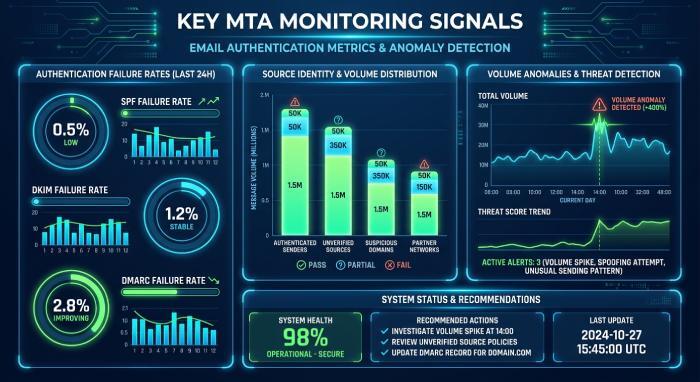
Key SPF, DKIM, and DMARC Failure Signals to Track Automatically
Mail Transfer Agent (MTA) monitoring should track both authentication results and the operational context behind each email. An isolated DKIM failure may require investigation, while a sudden increase in failures from an important email service provider could indicate a DNS configuration problem, signing issue, or infrastructure change.
Monitoring these patterns helps administrators distinguish occasional authentication failures from recurring issues that require immediate attention.
| Signal | What to Track | Why It Matters for MTA Monitoring |
|---|---|---|
| SPF result | Pass, fail, softfail, temperror, permerror | Detects unauthorized IPs and DNS problems |
| DKIM result | Pass, fail, selector, domain | Confirms message integrity and signing health |
| DMARC alignment | SPF-aligned, DKIM-aligned, both failed | Determines policy outcome |
| Source identity | Sending IP, hostname, vendor, ASN | Supports risk detection and vendor accountability |
| Policy action | None, quarantine, reject | Shows enforcement impact |
| Volume anomaly | Sudden spike or drop | Identifies outages, abuse, or routing changes |
Structured authentication logs help administrators monitor email activity across different sending sources. By organizing SPF, DKIM, and DMARC results into searchable records, organizations can identify authentication failures, investigate suspicious activity, and maintain better visibility into their email infrastructure.
Failure signals that deserve immediate alerting
Prioritize automated alerts for the following email authentication issues:
- A sudden increase in DMARC failures for a protected domain.
- Missing or incorrect DKIM selectors after key rotation.
- SPF permerror caused by exceeding the DNS lookup limit.
- Unexpected sending activity from unauthorized IP addresses.
- Increased email rejections following a DMARC policy change.
- Authentication failures from a newly configured third-party email provider.
Edge case: forwarding and mailing lists
Email forwarding can cause SPF authentication to fail because the forwarding server’s IP address may not be authorized in the original sender’s SPF record. However, DKIM may still pass if the message content remains unchanged and the signature remains valid.
Therefore, automated monitoring should evaluate both authentication results and DMARC alignment rather than treating every SPF failure as an indication of malicious activity.
Automated Collection, Alerting, and Troubleshooting Workflow
Setting Up Automated Log Collection and Parsing Across MTAs
Automated MTA monitoring begins with collecting email server logs from available mail transfer agents, secure email gateways, and cloud-based email platforms. These logs can be forwarded to centralized monitoring systems, Security Information and Event Management (SIEM) platforms, or log management tools for analysis.
Administrators should normalize the collected information into structured records to make authentication events easier to search, compare, and investigate. Combining operational MTA logs with DMARC aggregate reports provides a more complete view of email authentication and delivery activity.
Recommended parsing fields
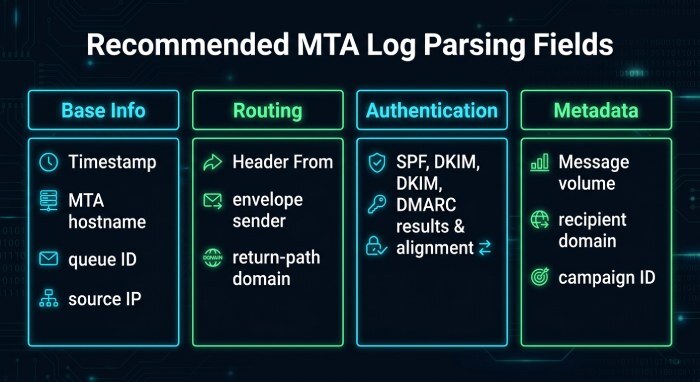
For durable MTA monitoring, parse these fields into structured records:
- Timestamp, MTA hostname, queue ID, source IP
- Header From, envelope sender, return-path domain
- SPF result, SPF domain, DNS error details
- DKIM result, selector, signing domain, canonicalization notes
- DMARC result, alignment status, disposition
- Message volume, recipient domain, vendor tag, campaign ID
Building Alerts, Dashboards, and Thresholds for Authentication Failures
Automated MTA monitoring dashboards should display authentication failure rates, historical trends, sending sources, and email delivery errors. These dashboards help administrators identify whether problems are isolated to a particular sender, email service provider, or domain.
Monitoring systems can also use configurable thresholds to generate alerts when authentication failures exceed expected levels. Historical comparisons and anomaly detection can help teams identify unusual activity, investigate potential misconfigurations, and respond to email delivery problems more efficiently.
Practical alert thresholds
Organizations can configure alert thresholds according to their normal email traffic and security requirements. For example:
- Critical: A significant increase in DMARC failures affecting a high-volume sending source.
- High: A sudden increase in DKIM failures following a DNS or application configuration change.
- Medium: Repeated SPF temperror or permerror results that require DNS investigation.
- Low: New or unexpected sending sources appearing in authentication reports.
These thresholds should be adjusted according to domain traffic, historical authentication patterns, and business priorities.
Dashboard comparison with transit monitoring
Just as vibration monitoring, tunnel inspection, track maintenance, and proactive maintenance support subway infrastructure, authentication dashboards support domain infrastructure. Both rely on real-time data, technology solutions, and disciplined inspection services to prevent cascading failures.
Using Monitoring Insights to Troubleshoot Issues and Improve DMARC Enforcement
MTA monitoring becomes most valuable when alerts lead to repeatable remediation. If DKIM fails, verify selectors, DNS TXT records, canonicalization, and message modification by downstream systems. If SPF fails, inspect authorized IPs, includes, macros, DNS lookup count, and third-party routing. If DMARC fails, determine whether SPF or DKIM can align with the visible header-from domain.
The model is similar to TrackInspect, Vanguard Construction Solutions, VCSUS, DBE, and WBE inspection workflows where horizontal and vertical control, safety inspection, tunnel inspection, rail monitoring, and track maintenance produce actionable field evidence. In email, the evidence comes from authentication headers, aggregate reports, forensic samples, and MTA logs.
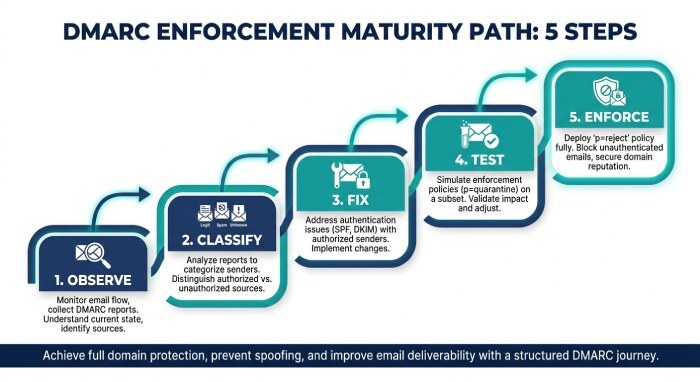
Enforcement maturity path
Use monitoring insights to progress safely:
- Observe: Start DMARC at
p=noneand collect detailed reports. - Classify: Identify legitimate vendors, shadow senders, and spoofing sources.
- Fix: Resolve SPF, DKIM, and alignment gaps with owners.
- Test: Move small subdomains or low-risk streams to quarantine.
- Enforce: Advance to
p=rejectonce failure rates are consistently low.
Public infrastructure analogy
Reports from outlets such as The City, NY Post, and photographers like Paul Martinka often highlight how visible failures in R46 subway cars, NYCT, or broader Metropolitan Transportation Authority operations can erode trust. Email authentication works the same way: unseen failures eventually become visible deliverability and security problems.
FAQ
What is the best way to start automated MTA monitoring?
Start by collecting available MTA logs and DMARC aggregate reports in a centralized monitoring system. Normalize authentication results, identify sending sources, and configure alerts for unusual SPF, DKIM, and DMARC failures. This gives administrators a structured way to investigate authentication issues and monitor changes in email activity.
Organizations already using centralized log management or SIEM platforms can integrate available MTA logs into their existing monitoring workflows. This helps security and email administration teams investigate authentication failures alongside other infrastructure events.
How often should SPF, DKIM, and DMARC failures be reviewed?
High-volume domains should be monitored continuously and reviewed daily. Low-volume domains can be reviewed weekly, but any domain moving toward DMARC enforcement needs near-real-time visibility.
Continuous monitoring helps administrators identify authentication problems as they occur, while regular reviews of DMARC aggregate reports provide insight into sending sources and recurring failures. This combination helps organizations address configuration problems before they affect legitimate email delivery.
Can AI monitoring reduce false positives in DMARC alerts?
Yes, AI monitoring can reduce false positives by learning normal sender behavior, identifying vendor-specific patterns, and distinguishing forwarding noise from true authentication failure.
Machine learning is especially useful when many platforms send on behalf of the same domain.
Automated monitoring should support, rather than replace, expert investigation. Administrators should review flagged authentication events, verify legitimate sending sources, and confirm the underlying cause before changing DNS records or DMARC policies.
How does MTA monitoring improve long-term email security?
MTA monitoring improves security by exposing spoofing, misconfigured vendors, abandoned senders, and authentication drift. These insights support stronger DMARC enforcement, better vendor governance, and more reliable email delivery.
Regular MTA monitoring helps organizations maintain accurate authentication records, identify unauthorized sending sources, and resolve configuration issues. Over time, this improves domain protection, supports DMARC enforcement, and helps maintain reliable email delivery.
General Manager
General Manager of DuoCircle. Product strategy and commercial lead for DMARC Report's 2,000+ customer base.
LinkedIn Profile →Take control of your DMARC reports
Turn raw XML into actionable dashboards. Start free - no credit card required.