How Can I Perform An MX Records Lookup To Find Out Why My Emails Are Bouncing?

Quick Answer
An MX records lookup checks which mail servers handle a domain’s email. Reviewing MX records can reveal missing, incorrect, or misconfigured entries that may contribute to bounced emails and help pinpoint delivery issues.

To perform an MX records lookup, query the recipient domain’s MX records using a tool such as dig, nslookup, or host. Check the MX hosts, preference values, and DNS resolution, then review the bounce message to determine whether the problem is related to DNS, mail-server connectivity, or email authentication.
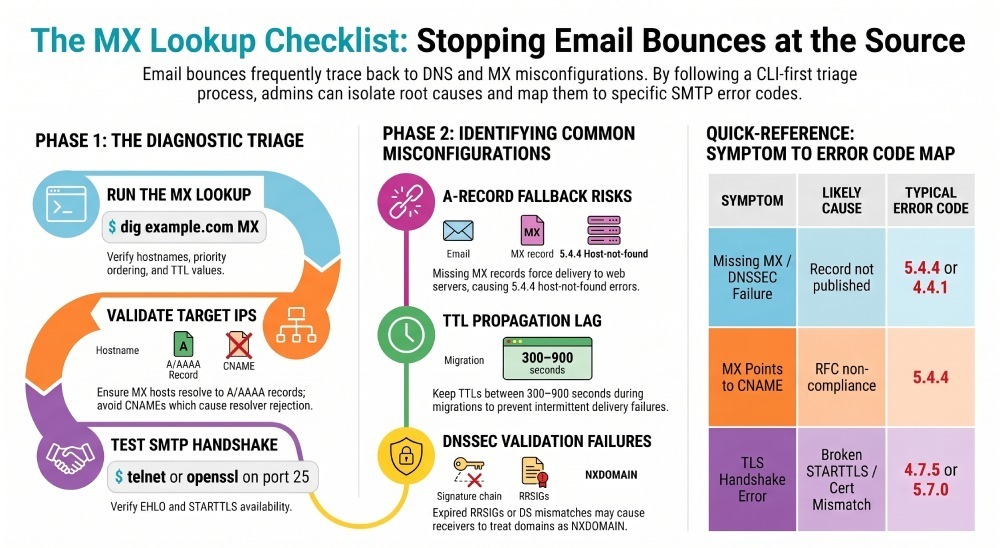
Email bounces frequently trace back to DNS and MX issues: missing or malformed MX, stale A/AAAA targets, high TTLs slowing propagation, or TLS misconfigurations on the receiving servers. An effective investigation starts with verifying the MX records themselves, then proceeds to target reachability, SMTP handshake checks (EHLO, STARTTLS), and finally to interpreting NDRs (Non-Delivery Reports) to isolate root cause.
DNS and MX configuration problems can contribute to email bounce and delivery failures, particularly during domain migrations or mail-server changes. Common issues include missing or incorrect MX records, invalid MX targets, stale A or AAAA records, DNS propagation delays, and DNSSEC validation problems. Checking MX records alongside bounce messages and SMTP responses can help determine whether the failure originates in DNS, mail-server connectivity, or email authentication.
Perform MX Lookups and Interpret Results (CLI-first for fast triage)
This section shows exactly how to run MX lookups, read the answers, and decide what to test next—then ties each finding back to DMARCReport for ongoing visibility and alerting.
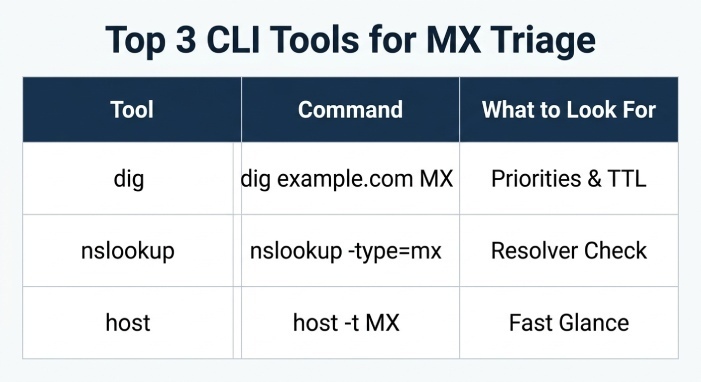
Command-line MX lookups and flags to know
Use any of the three standard DNS tools; here are practical commands, what to look for, and how they inform bounce investigations.
| Tool | Command | What to look for | Bounce implications | How DMARCReport helps |
|---|---|---|---|---|
| dig | dig +nocmd example.com MX +noall +answer | Multiple MX answers with priority and hostnames; check TTL; note authoritative servers with +trace | Missing MX → senders may fallback to A; priority ordering matters; long TTL slows fixes | “MX Health” pane highlights missing/multiple/identical-priority MX, TTL outliers, last-change times |
| dig (auth) | dig @ns1.example.net example.com MX +norecurse | Validate on authoritative NS, bypassing caching | Confirms whether records are actually published vs cache artifacts | Auth-vs-recursive diff alerts if auth data != what major resolvers see |
| nslookup | nslookup -type=mx example.com 1.1.1.1 | Quick single-resolver check; switch resolvers to compare | Resolver inconsistencies → transient 4.4.1 timeouts | Resolver comparison widget shows 8.8.8.8 vs 1.1.1.1 vs 9.9.9.9 deltas |
| host | host -t MX example.com | Fast glance; pairs well with host -t A for each MX | MX → CNAME is invalid and will cause lookups to fail | Rule flags CNAME-under-MX and suggests canonical A/AAAA |
Example output and interpretation:
- dig +nocmd example.com MX +noall +answer
- 300 IN MX 10 mx1.mailhost.com.
- 300 IN MX 20 mx2.mailhost.com.
- Action: Test mx1 first; if unreachable or returns 4xx, servers should try mx2. Identical priorities imply round-robin—verify both accept your traffic.
- dig mx1.mailhost.com A +short; dig mx1.mailhost.com AAAA +short
- Confirm the IPs resolve; unreachable or wrong IPs surface as 4.4.1 (timeout) or 5.4.4 (host not found).
- dig +trace example.com
- Walk the delegation path; useful to catch DNSSEC or NS delegation errors.
Tie-back to product: DMARCReport continuously snapshots your MX, A/AAAA, and DNSSEC state, correlating any change windows with spikes in bounces or authentication failures in your DMARC aggregate reports, and can alert you if an MX disappears, points to a CNAME, or diverges across resolvers.
Interpreting MX in real-world bounce investigations
- Multiple MX with priorities: Mail Transfer Agent (MTA) try the lowest number first; sustained timeouts on the primary should lead to fallback. If bounces cite 4.4.1 without any attempts to secondary, the sender may be misbehaving—or your secondary is also failing. DMARCReport’s delivery timeline will show whether receiving infrastructure was accepted from alternative MX during the incident window.
- Identical priorities: Load distribution; ensure every host at that priority is configured the same (TLS, certificate, banner, policies) to avoid inconsistent outcomes. DMARCReport can compare STARTTLS support and present certificates across all MX endpoints.
- MX → CNAME: Not RFC-compliant; many resolvers reject or fail. Expect 5.4.4 or 4.4.1 depending on cache behavior. DMARCReport flags this misconfiguration with remediation guidance.
Quick case study (MX flip gone wrong)
For example, if a mail domain is moved to a new inbound mail service, an incorrect MX configuration can cause delivery failures. If an MX record points to an invalid or improperly configured mail host, senders may receive temporary or permanent delivery errors. Checking the MX records, resolving their target hostnames, and comparing the results with the bounce message can help identify the source of the problem.
Programmatic MX Lookups with Robust Timeouts and Error Handling
Automating MX checks is vital in CI/CD, migration runbooks, and production monitoring. Below are minimal, production-ready snippets with timeouts and graceful error paths—DMARCReport can ingest their outputs via API/webhooks to enrich dashboards and alerts.
Python (dnspython + sockets)
import dns.resolver, socket, ssl
from contextlib import closing

def lookup_mx(domain, timeout=3.0):
r = dns.resolver.Resolver()
r.lifetime = timeout
try:
answers = r.resolve(domain, 'MX')
mx = sorted([(ans.preference, ans.exchange.to_text().rstrip('.')) for ans in answers])
return mx, None
except (dns.resolver.NXDOMAIN, dns.resolver.NoAnswer) as e:
return [], f"No MX for {domain}: {e}"
except dns.exception.Timeout:
return [], "DNS timeout"
except Exception as e:
return [], f"DNS error: {e}"

def test_smtp(host, port=25, timeout=4.0, starttls=True):
try:
with closing(socket.create_connection((host, port), timeout=timeout)) as s:
s.settimeout(timeout)

# Read banner

banner = s.recv(512).decode(errors='ignore')
s.sendall(b"EHLO probe.examplern")
ehlo = s.recv(1024).decode(errors='ignore')
tls_ok = "STARTTLS" in ehlo
if starttls and tls_ok:
s.sendall(b"STARTTLSrn")
resp = s.recv(512).decode(errors='ignore')
return {"banner": banner, "ehlo": ehlo, "starttls": tls_ok}, None
except socket.timeout:
return None, "SMTP timeout"
except Exception as e:
return None, f"SMTP error: {e}"

mx, err = lookup_mx("example.com")
if err:
print(err)
for pref, host in mx:
print(f"Testing {host} (pref {pref})")
res, terr = test_smtp(host)
print(res or terr)
Node.js (dns.promises + AbortController)
import dns from 'node:dns/promises';
import net from 'node:net';

async function lookupMx(domain, timeoutMs = 3000) {
const controller = new AbortController();
const t = setTimeout(() => controller.abort(), timeoutMs);
try {
const mx = await dns.resolveMx(domain, { signal: controller.signal });
return mx.sort((a, b) => a.priority - b.priority);
} catch (e) {
throw new Error(`MX lookup failed: ${e.code || e.message}`);
} finally {
clearTimeout(t);
}
}

function testSmtp(host, port = 25, timeoutMs = 4000) {
return new Promise((resolve) => {
const sock = net.createConnection({ host, port, timeout: timeoutMs });
let data = '';
sock.on('data', chunk => data += chunk.toString());
sock.on('timeout', () => { sock.destroy(); resolve({ error: 'SMTP timeout' }); });
sock.on('error', (err) => resolve({ error: `SMTP error: ${err.message}` }));
sock.on('connect', () => sock.write('EHLO probe.examplern'));
sock.on('close', () => resolve({ transcript: data }));
});
}

(async () => {
try {
const mx = await lookupMx('example.com');
for (const { exchange, priority } of mx) {
const res = await testSmtp(exchange);
console.log(exchange, priority, res);
}
} catch (e) {
console.error(e.message);
}
})();
Go (context, net.Resolver, net.Dialer)
package main

import (
"context"
"fmt"
"net"
"time"
)

func lookupMX(ctx context.Context, domain string) ([]*net.MX, error) {
var r net.Resolver
return r.LookupMX(ctx, domain)
}

func testSMTP(ctx context.Context, host string) error {
d := net.Dialer{Timeout: 4 * time.Second}
conn, err := d.DialContext(ctx, "tcp", net.JoinHostPort(host, "25"))
if err != nil {
return err
}
defer conn.Close()
_ , err = conn.Write([]byte("EHLO probe.examplern"))
return err
}

func main() {
ctx, cancel := context.WithTimeout(context.Background(), 3*time.Second)*
*defer cancel()*
*mx, err := lookupMX(ctx, "example.com")*
*if err != nil || len(mx) == 0 {*
*fmt.Println("MX lookup error:", err)*
*return*
*}*
*for _, m := range mx {*
*fmt.Printf("Testing %s (pref %d)n", m.Host, m.Pref)*
*ctx2, cancel2 := context.WithTimeout(context.Background(), 4*time.Second)
err := testSMTP(ctx2, m.Host)
cancel2()
if err != nil {
fmt.Println("SMTP error:", err)
} else {
fmt.Println("SMTP EHLO ok")
}
}
}
Product tie-in: Teams pipe these probes to DMARCReport via API for continuous assurance. DMARCReport associates probe results with DMARC aggregate data (SPF/DKIM alignment, policy actions) so you can see, for example, whether a STARTTLS regression coincided with dmarc=fail rejections.
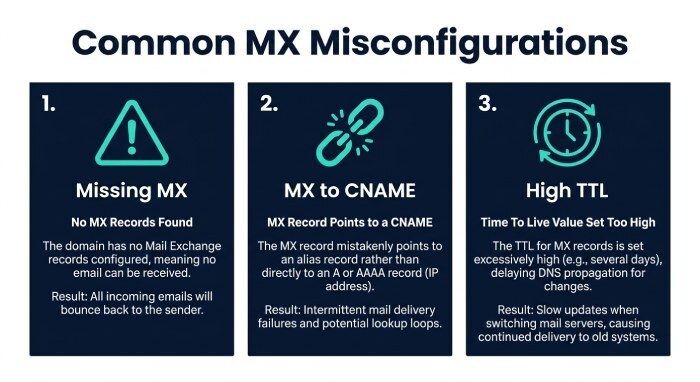
MX Priority, Multiple Records, and Misconfigurations (Including SMTP A-record Fallback)
Understanding MX selection and common misconfigurations is crucial to preventing and resolving bounces. DMARCReport provides rules and alerts for each failure mode.
How MX priority works and identical priorities
- Lower numeric priority is tried first (10 before 20).
- On transient failures (4xx or timeouts), senders should try the next priority. Permanent 5xx typically stops attempts.
- Identical priorities : When multiple MX records have the same preference value, sending systems may select among them according to their own implementation. Make sure all MX hosts with the same priority are configured consistently and can accept mail reliably.
Common DNS misconfigurations that cause bounces and how to fix
- Missing MX:
- Symptom: dig example.com MX returns no records.
- Effect: SMTP falls back to A/AAAA for the domain (per RFC 5321), which may be a web server—leading to 5.7.x policy rejects or 4.4.1 timeouts.
- Fix: Publish MX with at least two hosts, TTL 300–900. DMARCReport alerts “No MX” and tracks time since last seen.
- MX pointing to CNAME:
- Symptom: host -t MX shows an MX whose target is a CNAME.
- Effect: Non-compliant; many MTAs/Resolvers fail → 5.4.4 or 4.4.1.
- Fix: Point MX directly to A/AAAA-backed names (no CNAME). DMARCReport flags “MX → CNAME” with evidence.
- Incorrect or stale A/AAAA of MX:
- Symptom: dig mx1.example.com A returns wrong IP; AAAA exists but IPv6 path filtered.
- Effect: Timeouts (4.4.1), connection refused, or TLS mismatch.
- Fix: Update A/AAAA, verify IPv6 reachability; if IPv6 not ready, remove AAAA. DMARCReport shows per-protocol reachability and certificate checks by IP.
- Excessively high TTL:
- Symptom: TTLs ≥ 3600 during cutover.
- Effect: Slow propagation → intermittent 4.4.1 as senders use cached, deprecated endpoints.
- Fix: Lower Time-To-Live(TTL) to 300–900 pre-change, raise post-stabilization. DMARCReport’s change-planning wizard reminds you to drop TTLs 24–48h before migrations.
- DNSSEC validation failures:
- Symptom: dig +dnssec AD flag absent on validating resolvers; RRSIG expired; DS mismatch.
- Effect: Some receivers treat as NXDOMAIN/timeout → 4.4.1, 5.4.4.
- Fix: Rollover keys carefully; validate chain on multiple resolvers; restore AD flag. DMARCReport monitors DNSSEC freshness and validation across resolvers.
SMTP fallback to A records (when no MX exists)
Per RFC 5321, if no MX exists, senders should deliver to the A/AAAA of the domain itself:
- Risk 1: Delivery aimed at a web server, which either drops or 5xx’s SMTP, yielding 5.4.4/4.4.1.
- Risk 2: Mixed outcomes—some senders obey fallback, others do not—creating recipient-specific bounce patterns that are hard to debug.
- Detection: No MX found; telnet example.com 25 connects to an unexpected banner or times out.
- Prevention: Always publish explicit MX records. DMARCReport’s “No MX” and “A-fallback detected” heuristics warn you before it hits production.
End-to-end Delivery Testing and Mapping to Bounce Codes
After your MX lookup, validate each MX target at the SMTP layer. This helps you classify bounces precisely and fix faster. DMARCReport captures and correlates these signals with DMARC outcomes.
Connectivity and TLS checks step-by-step
- Port 25 reachability:
- nc -vz mx1.mailhost.com 25
- Expect “succeeded” and a 220 banner.
- EHLO and advertised features:
openssl s_client -starttls smtp -connect mx1.mailhost.com:25 -servername mx1.mailhost.com- Look for 250 lines after EHLO including SIZE, STARTTLS, 8BITMIME. Check cert CN/SAN matches mx1.mailhost.com and that chain is valid.
- Plain-text transcript (no TLS) for diagnostics:
- telnet mx1.mailhost.com 25
- EHLO test.example
- MAIL FROM:me@example.com
- RCPT TO:user@recipient.com
- QUIT
- Useful for policy responses prior to DATA (e.g., 550 relaying denied, 550 mailbox unavailable).
- Simulated SMTP transaction:
- swaks —to user@recipient.com —server mx1.mailhost.com —ehlo test.example —quit-after RCPT
- Maps exactly where in the pipeline policy rejects occur.
DMARCReport augments these tests by storing Transport Layer Security (TLS) capability and certificate metadata per MX, issuing expiry alerts, and cross-referencing with bounce surges. For example, if STARTTLS disappears on mx2 only, DMARCReport will show asymmetric capabilities that align with domain-specific bounce patterns.
Mapping failures to typical SMTP bounce codes
| Symptom | Likely cause | Typical codes/messages | Next action |
|---|---|---|---|
| NXDOMAIN/No MX | Missing MX or DNSSEC failure | 5.4.4 Host not found; 4.4.1 Connection timed out | Publish correct MX; fix DNSSEC chain |
| MX → CNAME | Non-compliant MX target | 5.4.4; 4.4.1 | Point MX to A/AAAA-backed hostnames |
| Timeouts on primary MX | Unreachable host or firewall | 4.4.1/451 timeout | Confirm routing; ensure sender can reach port 25; verify IPv6 |
| TLS handshake error | Broken STARTTLS/certificate mismatch | 4.7.5 TLS handshake failed; 5.7.0 TLS required | Fix cert chain/SNI; restore STARTTLS |
| Delivered to wrong host | A-record fallback to web host | 550 not a mail server; 5.4.6 routing loop | Publish MX; correct A/AAAA; adjust firewall |
| Authentication policy rejection | SPF/DKIM fail with DMARC p=reject | 5.7.26 DMARC fail; 5.7.23/24 SPF/DKIM fail | Fix SPF includes, DKIM keys, alignment; review DMARC policy |
DMARCReport’s DMARC aggregate and forensic views explicitly annotate dmarc=fail, spf=fail, dkim=fail alongside MX/DNS health signals, helping you confirm whether a bounce is DNS/MX-driven or policy/authentication-driven.
Best Practices to Minimize Bounces and Monitor at Scale
This section distills configuration patterns and operational habits that reduce bounce risk, plus how to monitor and automate them with DMARCReport.
Configure MX and related DNS/authentication records
- MX:
- Two or more MX records, priorities like 10/20; no CNAME targets; TTL 300–900.
- Ensure each MX has A (and optionally AAAA) with working paths.
- SPF (TXT at root):
v=spf1 include:mailvendor.com include:_spf.example.net -all- Keep DNS lookups ≤ 10; audit includes for sprawl.
- DKIM (selector._domainkey):
- Publish 1024–2048-bit keys; rotate keys; align d= with From domain.
- DMARC (_dmarc):
v=DMARC1; p=quarantine; rua=mailto:dmarc@dmarcreport.com; ruf=mailto:forensic@dmarcreport.com; fo=1; pct=100- Start with p=none to observe, then step up.
- Reverse PTR:
- rDNS for outbound IPs must map to a sensible hostname with matching forward A.
- Optional but valuable:
- MTA-STS and TLS-RPT to harden TLS and get reports on failures.
DMARCReport validates SPF flattening risk, DKIM key age/strength, and DMARC alignment, and can consume TLS-RPT data to flag STARTTLS regressions that may masquerade as DNS/MX issues.
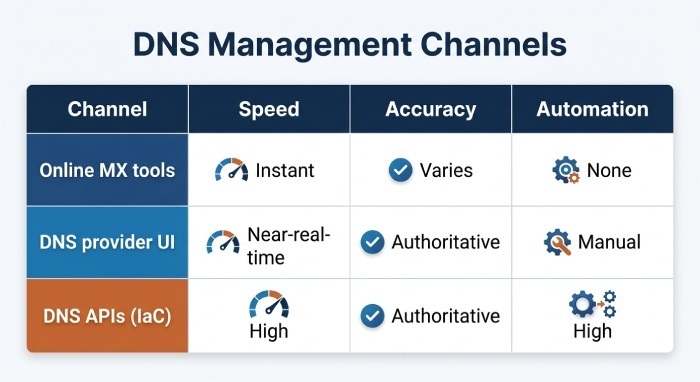
Online tools vs DNS provider UIs vs DNS APIs
| Channel | Speed | Accuracy | Automation | Best use |
|---|---|---|---|---|
| Online MX tools | Instant | Varies by resolver | None | One-off checks and screenshots for tickets |
| DNS provider UI | Near-real-time | Authoritative | Manual | Publishing/fixing records; change logs |
| DNS APIs (IaC) | High | Authoritative | High | CI/CD, repeatable changes, auditability |
DMARCReport integrates with DNS provider APIs or reads via external resolvers to verify that published records match intended state, then alerts if reality diverges (e.g., auth vs recursive mismatch).
Monitor MX record changes and DNS health with alerts
- Propagation verification:
- Query multiple public resolvers (8.8.8.8, 1.1.1.1, 9.9.9.9) and authoritative NS; compare answers and TTLs.
- TTL awareness:
- Lower TTL before cutovers; DMARCReport can schedule reminders and track TTL normalization post-change.
- Authoritative servers:
- Check Start Of Authority (SOA) serial increments and NS consistency; stale secondaries cause split-horizon behavior.
- Change alerts:
- Triggered on MX add/remove, target change, TTL change, STARTTLS capability shift, or certificate swap.
- Baseline and drift:
- Baseline expected MX count/priorities and alert on drift.
In DMARCReport, “MX & DNS Health” monitoring combines these checks with DMARC authentication telemetry so you can see both control-plane changes and data-plane outcomes in one place.
FAQs
Do MX changes require downtime, and how long does propagation take?
No downtime is required if you stage changes well. With TTLs at 300–900 seconds, most senders pick up new MX targets within 5–20 minutes; some caches linger longer. DMARCReport’s propagation dashboard shows when major resolvers switch to the new values so you can declare completion confidently.
Should my MX hosts have IPv6 (AAAA) records?
Preferably yes, but only if your IPv6 path is fully reachable. Publishing AAAA without open port 25 and functional routing produces asymmetric timeouts. DMARCReport tests IPv4 and IPv6 separately and alerts on v6-only failures.
Gmail accepts my mail, but another provider bounces—why?
Providers vary in DNS/SMTP policy: some enforce strict DNSSEC, require STARTTLS, or reject A-fallback deliveries. DMARCReport’s per-destination outcome charts pair bounce codes with DNS/MX/TLS observations so you can tune for the strictest receiver first.
Can I point MX to a vendor CNAME?
No—point MX to a vendor-provided hostname that itself is an A/AAAA, or to the vendor’s recommended MX names (which are already compliant). DMARCReport will flag and explain any MX → CNAME pattern.
Should I publish a wildcard MX?
No. Wildcard MX complicates security and routing, and can mask configuration errors. Publish explicit MX for each domain or subdomain that needs mail, and monitor with DMARCReport for gaps.
Conclusion: A Practical Workflow Powered by DMARCReport
- Run an MX lookup (dig/nslookup/host) and validate priorities and targets.
- Resolve each MX to A/AAAA; check for CNAMEs, stale IPs, high TTLs, and DNSSEC validity.
- Test SMTP on every MX (port 25, EHLO, STARTTLS, certificate chain) and simulate RCPT to pinpoint where failures occur.
- Map errors to bounce codes to separate DNS/MX issues (5.4.4, 4.4.1, 4.7.5) from authentication/policy problems (5.7.23/24/26).
- Configure robust MX/SPF/DKIM/DMARC/PTR—and monitor continuously.
DMARCReport ties these steps together: it monitors MX and DNS health, alerts on risky changes, validates TLS and resolver consistency, and correlates those signals with DMARC authentication results and bounce patterns. Adopt DMARCReport to turn ad-hoc MX troubleshooting into a proactive, automated practice that minimizes bounces and preserves your deliverability.
General Manager
General Manager of DuoCircle. Product strategy and commercial lead for DMARC Report's 2,000+ customer base.
LinkedIn Profile →Take control of your DMARC reports
Turn raw XML into actionable dashboards. Start free - no credit card required.