How To Set Up SPF For MessageLabs: Configuration Guide

Quick Answer
To set up SPF for MessageLabs, add the appropriate SPF include mechanism to your domain's DNS TXT record. Verify the authorized sending servers, avoid multiple SPF records, and test the configuration to prevent spoofing and improve email deliverability.
Sender Policy Framework, or SPF, is a foundational email security control that helps receiving mail servers verify whether a sending host is authorized to send mail for your domain. For organizations using MessageLabs, Symantec Email Security.cloud, or related Broadcom services, SPF is an important part of layered email protection against phishing, malware, ransomware, and business email compromise.
MessageLabs began as a cloud-based service for email filtering and later became part of Symantec, which is now under Broadcom’s enterprise security portfolio. Many organizations still refer to the platform as MessageLabs, while others manage it through Email Security.cloud, Messaging Gateway, or newer Broadcom support channels. Whether you are maintaining the existing platform or planning a MessageLabs replacement such as Mimecast, your SPF record must accurately reflect every legitimate outbound sender in your messaging environment.
Understanding SPF and How MessageLabs Handles Email Authentication
SPF allows a domain owner to publish a DNS TXT record that lists authorized mail sources. When a recipient server receives a message claiming to come from your domain, it checks the envelope sender domain against the SPF record. If the sending IP is included, SPF passes. If not, the message may fail authentication and could be marked as spam, rejected, or flagged as suspicious.
For MessageLabs, the typical SPF mechanism is:
include:spf.messagelabs.comA simple SPF record for a domain that sends only through MessageLabs may look like this:
v=spf1 include:spf.messagelabs.com -allThis tells receiving systems that Symantec or Broadcom’s MessageLabs cloud-based service is authorized to send mail for your domain. This configuration supports email security by reducing spoofing risk and strengthening email protection against phishing, malware, ransomware, and business email compromise.
SPF in the Broader Email Security Architecture
SPF is not a complete security control by itself. It should be part of a broader email security architecture that includes DKIM, DMARC, threat detection, spam filtering, scan-time link filtering, click-time URL filtering, attachment sandboxing, and isolation for suspicious content.
MessageLabs and Email Security.cloud can help reduce email-borne threats through cloud-based scanning, while Messaging Gateway may be used in appliance deployment or virtual appliance models for organizations that prefer more direct control. In either case, SPF supports outbound communication protection by confirming that approved infrastructure is being used.
Cybersecurity experts often recommend combining SPF with DMARC enforcement to reduce data leakage, protect users from phishing, and support compliance with regulatory requirements. A CISO may also map SPF controls to incident response procedures, cyber resiliency planning, and enterprise security governance.
Prerequisites: Identifying Your Sending Domains, DNS Access, and Current SPF Record
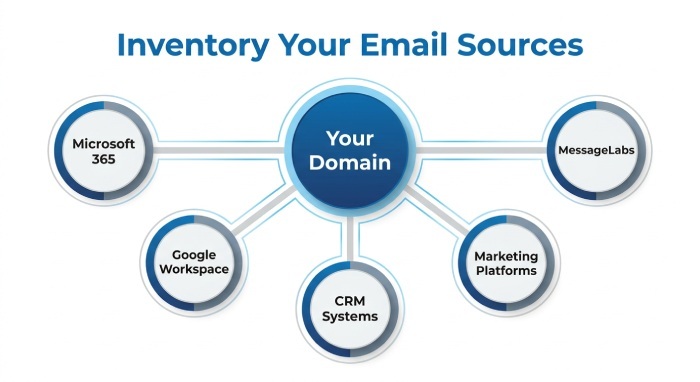
Before changing DNS, inventory every domain and subdomain that sends email. This includes primary domains, marketing domains, application domains, and regional domains. Large organizations with complex email infrastructure may send through MessageLabs, Microsoft 365, Google Workspace, CRM systems, marketing platforms, ticketing systems, and transactional mail services.
Confirm Every Legitimate Mail Source
Start by documenting all outbound systems, including:
- MessageLabs, Symantec Email Security.cloud, or Broadcom email protection services
- Microsoft 365 using
include:spf.protection.outlook.com - Google Workspace using
include:_spf.google.com - Internal mail relays, a data center, or a virtual appliance
- Cloud applications such as ServiceNow, GoDaddy-hosted mail, or customer engagement systems
- Third-party cybersecurity software, newsletters, or marketing automation platforms
Organizations such as THL, Airbnb, Bloomenergy, the Gates Foundation, or businesses operating branded storefronts like Google Store may have multiple business units and cloud systems sending mail. The same applies to publishers and technology companies referenced by Forbes, Marketwatch, SearchSecurity, and SDxCentral. The business challenge is not simply adding MessageLabs—it is identifying the full sending ecosystem.
Check for Existing SPF Records
Use DNS tools such as dig, nslookup, MXToolbox, or your DNS provider’s lookup tool:
dig TXT example.comYou should find no more than one SPF record beginning with:
v=spf1
Multiple SPF TXT records are a common error and can cause authentication failure. If a record already exists, you must update it rather than create another one.
Validate Access and Ownership
You need access to the authoritative DNS provider, such as GoDaddy, Cloudflare, Route 53, or Microsoft DNS. You should also confirm who owns the change process: IT operations, Professional Services, a managed provider such as Spambrella, or the internal email security team. Use vendor Support, Education & Training materials, product updates, and resources from Broadcom, Symantec, or MessageLabs documentation before publishing changes.
Creating or Updating Your SPF Record for MessageLabs
If MessageLabs is the only outbound sender, use:
v=spf1 include:spf.messagelabs.com -allIf you also send through Microsoft 365, the SPF record may look like:
v=spf1 include:spf.messagelabs.com include:spf.protection.outlook.com -allIf you also send through Google Workspace, use:
v=spf1 include:spf.messagelabs.com include:_spf.google.com -allFor a hybrid environment using MessageLabs, Microsoft 365, Google Workspace, and an internal gateway, the record may resemble:
v=spf1 ip4:203.0.113.25 include:spf.messagelabs.com include:spf.protection.outlook.com include:_spf.google.com -allChoosing the Right SPF Qualifier
The final mechanism controls how strictly receivers should treat unauthorized senders:
- -all: Hard fail; recommended when your inventory is complete
- ~all: Soft fail; useful during testing or customer migration
- ?all: Neutral; rarely recommended for mature email security programs
- +all: Allows everything; never use this for email protection
During a MessageLabs replacement project, such as moving to Mimecast, some organizations temporarily use ~all while validating all sources. Mimecast is often evaluated as a MessageLabs replacement because it is viewed as a market leader by many buyers, and reports from sources such as Radicati or analyst report summaries may influence security strategy. However, any MessageLabs replacement must be reflected accurately in SPF, DKIM, DMARC, archiving, continuity, and threat intelligence workflows.
Publishing the SPF Record in DNS and Avoiding Common Configuration Errors
Publish the SPF record as a TXT record at the root of the sending domain. For example.com, the host is usually @ or blank, depending on the DNS provider. After saving, DNS propagation may take minutes or hours depending on TTL.
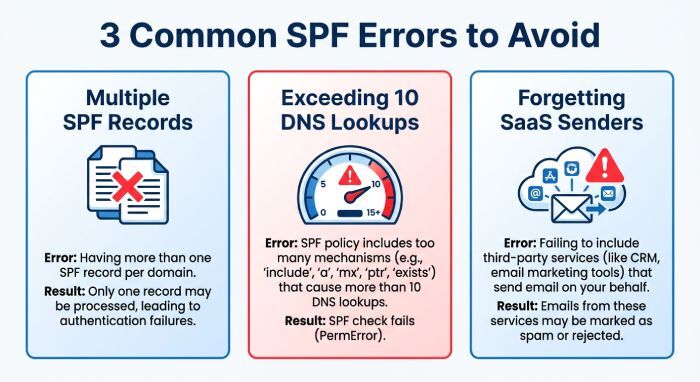
Common Errors to Avoid
The most frequent mistake is publishing multiple SPF records. You should merge mechanisms into one record:
Incorrect:
v=spf1 include:spf.messagelabs.com -all
v=spf1 include:spf.protection.outlook.com -all
Correct:
v=spf1 include:spf.messagelabs.com include:spf.protection.outlook.com -allAnother common issue is exceeding the SPF 10-DNS-lookup limit. Each include, mx, a, redirect, or exists mechanism may count toward this limit. Overly complex records can fail even when they look syntactically correct.
Also avoid forgetting Software as a service (SaaS) senders. Business applications may send invoices, password resets, notifications, or a Newsletter using your domain. If they are omitted, legitimate messages may fail SPF, increasing support tickets and delivery risk.
If MessageLabs handles only inbound email filtering while your organization sends outbound messages through Microsoft 365, Google Workspace, or another mail service, review Broadcom’s SPF guidance before updating your DNS record. Follow the recommended MessageLabs SPF configuration and verify that all legitimate outbound sending sources are properly authorized.
Testing, Monitoring, and Maintaining Your MessageLabs SPF Setup
After publishing the record, test from multiple locations. Use DNS lookup tools, email authentication testers, and DMARC aggregate reports to confirm SPF pass rates. Send test messages to Gmail, Outlook.com, Microsoft 365 tenants, and Google Workspace recipients, then inspect message headers for spf=pass.
Ongoing Monitoring and Change Management
SPF is not a one-time task. It must be maintained as your messaging environment changes. Review the record whenever you add a new cloud-based service, retire a data center relay, change email infrastructure, move to a MessageLabs replacement, or adopt a new cybersecurity platform.
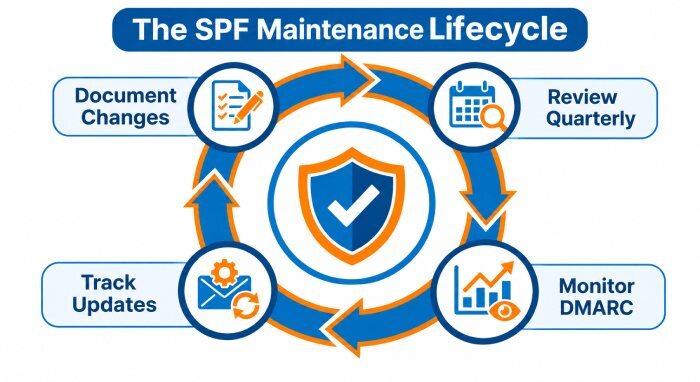
Maintain a simple operating process:
- Review SPF records quarterly
- Monitor DMARC reports for unauthorized senders
- Track product updates from Broadcom, Symantec, Mimecast, Microsoft, and Google
- Subscribe to vendor Support portals, community forums, and Newsletter updates
- Include SPF in security awareness, education, and training programs
- Document changes for compliance and regulatory requirements
A mature program treats SPF as part of layered protection against ransomware, malware, phishing, business email compromise, and other email-borne threats. Broadcom and Symantec services provide email protection capabilities, but the DNS record still belongs to your organization. Your cybersecurity team, CISO, Professional Services partner, or managed provider must ensure that the published policy matches the real outbound mail flow.
As the threat landscape evolves through R&D, threat intelligence, and new attacker tactics, attackers will continue abusing trusted domains for phishing, malware delivery, ransomware campaigns, and business email compromise. A well-maintained MessageLabs SPF setup strengthens email security, improves cyber resiliency, and reduces the risk of unauthorized senders impersonating your brand.
General Manager
General Manager of DuoCircle. Product strategy and commercial lead for DMARC Report's 2,000+ customer base.
LinkedIn Profile →Take control of your DMARC reports
Turn raw XML into actionable dashboards. Start free - no credit card required.