How To Track Email Authentication Changes After A DNS Migration

Quick Answer
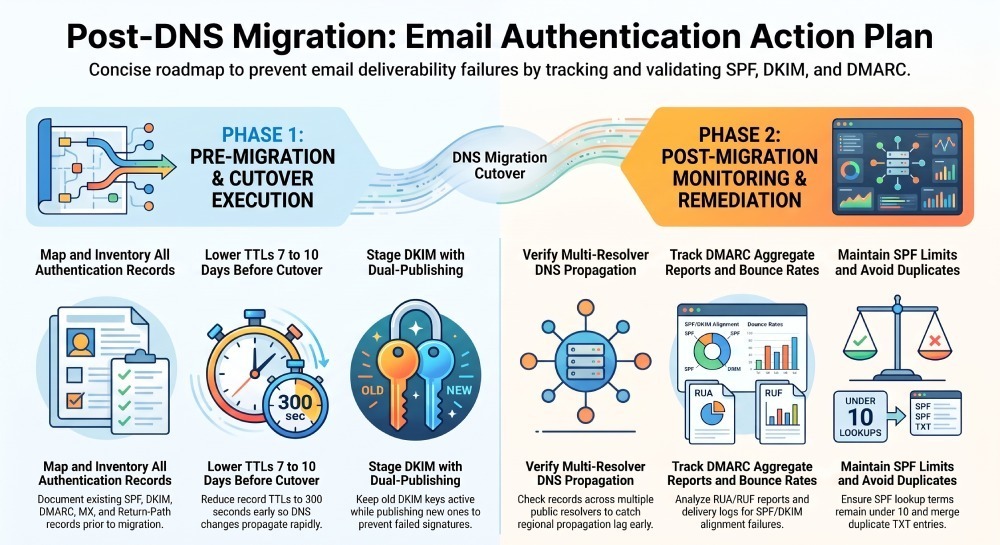
To track email authentication changes after a DNS migration, compare SPF, DKIM, and DMARC records before and after the move. Verify DNS propagation, monitor DMARC reports, check authentication results, and fix misconfigurations quickly to maintain email deliverability and prevent spoofing.
Tracking email authentication after a DNS migration involves documenting existing DNS records, verifying the new DNS configuration, and monitoring SPF, DKIM, and DMARC results after the cutover. Checking relevant MX, return-path, and email security policy records can also help identify configuration issues that affect mail delivery.
Before migrating, record the current DNS values and TTLs. After the change, compare the published records against the original configuration, verify the authoritative nameservers, and review DMARC aggregate reports for changes in authentication results. This process helps identify missing records, incorrect DKIM selectors, SPF evaluation errors, and DMARC alignment failures.
Inventory and Map: What Changes and How to Avoid Gaps
Identify Every Authentication-Relevant Record
A DNS migration can affect email authentication and related mail services. Inventory the records used by your domain and send providers before making changes.
- SPF: TXT record at the domain used for the SPF identity, which may be the root domain or a subdomain.
- DKIM: TXT or CNAME records at the relevant selector under
._domainkey, depending on the provider’s setup. - DMARC: TXT record at
_dmarc.example.com, containing the domain’s DMARC policy and any configured reporting options. - MTA-STS: TXT record at
_mta-sts.example.comand an HTTPS policy file athttps://mta-sts.example.com/.well-known/mta-sts.txt, if MTA-STS is configured. - TLS-RPT: TXT record at
_smtp._tls.example.com, if TLS reporting is enabled. - MX: Mail-exchange records that direct incoming email to the appropriate mail servers.
- Return-Path/MAIL FROM: Provider-specific DNS records for the configured bounce or custom MAIL FROM domain, where applicable.
- Tracking and link domains: CNAME records used for branded tracking links, where configured. These are related to email delivery infrastructure but are not themselves SPF, DKIM, or DMARC authentication records.
- Verification records: TXT or CNAME records required by email service providers to verify domain ownership or configure authentication.
Map old → new records to prevent holes
Create an explicit mapping before cutover so you can validate each item post-migration.
| Record Type | Name | Old Value | New Value | Verification Method |
|---|---|---|---|---|
| SPF (TXT) | example.com | v=spf1 include:_spf.oldvendor.com -all | v=spf1 include:_spf.newvendor.com -all | dig TXT example.com |
| DKIM (CNAME) | s1._domainkey | s1.domainkey.oldesp.com | s1.domainkey.newesp.com | dig CNAME s1._domainkey.example.com |
| DMARC (TXT) | _dmarc | v=DMARC1; p=quarantine; rua=mailto:dmarc@old; fo=1 | v=DMARC1; p=quarantine; rua=mailto:rua@dmarcreport.io | dig TXT _dmarc.example.com |
| Return-Path (CNAME) | mailfrom.example.com | u12345.wl.oldesp.net | u67890.wl.newesp.net | dig CNAME mailfrom.example.com |
| TLS-RPT (TXT) | _smtp._tls | v=TLSRPTv1; rua=mailto:tlsrpt@old | v=TLSRPTv1; rua=mailto:tls@dmarcreport.io | dig TXT _smtp._tls.example.com |
DMARCReport attaches this mapping to your migration checklist and validates each record across multiple public resolvers.
ESP- and provider-specific nuances
- SendGrid: DKIM often via two CNAMEs (
s1/s2._domainkey) to sendgrid.net; Return-Path CNAME to uXXXX.wl.sendgrid.net; tracking CNAME for link branding. - Mailgun: DKIM typically two TXT records per domain (k=rsa; p=…), plus CNAME for tracking; SPF include: mailgun.org.
- Amazon SES: Three CNAMEs for DKIM verification; TXT for domain verification (amazonses: token); MAIL FROM subdomain with MX+TXT; SPF via include:amazonses.com or consolidated via domain’s SPF.
- Cloudflare: Orange-cloud proxy must be OFF for MX/SMTP-related records; very long TXT may need split quoting; CNAME flattening may affect SPF includes indirectly.
- Route 53: Supports long TXT and ALIAS; DNS query logging available via CloudWatch.
- GoDaddy: TXT quoting/line breaks can be tricky; UI may wrap long DKIM TXT; propagation can be slower.
- Azure DNS: Strict on TXT quoting; supports 4,000-byte TXT chunks but UI requires careful entry.
Verify Propagation with Tools and Logs
Command-line verification (multi-resolver)
dig +short TXT example.com @1.1.1.1and@8.8.8.8to compare SPF across resolversdig +trace _dmarc.example.com TXTto observe delegation/NS propagationdig CNAME s1._domainkey.example.com+multi to confirm DKIM targetsnslookup -type=txt _smtp._tls.example.comto verify TLS-RPT- host -t TXT _mta-sts.example.comandcurlhttps://mta-sts.example.com/.well-known/mta-sts.txtto verify the MTA-STS DNS TXT record and check the published policy file.
DMARCReport automates these checks every 5 minutes during your cutover window, storing resolver-by-resolver snapshots so you can prove when each record completed propagation.
Online propagation checkers and DNS logs
- Use propagation checkers to spot regional lag, but confirm with authoritative queries.
- Enable DNS query logging (Route 53 Resolver Query Logs, Cloudflare Analytics) to confirm that resolvers request your new DKIM/SPF TXT immediately after NS switch.
- Correlate spikes in DMARC “fail” dispositions with regions still seeing old TXT records.
DMARCReport correlates DNS snapshots with RUA/RUF events, so when a DKIM fail rises in EMEA, you can see that EMEA resolvers still had stale s1._domainkey for 28–45 minutes.
Cutover: TTL Management, Staged Migration, and Safe Rollback
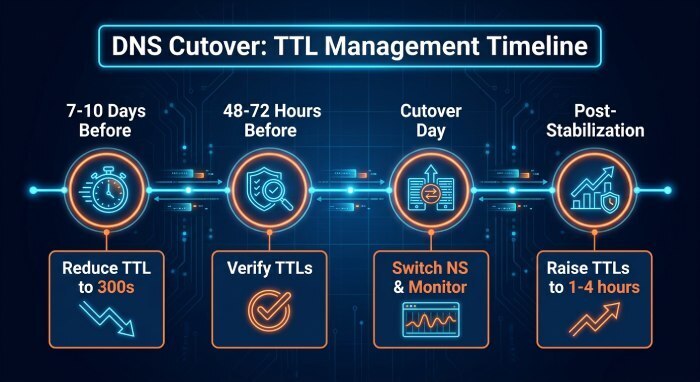
TTL management that minimizes downtime
- 7–10 days before: Identify all auth records; reduce Time to live (TTL) to 300s (or 600s where 300 is disallowed).
- 48–72 hours before: Verify TTLs took effect with dig +ttlunits.
- Cutover day: Keep TTLs low; switch NS at registrar; monitor for 24–48 hours.
- After stabilization: Raise TTLs back to 1–4 hours.
Staged cutover pattern
- Parallel zones: Keep old provider authoritative until new provider is live; mirror all changes in both.
- Publish both old and new DKIM selectors simultaneously (additive change) to avoid broken signatures while MTA caches update.
- Maintain the existing DMARC policy during migration where possible. If authentication or alignment failures occur, investigate the affected sending sources, DKIM configuration, SPF identity, and DNS records before considering a policy change. Any temporary policy adjustment should be based on a documented risk assessment and restored when appropriate.
DMARCReport simulates DMARC outcomes per policy (strict vs. relaxed) and can schedule a temporary policy downgrade with auto-revert reminders.
Rollback-ready plan
- Keep the old zone warm for 72 hours; do not delete old DKIM TXT/CNAMEs.
- Document registrar NS change and the exact prior state; scripted rollback (nsupdate or provider API) ready.
- Rollback triggers: sustained DMARC fail rate >2% for >30 minutes across major ISPs, or SPF permerror >1% overall.
DMARCReport can fire a “hold” alert if aggregate failures exceed baselines and annotate the incident timeline for postmortem.
DMARC Reporting: Configure, Interpret, and Act
Configure RUA and RUF during migration
- DMARC TXT example:
v=DMARC1; p=quarantine; rua=mailto:rua@dmarcreport.io; ruf=mailto:ruf@dmarcreport.io; fo=1; pct=100; aspf=r; adkim=r - Ensure the rua/ruf mailboxes are authorized (some receivers require DNS authorization via a mailto domain’s reporting URI).
DMARCReport validates rua/ruf syntax, handles external reporting authorization records, and deduplicates RUF events.
Interpret aggregate (RUA) and forensic (RUF) signals
- Watch for sources with new SPF fail but DKIM pass: likely envelope or include-chain issues.
- DKIM fails with the correct selector: check DNS propagation or body canonicalization differences; if multiple selectors are in play, confirm the signature’s selector exists at new DNS.
- surge in unauthenticated volume from unexpected IPs: potential spoofing exposed by record lag.
Automated Monitoring and Alerting
Lightweight Scripts
- Monitor DMARC DNS records: Run a scheduled check of
_dmarc.example.comand compare the published record with the expected configuration. Alert if an unexpected change persists across multiple checks. - Monitor SPF evaluation: Check for SPF DNS-query-limit errors. SPF permits a maximum of 10 DNS-query-causing terms during evaluation. An internal warning threshold of 8 can provide room for future changes. Investigate unnecessary mechanisms and nested include statements before considering flattening, which requires maintenance when provider IP addresses change.
- Verify DKIM records: Use
opendkim-testkey -d example.com -s s1where supported, replacing the domain and selector with your actual values. Confirm that the selector’s published TXT or CNAME record matches the provider’s configuration.
DMARC reporting, DNS checks, and sending-platform logs can complement these scripts to help identify authentication problems after migration.
SIEM and Log Integration
- Where supported, integrate available DMARC reporting data with a SIEM platform such as Splunk or QRadar to monitor changes in authentication results.
- Correlate authentication failures with mail transfer agent logs, email service provider events, and DNS changes when investigating delivery problems.
- Configure alerts around documented operational baselines rather than relying on a universal DMARC failure threshold.
Third-Party Monitoring
- Use DNS monitoring tools to check relevant MX, TXT, and CNAME records.
- Compare authoritative DNS responses with recursive resolver results when investigating unexpected record changes or possible caching issues.
- Review DMARC aggregate reports alongside message headers and sending-platform logs. DNS checks show what records are published, while authentication results help establish how those records affect actual email.
Provider and ESP Differences That Matter
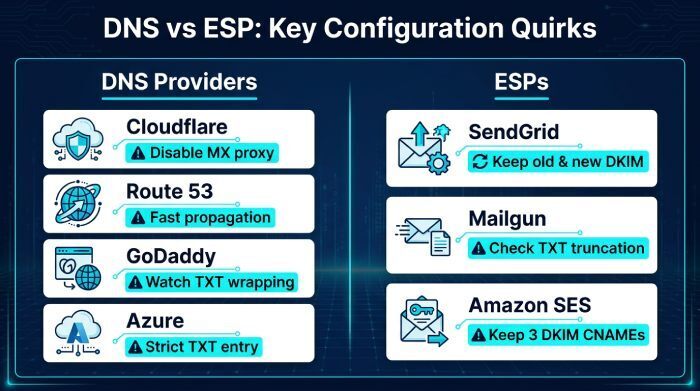
DNS providers
- Cloudflare: Disable proxy on MX, DKIM, and MTA-STS hosts; beware automatic flattening side effects; DMARCReport flags orange-cloud on sensitive records.
- Route 53: Fast propagation; authoritative logging; DMARCReport can pull CloudWatch metrics to enrich timelines.
- GoDaddy: UI TXT wrapping; DMARCReport checks for unbalanced quotes and 255-byte segmenting for DKIM.
- Azure DNS: Strict TXT entry; API-friendly; DMARCReport provides ARM template snippets for batch changes.
ESP specifics and migration steps
- SendGrid: Publish both old and new DKIM CNAMEs; update link branding CNAMEs first; return-path CNAME last; DMARCReport verifies selector reachability.
- Mailgun: Ensure SPF include:mailgun.org remains; validate DKIM TXT not truncated; DMARCReport tests selector TXT length and parsing.
- Amazon SES: Keep all three DKIM CNAMEs; confirm MAIL FROM domain MX+TXT remain intact; DMARCReport correlates amazonses verification with DKIM passes by region.
Troubleshooting Fast: Common Issues and Fixes
Frequent post-migration problems and fastest remedies
- Duplicate SPF records: Merge into one; DMARCReport’s SPF Linter flags duplicates and proposes a combined record.
- Incorrect DKIM selector: Check the From: domain’s selector; ensure
sX._domainkeyexists and matches ESP; DMARCReport’s Selector Auditor lists expected vs. found selectors. - TXT truncation/quoting: Long DKIM keys must be split into 255-byte chunks with proper quotes; DMARCReport detects malformed TXT and offers corrected syntax.
- DNS caching/stale resolvers: Use
dig +traceand compare multiple public resolvers; wait up to the max TTL previously set; DMARCReport displays a resolver heatmap of record freshness. - SPF 10-lookup limit: Flatten SPF or consolidate vendors; DMARCReport simulates lookup depth and flags void lookups.
Validate DKIM key rotation and selector placement
- Before cutover: Publish new selector (s2) and keep old (s1) live; configure MTAs/ESPs to start signing with s2.
- Validate DNS side:
dig TXT s2._domainkey.example.com; opendkim-testkey -d example.com -s s2. - Validate mail flow: Send to Gmail/Outlook; view headers; check Authentication-Results for dkim=pass, s=s2; confirm DMARC alignment.
- After stabilization: Retire old selector s1; update DMARCReport to mark s1 deprecated and watch for any lingering s1 signatures in RUA.
DMARCReport tracks selector lifecycles and alerts if deprecated selectors are still used or if new selectors fail verification.
Timeline Expectations and Interpreting Transient Failures
What to Monitor After Cutover
- DNS visibility: The time required for DNS changes to become visible depends on TTL values, resolver caching, and whether authoritative nameservers or delegation records changed.
- DKIM verification: If DKIM fails after migration, check the selector, published TXT or CNAME record, and the DNS response before assuming the issue is temporary.
- DMARC reporting: Aggregate reports arrive according to participating receivers’ reporting schedules. The time needed to identify meaningful changes depends on reporting frequency and email volume.
How to Interpret Transient Failures
- Brief, isolated failures: Compare DNS responses across authoritative nameservers and recursive resolvers. Check again after considering the relevant TTL and caching behavior.
- Persistent or widespread failures: Investigate incorrect DNS records, missing DKIM selectors, unavailable SPF includes, and DMARC alignment problems. Review message headers and sending-platform logs to identify the cause.
- Confirm recovery: Verify that authentication results return to expected levels before considering the migration complete.
Measuring Real-World Deliverability Impact
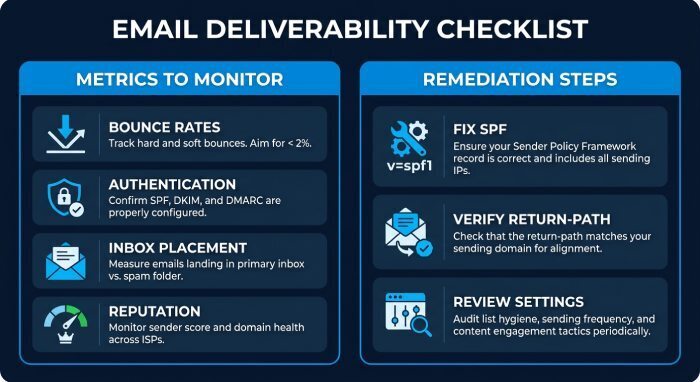
Metrics to Monitor
After a DNS migration, monitor:
- Bounce rates: Review hard and soft bounces, including SMTP error codes that may indicate authentication or configuration problems.
- Authentication results: Check SPF, DKIM, and DMARC results using message headers, sending-platform logs, and available DMARC aggregate reports.
- Inbox placement: Use consistent testing methods to identify potential changes in inbox and spam-folder placement.
- Spam complaints and reputation: Review available provider feedback, domain and IP reputation signals, and relevant blocklist listings.
Prioritized Remediation When Issues Arise
- Investigate authentication failures: Check SPF results, DKIM signatures, and DMARC alignment before changing the domain’s policy.
- Resolve SPF errors: Review DNS lookups, nested includes, and obsolete mechanisms. Keep within SPF’s limit of 10 DNS-query-causing terms, and avoid flattening without considering ongoing maintenance.
- Verify return-path configuration: Confirm that the sending provider’s MAIL FROM or bounce domain and related DNS records match its documented requirements.
- Review provider settings: Confirm domain verification and DKIM selector configuration. Rotate keys if compromise is suspected, following the provider’s guidance.
- Monitor recovery: Compare authentication results, bounce logs, and available DMARC reports before and after remediation to identify whether the changes resolved the issue.
FAQ
Should I relax my DMARC policy during migration?
Not automatically. Maintain your existing DMARC policy where possible and investigate SPF, DKIM, and alignment failures first. Change the policy temporarily only after assessing the risks, and document when to restore the original settings.
How long should I keep old DKIM selectors published?
Keep old selectors for at least 72 hours after cutover, or one full business cycle of your highest-volume region. DMARCReport alerts you if any RUA entries still show signatures with the old selector so you can retire safely.
We use multiple ESPs—how do we avoid SPF 10-lookup failures?
Consolidate vendors include and/or flatten SPF temporarily. DMARCReport’s SPF Linter calculates lookup depth and recommends a vendor-priority flattening plan.
What if my DMARC RUF reports contain sensitive data?
Use fo=1:d to limit reporting to DKIM-only failures, or omit ruf during steady state. DMARCReport enforces encryption at rest and offers redaction settings for ARF payloads.
Conclusion: Make Migration Measurable and Safe with DMARCReport
The fastest, safest way to track email authentication changes after a DNS migration is to inventory and map every relevant record, lower TTLs and stage the cutover, verify propagation with authoritative checks, and—critically—monitor real traffic using DMARC RUA/RUF to catch and correct regressions within minutes. DMARCReport centralizes this lifecycle: it builds your pre-migration record map, runs resolver-diverse propagation checks, ingests and explains DMARC outcomes, and alerts on SPF/DKIM/DMARC deviations with provider- and ESP-aware guidance. Pair DMARCReport with disciplined TTL management and a rollback plan, and your next DNS migration will be auditable, resilient, and deliverability-safe.
General Manager
General Manager of DuoCircle. Product strategy and commercial lead for DMARC Report's 2,000+ customer base.
LinkedIn Profile →Take control of your DMARC reports
Turn raw XML into actionable dashboards. Start free - no credit card required.