How Can I Troubleshoot Gmail Bounce Messages That Mention DMARC Failures?

Quick Answer
To troubleshoot Gmail DMARC bounces (typically 550 5.7.26 errors), inspect the bounce's SMTP code and Authentication-Results header to identify whether SPF, DKIM, or alignment failed. Then validate your DNS records and signing configuration against the actual sending IP. For one B2B SaaS domain, 71% of Gmail DMARC bounces traced to SPF includes exceeding the 10-lookup limit, and consolidating includes cut bounces from 3.3% to 0.5% within 48 hours.
Related: Free DMARC Checker ·How to Create an SPF Record ·SPF Record Format

Try Our Free DMARC Checker
Validate your DMARC policy, check alignment settings, and verify reporting configuration.
Check DMARC Record →To troubleshoot Gmail bounce messages that mention DMARC (Domain-based Message Authentication, Reporting, and Conformance) failures, start by inspecting the bounce’s SMTP code and Gmail headers (Authentication-Results and ARC), identify whether SPF (Sender Policy Framework), DKIM (DomainKeys Identified Mail), or alignment failed, validate your SPF and DKIM records against the actual sending IP, ensure identifier alignment with the From: domain, and use DMARC Report to aggregate findings and verify fixes before reattempting delivery. For one B2B SaaS domain sending 2.4 million monthly Gmail messages, 3.3% experienced DMARC bounces --- 71% traced to SPF includes exceeding the 10-lookup limit across two marketing platforms. Consolidating those includes reduced Gmail DMARC bounces to 0.5% within 48 hours.
DMARC reporting without automation is like watching security cameras without recording, says Brad Slavin, General Manager of DuoCircle. You see the threats in real time but you can’t go back and investigate. DMARC Report captures and classifies every aggregate and forensic report so your security team has a complete audit trail.
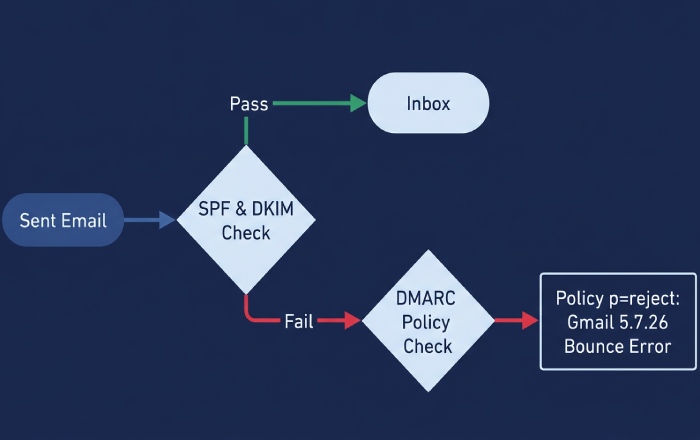
Before diving into headers, run a DMARC record lookup to confirm exactly which policy Gmail is enforcing against your domain. Gmail rejects or defers mail when the sending domain’s DMARC policy and authentication results indicate the message cannot be trusted. Gmail’s bounces tell you which mechanism failed (SPF, DKIM, DMARC alignment) and why it enforced (e.g., policy p=reject). Because DMARC depends on SPF and/or DKIM plus domain alignment with the visible From: header, the root cause is often outside DMARC itself: misconfigured SPF includes, broken DKIM signatures, or misaligned identities introduced by third-party senders and forwarders.
Your goal is to read the Gmail bounce like a diagnostic trace, then confirm your DNS and signing configuration exactly as Gmail evaluated it at reception time. DMARC Report shortens this loop by turning Gmail aggregate (RUA) and forensic (RUF) reports into a per-sending-source map, correlating failures to IPs, selectors, and routes so you can fix configuration once, verify impact across providers, and move safely to DMARC enforcement without losing legitimate mail.
What Causes Gmail to Generate DMARC Bounces?
When Does Gmail Reject Messages Due to DMARC?
Gmail will reject at SMTP with DMARC-related bounces when:
- The message fails both SPF and DKIM, or both are misaligned with the From: domain, and the DMARC policy is set to enforcement (p=quarantine or p=reject), most visibly with p=reject.
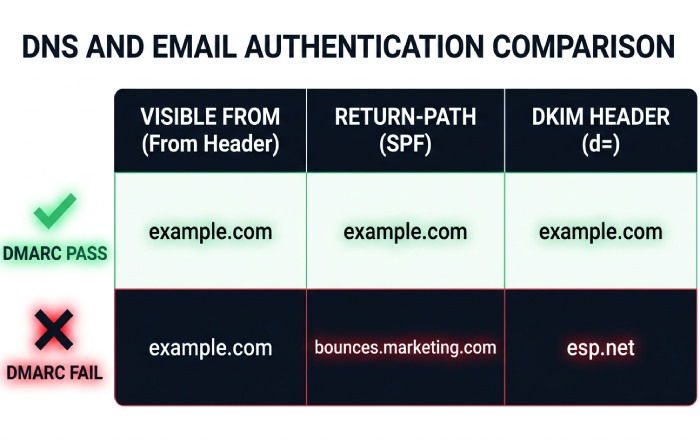
- SPF passes but is not aligned (e.g., the Return-Path uses a different organizational domain), and DKIM either fails or is unsigned or aligned incorrectly.
- The DKIM signature verifies but is not aligned (d= does not match the From: organizational domain), and SPF is fail or misaligned.
What Are the Common Gmail SMTP Response Codes?
- 550 5.7.26: “This message does not pass authentication checks (SPF and DKIM both do not pass) and the domain’s DMARC policy is reject.” This is the most common DMARC bounce code.
- 550 5.7.1: “Unauthenticated email from example.com is not accepted due to domain’s DMARC policy.”
- 421 4.7.0: Temporarily deferred due to domain reputation or transient authentication lookup failures (e.g., DNS timeouts).
Where Do You Read the Failure Cause?
- Gmail bounce DSN fields: Action: failed, Status: 5.7.26, Diagnostic-Code: smtp; 550 5.7.26 …
- Original message headers (message/rfc822):
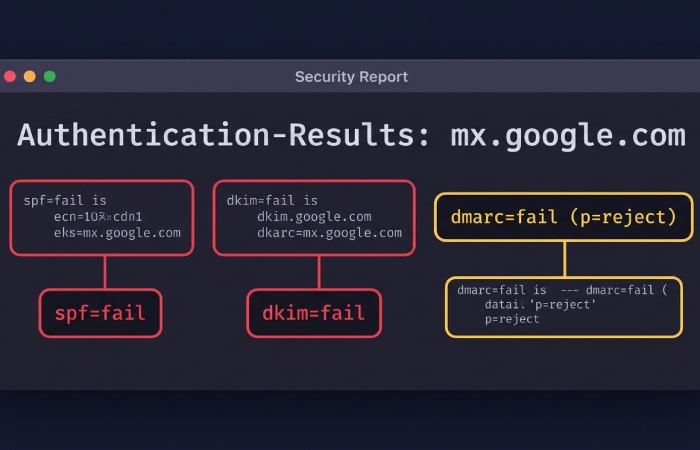
- Authentication-Results: mx.google.com; spf=fail; dkim=fail; dmarc=fail (p=reject)
- ARC-Seal / ARC-Message-Signature / ARC-Authentication-Results for forwarded or mediated mail
How Do You Parse a Gmail Bounce to Trace Which Hop Failed?
- Open the bounce and expand “Show original” or view the MIME attachment of the failed message.
- Extract Authentication-Results from the topmost (Gmail) receiver. Example:
Authentication-Results: mx.google.com; spf=fail smtp.mailfrom=bounce@mailer.example.net; dkim=fail header.d=example.com header.s=selector1; dmarc=fail (p=reject) header.from=example.com - Identify the sending IP from Received headers --- the last untrusted hop before Gmail’s mx.google.com.
- Check ARC if present: if ARC-Authentication-Results shows an earlier pass and ARC-Seal is valid, Gmail may still deliver forwarded mail. If ARC is absent or broken, SPF failures via forwarding will cause DMARC failures.
Mapping SMTP codes to root causes:
- 5.7.26: DMARC policy enforcement --- both SPF and DKIM failed to produce aligned passes.
- 5.7.23: SPF validation issue (often “SPF validation failed”).
- 5.7.5 / 5.7.0: General policy or authentication block --- read Authentication-Results for the specific cause.
How Do You Diagnose SPF Issues Causing Gmail DMARC Bounces?
What Is the Step-by-Step SPF Troubleshooting Process?
-
Confirm your SPF record syntax: Run
dig +short TXT example.comand verify you have exactly one SPF record. Multiple SPF records cause a permerror that Gmail may treat as a fail. -
Validate authorized IPs: Ensure the sending IP shown in the bounce’s Received headers matches an ip4/ip6 mechanism or is included via include/redirect mechanisms. Check your SPF record to verify coverage.
-
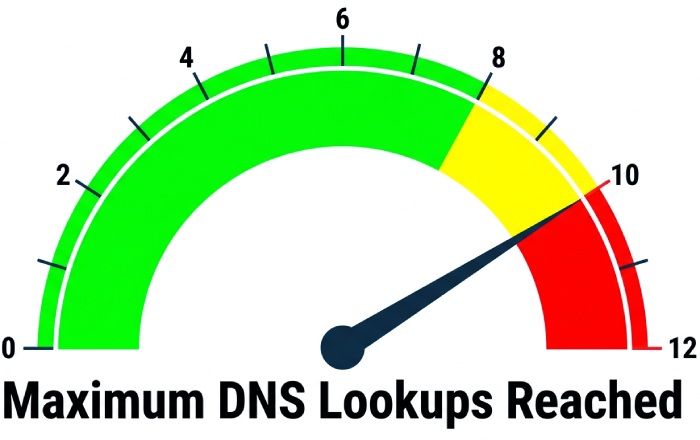
Count DNS lookups: SPF allows a maximum of 10 DNS-mechanism lookups across include, a, mx, ptr (avoid), exists, and redirect. Watch for void lookups and nested includes --- Gmail marks permerror/temperror that can drive DMARC failures.
-
Choose the right qualifier: For p=none DMARC, ~all (softfail) is safer during remediation. Move to -all (fail) when DMARC Report confirms coverage of all legitimate senders.
-
Ensure Return-Path alignment: Under DMARC relaxed alignment, the MAIL FROM organizational domain must match the From: organizational domain. If a marketing platform uses its own return-path domain, you will need DKIM alignment to satisfy DMARC.
Useful diagnostic commands:
digorkdigto expand includes and count lookupsspfqueryor online analyzers to simulate Gmail’s evaluation from the failing IP
Case data: A B2B SaaS domain with 2.4 million monthly Gmail attempts had 3.3% DMARC bounces. Of those, 71% traced to SPF includes exceeding 10 lookups via two marketing platforms. After consolidating includes and authorizing one shared pool, Gmail DMARC bounces fell to 0.5% within 48 hours (DNS TTLs at 3600 seconds). According to DMARC Report portfolio data, median SPF include depth is 3, with the 90th percentile at 9 --- dangerously close to the 10-lookup cliff. Between 13% and 18% of Gmail DMARC bounces in high-volume marketing programs trace to SPF permerrors caused by nested includes and void lookups.
How Do You Verify DKIM and Achieve Alignment?
What Is the DKIM Troubleshooting Checklist?
-
Confirm selector DNS: Run
dig +short TXT selector1._domainkey.example.com. Ensure a valid p= public key with no extra quotes or whitespace. Use 2048-bit keys (1024-bit minimum per Google’s requirements). Verify with a DKIM lookup tool. -
Validate signature fields in the bounce headers:
- d= (signing domain) should be the From: domain or its organizational domain for relaxed alignment.
- s= selector must exist in DNS. Expired x= timestamps or altered content cause failures.
- Canonicalization: c=relaxed/relaxed is resilient. Strict/simple can break with minor content rewrapping.
- Avoid using l= body length unless specifically needed --- mailing list footers often break the body hash.
-
Ensure signing occurs after all content modifications: Footers, link tracking, or subject prefixes inserted post-signing will invalidate DKIM.
-
Handle multiple signatures: Including both an ESP d=esp.com and your d=example.com is valid. For DMARC, ensure at least one aligned signature uses d=example.com (or your organizational domain).
Quick diagnostic commands:
openssl rsa -pubin -in dkim-publickey.pem -text -nooutfor key sanity checkingopendkim-testmsg < raw.emlto verify DKIM locally- Re-send the exact .eml through a test SMTP host to reproduce the issue
How Should You Choose Between Relaxed and Strict Alignment?
- Relaxed (aspf=r, adkim=r): Organizational-domain match is sufficient (mail.example.com aligns with example.com). This is the recommended starting point.
- Strict (aspf=s, adkim=s): Exact domain match only. Move to strict only when you fully control all senders on that axis.
For third-party senders, prioritize DKIM alignment (d=example.com) because SPF alignment often breaks during forwarding. The minimum viable setup for resilient delivery to Gmail is valid DKIM signed with d=your From: domain (aligned) and SPF passing for your return-path where possible, with DMARC relaxed alignment.
How Do You Configure DMARC Policy and Move Safely to Enforcement?
What Is the Safe Rollout Process for Gmail?
Start with a monitoring policy:
v=DMARC1; p=none; rua=mailto:dmarc@dmarcreport.example; ruf=mailto:forensics@dmarcreport.example; fo=1; aspf=r; adkim=r; pct=100; ri=86400Interpret your reports:
- RUA (aggregate XML): Volume by source IP/host, SPF/DKIM pass/fail, aligned/misaligned at Gmail.
- RUF (forensic copies): Specific failing samples --- use judiciously and ensure privacy compliance.
Transition to enforcement:
- Move to p=quarantine with pct=10, then ramp to 100. Proceed to p=reject once DMARC Report shows greater than 98-99% aligned passes across Gmail and other major providers. A dedicated DMARC monitoring service gives you the continuous visibility to make each policy step safely.
- Use sp= to set subdomain policy, or delegate subdomains with separate policies if third parties send from them.
How Does Gmail Differ from Microsoft and Yahoo?
-
Gmail: Strictly honors p=reject with 5.7.26 bounces. Uses ARC to improve deliverability of forwarded mail when ARC chains are trustworthy. Provides fine-grained Authentication-Results and robust ARC handling. According to Google’s 2024 bulk sender requirements, all domains sending 5,000+ messages per day must have DMARC at minimum p=none.
-
Microsoft (Outlook/Exchange Online): Enforces DMARC but sometimes quarantines instead of outright rejecting, depending on tenant policies. SMTP codes are often 5.7.23 or 5.7.26. Feedback may be less explicit in headers.
-
Yahoo: Early DMARC adopter that enforces p=reject strongly and provides clear Authentication-Results similar to Gmail.
Fixes validated with Gmail typically generalize to other providers, but verify at each one. DMARC Report’s cross-provider rollups prevent false confidence from provider-specific behavior.
How Do You Handle Third-Party Senders to Avoid Gmail DMARC Bounces?
What Are the Configuration Approaches?
- DKIM signing by the platform with your domain: Provide a selector and publish their public key under your domain (d=example.com). Verify with a DKIM lookup.
- SPF delegation: Include the platform’s SPF (include:esp-domain.tld) for the domain used in Return-Path. Be mindful of the 10-lookup limit.
- Subdomain delegation: Send from a controlled subdomain (e.g., mail.example.com) solely for that platform. Publish DKIM, SPF, and DMARC specifically for that subdomain.
- Custom bounce/return-path (CNAME): Point bounces.example.com to the ESP’s bounce domain so SPF aligns to your organizational domain.
- Google Workspace “Send As”: Ensure the external SMTP uses DKIM aligned with your From: domain, or configure Gmail to send via the ESP with aligned DKIM.
What Common Operational Pitfalls Trigger Gmail DMARC Bounces?
- Simple forwarding and mailing lists: SPF breaks during forwarding. Rely on DKIM alignment. Without ARC, Gmail may reject forwarded messages.
- Content modification post-DKIM: Footers, link-wrapping, and subject tags inserted after signing break DKIM. Always sign at the last modification point.
- DNS hygiene: Long TTLs slow rollouts. Orphaned selectors and overlapping SPF records cause intermittent failures. Our free email authentication tools can help you spot these DNS issues before Gmail does.
- Multiple DKIM signatures: Confusing order or invalid legacy signatures can mislead troubleshooting. Keep one aligned, validated signature as the primary.
- Key rotation timing: New selectors not propagated or old ones retired too early cause intermittent 5.7.26 spikes. Follow key rotation best practices.
How Do You Test Each Pitfall?
- Forwarding test: Send to a mailbox that auto-forwards to Gmail. Compare Authentication-Results with and without ARC.
- Mailing-list test: Post to a list that adds footer content. Inspect the DKIM body hash result.
- DNS test: Lower TTLs (e.g., 300-900 seconds) during migrations. Verify via multiple public resolvers.
- A/B signatures: Temporarily sign with two selectors and watch which passes in DMARC Report before removing the old one.
Frequently Asked Questions
Why Does Gmail Say “SPF and DKIM Both Do Not Pass” When My ESP Shows “Delivered”?
Your ESP’s “Delivered” means the message was accepted by the next hop, not by Gmail. Gmail’s final evaluation failed both SPF and DKIM (or alignment), and with p=reject it refused the message. Use the bounce’s Authentication-Results and DMARC Report’s RUA data to see the exact IP and selector Gmail evaluated.
Can ARC Fix My DMARC Bounces at Gmail?
ARC (Authenticated Received Chain) can help only for forwarded or mediated mail where the original authentication passed upstream. If your original message already failed DKIM/SPF or lacked alignment, ARC will not rescue it. DMARC Report shows where ARC led to acceptance versus rejection so you can target the true root causes.
Should I Switch to Strict Alignment to Block Spoofing Faster?
Only after DMARC Report shows that 100% of legitimate sends align exactly. Many third-party flows rely on relaxed alignment, and going strict prematurely will spike Gmail rejections.
Do I Need Both SPF and DKIM Aligned for DMARC to Pass at Gmail?
No --- DMARC requires at least one aligned pass (SPF or DKIM). However, for resilience against forwarding and mailing list modifications, ensure DKIM aligned passes are consistent.
How Long Until Gmail Reflects My DNS Fixes?
Typically within the DNS TTL period. For DKIM, selector DNS changes propagate quickly (minutes to hours). Use low TTLs during migrations and monitor DMARC Report for bounce reductions within the first one to two propagation windows.
Conclusion: A Repeatable Gmail DMARC Troubleshooting Workflow
Follow this repeatable workflow to diagnose and resolve Gmail DMARC bounces:
- Read the Gmail bounce: Map the 5.7.x code to SPF/DKIM/DMARC, extract Authentication-Results and ARC, and identify the sending IP and selector.
- Fix SPF: Verify record syntax, includes, lookup counts, and alignment of the MAIL FROM with your From: domain. Check your SPF record.
- Fix DKIM: Ensure valid selector DNS, robust canonicalization, signing at the final content modification point, and alignment (d=your domain). Verify your DKIM selector.
- Validate DMARC: Start with p=none and full RUA/RUF to gather evidence, then progress to quarantine and reject with a pct ramp.
- Compare across providers: Gmail versus Microsoft versus Yahoo may differ. Confirm improvements broadly using DMARC Report.
DMARC Report operationalizes each step: it ingests Gmail’s aggregate and forensic data, correlates failures to IPs and selectors, visualizes SPF include chains and lookup counts, simulates policy and alignment changes, alerts on bounce spikes, and verifies that your fixes reduce Gmail DMARC bounces before you move to stricter enforcement. With DMARC Report guiding the loop, you cut time-to-fix, prevent mail loss, and sustain compliant, high-reputation delivery to Gmail at scale.
General Manager
General Manager of DuoCircle. Product strategy and commercial lead for DMARC Report's 2,000+ customer base.
LinkedIn Profile →Take control of your DMARC reports
Turn raw XML into actionable dashboards. Start free - no credit card required.