Is It Safe To Unsubscribe From Spam Emails?

Quick Answer
Unsubscribing from spam emails can be risky because malicious links may confirm your address is active or lead to phishing sites. Only unsubscribe from trusted senders you recognize. For suspicious emails, avoid clicking links, mark them as spam, and block the sender.
Whether it is safe to unsubscribe depends on who sent the email. If you signed up for the newsletter yourself, unsubscribing is safe. If the message came from a sender you do not recognize, leave the unsubscribe link alone. This article covers both sides of that link: how a recipient can tell a real opt-out from a trap, and how a sending domain’s own configuration determines how easy that trap is to build in the first place.
Why Unsubscribe Links Exist
In the US, a sender may not send commercial email to a recipient more than ten business days after receiving an opt-out request. Google and Yahoo add their own requirements for bulk senders, meaning those that send more than 5,000 messages per day must support one-click unsubscribe and honor requests within two days. This is why Gmail sometimes displays an Unsubscribe link next to the sender’s name.
Spammers typically do not follow these rules, so an unsubscribe link in their messages cannot be trusted.
Why Clicking Unsubscribe on Spam Can Backfire
Clicking can signal to the sender that your address is active and monitored, which makes it more valuable for future spam campaigns and for resale. The size of that effect is hard to measure, but avoiding the click costs nothing. A bigger concern is the page the link opens. Cybersecurity firm DNSFilter found that roughly one in every 644 unsubscribe clicks leads to a potentially malicious website, a figure its CTO, Tim Keanini, gave to the Wall Street Journal in mid-2025, and those pages typically ask for login credentials or prompt a download.
None of this applies to messages from companies you know. Unsubscribing from a retailer or newsletter you actually signed up for is safe, provided the link leads to the sender’s own website.
How to Check Whether an Unsubscribe Link Is Safe
Do you recognize the sender?
Think about whether you signed up, made a purchase, or created an account with this sender. If the name is unfamiliar, or the address is a random string of characters at an unknown domain, treat the message as spam.
What do the authentication results say?
Legitimate senders authenticate their mail with SPF, DKIM, and DMARC, and Gmail shows you the results. Open the email, click the three-dot menu at the top right of the message, and choose Show original. The summary at the top of the page lists SPF, DKIM, and DMARC.
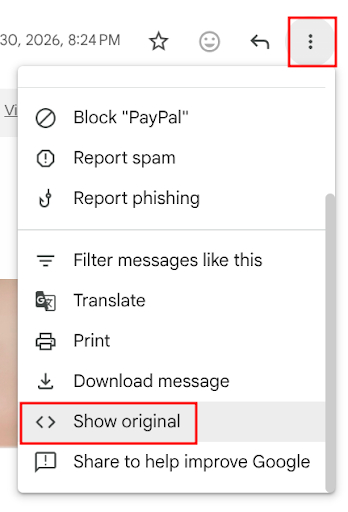
Three PASS results mean the message came from the domain it claims. They don’t mean the sender is trustworthy, since spammers can authenticate domains they own too. Watch instead for a DMARC failure on a message that claims to come from a brand you know. That points to spoofing. Don’t click anything in it; report it as phishing.
Where does the link actually go?
When a sender supports one-click unsubscribe, Gmail shows its own Unsubscribe link beside the sender’s name and submits the request for you, so you never visit the sender’s site at all.

If the only option is a link in the message body, hover over it and read the URL before clicking. A domain that doesn’t match the sender, or that looks like a misspelling, is a reason to stop.
What does the page ask for?
A legitimate opt-out page requires little. DNSFilter’s Keanini has pointed out that clicking an unsubscribe link takes you out of your email client’s relatively controlled environment and onto the open web, where there’s less protecting you. A page that then asks for credentials is a good reason to leave - a plain confirmation that you’ve been removed is generally safe. An unsubscribe request should never need a password or payment card.
What to Do With Actual Spam
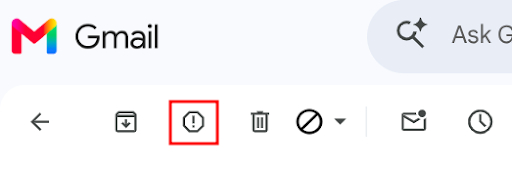
Skip the unsubscribe link. In Gmail, select the message and click Report spam, which trains Gmail’s filters and removes the message without any contact with the sender.
Then block the sender. Gmail’s built-in block option works one address at a time, which does little against spammers who send from a rotating pool of addresses at the same domain. Block Sender, a browser extension and dashboard for Gmail, lets you create a block based on domain, subject line, keyword, or IP address, so a block on the domain alone catches the next message automatically, even from an address you’ve never seen before.
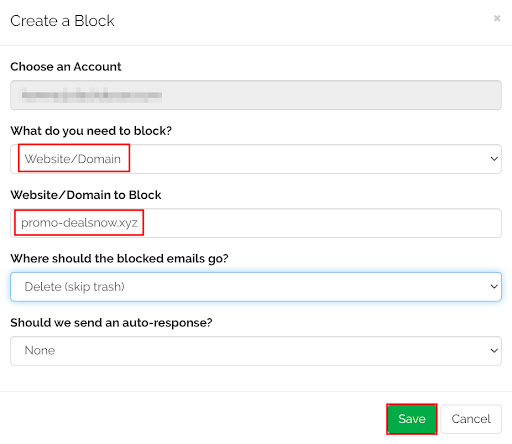
For a single unwanted message, deleting it without opening any links is enough. For a pattern that keeps recurring, a Gmail filter that sends matches to trash works too.
Troubleshooting
If you unsubscribe from a legitimate company and the emails continue, give it ten business days before assuming something is wrong, since that’s the window the law allows. If messages still arrive after that, contact the company’s support team and mark the messages as spam.
If an email has no unsubscribe link at all, that’s a warning sign on its own, since legitimate marketing email is required to include one. Report it as spam.
If the unsubscribe page asks you to log in, close it. Go to the company’s site by typing the address yourself and manage your preferences from your account settings there.
If you already clicked and only saw a confirmation page, expect a little more spam and move on. If you typed a password anywhere, change it now and turn on two-factor authentication. If a file is downloaded, run a malware scan.
If spam keeps arriving from new addresses at the same source, block by domain or keyword rather than by individual address.
For Senders: How DMARC Policy Affects This
The advice above only works if a recipient can actually tell a real sender from a spoofed one, and that distinction is decided almost entirely by the sending domain’s own DMARC configuration.
A DMARC record includes a policy tag, p=, that tells receiving mail servers what to do with messages that fail authentication. At p=none, failing mail is still delivered, and only a report is generated, so a domain at this stage can still be freely spoofed: an attacker can send a fake “unsubscribe from our newsletter” message claiming to be from the brand, and it reaches the inbox. At p=quarantine, failing mail is routed to spam, which blocks most spoofed messages from the primary inbox, though some recipients still check spam folders. At p=reject, failing mail is blocked at the server and never reaches the inbox at all, which is the only setting that gives full protection against a domain being impersonated.
Most domains that publish a DMARC record are still sitting at p=none, meaning the record exists but does nothing to stop impersonation. Moving to p=reject requires first confirming, through DMARC aggregate reports, that every legitimate sending source (marketing platforms, transactional email tools, internal mail servers) passes authentication, then raising enforcement in stages so real mail doesn’t get blocked along the way. DMARC Report’s DMARC checker shows a domain’s current policy, and the DMARC guide walks through getting to enforcement.
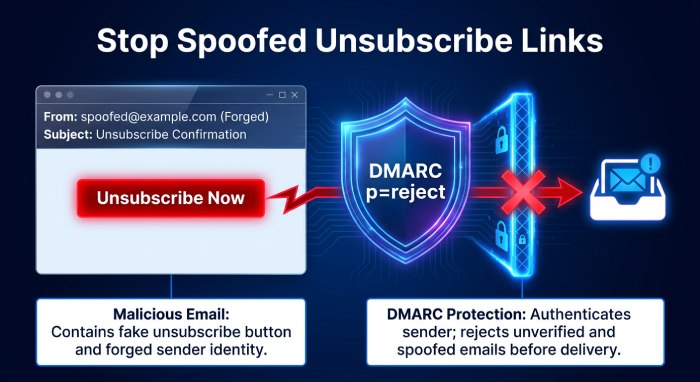
A brand’s unsubscribe link is a predictable, high-trust element that recipients already expect to see, which makes it a natural target for spoofing. A message that copies a company’s branding and includes a fake unsubscribe link is hard for a recipient to catch by eye, but authentication catches it regardless of how convincing the message looks: a domain enforcing DMARC at p=quarantine or p=reject stops a spoofed version of that message from reaching the inbox in the first place. Reviewing DMARC aggregate reports regularly shows whether unauthorized sources are sending mail using your domain, often the first sign that someone is impersonating your brand this way.
A few other things affect how trustworthy your unsubscribe process looks, to recipients and mailbox providers alike. Recipients who can’t find an unsubscribe option tend to report the message as spam instead, which damages sender reputation more than a lost subscriber does. Google and Yahoo expect a List-Unsubscribe header with an HTTPS URL, a matching List-Unsubscribe-Post header, and requests processed within two days. And a DMARC pass depends on SPF or DKIM aligning with the sending domain, so authenticating with those in addition to DMARC matters too.
Unsubscribing is safe when you know the sender, the message authenticates correctly, and the unsubscribe page asks only for confirmation. Everywhere else, report the message as spam and block the sender. On the sending side, the same authentication that protects a recipient protects a brand: a domain enforcing DMARC at p=reject is far harder to spoof convincingly, unsubscribe link included.
General Manager
General Manager of DuoCircle. Product strategy and commercial lead for DMARC Report's 2,000+ customer base.
LinkedIn Profile →Take control of your DMARC reports
Turn raw XML into actionable dashboards. Start free - no credit card required.