Fake School Email Scams: How To Spot Phishing And Impersonation

Quick Answer
Fake school email scams use phishing and impersonation to mimic trusted schools, teachers, or administrators. They may pressure recipients to click malicious links, share login details, transfer money, or disclose sensitive information.
Fake school email scams are increasingly targeting students, parents, teachers, and school staff through deceptive messages that impersonate trusted educational institutions. These phishing emails often use urgent account alerts, fake login links, scholarship offers, or payment requests to steal personal information and credentials. Understanding how to identify suspicious sender addresses, verify links, and recognize common warning signs can help protect your school accounts and sensitive information from email fraud and impersonation.
What Fake School Email Scams Are and Why They’re Increasing
A fake school email is a fraudulent message designed to look like it came from a school, college, university, teacher, administrator, financial aid office, or student account. These scams are increasing because education communities rely heavily on email for assignments, tuition notices, login alerts, event updates, account verification, and access to online services.
Attackers know that a student email or staff email often carries trust. A message that appears to come from a US university, US college, community college, or college IT department may persuade students, parents, and employees to click before thinking. Scammers also exploit the authority associated with a .edu email address, even though a real .edu email address should only be issued by an accredited educational institution or approved program under institution policy.
Fake school emails can reach students, parents, teachers, and staff across phones, tablets, and computers. Because these messages may appear in familiar email apps and look like routine school communications, recipients should verify the sender, domain, links, and requests before taking action.
Why Attackers Target School Communities
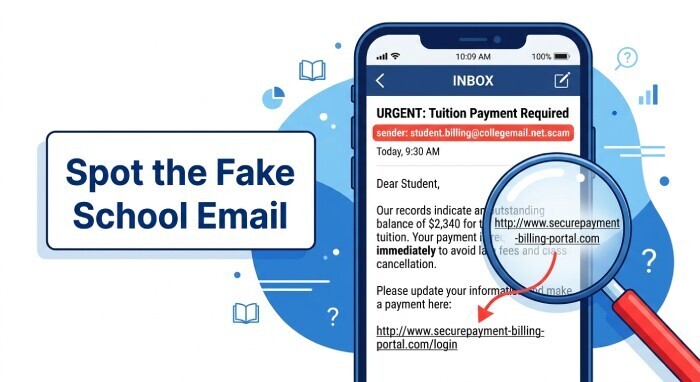
School communities are attractive targets because they include students, parents, teachers, administrators, researchers, alumni, vendors, and staff who may have different levels of cybersecurity awareness. Attackers may impersonate trusted school personnel, education technology providers, financial aid offices, or other familiar organizations to make fraudulent messages appear legitimate. Their goals may include stealing account credentials, redirecting payments, delivering malware, or gaining unauthorized access to school systems and sensitive information.
Some phishing attacks try to collect passwords for student email accounts. Others aim for payment fraud, data breach protection scams, identity protection upsells, malware delivery, or access to alt accounts used for clubs, labs, or school projects.
Common Types of School Email Impersonation: Admin, Teachers, IT, Financial Aid, and Student Accounts
Admin and Teacher Impersonation
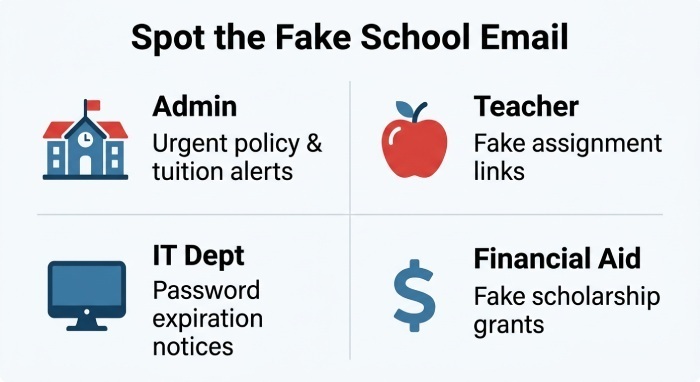
Administrative impersonation usually involves urgent messages about discipline, enrollment, transcripts, tuition, emergency forms, or school policy changes. Teacher impersonation often includes fake assignment links, grade-change notices, substitute plans, or requests to open attachments and links.
A scammer may create a fake school email using a lookalike email domain, such as replacing one letter in the school’s domain or using custom domains that resemble official systems. Custom domains can be legitimate for school portals, alumni programs, and vendors, but custom domains are also abused when attackers register deceptive addresses.
Teacher scams may ask students to “review this document,” “confirm your student email,” or “borrow email access for a class project.” No teacher should ask a student to share login credentials, bypass platform terms of service, or use a disposable email address to avoid school monitoring rules.
IT, Financial Aid, and Student Account Takeovers
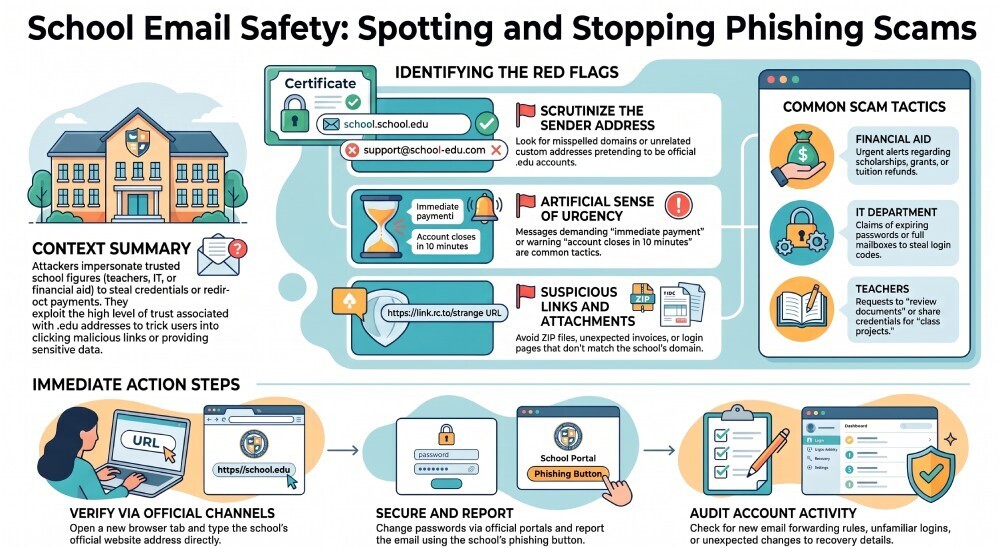
IT impersonation is a common fake school email tactic. Messages may claim that a student email password is expiring, mailbox storage is full, email forwarding must be enabled, or the account will be locked unless the recipient logs in. Legitimate IT teams generally should not request passwords by email.
Financial aid scams may mention scholarships, emergency grants, refunds, tuition payments, or direct deposit changes. These messages can target students, parents, faculty, or staff and may direct recipients to fraudulent payment portals or login pages.
Student account takeovers happen when attackers compromise a legitimate student email account and use it to send phishing messages as part of a phishing campaign. Because the message comes from a genuine school account, recipients may be less likely to question it. A real .edu address therefore does not automatically mean that every message from the account is safe.
Check the Email Domain Before You Trust the Message
Always inspect the sender’s email domain carefully. A legitimate school email should use the institution’s official domain, but a familiar or .edu address does not guarantee that the message is safe. Attackers can use lookalike domains, while compromised legitimate accounts can send convincing phishing messages.
If a message requests passwords, message authentication codes, payment information, or other sensitive details, do not use the link in the email. Instead, visit the school’s official website directly or contact the school’s IT department through a trusted channel to verify the request.
Red Flags That Reveal a Phishing Email: Sender Address, Urgency, Links, Attachments, and Grammar
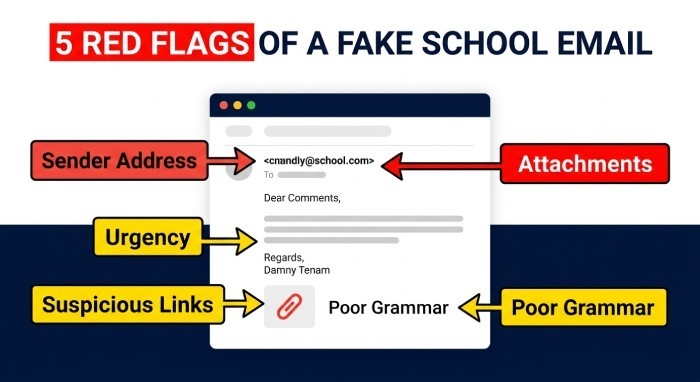
A fake school email often reveals itself through small inconsistencies. Look for:
- Sender address problems: misspelled domains, unrelated custom domains, or non-school accounts pretending to be a .edu email address.
- Urgency: “Your account closes in 10 minutes,” “Final warning,” or “Immediate payment required.”
- Suspicious links: login pages that do not match the school’s official domain.
- Unexpected attachments and links: ZIP files, macros, fake invoices, or shared documents from unknown accounts.
- Poor grammar or formatting: unusual greetings, odd capitalization, and inconsistent branding.
- Requests for codes or passwords: especially for student email, staff email, or parent portal access.
Safe Use Cases for Temporary Inboxes
A temporary email, disposable email address, or private email alias is appropriate for anonymous email use, online registrations, public Wi-Fi portals, retail stores, free trial sign ups, and spam protection when the platform allows it. A free plan may offer a free domain, basic history size, and the ability to receive emails instantly. A premium plan may include premium domains, custom domains, email forwarding, longer email retention policies, and larger attachment handling. Even when no sign-up needed tools make it easy to generate email and use a real-time inbox, they should not be used to create a fake school email or violate platform terms of service.
What to Do If You Receive or Click a Fake School Email
If you receive a suspicious message, do not reply, click, or forward it casually. Report it to the school, your college IT department, or the official help desk. If your school provides a phishing report button, use it.
If you clicked a link or entered credentials:
- Change your password immediately from the official school website, not from the email link.
- Enable multi-factor authentication on your student email, staff account, and related online services.
- Report the incident to IT, a teacher, or an administrator.
- Check account activity for email forwarding rules, unfamiliar logins, deleted messages, or changes to recovery details.
- Warn contacts if your account sent messages to classmates, parents, or staff.
- Scan your device if you open attachments and links.
Schools should also use authentication controls such as SPF, DKIM, and DMARC to reduce spoofing. These tools help receiving mail servers verify whether a message claiming to come from a school domain is authorized.
Prevention Tips for Students, Parents, Teachers, and School Staff
Students should treat every unexpected fake school email warning with caution, even if it appears to come from a friend’s student email. Parents should verify payment requests through the official school portal. Teachers should avoid sharing sensitive files through unknown links. Staff should confirm vendor requests through known phone numbers or approved procurement channels.
Do not assume that a .edu email address guarantees safety. Compromised accounts can send real-looking scams. Likewise, do not trust a message just because it mentions familiar entities such as Educause, a US college, a community college, or a school campaign.
The safest habit is verification: open a fresh browser tab, type the school’s official website URL, and contact the school directly before taking action.
General Manager
General Manager of DuoCircle. Product strategy and commercial lead for DMARC Report's 2,000+ customer base.
LinkedIn Profile →Take control of your DMARC reports
Turn raw XML into actionable dashboards. Start free - no credit card required.