Pretexting vs. Phishing: How Social Engineering Attacks Exploit Email Trust

Quick Answer
Pretexting and phishing are social engineering attacks that exploit email trust to trick users into sharing sensitive information. Pretexting uses fake identities, while phishing relies on deceptive emails and malicious links.
Email remains one of the most trusted communication channels in the workplace, making it a prime target for social engineering attacks. Cybercriminals exploit this trust through phishing emails and pretexting tactics designed to deceive employees, steal credentials, and manipulate business decisions. While both techniques rely on human behavior, they use different approaches to gain access and cause harm. Understanding the differences between pretexting and phishing is essential for strengthening email security, improving security awareness, and protecting organizations from evolving cyber threats.
What Social Engineering Means in Email Security
Social engineering is the manipulation of human trust to bypass technical controls, steal credentials, move money, or gain access to sensitive systems. In email security, social engineering often appears as convincing messages that look like routine business communication: a vendor invoice, a password reset, a shared Microsoft 365 document, or an urgent request from an executive.
Unlike purely technical exploits, social engineering targets decision-making. Threat actors study roles, relationships, workflows, and email environments to make their deception feel normal. That is why phishing and pretexting remain among the most effective email attacks facing organizations of all sizes, including SMBs, MSPs, Resellers, and enterprise teams.
Modern cybercriminals use social engineering to gain unauthorized access to business accounts and sensitive information. A successful attack can lead to business email compromise, credential theft, ransomware infections, or fraudulent financial transactions. Strong cybersecurity therefore requires more than filtering suspicious messages; it also involves security awareness training, identity protection, endpoint security, and rapid threat response.
Why Email Trust Is So Valuable to Attackers
Email is trusted because it is embedded in daily operations. Employees approve purchases, exchange files, receive HR notices, collaborate in Google Workspace and Microsoft 365, and communicate with customers through email. Threat actors exploit that trust by mimicking familiar senders, brands, and workflows.
For cybersecurity teams, this means email attacks are not just inbox problems. They are identity, endpoint, and data protection problems. A single stolen credential can expose cloud apps, trigger fraudulent payments, or give cybercriminals the foothold needed to deploy malware.
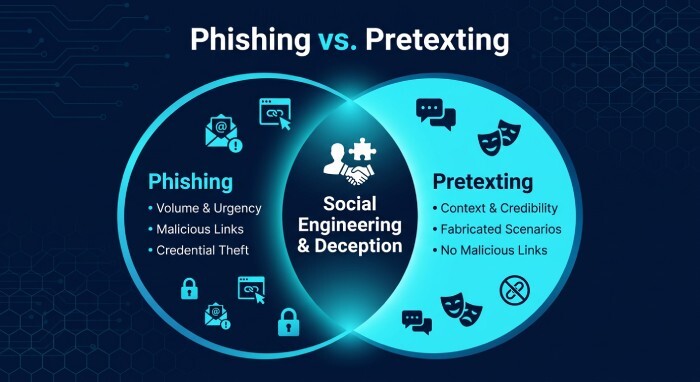
Pretexting vs. Phishing: Key Differences and Overlaps
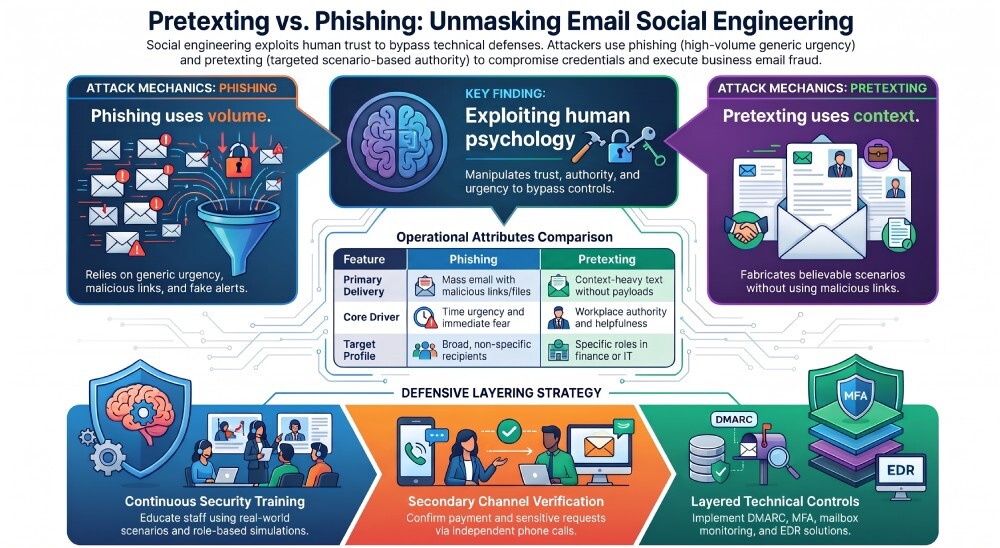
Phishing is a broad category of social engineering in which cybercriminals send fraudulent messages to trick recipients into clicking links, opening attachments, entering credentials, or taking unsafe actions. Phishing may be generic, targeted, or highly personalized.
Pretexting is a more specific form of social engineering built around a fabricated scenario. In pretexting, the attacker creates a believable identity, story, or business context to persuade the victim. For example, a threat actor may pretend to be a finance executive requesting a wire transfer, an IT technician asking for Multifactor authentication (MFA) approval, or a vendor updating payment details.
How Phishing Typically Works
Phishing often relies on volume and urgency. A phishing email might claim that a Microsoft 365 account will be disabled, a Google Workspace file requires review, or a package delivery has failed. The objective is usually credential theft, malware delivery, or initial access.
Common phishing attack vectors include:
- Fake login pages for Microsoft 365, Google Workspace, or VPN portals
- Malicious attachments that deploy infostealers or ransomware
- Links to spoofed cloud storage pages
- QR-code phishing that moves users away from monitored email environments
- Impersonation of known brands, executives, or IT teams
How Pretexting Typically Works
Pretexting depends on context and credibility. The attacker may spend time researching LinkedIn profiles, vendor relationships, finance processes, and public company information. The message may contain no malicious link or attachment, making detection harder for traditional security products.
A pretexting email might read like a normal business request: “Can you confirm whether this invoice is ready for payment?” or “I’m in a meeting and need you to update the ACH details for this vendor.” Because pretexting often imitates legitimate internal workflows, it is closely associated with Business Email Compromise.
Where the Two Techniques Overlap
Phishing and pretexting frequently work together. A phishing email may use a pretext, and a pretexting campaign may eventually deliver a phishing link. Both rely on deception, both are forms of social engineering, and both are used by threat actors to defeat trust-based processes.
The Role of Identity in Both Attacks
Identity protection is critical because compromised accounts make phishing and pretexting far more convincing. If cybercriminals send requests from a real mailbox, employees may be more likely to trust the message. This is why organizations should use multi-factor authentication, monitor unusual login activity, and establish strong account security procedures.
How Attackers Exploit Trust, Authority, and Urgency
Threat actors understand workplace psychology. Social engineering works because people want to be helpful, responsive, and compliant with authority. Cybercriminals design email attacks to exploit these instincts.
Trust
Attackers may impersonate coworkers, vendors, MSPs, payroll providers, or security platforms. In compromised email environments, the trust factor becomes even stronger because the message may come from a legitimate account with a real email history.
Authority
Pretexting often uses authority to pressure action. A message from a “CEO” or “CFO” asking for secrecy can push an employee to bypass normal controls. In Business Email Compromise, authority-based deception is used to change bank details, approve invoices, or release sensitive data.
Urgency
Phishing commonly uses time pressure: “Your account will be suspended,” “Payment is overdue,” or “Respond within 30 minutes.” Urgency reduces critical thinking and increases click rates, which is why security awareness training should teach employees to pause, verify, and report.
Attackers Adapt Their Tradecraft
Modern threat actors continuously refine their tradecraft. They monitor defenses, test subject lines, abuse legitimate file-sharing tools, and use compromised infrastructure. Some campaigns avoid obvious malware and instead rely on credential capture, inbox rules, and session hijacking.
From Inbox to Endpoint
Email attacks can quickly become endpoint security incidents. A malicious attachment may execute code, deploy infostealers, or introduce ransomware. Endpoint Detection and Response (EDR) solutions help organizations monitor devices, identify suspicious activity, and investigate potential threats after an email-based attack.
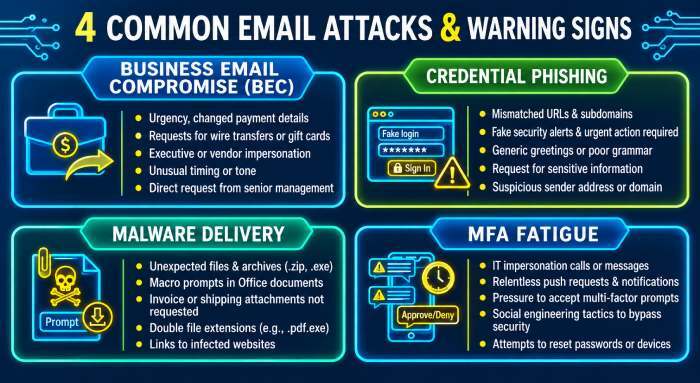
Real-World Email Attack Scenarios and Warning Signs
Real-world phishing and pretexting scenarios often look ordinary at first. The warning signs are usually subtle, which is why security awareness and security awareness training must be practical, role-based, and continuous.
Scenario 1: Business Email Compromise
A finance employee receives an email that appears to come from a known vendor requesting an urgent payment update. The message references a real invoice and uses familiar language. No link is included. This is classic pretexting and a common business email compromise pattern.
Warning signs include unusual urgency, changes to payment details, requests to bypass procedure, and slight differences in sender domain names.
Scenario 2: Credential Phishing
An employee receives a fake Microsoft 365 alert stating that their password will expire. The link leads to a convincing login page. If the employee enters credentials, cybercriminals may access email, cloud storage, and internal apps.
Warning signs include unexpected login prompts, mismatched URLs, poor branding, and messages that create fear or urgency.
Scenario 3: Malware Delivery
A user receives a spreadsheet labeled as a supplier invoice. Opening it may expose the device to malware that steals browser passwords or compromises sensitive information. Stolen credentials can then be used to access business accounts or support further attacks.
Warning signs include unexpected attachments, macro prompts, compressed files, and requests to disable security controls.
Scenario 4: MFA Fatigue or Helpdesk Impersonation
A threat actor pretends to be IT support and asks a user to approve an MFA push or share a temporary code. This pretexting approach blends identity abuse with social engineering and can defeat organizations that rely on MFA without strong verification procedures.
Security teams can use resources such as Huntress Cybersecurity 101, the Threat Library, Tradecraft Tuesday, _declassified, Fireside Chat, The Product Lab, and the Cyber Threat Report to stay current on these evolving cyber threats and attacker behaviors.
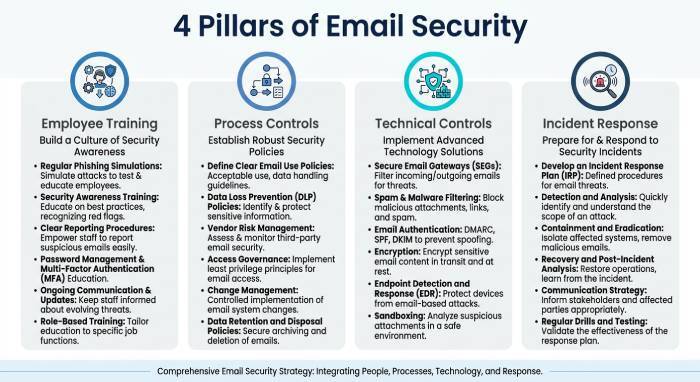
Practical Defenses: Training, Verification, and Email Security Controls
Defending against phishing, pretexting, and broader social engineering requires layered risk mitigation. No single security platform or control can stop every campaign, especially when cybercriminals use legitimate accounts and realistic business context.
Security Awareness and Employee Training
Security awareness training should go beyond annual check-the-box modules. Effective cybersecurity education uses real-world examples, role-specific scenarios, awareness campaigns, and attack simulation to help employees recognize suspicious requests.
A mature SAT program teaches users to:
- Verify payment changes through a second channel
- Report suspected phishing immediately
- Treat urgency and secrecy as warning signs
- Inspect sender addresses and links carefully
- Understand how pretexting manipulates trust
- Recognize that cybercriminals may use accurate business details
Security awareness is most effective when reinforced regularly. Employee training should be short, relevant, and connected to actual email attacks seen in the organization.
Verification and Process Controls
Human verification is one of the best defenses against pretexting. Organizations should require callback verification for wire transfers, vendor banking changes, payroll updates, and sensitive data requests. Verification should use known contact information, not the phone number or email address provided in the suspicious message.
For Compliance and compliance support, documented approval workflows also help demonstrate operational readiness and reduce fraud risk.
Technical Controls and Managed Detection
Technical defenses should include secure email gateways, authentication protocols, mailbox monitoring, endpoint security, and identity controls. In Microsoft 365 and Google Workspace, teams should monitor forwarding rules, suspicious logins, impossible travel, OAuth app abuse, and privilege changes.
A layered email security approach may include:
- SPF, DKIM, and DMARC authentication
- Secure email gateways and spam filtering
- Multi-factor authentication (MFA)
- Mailbox monitoring and suspicious login detection
- Endpoint Detection and Response (EDR)
- Security Information and Event Management (SIEM) tools
- Employee security awareness training
Vendors such as Huntress combine managed security, EDR, identity monitoring, and human-led investigation to help teams detect and respond to cyber threats. Capabilities like the Huntress Athena Engine, Agentic SOC workflows, and analyst-driven triage can strengthen proactive defense, especially for SMBs and MSPs that may not have a large internal security operations center.
Incident Response for Suspected Email Attacks
When phishing or pretexting is reported, incident response should move quickly. Security teams should identify affected users, revoke active sessions, reset credentials, review inbox rules, search for similar messages, and check whether initial access led to endpoint activity.
SOC analysts should correlate email events with endpoint detection and response data, SIEM alerts, identity logs, and cloud audit trails. If ransomware, infostealers, or living off the land behavior is suspected, containment must be immediate.
The most resilient organizations treat every reported message as a learning opportunity. By combining security awareness training, threat detection, strong verification, managed security, and continuous cybersecurity education, teams can reduce the impact of social engineering, phishing, pretexting, and other evolving email attacks.
General Manager
General Manager of DuoCircle. Product strategy and commercial lead for DMARC Report's 2,000+ customer base.
LinkedIn Profile →Take control of your DMARC reports
Turn raw XML into actionable dashboards. Start free - no credit card required.