Valid Email Tester: How To Check Email Deliverability Before Sending

Quick Answer
A valid email tester checks email addresses, verifies domain and mail server settings, and identifies potential deliverability issues before sending. Testing helps reduce bounces, improve inbox placement, and ensure emails reach valid recipients.
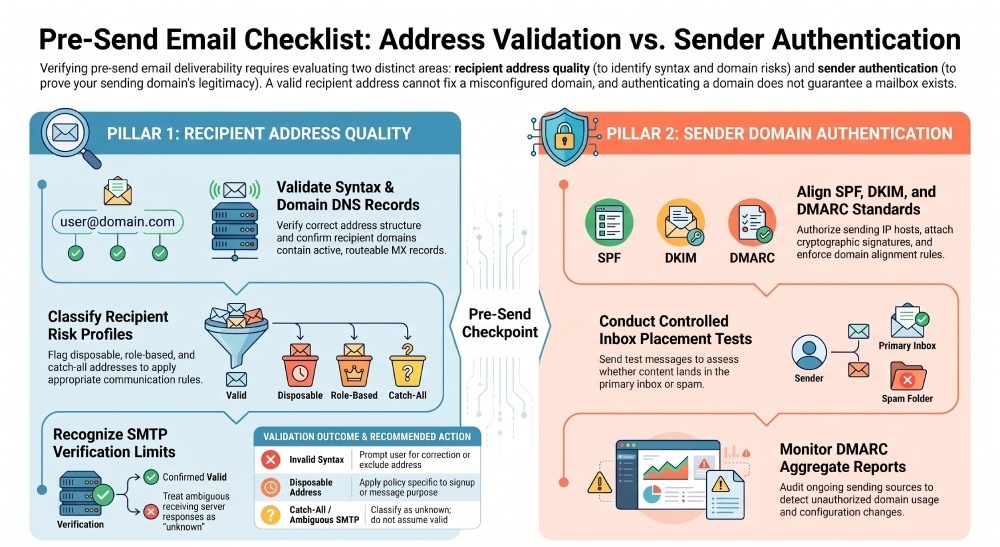
Sending emails to invalid addresses can lead to bounces and make campaign performance harder to assess. However, an address that passes basic validation is not automatically safe to contact, and a technically valid message can still be filtered or rejected by a receiving provider. A reliable pre-send process therefore needs to examine two separate areas: recipient address quality and sender email authentication. Address validation helps identify formatting and domain issues, while authentication checks help determine whether messages are properly authenticated as coming from your domain.
This guide explains how to check email addresses, interpret validation results, review authentication, and prepare your sending infrastructure before launching a campaign.
What Is a Valid Email Tester?
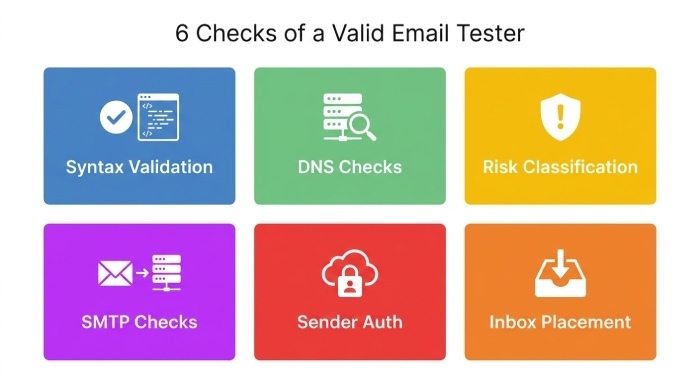
A valid email tester is a tool or process that evaluates whether an email address is correctly formatted and whether available technical signals suggest it may accept email. Depending on the service, testing may include:
- Syntax validation: Checks whether an address follows expected email-address formatting rules.
- DNS checks: Examines whether the recipient domain has relevant DNS records for receiving email.
- Risk classification: Identifies categories such as disposable addresses, role-based accounts, and catch-all domains.
- SMTP checks: Attempts to obtain information from a receiving mail server, where permitted.
- Sender authentication checks: Reviews SPF, DKIM, and DMARC configuration for the domain used to send email.
- Inbox placement testing: Uses controlled test messages to assess where messages arrive at participating test inboxes.
These checks answer different questions. A syntax check cannot establish that a mailbox exists, and a domain’s authentication configuration does not prove that a particular recipient address is valid.
It is also important to distinguish email validation from email deliverability. Validation assesses address quality and related risk signals. Deliverability concerns whether messages are accepted and successfully delivered, and inbox placement concerns whether they reach the inbox rather than spam or another folder.
How to Check Email Deliverability Before Sending
A structured pre-send process helps identify common problems without treating uncertain results as proof that an address is invalid.
Step 1: Validate Email Address Syntax
Start by checking whether each address has the expected structure. For example, customer@example.com has a local part (customer) and a domain (example.com).
A syntax validator should check for:
- Missing local parts or domains.
- Missing or misplaced @ symbols.
- Invalid dot placement.
- Excessive address or component lengths.
- Unsupported characters under the validator’s chosen rules.
- Internationalized domain names that require appropriate normalization and handling.
Email syntax is more complex than a simple regular expression can fully represent. Standards such as RFC 5321 and RFC 5322 describe relevant SMTP and message-format requirements.
Avoid rejecting every address that does not match a narrow, overly restrictive pattern.
You can also offer a suggested correction when an address appears to contain a common typo. For example, if someone enters user@gmial.com, a signup form might suggest checking the domain before submission.
Do not silently change an address. Let the user confirm the correction. Important: A syntactically valid address may still belong to a nonexistent mailbox, so syntax
validation should be treated as the first check rather than the final result.
Step 2: Check the Recipient Domain and DNS Records
After syntax validation, examine the domain portion of the address. DNS checks can help determine whether the domain exists and how email delivery is configured.
Check the following:
- MX records: Identify the mail servers designated to receive email for the domain.
- A and AAAA records: Provide address information that may be relevant when determining whether the domain can receive email.
- DNS response status: Distinguish between a nonexistent domain, a successful lookup, and a temporary or unresolved DNS error.
A domain without an MX record is not automatically unable to receive email. Under RFC 5321, SMTP supports an implicit-MX fallback in certain circumstances when no MX records exist, provided the domain’s address records and mail service meet the relevant requirements.
Interpret DNS results carefully:
- NXDOMAIN: The queried domain name does not exist according to the DNS response.
- SERVFAIL: The lookup failed. This may reflect a temporary DNS problem, DNSSEC validation issue, or another resolver-side problem.
- No MX records: Check whether the implicit-MX fallback applies before concluding that email delivery is impossible.
- Unusable mail-server records: Investigate the configuration rather than assuming that a particular recipient mailbox is invalid.
DNS checks cannot confirm whether an individual mailbox exists. They only provide information about the domain and its mail-routing configuration.
Step 3: Identify Disposable, Role-Based, and Catch-All Addresses
Some email addresses require additional consideration even when their syntax and domain checks pass.
Disposable email addresses
Disposable email services provide temporary addresses that may expire or become inaccessible. These addresses can create challenges for account verification, ongoing customer communication, and subscriber retention.
A validation service may identify known disposable domains. Keep any domain lists updated, and avoid treating an unfamiliar domain as disposable without supporting evidence.
Whether to block a disposable address depends on the use case. A service may reasonably restrict temporary addresses for account creation while applying a different policy to other types of communication.
Role-based email addresses
Addresses such as admin@example.com, sales@example.com, and support@example.com may serve teams rather than individual people.
They are not necessarily invalid. In business-to-business communication, a role-based address may be the appropriate contact for a department or purchasing team.
Flag these addresses when useful, but do not automatically reject them unless your business requirements justify that decision.
Catch-all domains
Some mail servers accept messages addressed to many or all recipients at a domain, including addresses that may not correspond to individual mailboxes.
This behavior can make address validation less conclusive. A receiving server may accept a message initially and still fail to deliver it later.
Treat catch-all results as uncertain rather than automatically classifying every address as valid or invalid.
Build a practical classification policy
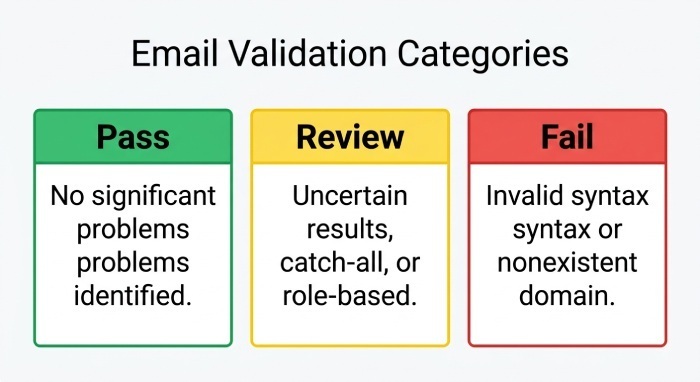
A useful validation system can group results into three categories:
- Pass: Available checks did not identify a significant problem.
- Review: Results are uncertain, or the address has characteristics that require further consideration.
- Fail: Reliable evidence indicates a problem, such as invalid syntax or a nonexistent domain.
These labels should describe the checks performed, not guarantee delivery. A “pass” result does not establish that the mailbox is active, that the recipient has consented to marketing, or that your message will reach the inbox.
Step 4: Understand SMTP Verification and Its Limitations
SMTP-level verification may provide additional clues about whether a receiving server will accept a message for a particular address. However, it is not a universally reliable method of confirming mailbox existence.
Some receiving servers restrict recipient verification, return deliberately ambiguous responses, use catch-all configurations, or accept a message before rejecting it later.
Consider these limitations when interpreting results:
- Successful SMTP responses: Do not guarantee that a mailbox exists or that a message will reach the inbox.
- Permanent rejections: May indicate an invalid recipient, but can also result from policy restrictions or other server-side conditions.
- Temporary errors: Greylisting, rate limiting, timeouts, and temporary server failures may make the result inconclusive.
- Restricted verification: Some providers deliberately prevent external systems from checking individual recipients.
- Catch-all behavior: A server may accept different recipient addresses without confirming that each mailbox exists.
Do not repeatedly probe receiving servers or ignore their acceptable-use policies to obtain a more definitive result.
When SMTP results are ambiguous, classify the address as unknown. Use a reputable validation service where appropriate, review available DNS information, or ask the user to confirm the address through a permission-based process such as double opt-in.
SMTP verification should be one possible input into address assessment, not the sole basis for deciding whether an address is safe to contact.
Step 5: Check SPF, DKIM, and DMARC for Your Sending Domain
Address validation is only one part of preparing an email campaign. You should also verify that your own sending domain is configured correctly.
Three important email authentication standards work together to help receiving systems evaluate messages claiming to come from your domain.
SPF: Sender Policy Framework
SPF specifies which sending hosts are authorized to send email for a domain.
Before a campaign, review your SPF record to confirm that legitimate sending services are included and that the record is syntactically correct. Check for lookup-limit issues and unnecessary or outdated mechanisms.
An SPF record that omits an authorized email service may cause messages from that service to fail SPF authentication.
DKIM: DomainKeys Identified Mail
DKIM uses a digital signature to help receiving servers verify that a message was signed by a domain and that the signed content has not been altered in a way that invalidates the signature.
Confirm that your email service is signing messages and that the required DKIM DNS records and selectors are configured correctly. If you use multiple sending platforms, check that each relevant platform has been configured for the appropriate domain.
DMARC: Domain-based Message Authentication, Reporting, and Conformance
DMARC builds on SPF and DKIM by checking whether at least one of those authentication methods passes with the required alignment to the domain in the visible From address.
DMARC also allows domain owners to publish a policy for handling messages that fail DMARC and to request reports about messages using their domains.
Before sending, review your DMARC policy, alignment settings, reporting configuration, and recent authentication results. Investigate unexpected failures and confirm that legitimate sending services are properly configured before making enforcement changes.
For the official requirements and recommendations for sending to Gmail accounts, refer to Google’s email sender guidelines.
Why this matters: A valid recipient address does not compensate for a misconfigured sending domain. Similarly, successful SPF, DKIM, and DMARC checks do not prove that a recipient mailbox exists or guarantee inbox placement.
Step 6: Monitor Authentication With DMARCReport
DMARCReport helps organizations understand how their domains are being used for email and whether messages pass the relevant authentication checks.
Its reporting and monitoring capabilities can help teams:
- Review aggregate DMARC reports and examine sending sources.
- Understand SPF, DKIM, and DMARC authentication results.
- Identify legitimate services that may be misconfigured.
- Investigate unexpected sources sending mail using their domains.
- Monitor authentication-related DNS changes and receive relevant alerts.
- Track authentication trends to support troubleshooting and policy decisions.
For example, if a company begins sending through a new email marketing platform, its team should verify that the platform is configured to authenticate messages correctly. DMARC reports can help identify whether messages from that source pass or fail authentication and whether alignment issues need investigation.
If authentication results change unexpectedly, the team can review the affected sending source and check its configuration before making changes to the campaign or domain policy. DMARCReport complements address-validation tools; it does not replace them. Its authentication reports do not verify individual recipient mailboxes, classify disposable addresses, or guarantee that a message will reach the inbox.
Step 7: Test Inbox Placement and Review Email Content
Authentication is important, but it is not the only factor affecting delivery.
Before a major campaign, consider sending controlled tests to inboxes you own or are authorized to use. Where appropriate, use an inbox-placement testing service to assess how messages are handled by different providers.
Review the following areas:
Inbox placement Check whether test messages arrive in the inbox, spam folder, or another location. Test results are indicative rather than a guarantee of how every recipient’s mailbox will handle the campaign.
Message content Review subject lines, links, sender information, formatting, and the relevance of the content. Avoid deceptive subject lines and ensure that recipients can understand who is contacting them and why.
Sending infrastructure Check that your sending platform is configured correctly, uses appropriate transport security, and follows the requirements of the providers receiving your mail.
Recipient expectations Send marketing email to recipients who have provided the necessary permission or otherwise meet the applicable legal requirements. Provide clear unsubscribe options where required, and honor opt-out requests promptly.
Reputation and engagement Monitor available signals such as delivery failures, spam complaints, and meaningful recipient engagement. Interpret them in context rather than relying on a single metric to judge campaign health.
Inbox placement testing and authentication reporting provide complementary information. One examines the outcome of controlled test sends; the other helps explain how messages using your domain authenticate.
Step 8: Review Results Before Sending the Full Campaign
Once the checks are complete, review the findings and decide what action is appropriate.
| Validation result | Recommended action |
|---|---|
| Invalid address syntax | Ask the user to correct the address or exclude it from the campaign |
| Domain returns NXDOMAIN | Investigate and exclude the address if the result is confirmed |
| Temporary DNS error | Retry the lookup later before making a final decision |
| No MX record | Check whether implicit-MX delivery applies |
| Disposable address detected | Apply the policy appropriate to the signup or communication purpose |
| Role-based address | Retain or flag it according to the use case |
| Catch-all or uncertain SMTP result | Mark as unknown; avoid treating it as confirmed valid or invalid |
| SPF, DKIM, or DMARC failure | Investigate the sending configuration and review authentication reports |
| Unexpected inbox-placement results | Review authentication, reputation, content, and provider-specific filtering |
For larger campaigns, start with a controlled send to an appropriate, engaged audience and review the available results before increasing volume. Follow your email service provider sending policies and applicable legal requirements.
Do not use a single validation score as permission to send to every address. Address quality, recipient consent, authentication, and delivery performance must be considered separately.
Common Mistakes to Avoid When Using a Valid Email Tester
Even a well-designed validation process can produce misleading decisions if its results are interpreted incorrectly.
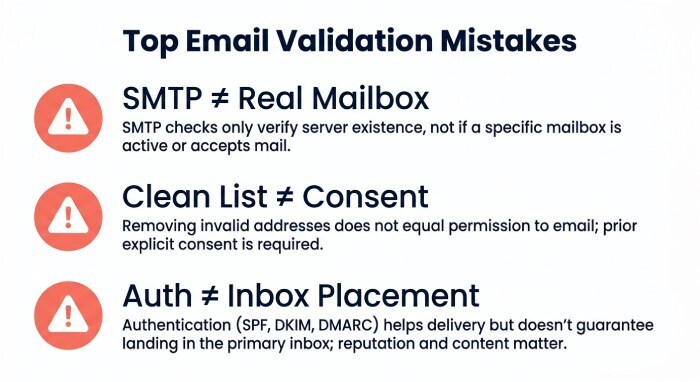
- Treating every SMTP acceptance as proof of a real mailbox: Receiving servers may accept messages without confirming that an individual mailbox exists.
- Marking every DNS failure as permanent: Temporary resolver errors should be investigated before an address is rejected.
- Using the recipient’s authentication records to judge mailbox validity: SPF, DKIM, and DMARC describe aspects of domain authentication, not the existence of a specific recipient.
- Assuming authentication guarantees inbox placement: Authentication helps establish trust in the sending domain, but filtering decisions also depend on other signals.
- Blocking every role-based or catch-all address: These categories can contain legitimate contacts. Use a policy that reflects the communication purpose and available evidence.
- Confusing a clean list with permission to send: Address validation does not establish consent or override privacy, anti-spam, or provider requirements.
- Ignoring authentication monitoring after a successful test: Sending services and DNS configurations can change. Continue monitoring your domain rather than treating a single successful check as permanent confirmation.
Frequently Asked Questions
What is the best way to check email deliverability before sending?
Combine syntax and DNS checks, appropriate address-risk classification, sender authentication reviews, and controlled inbox-placement tests. Monitor delivery failures and complaints after sending as well. No single test can guarantee inbox delivery.
Can a valid email tester confirm that a mailbox exists?
Not always. Syntax and DNS checks cannot confirm an individual mailbox. Some SMTP checks provide additional clues, but receiving servers may restrict verification or return ambiguous results. Treat uncertain outcomes as unknown.
Does a valid email address guarantee that an email will reach the inbox?
No. A valid address may still reject a message, and an accepted message may be filtered into spam. Inbox placement can depend on authentication, sender reputation, recipient engagement, message content, and receiving-provider policies.
How do SPF, DKIM, and DMARC affect email deliverability?
SPF identifies authorized sending hosts, DKIM provides a domain-associated message signature, and DMARC checks SPF or DKIM authentication with alignment to the visible From domain. Correct configuration supports email security and helps receiving providers evaluate messages, but it does not guarantee inbox placement.
Can DMARCReport validate individual email addresses?
DMARCReport focuses on email authentication reporting and monitoring. It helps organizations analyze SPF, DKIM, and DMARC results and investigate sending-source or configuration issues. It should not be treated as an individual mailbox-validation or disposable-email detection service.
How often should email addresses be validated?
Validate addresses when they are collected, and reassess them when delivery failures, list changes, or other relevant signals indicate a need. The right schedule depends on list activity, business purpose, and the capabilities of the validation service. Avoid repeatedly probing receiving servers when their policies do not permit it.
What should I do if an email address returns an unknown result?
Do not automatically classify it as invalid or safe. Review the available DNS and validation results, consider a reputable validation service, and use a confirmation process such as double opt-in when appropriate. Apply your normal consent and sending policies before contacting the address.
What is the difference between email validation and email authentication?
Email validation assesses an address’s format and available indicators of its suitability for receiving mail. Email authentication checks whether a message is authorized and aligned with the domain it claims to come from. Both are useful, but they solve different problems.
Conclusion: Build a More Reliable Pre-Send Email Checklist
A valid email tester can help identify formatting errors, DNS problems, disposable addresses, and other potential risks before a campaign. However, address validation is only one part of a reliable email program.
For better-informed sending decisions:
- Validate address syntax and check domain DNS records.
- Treat ambiguous SMTP and DNS results cautiously.
- Classify role-based, disposable, and catch-all addresses according to your use case.
- Verify SPF, DKIM, and DMARC for your sending domain.
- Test inbox placement where appropriate and monitor delivery results.
- Continue reviewing authentication reports and investigate unexpected changes.
DMARCReport supports the authentication side of this process by helping teams review DMARC reports, understand SPF/DKIM/DMARC results, identify sending sources, and monitor authentication-related configuration changes.
Combining responsible address validation with ongoing email authentication monitoring gives your organization a clearer picture of potential sending problems—without confusing a valid address with a guaranteed inbox delivery.
General Manager
General Manager of DuoCircle. Product strategy and commercial lead for DMARC Report's 2,000+ customer base.
LinkedIn Profile →Take control of your DMARC reports
Turn raw XML into actionable dashboards. Start free - no credit card required.