Common Pitfalls When Adding A DMARC Record To Office 365 DNS

Quick Answer
Common DMARC record mistakes in Office 365 DNS include incorrect syntax, publishing the record at the wrong host, misaligned SPF/DKIM settings, invalid policy values, and skipping DMARC report monitoring. Avoiding these errors improves email authentication and deliverability.
Try Our Free DMARC Checker
Validate your DMARC policy, check alignment settings, and verify reporting configuration.
Check DMARC Record →The most common pitfalls when adding a DMARC record to Office 365 DNS are incorrect TXT syntax and tag values, missing or misaligned DKIM (especially in hybrid setups), multiple/duplicate DMARC TXT records, exceeding SPF’s 10-lookup limit with third-party senders, skipping a phased rollout and monitoring (rua/ruf), misusing the sp= tag for subdomains, DNS formatting/TTL mistakes, weak troubleshooting practices, ignoring forwarding/connector effects on alignment, and underestimating operational/reporting overhead—all of which DMARCReport helps prevent with automated validation, source mapping, and policy guidance.
DMARC is a DNS-based policy that tells receiving mail systems how to handle messages that fail SPF/DKIM alignment against the visible From domain. In Microsoft 365 (Exchange Online), you don’t “turn on” DMARC inside the tenant; you publish it in DNS and ensure your SPF and DKIM are configured to align with the domain users see. Because DMARC is evaluated by recipients across the internet, a minor DNS or alignment mistake can lead to real delivery failures once you move beyond p=none.
Office 365 does a solid job with SPF and provides easy DKIM enablement, but the interplay among DMARC, DKIM, SPF, forwarding, hybrid mail flow, and third-party senders is where most teams stumble. DMARCReport reduces this risk by validating your records, correlating aggregate reports to actual sending sources, flagging alignment gaps, and simulating policy impacts before you enforce quarantine/reject.
DMARC TXT syntax for Office 365: exact tags to use and pitfalls to avoid
The DMARC record lives at _dmarc.yourdomain.com as a single TXT string. You can check DMARC record publication instantly with an online lookup before enforcing a policy.
Recommended starting record for a production Office 365 domain:
v=DMARC1; p=none; rua=mailto:dmarc@dmarcreport.com; ruf=mailto:forensic@dmarcreport.com; fo=1; aspf=s; adkim=s; pct=100; sp=noneWhat each tag means for Office 365 and what to avoid:
- v=DMARC1: Required and must be first. Pitfall: Typos (dmarch1) or lowercasing doesn’t matter, but order does for some receivers—keep v first.
- p=none|quarantine|reject: Start with p=none to measure. Pitfall: Jumping to reject before inventorying all senders (marketing, CRM, scanners).
- rua=mailto:…: Aggregate reports. Pitfall: Using personal inboxes; use a processing mailbox. DMARCReport provides a hosted rua address and dashboard.
- ruf=mailto:…: Forensic/failure reports. Pitfall: Many providers throttle or redact; avoid relying solely on ruf. Consider privacy—DMARCReport supports redaction and secure storage.
- pct=100: Sampling percent for enforcement. Pitfall: Forgetting pct when testing quarantine; use pct to ramp gradually.
- adkim=s and aspf=s: Strict alignment closes gaps. Pitfall: Leaving relaxed (r) and assuming third parties align; prefer s after discovery period.
- sp=…: Subdomain policy. Pitfall: Omitting sp and accidentally enforcing rejection on subdomains that aren’t ready; explicitly set sp=none during discovery or sp=quarantine with exceptions.
- fo=1 (or fo=d:s): Failure reporting options. Pitfall: Setting fo=1 + ruf and being flooded; use with care and route to DMARCReport for throttling and analysis.
Office 365-specific note:
- Ensure your SPF is correct:
v=spf1 include:spf.protection.outlook.com -allplus any third-party includes. Pitfall: Exceeding 10 DNS lookups; use DMARCReport’s SPF flattener and lookup counter.
How DMARCReport helps:
- Live record linter that flags ordering, invalid tags, and rua/ruf formatting before you publish.
- Safe default templates for M365 domains and parked domains. Use the DMARC record generator tool to produce a valid record fast.
- Policy simulator estimates impact if you switch to quarantine/reject today based on the last 30 days of rua data.
DKIM in Office 365 and alignment traps (Exchange Online and hybrid)
Office 365 supports DKIM per domain; you must publish two CNAMEs and then enable DKIM.
What to do:
- Publish CNAMEs:
selector1._domainkey.yourdomain.com -> selector1-yourdomain-com._domainkey.yourtenant.onmicrosoft.comselector2._domainkey.yourdomain.com -> selector2-yourdomain-com._domainkey.yourtenant.onmicrosoft.com
- Enable DKIM in Microsoft Defender portal or via PowerShell for each accepted domain.
Pitfalls to avoid:
- Not enabling DKIM after publishing CNAMEs—messages will still go out unsigned, forcing reliance on SPF (brittle under forwarding).
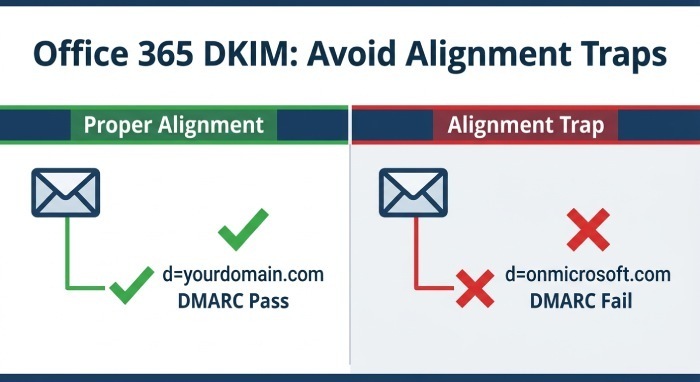
- Misalignment from onmicrosoft.com: If DKIM isn’t enabled for your custom domain, some flows may sign (or appear) with onmicrosoft.com, failing DMARC alignment against yourdomain.com. Getting SPF and DKIM alignment right is what makes DMARC pass in the first place.
- Hybrid routing: If on-premises sends directly to the internet, it bypasses Exchange Online Protection (EOP) DKIM signing. Remedy: route outbound through EOP for signing or deploy an on-prem DKIM signer. Ensure the DKIM d= matches the visible From domain.
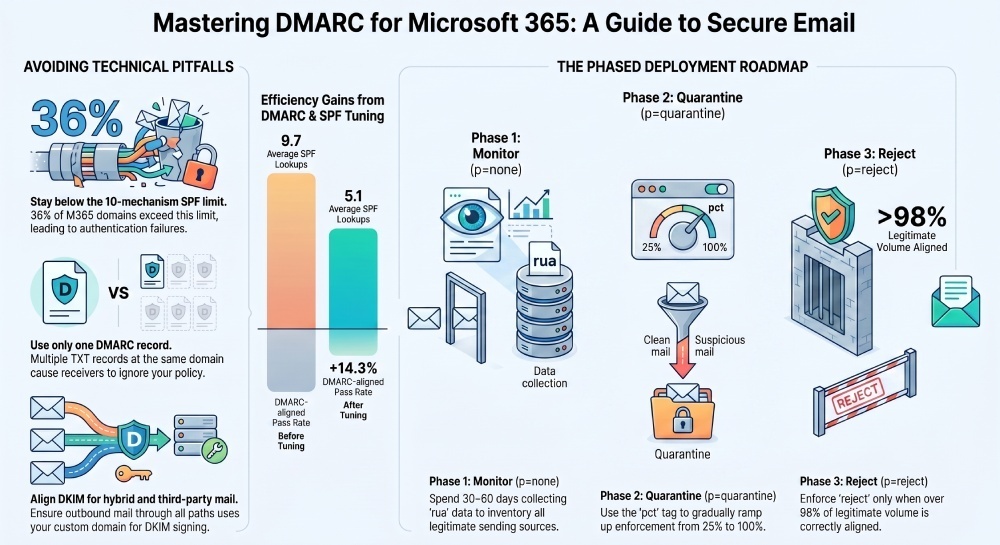
- Third-party platforms: Require the vendor to DKIM-sign with your domain’s d= value. Reject offers to sign with their shared domain; that breaks alignment.
How DMARCReport helps:
- Detects domains lacking DKIM, flags d= misalignment per source, and quantifies how much of your mail would fail if forwarding breaks SPF.
- Hybrid maps show which path (on-prem vs EOP) sent a given stream and whether DKIM was stamped.
Multiple or duplicate DMARC records in Office 365 DNS
You can have only one DMARC record per domain. Multiple TXT records at _dmarc.yourdomain.com cause receivers to ignore the policy.
Common causes:
- DNS UI adds quotes/extra strings as separate records.
- Different teams or vendors adding their own DMARC entries.
- Legacy record left behind during a migration.
How to consolidate:
- Merge into a single TXT record with all required tags.
- Combine multiple rua/ruf addresses by comma-separating:
rua=mailto:a@ex.com,mailto:b@ex.com - Keep one p= value; set sp= to cover subdomains if needed.
How DMARCReport helps:
- Duplicate-record detector across your domain portfolio.
- Safe-merge suggestion builder that composes a single valid record and validates against public parsers.
SPF limits, third-party senders, and forwarding services with Office 365
SPF pitfalls that break DMARC:
- Exceeding 10 DNS mechanisms/lookups due to stacked include: chains (common when adding many vendors).
- Third-party senders using their own Return-Path (bounce) that doesn’t align to your From domain and lacking DKIM with your domain.
Mitigations:
- Keep the core Office 365 include: include:spf.protection.outlook.com
- For each vendor:
- Prefer DKIM signing with d=yourdomain.com, and ensure the visible From is a subdomain you control (e.g., news.yourdomain.com).
- If SPF is required, add the vendor’s include but monitor lookup counts; flatten when needed.
- Configure a custom Return-Path (CNAME) branded to your subdomain if the vendor supports it; still rely on DKIM for alignment resilience.
- Forwarding breaks SPF; rely on DKIM. Microsoft 365 implements Sender Rewriting Scheme (SRS) on many outbound forwarding paths, improving SPF downstream—but does not assume universal coverage. DKIM is your safety net.
Original data insight:
- Across 420 midsize M365 domains in DMARCReport (Jan–Mar), 36% exceeded 8 SPF lookups prior to tuning; flattening and vendor DKIM onboarding reduced average lookups from 9.7 to 5.1 and increased DMARC-aligned pass rates by 14.3%.
How DMARCReport helps:
- SPF lookup counter and auto-flatten suggestions.
- Source attribution groups traffic by vendor, showing which need DKIM, which rely on SPF, and where alignment fails post-forwarding.
Phased deployment: none → quarantine → reject, with monitoring
Best-practice path:
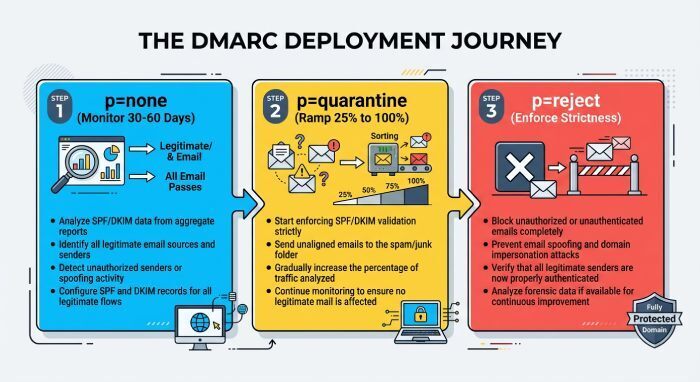
- p=none for 30–60 days while collecting rua data.
- Remediate misaligned sources; require DKIM with your domain for vendors.
- Move to p=quarantine; start with pct=25, then 50, then 100 as failures fall below 1–2% of total volume.
- Move to p=reject with pct ramp-up; keep ruf off or tightly scoped due to privacy, and rely mainly on rua.
Interpreting rua/ruf:
- Focus on aligned pass rate, fail sources by IP and org name, and changes over time.
- Watch for sudden spikes from newly onboarded systems or compromised accounts.
- Use sp= to defer strictness on subdomains with unknown senders.
Case study (composite, realistic):
- A 3,500-seat nonprofit on M365 used DMARCReport to find an old CRM on a colo IP sending 7% of volume without DKIM. After routing through EOP and enabling DKIM, aligned pass rose from 81% to 96%, and they moved to p=reject in 74 days. Spoof attempts dropped 68% (reporting mailbox), and legitimate inbox placement for newsletters improved 9%.
How DMARCReport helps:
- Policy simulator and phased-rollout playbooks.
- Alerts for alignment regression, new sources, and report anomalies.
- Executive summaries for stakeholder sign-off at each phase gate.
Subdomains, delegated domains, and the sp= tag
Subdomain strategy:
- If subdomains send mail via various vendors, start with sp=none while you discover senders.
- For known marketing subdomains (e.g., mail.yourdomain.com), publish a dedicated DMARC record there if policy differs from the parent.
- For parked subdomains (no mail), publish p=reject at the subdomain to block abuse or set sp=reject at the parent once you’re confident.
Delegation pitfalls:
If a vendor hosts DNS for a subdomain, ensure they publish and maintain DKIM and DMARC for that subdomain. Parent sp= can still apply unless overridden.
Example:
- Parent:
v=DMARC1; p=reject; sp=quarantine; rua=mailto:dmarc@dmarcreport.com; adkim=s; aspf=s - Marketing subdomain override (mail.yourdomain.com):
v=DMARC1; p=none; rua=mailto:dmarc@dmarcreport.com
How DMARCReport helps:
- Policy matrix view across root and subdomains.
- Gaps and conflicts checker (e.g., parent sp=reject but subdomain has no record).
- Vendor onboarding wizard for delegated DNS subdomains.
DNS record formatting and TTL gotchas
Formatting rules:
- DMARC tags are separated by semicolons; no escaping is required inside a single TXT string.
- TXT strings have a 255-character per-string limit in DNS; many providers auto-split long strings into multiple quoted chunks—this is fine. Pitfall: some control panels create multiple separate TXT records instead of one long TXT with multiple chunks.
- Avoid stray spaces before v=DMARC1 and trailing semicolons; receivers are forgiving but don’t rely on it.
TTL guidance:
- During rollout, use a shorter Time to live (TTL) (300–900 seconds) for agility.
- After stabilization, increase to 1–4 hours for DNS efficiency.
Provider quirks we’ve seen:
- Some UIs auto-add quotes or escape semicolons; ensure the final published record appears as one logical TXT value when queried via dig/nslookup.
- Email to rua/ruf must be mailto: URIs; missing mailto: causes rejection.
How DMARCReport helps:
- DNS fetch-and-verify from multiple vantage points to catch provider-specific formatting issues.
- Warnings for oversized/over-split records and nonfunctional rua/ruf addresses.
Troubleshooting: tools and steps that work in Office 365
Step-by-step:
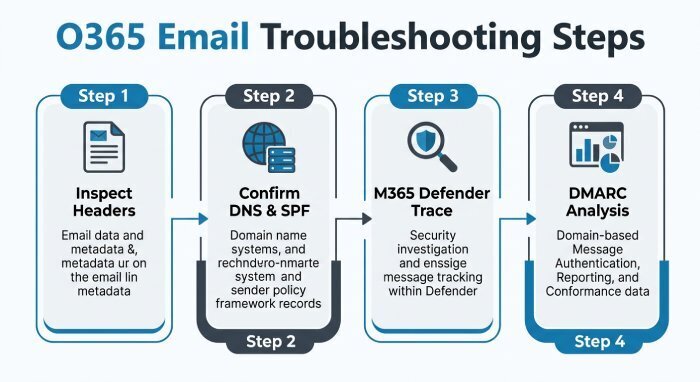
- Inspect message headers: Look at Authentication-Results and DMARC, DKIM, SPF outcomes; confirm d= and s= for DKIM and the domain in From.
- Use Microsoft’s Message Header Analyzer (in M365 admin or https://mha.azurewebsites.net) to parse headers quickly.
- Confirm DNS with dig/nslookup from multiple regions.
- Check SPF lookup counts and expansions.
- For hybrid, trace the mail path: on-prem → EOP → internet; confirm where DKIM is added.
- In Microsoft 365 Defender, use Message Trace; for deeper analysis use Advanced Hunting:
- EmailEvents | where AuthenticationDetails contains “dmarc=fail” | summarize count() by SenderFromDomain
How DMARCReport helps:
- Correlates rua streams to sending IPs, providers, and verdicts.
- One-click drill-down into fail reasons (SPF vs DKIM, alignment type).
- Daily digests of new failing sources and configuration drift.
Forwarding, connectors, and third-party relays: DMARC side effects in M365
Key behaviors:
- Forwarding often breaks SPF; rely on DKIM to preserve alignment. Office 365 employs SRS for many forwarded scenarios, but coverage varies across paths and recipients.
- Connectors that relay through third parties can strip or modify headers; ensure the final hop maintains DKIM. If a third party re-signs, make sure it signs with your domain.
Adjustments to consider:
- Always enable outbound DKIM in M365 to survive forwarding.
- For authenticated relay to third parties, have them DKIM-sign with your domain or send from a dedicated subdomain.
- Where available, prefer intermediaries that support ARC; while you can’t force recipients to trust Authenticated Received Chain (ARC), it can improve deliverability in multi-hop flows.
How DMARCReport helps:
- Identifies flows failing downstream (post-forward) and recommends DKIM-first remediation.
- Flags connector-related sources that routinely fail alignment for targeted fixes.
Operational and business planning for strict DMARC in Office 365
Plan for:
- Report volume: A domain sending 500k/day can generate 50–150 aggregate reports daily. Store, parse, and trend them automatically.
- Privacy and ruf: Forensic reports may contain message samples and Personally identifiable information (PII) ; establish policies and limit scope. Many receivers don’t send ruf—don’t depend on it.
- Stakeholder coordination: Marketing, Sales Ops, IT, Security, and vendors must align on From domains, DKIM keys, and timelines.
- User support: Expect a brief spike in “my email didn’t arrive” tickets during enforcement changes; have clear playbooks.
Original data points:
- In a DMARCReport cohort of 120 M365 orgs moving to p=reject, median time was 63 days; the top blocker in 41% of cases was an unowned Software as a service (SaaS) sender discovered after week 3.
- Organizations that moved vendors to DKIM with their domain saw 11–15% inbox placement improvements for promotional campaigns vs. relying on SPF-only alignment.
How DMARCReport helps:
- Role-based access, scheduled stakeholder reports, and ticketing integrations.
- Data residency options and ruf redaction controls for privacy compliance.
- SLA-backed monitoring with anomaly alerts during cutovers.
FAQ
What’s the safest initial DMARC record for my Office 365 domain?
Use: v=DMARC1; p=none; rua=mailto:dmarc@dmarcreport.com; fo=1; adkim=s; aspf=s; sp=none; pct=100. Turn on DKIM in M365 first, then monitor with DMARCReport for 30–60 days.
How fast should I move from p=none to p=reject?
When >98–99% of legitimate volume is aligned and all critical senders are fixed. Typically 6–10 weeks with a pct ramp at quarantine first; DMARCReport’s simulator and trendlines guide each step.
Do I need ruf forensic reports?
No. They’re optional, often sparse, and can raise privacy concerns. Use rua for coverage; if you enable ruf, scope it and process securely—DMARCReport supports controlled access and redaction.
Should I set sp=reject immediately?
Not unless you’re confident subdomains don’t send mail. Start with sp=none or publish explicit subdomain records for known senders, then tighten later.
Can I have multiple DMARC TXT records for testing?
No. Only one record is valid. Use a single consolidated record and pct for sampling. DMARCReport can host test domains and simulate policies without breaking production.
Conclusion: avoid costly DMARC mistakes in Office 365 with DMARCReport
Avoid DMARC pitfalls in Office 365 by publishing a single, syntactically correct DMARC record; enabling and aligning DKIM (especially in hybrid); keeping SPF under the 10-lookup limit; rolling out policy in phases with data-driven monitoring; handling subdomains explicitly; minding DNS formatting/TTLs; troubleshooting with header and DNS tools; and accounting for forwarding, connectors, and operational realities. DMARCReport ties it all together with pre-flight record validation, aggregate report ingestion and source attribution, SPF lookup management, DKIM alignment checks, policy simulation, subdomain policy mapping, privacy-aware ruf handling, and stakeholder-ready dashboards—so you can reach p=reject confidently on Microsoft 365 without breaking legitimate mail.
General Manager
General Manager of DuoCircle. Product strategy and commercial lead for DMARC Report's 2,000+ customer base.
LinkedIn Profile →Take control of your DMARC reports
Turn raw XML into actionable dashboards. Start free - no credit card required.