What Configuration Mistakes Commonly Lead To DKIM Neutral Results For Outbound Email?

Quick Answer
DKIM neutral results for outbound email often occur due to missing or incorrect DKIM signatures, misconfigured selectors, invalid DNS public keys, or improper signing settings. Verify your DNS records, selector configuration, and email server settings to improve DKIM authentication reliability.
Try Our Free DKIM Lookup
Auto-discover DKIM selectors for any domain - scan 185 common selectors across all major providers.
Discover DKIM Selectors →DKIM neutral results can indicate that a receiving mail server could not properly process a message’s DKIM signature, such as when the signature contains syntax errors. However, missing DNS keys, temporary DNS lookup problems, and changes to a signed message can produce different DKIM results depending on the cause and receiving server.
Understanding the difference between neutral, fail, temperror, permerror, and none helps email administrators troubleshoot authentication issues more accurately. This guide explains common DKIM configuration problems, how to investigate them, and how DMARC reporting can help identify broader email authentication issues.
DNS and selector publishing pitfalls that produce DKIM neutral
DNS configuration problems can prevent successful DKIM verification, but they do not always produce a dkim=neutral result. Depending on the failure, a verifier may report temperror or permerror.
Incorrect or missing DKIM TXT records
- Typical causes: An incorrect selector name (s=), a misconfigured
_domainkeysubdomain, malformed record tags, an invalid public key, or formatting errors in the published TXT record. - Possible symptoms: DKIM verification may fail or return an error if the public key is missing, inaccessible, or malformed. The exact result—such as dkim=fail, dkim=temperror, or dkim=permerror—depends on the issue and the receiving server. A dkim=neutral result generally indicates that the signature contains syntax errors or could not be properly processed.
- Best practices:
- Publish the public key at
selector._domainkey.example.comwith the required DKIM tags, such as v=DKIM1; k=rsa; p=BASE64KEY. - Ensure the p= value contains valid public-key data without unintended spaces or characters. DNS providers may split long TXT records into multiple quoted strings; these are valid when the strings are concatenated correctly.
- Use a suitable Time-To-Live(TTL), such as 3600 seconds, during key changes if appropriate for your DNS setup. Remember that cached records may remain available until their TTL expires.
- Check the published record with
dig +short TXT selector._domainkey.example.comand confirm that the selector and public key match the signing configuration.
- Publish the public key at
How DMARCReport Helps: DMARCReport helps administrators monitor email authentication activity and investigate potential DKIM configuration issues. By reviewing DMARC reports, sending sources, and DKIM authentication patterns, teams can identify anomalies and investigate possible causes. Administrators can then verify selector records, inspect message headers, and review mail-server logs to determine the appropriate fix.
DNS propagation, TTL, CNAME, and TXT string splitting
- Propagation/TTL: Publishing a new key shortly before signing can yield neutral until caches refresh. Prepublish keys 24–48 hours before cutover.
- CNAME selectors: DKIM allows the selector label to CNAME to a vendor-managed record, but mistakes in target hostnames, loops, or mismatched TTLs can cause lookup failures at some resolvers.
- TXT splitting: DNS providers sometimes split long TXT values into multiple quoted strings; this is OK if the base64 is contiguous after concatenation. Extra spaces, stray semicolons, or backslashes can corrupt the key.
- DNSSEC: Bogus or inconsistent DNSSEC signing can block retrieval; some receivers will report temperror/neutral.
How DMARCReport helps: We test both authoritative and recursive resolution paths, surface temperror/neutral clusters attributable to DNS, and provide a “safe publish” checklist (prepublish windows, TTL choices, CNAME verification). We’ll warn if your key’s TXT payload exceeds provider limits or if the authoritative zone returns inconsistent answers.
Selector naming, reuse, and rotation mistakes
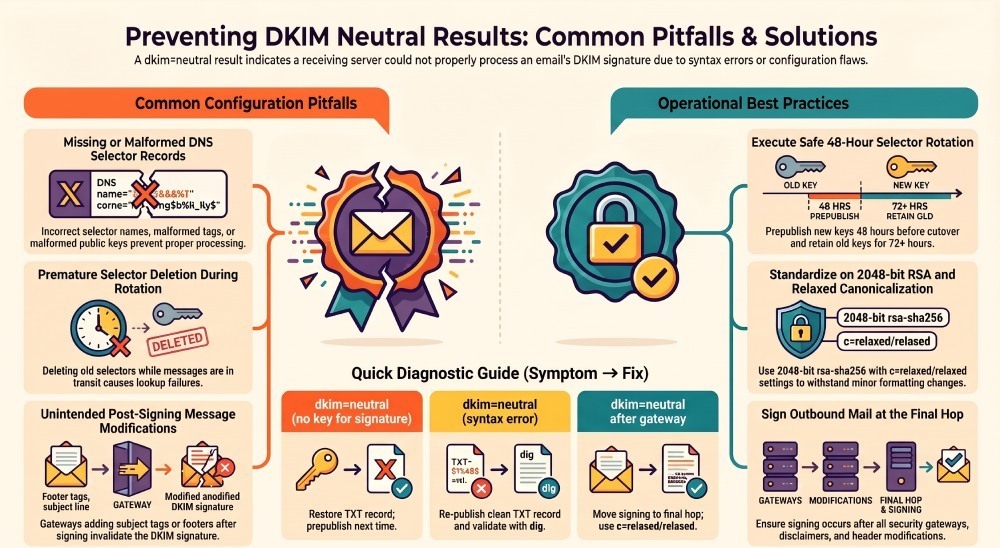
- Reuse or premature deletion: Deleting an old selector while messages signed with it are still in transit or being retried will cause neutral for those deliveries.
- Incorrect naming: Using dots or unusual characters outside DNS label rules; or publishing at selector.domainkey.example.com (missing underscore) will be invisible to verifiers.
- Safe rotation:
- Maintain at least two selectors (“s1”, “s2”).
- Prepublish the new TXT 48 hours before switching signers.
- Switch signing to the new selector.
- Monitor for ≥72 hours in DMARCReport for neutral spikes.
- Only then remove the old selector.
Example scenario: An organization rotates its DKIM keys and removes the old selector before all messages signed with that selector have been delivered. If receiving servers can no longer retrieve the old public key, some messages may encounter DKIM verification problems. Keeping the old selector published during the transition can help prevent disruption while queued messages are delivered.
Signing infrastructure and key management mistakes
When the signer can’t access or properly use the private key, messages may be sent unsigned or with unverifiable signatures.
Private key path, permissions, and format errors
- Wrong path/permissions: MTAs like Postfix/OpenDKIM or Exchange can silently skip signing if the key file isn’t readable by the signing process user.
- Format mismatch: Providing an encrypted private key without supplying the passphrase, or using unsupported key formats (PKCS#8 vs PKCS#1) for your signer version.
- Algorithm mismatch: Signer uses rsa-sha1 while receivers expect rsa-sha256; or k= value misaligned.
Best practices:
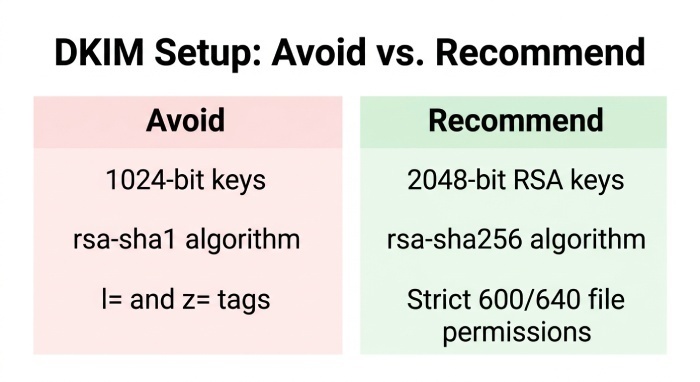
- Use 2048-bit RSA with rsa-sha256 today; avoid rsa-sha1.
- Store keys in PEM (PKCS#1), restrict to 600/640 permissions, and verify with openssl rsa -check -in key.pem.
- Enable signer debug logging to capture “no key” or “signing disabled” messages.
How DMARCReport Helps: DMARCReport helps administrators monitor email authentication activity and investigate potential DKIM configuration issues. By reviewing DMARC reports, sending sources, and authentication patterns, teams can identify unusual changes and investigate why messages may be unsigned or fail DKIM verification. Administrators can then check DNS records, signing configurations, and mail-server logs to identify the appropriate fix.
Key size and algorithm compatibility
- 1024-bit keys are increasingly discouraged and may be treated as weak by some receivers. 4096-bit keys can be too large for TXT and misconfigured DNS chains.
- rsa-sha256 is the de facto standard; rsa-sha1 is deprecated and can yield neutral/permerror at strict receivers.
Recommended configuration:
- 2048-bit RSA, rsa-sha256, single-string p=.
- Avoid exotic tags: z= (copied headers) and l= (body length) are risky; l= is deprecated and can confuse verification.
Using appropriately sized DKIM keys and correctly configured DNS records can help maintain reliable email authentication. Organizations should review their DKIM key strength, signing algorithm, and DNS configuration to ensure compatibility with receiving mail servers.
Canonicalization choices and message modification
Choosing the wrong canonicalization or signing too many mutable headers makes even legitimate post-signing changes look like tampering, often resulting in neutral at cautious receivers.
Canonicalization: simple vs relaxed
- simple: Preserves line endings and whitespace exactly; fragile to benign rewrapping by gateways.
- relaxed: Ignore insignificant whitespace changes; far more resilient.
Guidance:
- Use c=relaxed/relaxed in most environments.
- Sign only stable headers in h= (From, To, Subject, Date, Message-ID, MIME-Version, Content-Type, Content-Transfer-Encoding). Avoid Received, Return-Path, or other hop-added headers.
How DMARCReport helps: We identify sources where dkim=neutral spikes correlate with known header/body rewriting (e.g., security gateways). Our playbooks recommend c=relaxed/relaxed and a minimal h= set per source.
Downstream modifications by gateways and filters
- Common changes that break DKIM:
- Adding legal disclaimers or footers.
- Rewrapping long lines or converting quoted-printable.
- Modifying Subject: with tags like [EXTERNAL].
- Security products rewriting URLs.
- Mitigations:
- Sign at the last outbound hop, after footers or subject tagging.
- Exclude unstable headers from h=.
- Where unavoidable (e.g., mailing lists), rely on ARC in addition to DKIM, and ensure the final sender re-signs.
Example scenario: A university’s outbound security gateway adds subject tags such as “[EXT]” or appends disclaimers after an email has been DKIM-signed. These changes can invalidate the DKIM signature if they affect signed headers or the signed message body. Administrators should identify where the changes occur, review their signing configuration, and consider signing messages after content modifications are complete. They should then test the updated mail flow to confirm successful DKIM verification.
Third-party senders, ESPs, and mailing lists
When others send on your behalf, misalignment between domains, selectors, and signing practices easily creates neutral results.
ESPs and delegated signing
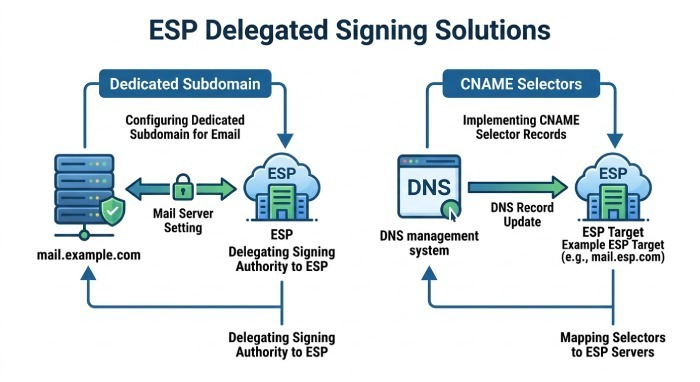
- Issues: ESP not configured to sign with your domain; missing or wrong selector at your DNS; Email Service Provider (ESP) re-signs but you didn’t publish their key.
- Solutions:
- Delegate a dedicated subdomain (e.g., mail.example.com) and publish the ESP’s DKIM selectors there.
- Use CNAME selectors to the ESP’s targets if supported, validated carefully.
- Ensure SPF and DKIM alignment with DMARC policy goals.
How DMARCReport helps: We attribute DKIM outcomes to ESP source IPs, track selector usage by source, and alert when a vendor’s traffic shifts from pass to neutral—often due to a missing or outdated selector in your DNS.
Mailing lists and rewriters
- Mailing lists often modify bodies/subjects and sometimes remove or replace DKIM signatures, leading to neutral.
- Strategies:
- Encourage lists to re-sign with their domain and adopt Authenticated Received Chain (ARC).
- Accept that DMARC alignment may rely on SPF for list traffic, or route such mail via subdomains with tailored DMARC policy.
Subdomain strategies
- Use subdomains per sender class (esp.example.com, students.example.edu) to isolate DKIM keys and selectors.
- Maintain per-subdomain selector inventories to avoid rotation collisions.
How DMARCReport helps: Subdomain rollups show which namespaces drive neutral outcomes. We suggest per-source policy tuning and provide ARC visibility where Authentication-Results headers are available.
Diagnostic playbook and tools to pinpoint neutral causes
A structured approach shortens time-to-fix from days to hours.
Step-by-step diagnostics
- Inspect Authentication-Results and DKIM-Signature
- Look for dkim=neutral/none/permerror/temperror and reasons like “no key for signature,” “syntax error,” or “body hash did not verify.”
- Extract d= (signing domain), s= (selector), c= (canonicalization), a= (algorithm), h= (headers), bh= and b= values.
- Query DNS for the selector
dig +short TXT s._domainkey.d=domain- Verify v=DKIM1; k=rsa; p= present and unbroken.
- If CNAME, follow the target and confirm final TXT content.
- Check DNSSEC status:
dig +dnssec
- Validate the public/private key pair offline
- Confirm private key exists, readable by signer, and matches the public key (
openssl rsa -in key.pem -pubout | diff with DNS p=).
- Confirm private key exists, readable by signer, and matches the public key (
- Review signer logs and configuration
- OpenDKIM/Postfix: check KeyTable/SigningTable paths, permissions.
- Ensure a=rsa-sha256 and c=relaxed/relaxed (unless you have strong reasons otherwise).
- Verify h= excludes volatile headers.
- Consider message modification points
- Inventory gateways that tag subjects, add footers, or rewrite URLs.
- Move signing to the final outbound device or configure that device to preserve DKIM.
- Re-test end-to-end
- Send to multiple large providers and check Authentication-Results.
- Use online DKIM validators and DMARCReport’s DKIM Inspector for multi-resolver checks.
How DMARCReport helps: We map the observed header indicators to likely root causes and provide one-click checks for the specific selector and domain. Our anomaly engine flags sudden shifts from pass to neutral by source ASN, IP, or sender reputation segment, and we maintain a selector inventory with “last-seen” telemetry to prevent premature deletions.
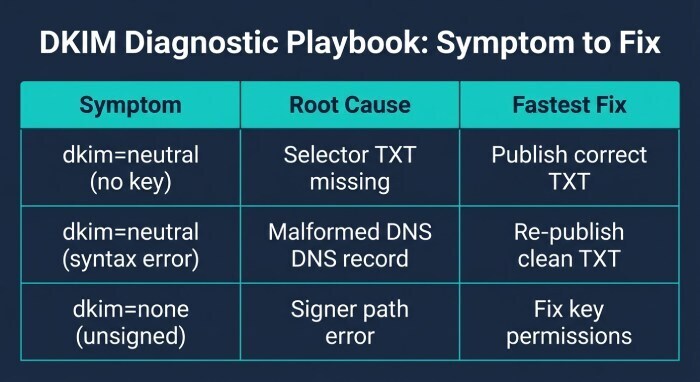
Quick cause-to-symptom map
| Symptom in headers or DMARCReport | Likely root cause | Fastest fix |
|---|---|---|
| dkim=neutral (no key for signature) | Selector TXT missing/mistyped; premature rotation | Publish/restore correct TXT; prepublish next time |
| dkim=neutral (syntax error) | Malformed v=/p=; extra quotes/semicolons | Re-publish clean TXT; validate with dig and lints |
| dkim=none (unsigned) | Signer path/permissions error; MTA role bypassed | Fix key path/permissions; ensure all routes traverse signer |
| dkim=neutral/temperror (key retrieval) | DNSSEC/caching/CNAME issues | Fix DNS chain; lower TTL; verify DNSSEC |
| dkim=neutral after gateway | Body/header modifications; c=simple | Switch to c=relaxed/relaxed; sign at last hop |
| dkim=permerror (unsupported alg) | rsa-sha1 or odd k= | Use rsa-sha256, k=rsa, 2048-bit |
FAQs
What does dkim=neutral mean?
A dkim=neutral result generally indicates that a DKIM signature contains syntax errors or could not otherwise be processed by the verifier. Check the receiver’s authentication results for additional diagnostic information.
Does a missing DKIM DNS record always cause a neutral result?
No. A missing or inaccessible public key can lead to different results depending on the circumstances and the receiving server. It should not automatically be classified as neutral.
Can modifying an email cause a DKIM neutral result?
Changes made after signing can invalidate a DKIM signature, particularly when signed headers or the signed message body are affected. These changes may produce a fail result rather than neutral.
How can DMARC reports help troubleshoot DKIM issues?
DMARC reports can help administrators review authentication patterns across sending sources and identify potential configuration or alignment problems. Message headers, DNS records, and mail-server logs can then help confirm the cause.
Conclusion: Prevent DKIM neutral with disciplined publishing, resilient signing, and continuous visibility
DKIM neutral outcomes almost always trace back to a handful of preventable missteps: broken or missing selector TXT records, signer/key misconfiguration, fragile canonicalization combined with post-signing modifications, ill-timed selector rotations and DNS quirks, third-party senders that don’t sign for your domain, and outmoded algorithms or key sizes. The operational recipe is clear: prepublish correct TXT records with 2048-bit rsa-sha256 keys, sign with relaxed/relaxed at the last outbound hop, limit h= to stable headers, rotate selectors safely with overlap, and validate every third party’s delegated signing.
DMARCReport operationalizes this discipline by:
- Continuously monitoring DKIM outcomes (pass/neutral/none/errors) by source, selector, and pathway.
- Linting your DKIM DNS and following CNAME/DNSSEC chains to catch neutral-causing mistakes before they impact email deliverability.
- Alerting on spikes in dkim=neutral, mapping Authentication-Results clues to specific root causes and prescriptive fixes.
- Managing selector inventories and safe rotation timelines with last-seen telemetry and rollback guidance.
- Providing a diagnostic cockpit—dig-style DNS checks, online validators, and optional Mail Transfer Agent (MTA) log integration—to shrink mean-time-to-resolution.
With these controls in place—and DMARCReport watching your ecosystem end-to-end—DKIM “neutral” becomes a rare exception rather than a routine headache.
General Manager
General Manager of DuoCircle. Product strategy and commercial lead for DMARC Report's 2,000+ customer base.
LinkedIn Profile →Take control of your DMARC reports
Turn raw XML into actionable dashboards. Start free - no credit card required.